Mozc: Google's Open Source Japanese IME, and What Building It Actually Costs
Mozc - a Japanese Input Method Editor designed for multi-platform
At a glance
- What is it?
- Mozc is the open source subset of Google Japanese Input, shipped as C++ source for Android, macOS, Chromium OS, Linux and Windows. It has no stable release, no official QA and no user support, so read this before you plan a build.
- Who is it for?
- Adopt Mozc if you are packaging a Japanese IME for a distribution or embedding libmozc.so in an Android product, and you can absorb building C++ from source with no upstream QA promise. Do not adopt it if you need a supported desktop IME today, since the README states there is no stable version and no user support.
- Can I use it commercially?
- Check first. The repository uses a licence we do not classify automatically, so read its LICENSE file before any commercial use.
- Is it still maintained?
- Yes. The repository last received commits 6 days ago.
- What is it written in?
- Mainly C++, according to GitHub's language statistics.
Answers come from the project's GitHub data, last synced on November 15, 2026, and from our analysis. They are not legal advice.
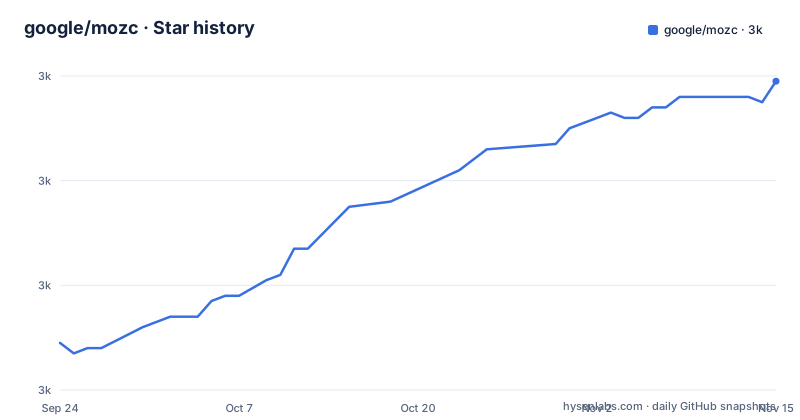
Star history
- google/mozc3,039 ★ · +50
| Repository | 2026-09-24 | 2026-11-15 |
|---|---|---|
| google/mozc | 3k | 3k |
50 Stars in the last 52 days, measured from the daily GitHub snapshot. Compare with other projects
Editorial analysis
What Mozc is, and the two meanings of the name
Mozc is a Japanese Input Method Editor designed for multi-platform use: Android OS, Apple macOS, Chromium OS, GNU/Linux and Microsoft Windows. It is not a product Google sells. The README is explicit that the name carries two meanings: it is the internal code name of Google Japanese Input still used inside Google, and it is also the project name for releasing a subset of Google Japanese Input as source code under an OSS licence, without warranty or user support. Inside this repository, the second meaning applies.
The people who should care are not end users looking for a nicer way to type Japanese. They are distribution packagers, Android platform teams that want an IME library, and developers building their own input products on top of a conversion engine. If you want a finished IME you install and forget, Mozc is the wrong layer to start from, because the README states plainly that Google does not promise any official QA for the OSS project.
No stable release, and why the version number is not a signal
The release plan section opens with the line that there is no stable version. Mozc has no concept of a stable release. Instead, the version number changes whenever a non-trivial change lands. The README tells packagers and product developers to pick up any version, because they are all equally stable or equally unstable in the absence of an official QA process.
That is a real design position, not marketing hedging. It means a version bump tells you that something changed, not that anything was fixed, hardened or regression-tested by Google. If your packaging workflow assumes that a higher version number is a safer version number, that assumption does not hold here. The release history document is where the project points for information about recent changes, and that is the file to read rather than the version string.
Building Mozc on Linux and getting a first conversion
The README does not contain inline build steps. It links to per-platform documents: docs/build_mozc_for_android.md for the Android library (libmozc.so), docs/build_mozc_for_linux.md for the Linux desktop, docs/build_mozc_in_osx.md for macOS, and docs/build_mozc_in_windows.md for Windows. The repository also carries a docker directory and a dotnet-tools.json file at the top level, which suggests containerised and .NET-based tooling is part of the build story, but the README does not describe either.
The honest first step is to fetch the source and read the build document for your platform before running anything:
git clone https://github.com/google/mozc.git
cd mozc
ls docs/
That listing should show the four build documents named above. Open the one matching your target and follow it; the commands, dependencies and output paths live there, not in the README. Because no release artifacts are described in the README, there is nothing to download and install as a prebuilt package from this repository. The project is source-first.
If your goal is an Android library rather than a desktop IME, the target is different: docs/build_mozc_for_android.md covers producing libmozc.so. That is a library to embed, not an application to launch, so success looks like a shared object you can link against, not a running IME window.
The conversion engine, the dictionary, and where the licence changes
Mozc is the conversion and input layer behind Google Japanese Input, which is why the repository is C++ and why it ships dictionary data alongside the engine. The dictionary is also where the licence stops being uniform. The README states that all Mozc code written by Google is under the BSD 3-Clause License, but third party code lives in src/third_party, and each subdirectory there has its own copyright notice.
Outside src/third_party, three more directories carry third party code: src/data/dictionary_oss, src/data/test/dictionary (described as the same as the dictionary_oss directory), and src/data/test/stress_test, which the README marks as public domain, pointing at a comment in src/data/test/stress_test/sentences.txt. The dictionary_oss README.txt is the file to read for the mixed terms. The practical consequence for anyone repackaging Mozc is that a single licence identifier for the whole repository is misleading. The GitHub metadata for this project reports the licence as NOASSERTION, which matches what the README describes: a BSD 3-Clause core with mixed third party material underneath.
Vocabulary and conversion results are governed separately. The README points to VOCABULARY_POLICY.md for the project's policies on vocabulary and conversion results, and to docs/about_branding.md for the detailed differences between Google Japanese Input and Mozc. Both matter if you intend to ship Mozc under your own name.
Where Mozc is the wrong tool
The clearest failure mode is expecting support. The README says the project is released without warranty or user support, and that it is not an officially supported Google product. There is no support channel described, no stable release, and no QA promise. A team that needs a vendor to answer when Japanese input breaks in production is not the audience for this repository.
The second limitation is the branding boundary. Mozc is a subset of Google Japanese Input, not the whole thing. The README directs readers to docs/about_branding.md for the detailed differences, which means behaviour you observe in Google Japanese Input is not automatically behaviour you get from Mozc. If your requirement is defined as matching Google Japanese Input exactly, Mozc is the wrong artifact to measure against.
The third is scope. Mozc targets Android, macOS, Chromium OS, Linux and Windows. If your platform is not on that list, the repository offers no build document for you, and the README gives no guidance for porting.
How Mozc differs from Fcitx and IBus integrations
The related searches around this project include fcitx-mozc, which points at a real distinction. Fcitx and IBus are input method frameworks: they own the desktop-level plumbing, the keyboard grab, the candidate window and the switching between input methods. Mozc is the Japanese conversion engine that such a framework drives. On a Linux desktop, the practical arrangement is a framework plus a Mozc engine binding, not Mozc alone as your input method.
That difference changes what you are adopting. Choosing a framework is choosing how input integrates with your desktop session. Choosing Mozc is choosing the Japanese conversion behaviour and the dictionary behind it. If you are packaging for a distribution, the question is usually which framework binding to ship alongside Mozc, not whether Mozc replaces the framework. The README does not document any framework integration itself; it documents how to build Mozc for each platform, so the binding is work that lives outside this repository.
Maintenance cost and what the repository tells you about it
The last push to the default branch was on 2026-09-19, so the repository is not dormant. That is the only maintenance signal available here; the README makes no commitment about how long the project will keep moving. The repository has no published GitHub releases, which is consistent with the stated model of bumping version numbers on non-trivial changes rather than cutting releases.
For a packager, the cost profile is therefore: you track a moving master branch, you own the build for your platform using the document in docs/, and you own the QA that Google explicitly does not provide. Upgrading is not a matter of waiting for a stable tag. It is a matter of reading the release history document, rebuilding, and testing the conversion behaviour you depend on. The BSD 3-Clause core is permissive, but the mixed third party directories mean a licence review of src/third_party and src/data/dictionary_oss is part of the upgrade path, not a one-time task.
Editorial conclusion
Adopt Mozc if you are packaging a Japanese IME for a distribution or embedding libmozc.so in an Android product, and you can absorb building C++ from source with no upstream QA promise. Do not adopt it if you need a supported desktop IME today, since the README states there is no stable version and no user support. Before committing, read docs/build_mozc_for_linux.md and docs/about_branding.md, and check LICENSE plus src/data/dictionary_oss/README.txt so you know which parts of the tree are BSD 3-Clause and which are not.
Frequently asked questions
What is Mozc?
Mozc is a Japanese Input Method Editor designed for multi-platform use, covering Android OS, Apple macOS, Chromium OS, GNU/Linux and Microsoft Windows. In this repository the name refers to the project that releases a subset of Google Japanese Input as source code under an OSS licence, without warranty or user support.
Is Mozc the same as Google Japanese Input?
No. Mozc is a subset of Google Japanese Input released as source code, and the README notes that Mozc is also the internal code name of Google Japanese Input used inside Google. The detailed differences between the two are described in docs/about_branding.md.
How do I install Mozc?
The README does not give install steps. It links to build documents for each platform: docs/build_mozc_for_android.md, docs/build_mozc_for_linux.md, docs/build_mozc_in_osx.md and docs/build_mozc_in_windows.md. You build from source rather than installing a released package.
Does Mozc have a stable release?
No. The README states that there is no stable version, and that the version number changes only when a non-trivial change is introduced. It advises anyone packaging or building on Mozc to pick up any version, since they are equally stable or equally unstable without an official QA process.
What licence does Mozc use?
All Mozc code written by Google is released under The BSD 3-Clause License. Third party code in src/third_party has its own notices, and src/data/dictionary_oss, src/data/test/dictionary and src/data/test/stress_test contain third party material with separate terms.
Official sources
Add this badge to your README
If you maintain this project, the badge below links readers to this analysis and shows its maintenance status from the daily GitHub snapshot. Paste the markdown into your README; add ?metric=license or ?metric=stars to the image URL for a different field.

[](https://hysenlabs.com/projects/google-mozc)Star history chart for your README
[](https://hysenlabs.com/projects/google-mozc)Was this useful?