Ubertooth: Bluetooth sniffing hardware and the host software around it
Software, firmware, and hardware designs for Ubertooth
At a glance
- What is it?
- An open source wireless development platform pairing a BLE capable sniffer with firmware, host code and a hardware design, published in paired annual releases with its own bit level library.
- Who is it for?
- Ubertooth is the right tool when you need to see Bluetooth traffic from a machine that will not cooperate with a software stack, and the wrong one for a general purpose Bluetooth debugging setup on a modern host. The hardware is cheap and the protocol documentation is good, but the release line ended in December 2020, the last push was on 2026-03-19, and the firmware flashing path depends on a separate library release.
- Can I use it commercially?
- Yes, with conditions. GPL-2.0 is a copyleft licence: if you distribute software that includes it, you must release that software's source code under the same licence. Running it internally without distributing it does not trigger that obligation.
- Is it still maintained?
- Activity is slowing. The repository last received commits 7 months ago.
- What is it written in?
- Mainly C, according to GitHub's language statistics.
Answers come from the project's GitHub data, last synced on October 23, 2026, and from our analysis. They are not legal advice.
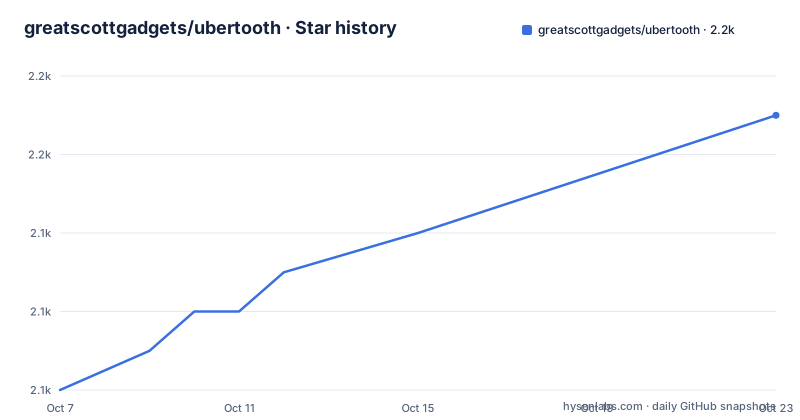
Star history
- greatscottgadgets/ubertooth2,151 ★ · +7
| Repository | 2026-10-07 | 2026-10-23 |
|---|---|---|
| greatscottgadgets/ubertooth | 2.1k | 2.2k |
7 Stars in the last 16 days, measured from the daily GitHub snapshot. Compare with other projects
Editorial analysis
Three things in one repository: hardware, firmware and host
Ubertooth is described as an open source wireless development platform suitable for Bluetooth experimentation, and the repository tree shows what that phrase covers. There is a `hardware/` directory holding the board design, a `firmware/` directory, a `host/` directory with the software that talks to the device, and a `tools/` directory. Alongside those sit `docs/`, a `changelog`, `Jenkinsfile`, a `Dockerfile` and a `TRADEMARK` file.
The hardware directory is the part that makes this unusual among open source projects. You can read the board design, build the firmware, and run the host software, all from one repository. That combination matters for research and reverse engineering work, where the question is often not just what the protocol does but what the hardware observed on the wire.
The homepage points at the commercial Ubertooth One product, so the open source project and the retail device are the same effort from the same company, Great Scott Gadgets. The repository carries a `TRADEMARK` file, which tells you the name is protected even though the designs are open. That split matters if you are considering branding your own version of the hardware.
What the sniffer actually captures and where it stops
The README is precise about capability, which is the most useful thing on the page. Ubertooth ships with a capable BLE, or Bluetooth Smart, sniffer, and can sniff some data from Basic Rate Bluetooth Classic connections.
The wording on Basic Rate is the interesting part. Basic Rate is the original BR mode of Bluetooth Classic, and the README says the sniffer can capture some data from those connections, not all of it and not Enhanced Data Rate. So the accurate summary is full BLE sniffing plus partial Bluetooth Classic coverage, and anyone planning work against a Classic audio or HID profile needs to check what the current code actually recovers before designing around it.
The distinction also explains why the project is described as a development platform rather than a sniffer product. A general purpose Bluetooth adapter on a current operating system already gives you BLE packet capture through the host stack. What the dedicated hardware gives you is a device that observes the air interface without needing the machine's own Bluetooth controller to be involved, which is exactly the situation in protocol research, locked down hardware and traffic between two devices that will not pair with you.
The single search question worth keeping in mind when reading the documentation is whether the device is a sniffer, and the README answers it directly: yes, for BLE, and partially for Basic Rate Classic.
Paired releases: the sniffer and libbtbb ship together
The release structure is the most concrete operational fact here. The latest release is 2020-12-R1, published on 2020-12-25, and the README states plainly that it is paired with libbtbb 2020-12-R1. The naming convention is annual and seasonal: 2018-08-R1 was the DEFCON release, 2018-12-R1 was named the Uberducky release, and 2020-12-R1 is described as the Christmas release.
Pairing two releases is a deliberate design choice and it has a consequence for anyone building from source. The host code depends on the bit level Bluetooth library, and the two are versioned together so the wire format expectations match. Building against a mismatched pair is the kind of error that produces a device that enumerates but produces nonsense captures, so the pairing is not a coincidence.
Documentation follows the same split. Flashing instructions are on a firmware page of the Read the Docs site rather than in the README, and building libbtbb has its own build guide page. The README's own instruction is to check those two pages rather than to work from the repository root.
The cadence picture should be stated without softening. The newest release is from December 2020 and the last push to the repository was on 2026-03-19. The project is not archived, so work still lands, but releases are not a current source of firmware.
The Dockerfile as the honest description of host dependencies
The repository ships a Dockerfile described in its own first comment as a sandbox test environment, and reading it tells you more about running the host software than the README does.
The base image is Ubuntu 20.04. The package list covers a cross compiler for ARM, the Bluetooth development headers, newlib for bare metal targets, USB development headers, CMake, make and pkg-config, plus Python packaging tools including pip, setuptools, python-is-python3 and numpy. Then two steps go beyond apt. One installs a third party USB hub driver directly from a Git repository with pip, and the other downloads the libbtbb source archive for the 2020-12-R1 tag, unpacks it, configures it with CMake, builds it, installs it and refreshes the linker cache.
That sequence is the practical answer to what it takes to build the host tools: an ARM toolchain, the Bluetooth and USB headers, and a libbtbb built from source against the matching tag. The pinned 2020-12-R1 download in the Dockerfile is what makes the pairing concrete in a form you can copy.
The image also exposes port 8080, with a comment saying it informs Docker that the container is listening there. That is a small detail with a plausible reading: something in the sandbox is served over HTTP, which is consistent with a capture tool that has a web interface or exports results over a port.
Support paths, and what the FAQ page is actually for
The README is unusually explicit about where to get help, which is worth quoting in spirit because it tells you how the project expects to be used. Before asking for help, the FAQ page is the place to check. For general use or development questions, GitHub issues on the project are the preferred venue, on the reasoning that an answer there helps others later.
The support commitment is stated numerically and it is modest. GitHub issues labelled technical support by Great Scott Gadgets employees can expect a response time of two weeks, and the README says there are currently no expected response times for other issues or pull requests. That is an unusually honest statement for a project README, and it is more useful to a prospective user than a vague promise of an active community.
There is also a Discord community where technical support requests are welcome, with the same caveat that there is no support staff on duty at all times, and the instruction to file a GitHub issue anyway so the request is tracked. The documentation is open to changes through pull requests, with suggestions accepted as GitHub issues, and the raw documentation sources are in the `docs/` folder of this repository.
Editorial conclusion
Ubertooth is the right tool when you need to see Bluetooth traffic from a machine that will not cooperate with a software stack, and the wrong one for a general purpose Bluetooth debugging setup on a modern host. The hardware is cheap and the protocol documentation is good, but the release line ended in December 2020, the last push was on 2026-03-19, and the firmware flashing path depends on a separate library release. If you need live BLE on a current Linux machine, the host software in a recent distribution will serve you better; if you need to sniff a connection the host stack will not expose, the sniffer is the reason to care about this project at all.
Frequently asked questions
Is Ubertooth One a Bluetooth sniffer?
Yes. The README states that Ubertooth ships with a capable BLE, or Bluetooth Smart, sniffer, and can sniff some data from Basic Rate Bluetooth Classic connections. The BLE coverage is described as capable while the Basic Rate Classic coverage is partial.
Which libbtbb release should I use with Ubertooth?
Use the release paired with your Ubertooth firmware. The latest release 2020-12-R1, published on 2020-12-25, is paired with libbtbb 2020-12-R1, and the repository's Dockerfile downloads and builds that exact tag from source before installing it.
How do I get firmware for Ubertooth?
The latest firmware build is published on the GitHub releases page for the project, and the README links to a firmware page on Read the Docs for flashing instructions. Building libbtbb has its own build guide on the same documentation site.
Official sources
Add this badge to your README
If you maintain this project, the badge below links readers to this analysis and shows its maintenance status from the daily GitHub snapshot. Paste the markdown into your README; add ?metric=license or ?metric=stars to the image URL for a different field.

[](https://hysenlabs.com/projects/greatscottgadgets-ubertooth)Star history chart for your README
[](https://hysenlabs.com/projects/greatscottgadgets-ubertooth)Was this useful?