glow Rust Bindings for OpenGL, OpenGL ES, and WebGL
GL on Whatever: a set of bindings to run GL anywhere and avoid target-specific code
At a glance
- What is it?
- glow provides a Rust interface intended to reduce target-specific graphics code across native OpenGL, OpenGL ES, and WebGL. It suits Rust applications that need a common graphics API, although the README leaves backend selection and runtime setup undocumented.
- Who is it for?
- Adopt glow when a Rust graphics application must span native GL and WebAssembly without maintaining separate target-specific interfaces. Do not choose it if you need documented backend discovery, a complete setup tutorial, or evidence that every extension behaves identically across targets.
- Can I use it commercially?
- Yes. Apache-2.0 is a permissive licence: you can use, modify and sell software built on it, as long as you keep its copyright and licence notices.
- Is it still maintained?
- Yes. The repository last received commits 2 days ago.
- What is it written in?
- Mainly Rust, according to GitHub's language statistics.
Answers come from the project's GitHub data, last synced on October 24, 2026, and from our analysis. They are not legal advice.
Star history
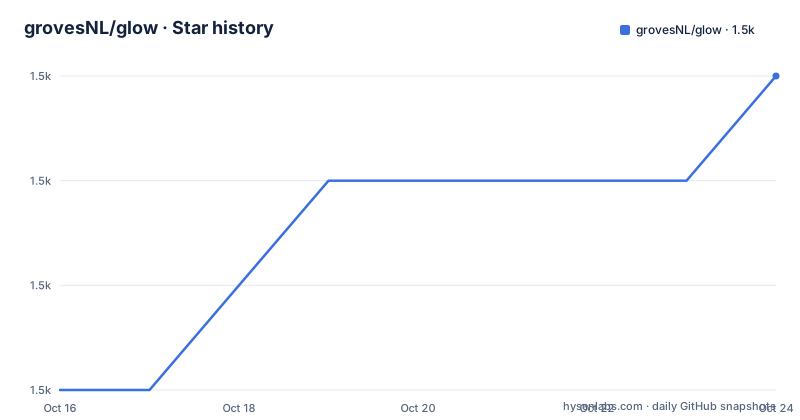
- grovesNL/glow1,513 ★ · +3
| Repository | 2026-10-16 | 2026-10-24 |
|---|---|---|
| grovesNL/glow | 1.5k | 1.5k |
3 Stars in the last 8 days, measured from the daily GitHub snapshot. Compare with other projects
Editorial analysis
Why glow Reduces Target-Specific Rust Graphics Code
glow addresses a portability problem in Rust graphics code. OpenGL, OpenGL ES, and WebGL expose related graphics concepts, but application code can still become tied to a particular binding library, platform context, or WebAssembly integration. The project describes itself as "GL on Whatever" and explicitly presents target-independent bindings as its purpose. Its intended users are Rust developers building graphics code that may run in a native application or in a browser through WebAssembly.
This is a binding layer, not a rendering framework. The README does not describe scene management, shader compilation policy, asset loading, window creation, or a game loop. The useful comparison is with writing separate Rust interfaces or platform calls for different GL environments. glow instead offers one Rust-facing surface intended to keep calls in portable code.
That promise does not mean all graphics capabilities are interchangeable. OpenGL, OpenGL ES, and WebGL differ in available entry points, extensions, object types, context behavior, and supported versions. The README does not document how glow maps those differences, which backend it selects at runtime, or how an application discovers unsupported functionality. A team should therefore treat cross-target compilation as one requirement, not proof that a complete renderer can move unchanged to every target.
Conditional Native and WebAssembly Dependencies
The repository layout indicates that glow handles platform differences partly through Rust target configuration. For WebAssembly targets that are not using Emscripten, `Cargo.toml` enables dependencies on `js-sys`, `wasm-bindgen`, `slotmap`, and `web_sys`. The selected `web-sys` features cover browser graphics and related HTML types such as `HtmlCanvasElement`, `HtmlImageElement`, `WebGlRenderingContext`, `WebGl2RenderingContext`, and WebGL resource objects.
This conditional dependency structure suggests that WebAssembly support is connected to browser APIs through generated JavaScript bindings rather than through a native loader visible in the repository files. Target-gated dependencies also keep the web integration out of the native dependency path. The crate itself uses Rust 2021 and has an optional `log` dependency.
Two feature flags are declared: `debug_trace_calls` and `debug_automatic_glGetError`. Their names indicate opt-in tracing and automatic GL error checks. The README does not explain their output, compatibility implications, or overhead, so those behaviors should be checked in the crate documentation before enabling them in production. The repository also contains `generate-native.sh`, suggesting generated native code is part of its maintenance workflow, although the script itself is not shown here.
Building glow for Native and WebAssembly Targets
The README provides two build commands, one for the host's native target and one for `wasm32-unknown-unknown`. These commands build the library; they do not demonstrate creating a GL context or drawing anything. Run the native build from the repository root to compile against the current Rust target.
cargo buildA successful command produces Cargo build output for the crate's native target. The README does not state the exact output text, so verification should rely on Cargo's exit status rather than an invented artifact name.
For the browser-oriented WebAssembly target, use the command documented in the README:
cargo build --target wasm32-unknown-unknownThe `wasm32-unknown-unknown` selection matches the conditional target rule in `Cargo.toml`, which activates the `web-sys` integration when `target_family = "wasm"` and `target_os` is not `emscripten`. The README identifies Rust 1.86 as the minimum Rust version. It does not document how to install that Rust toolchain component, add glow to an application, create a canvas, or initialize a context.
For a first real use, the repository's `examples/hello/` directory is the appropriate place to look for executable API usage, while `examples/howto/` appears intended for task-oriented examples. Their contents are not reproduced in the README, so this review does not invent a shader, context constructor, or draw call. The verifiable first step is to build the crate, then inspect `examples/hello/` for the API sequence supported by version 0.18.0.
Feature Flags for Debugging GL Calls and Errors
glow exposes two empty feature declarations that are intended to change diagnostic behavior. `debug_trace_calls` can be enabled when call tracing is useful during development. `debug_automatic_glGetError` corresponds to automatic error checking through `glGetError`. Both are opt-in Cargo features rather than default settings.
These switches are relevant because graphics failures often appear as missing output, rejected state changes, or unavailable extensions rather than as ordinary Rust exceptions. A call trace can help establish which operations reached the binding, while automatic error retrieval may help expose GL errors near the failing operation. However, the README does not document the exact trace destination, error semantics, synchronization behavior, or performance cost.
The available evidence supports only selecting the features, not recommending a particular feature combination. For example, the following syntax follows Cargo's declared feature names, but it is not a copied project command:
[dependencies]
glow = { version = "0.18.0", features = ["debug_trace_calls"] }
A production evaluation should determine what `debug_automatic_glGetError` does on each backend before enabling it globally. WebGL error handling and native GL error handling may have different operational constraints, and the README does not resolve that difference.
Portability Boundaries and Backend-Specific Capability Checks
glow's central benefit is a shared binding surface, but a shared interface cannot remove differences among graphics environments. The repository topics include `opengl`, `opengl-es`, `rust`, and `webgl`, while the crate description names all three as supported targets. That supports a multi-backend interpretation, but it does not establish that every OpenGL extension is available through WebGL or OpenGL ES.
The long list of enabled `web-sys` features shows that the browser integration includes standard WebGL 1 and WebGL 2 contexts as well as numerous extension interfaces. Even so, the visible configuration does not explain the abstraction boundary exposed by glow's public API. It also does not state how a caller requests WebGL 1 versus WebGL 2 or handles a missing extension.
This makes glow potentially useful for portable rendering code, but not a substitute for checking runtime capabilities. A native application may have a different GL version from a browser's available WebGL context. Shader source accepted by one environment may be rejected by another because versions and extensions differ. The README is silent on fallback behavior and feature reporting.
The real alternative is to use separate binding APIs for each target, such as native OpenGL bindings for desktop and a WebGL binding for browser builds. That approach requires more target-specific code, but it can expose each backend's extension model directly. Choose that route when exact backend control matters more than a common interface. Choose glow only after checking that the needed operations and capability queries in `src/` cover the portability requirement.
Release History, Maintenance Signals, and License Choice
The crate version in `Cargo.toml` is 0.18.0, and the repository has no GitHub releases. The repository is not archived, and its last push was on 2026-07-09. That is a current maintenance signal, but it is not a release history or compatibility guarantee. Consumers who need a formal release trail cannot rely on GitHub release notes for this project.
Upgrade planning is tied primarily to Cargo dependency resolution and the crate version. The optional `log` dependency and platform-specific `js-sys`, `wasm-bindgen`, `slotmap`, and `web-sys` dependencies contribute to what a build resolves. The README does not document a release cadence, migration policy, or compatibility range beyond the package metadata. Generated native code, indicated by `generate-native.sh`, may also matter to maintainers producing source changes, but its workflow is not described here.
The README offers any one of three licenses: Apache License, Version 2.0, zlib License, or MIT license. `Cargo.toml` records `MIT OR Apache-2.0 OR Zlib`, and the repository contains `LICENSE-APACHE`, `LICENSE-ZLIB`, and `LICENSE-MIT`. Contributions are stated to be dual licensed under the same options unless a contributor explicitly states otherwise. The repository files are therefore the appropriate starting point for license selection and compliance review, rather than assuming that only the Apache identifier applies.
Editorial conclusion
Adopt glow when a Rust graphics application must span native GL and WebAssembly without maintaining separate target-specific interfaces. Do not choose it if you need documented backend discovery, a complete setup tutorial, or evidence that every extension behaves identically across targets. Before adoption, inspect `examples/hello/`, verify the context creation path required by your target, and confirm that the OpenGL or WebGL features your application uses are represented by the current API.
Frequently asked questions
Which graphics APIs can glow use from Rust?
The project description states that glow provides bindings for OpenGL, OpenGL ES, and WebGL. Its purpose is to let Rust graphics code avoid separate target-specific interfaces.
How do I build glow for WebAssembly?
The README documents `cargo build --target wasm32-unknown-unknown`. Browser dependencies such as `web-sys` and `wasm-bindgen` are activated for WebAssembly targets other than Emscripten.
Does glow provide a complete application setup?
The README only documents building the crate. It does not cover adding it to an application, obtaining a native context, creating a browser canvas, or drawing a first frame; the repository includes `examples/hello/` and `examples/howto/` for further usage information.
What is glow's minimum Rust version?
The README badge states that the minimum Rust version is 1.86. It does not provide separate installation commands for that toolchain version.
How can glow debug graphics calls and GL errors?
`Cargo.toml` declares the optional `debug_trace_calls` and `debug_automatic_glGetError` features. The README does not explain their logging output, error-handling behavior, or performance cost.
Which license applies to glow?
The README offers Apache License, Version 2.0, zlib License, or MIT license at the user's option. The repository includes `LICENSE-APACHE`, `LICENSE-ZLIB`, and `LICENSE-MIT`, while `Cargo.toml` records `MIT OR Apache-2.0 OR Zlib`.
Official sources
Add this badge to your README
If you maintain this project, the badge below links readers to this analysis and shows its maintenance status from the daily GitHub snapshot. Paste the markdown into your README; add ?metric=license or ?metric=stars to the image URL for a different field.

[](https://hysenlabs.com/projects/grovesnl-glow)Star history chart for your README
[](https://hysenlabs.com/projects/grovesnl-glow)Was this useful?