gto76/python-cheatsheet: A Single-File Python Reference That Favors Breadth Over Depth
Comprehensive Python Cheatsheet
At a glance
- What is it?
- A comprehensive Python cheatsheet that condenses core syntax, data structures, and common libraries into one long README. It is a quick lookup tool, not a tutorial, and its usefulness depends on your tolerance for terse examples.
- Who is it for?
- Adopt this cheatsheet if you are an experienced Python developer who needs a fast, offline, copy-paste reference for syntax and standard library patterns, and if you prefer a single text file over searching docs. Avoid it if you are a beginner looking for explanations, because the terse comments and lack of narrative will frustrate you.
- Can I use it commercially?
- Not without permission. GitHub finds no licence file in the repository, and without a licence all rights are reserved by default: you may read the code but not reuse it. Check the README, or ask the authors, before using it.
- Is it still maintained?
- Yes. The repository last received commits 109 days ago.
- What is it written in?
- Mainly Python, according to GitHub's language statistics.
Answers come from the project's GitHub data, last synced on November 13, 2026, and from our analysis. They are not legal advice.
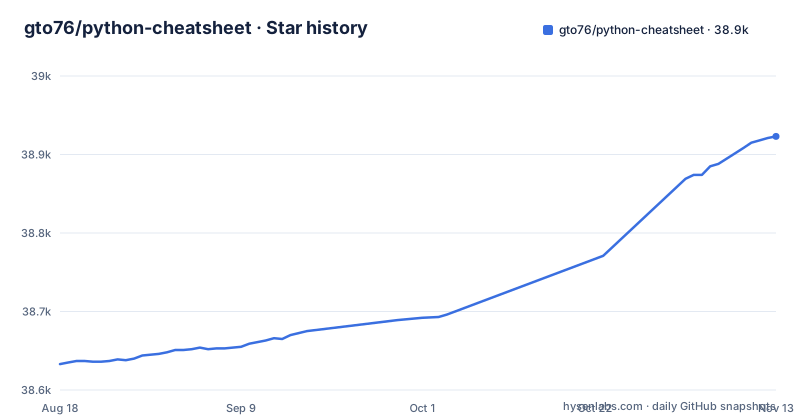
Star history
- gto76/python-cheatsheet38,923 ★ · +290
| Repository | 2026-08-18 | 2026-11-13 |
|---|---|---|
| gto76/python-cheatsheet | 38.6k | 38.9k |
290 Stars in the last 87 days, measured from the daily GitHub snapshot. Compare with other projects
Editorial analysis
What This Cheatsheet Actually Covers
The repository's main content is a single README file that acts as a condensed Python reference; it also holds index.html, parse.js, pdf/ and web/. It is organized into eight major sections: Collections, Data Types, Syntax Rules, System Calls, Data Formats, Misc Topics, Pip Packages, and Multimedia. Within those, you get code snippets for everything from list operations and dictionary views to regular expressions, threading, asyncio, and even pygame. The scope is broad, which is both its strength and its weakness. It is not a deep dive into any topic; it is a quick index of common patterns. For an engineer who has written Python before, this can be a fast way to recall the exact syntax for something like `dict.setdefault()` or `itertools.chain.from_iterable()`. For a beginner, the terse comments like `<list>.append(<el>) # Appends element to the end` assume you already know what append does.
The Format: One Long File, Heavily Annotated
The entire cheatsheet lives in the README.md file. That means you can download it as a plain text file and grep through it. The README provides a direct link to the raw text file, which is a deliberate choice: this is meant to be used as a local reference, not just a webpage. The structure uses markdown headings and anchor links, so on the GitHub page you can jump to sections like `#list` or `#dictionary`. Each code block is a single line or a small group of lines, with a comment that explains the effect. For example, `<list>.sort() # Sorts in ascending order. Accepts reverse=True.` This format is efficient for scanning but can be cryptic when a snippet relies on context not shown. The project also has a FAQ wiki page, which is linked from the top, but the main content is the README itself.
How to Use It: Commands and Workflows
Getting the cheatsheet is straightforward. You can visit the GitHub page or the hosted homepage at gto76.github.io/python-cheatsheet. To get the text file for offline use, the README provides a direct download link: `https://raw.githubusercontent.com/gto76/python-cheatsheet/main/README.md`. You can fetch it with curl, save it to your local machine, and then search it with grep. For instance, `curl -O https://raw.githubusercontent.com/gto76/python-cheatsheet/main/README.md` gives you a local copy. Then `grep -A2 'setdefault' README.md` will show you the relevant snippet. This is the intended workflow: a quick lookup, not a step-by-step tutorial. The cheatsheet also has a Pip Packages section listing Progress_Bar, Plot, Table, Console_App, GUI, Scraping, Web and Profile entries.
A Genuine Limitation: No Explanations, Just Patterns
The biggest limitation is that the cheatsheet tells you what code to write, but rarely why. For example, it shows `<dict>.setdefault(key, default)` and says it returns or writes the default when the key is missing, but it does not explain when you would prefer that over `get()` or `defaultdict`. This is a reference for people who have already learned Python, not a learning tool. Another issue is that the project is not versioned in a way that tells you which Python versions it targets. The last release is dated July 2026, The last release is dated July 2026, so check each snippet against your Python version. Some snippets, like the match statement, are only available in Python 3.10 and later. If you are working on an older codebase, you need to verify each snippet against your environment.
A Real Alternative: The Official Python Documentation
The obvious alternative is the official Python documentation, which is authoritative and version-specific. The difference in approach is fundamental: the official docs explain semantics, edge cases, and performance considerations, while this cheatsheet only shows the happy path. For example, the cheatsheet shows `<list>.pop()` and notes it removes an item, but the official docs will tell you that `pop()` on an empty list raises `IndexError`, and that `pop(0)` is O(n) while `pop()` is O(1). If you are debugging a subtle issue, the cheatsheet will not help; you need the docs. However, the official docs are spread across many pages, and finding the exact syntax for a rarely used function like `struct.pack()` can take several clicks. The cheatsheet's single-file format is faster for that. So the trade-off is speed versus depth.
Maintenance and License: What to Check Before Adopting
The repository has a default branch named `main` and a recent release dated July 2026, which suggests it is still maintained, but the cadence is not frequent. The repository does not declare a license, which is a red flag if you plan to copy sections into your own documentation or codebase. The absence of a license means, under copyright law, you do not have explicit permission to reuse the content beyond viewing it. That is a legal constraint you should resolve before redistributing anything. For personal use, downloading the text file and grepping it is fine, but if you want to include it in a company wiki or a training manual, you need to contact the author or find a similarly comprehensive cheatsheet with a permissive license like MIT or CC BY.
Who Should Adopt This, and What to Verify First
This cheatsheet is for the developer who knows Python and wants a single file to keep on their desktop for quick syntax recall. It is not for the person learning Python from scratch, because it will confuse more than it clarifies. If you decide to use it, verify that the snippets match your Python version. Check the release date and test any code you copy against your interpreter. Also, check the FAQ wiki, which might address common questions about the cheatsheet's accuracy or updates. The project is a useful convenience, but it is not a substitute for understanding the language. Keep it as a supplement to the official docs, not a replacement.
Editorial conclusion
Adopt this cheatsheet if you are an experienced Python developer who needs a fast, offline, copy-paste reference for syntax and standard library patterns, and if you prefer a single text file over searching docs. Avoid it if you are a beginner looking for explanations, because the terse comments and lack of narrative will frustrate you. Before relying on it, verify that the specific code snippets match your Python version, since the project is updated infrequently (last push July 2026) and may lag behind new language features. Also check the license, which is not declared in the repository, before redistributing it in any form. The cheatsheet's value is its convenience, not its authority; treat it as a memory jogger, not a specification.
Frequently asked questions
what is python cheat sheet
This one is a single markdown document with a table of contents that groups its entries into eight sections, from collections and data types through syntax rules, system calls, data formats, misc topics, pip packages, and multimedia. It is published as a rendered site at gto76.github.io/python-cheatsheet.
What is the purpose of the cheat sheet?
It works as a lookup table rather than a tutorial, since each entry is a single line of code followed by a trailing comment explaining the argument or the failure mode. The last two sections, pip packages and multimedia, reference outside libraries such as NumPy, Pandas, Plotly, and Pygame.
Where can I download the gto76 python cheatsheet?
The document header offers a text download that points at the raw `README.md` file on the main branch, and the rendered version is published at gto76.github.io/python-cheatsheet. A `pdf/` directory sits at the repository root alongside a `web/` directory.
Can I reuse the gto76 python cheatsheet in my own project?
The repository contains no license file and its license field resolves to unknown, so it states no permission to copy, redistribute, or translate the text. Ask the maintainer, through the issue tracker or the FAQ wiki page, before reusing the content.
Which Python version does the gto76 cheatsheet target?
Entries are written per construct rather than per release, so check the specific section you need, such as the match statement entry, against the version you actually run.
Official sources
Add this badge to your README
If you maintain this project, the badge below links readers to this analysis and shows its maintenance status from the daily GitHub snapshot. Paste the markdown into your README; add ?metric=license or ?metric=stars to the image URL for a different field.

[](https://hysenlabs.com/projects/gto76-python-cheatsheet)Star history chart for your README
[](https://hysenlabs.com/projects/gto76-python-cheatsheet)Was this useful?