Guaardvark: A Self-Hosted AI Workstation That Tries to Do Everything
The self-hosted AI workstation. Autonomous screen agents, 3-tier neural routing, parallel agent swarms, video generation, 4K/8K upscaling, RAG, voice interface, 60+ tool execution engine — all running locally on your hardware.
At a glance
- What is it?
- Guaardvark bundles coding agents, screen automation, media generation, RAG, and voice into one local install. The scope is ambitious, but the real question is whether one GPU and one machine can carry the load.
- Who is it for?
- Adopt Guaardvark if you are a tinkerer or a small team that wants every AI capability on one local machine, with no cloud APIs and full control over data. Do not adopt it if you need production-grade reliability, a single focused tool, or predictable resource usage; the 20-agent swarms and 4K upscaling will strain any single GPU.
- Can I use it commercially?
- Yes. MIT is a permissive licence: you can use, modify and sell software built on it, as long as you keep its copyright and licence notices.
- Is it still maintained?
- Yes. The repository last received commits 19 days ago.
- What is it written in?
- Mainly Python, according to GitHub's language statistics.
Answers come from the project's GitHub data, last synced on October 4, 2026, and from our analysis. They are not legal advice.
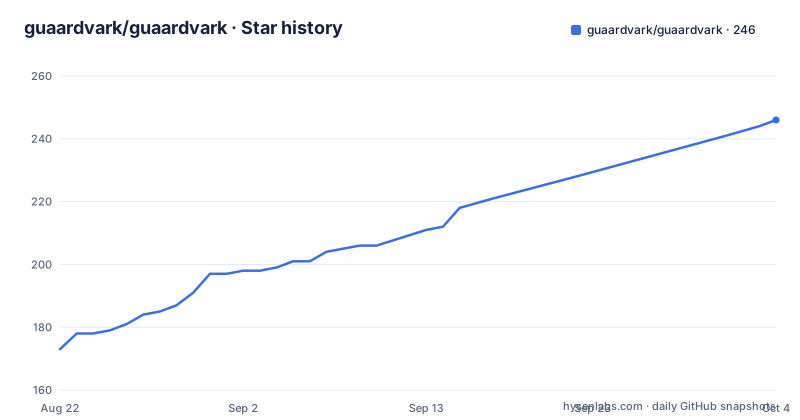
Star history
- guaardvark/guaardvark246 ★ · +73
| Repository | 2026-08-22 | 2026-10-04 |
|---|---|---|
| guaardvark/guaardvark | 173 | 246 |
73 Stars in the last 43 days, measured from the daily GitHub snapshot. Compare with other projects
Editorial analysis
What Guaardvark Actually Is
Guaardvark describes itself as a self-hosted AI studio. The README lists coding agents, 20-agent swarms in isolated git worktrees, screen agents with their own real desktop, self-tuning RAG, continuous voice chat, and a media pipeline that includes video, image, music, and voice cloning. All of it runs locally on your hardware, with no cloud APIs. The target user is someone who wants a single install that replaces a stack of separate AI tools: an IDE with agentic coding, a video generator, an upscaler, a document retrieval system, and a voice assistant. The project is written in Python and released under the MIT license. The homepage is guaardvark.com, and the repository is active, with the latest release v2.7.0 from August 2026. The scope is enormous, and that is both the appeal and the risk.
The Three-Tier Router and Agent Swarms
The AgentBrain system routes requests through three tiers: Reflex, a pattern match under 100 milliseconds; Instinct, a single-shot response; and Deliberation, a full ReACT loop. This is a latency hierarchy, not a quality hierarchy. Simple queries skip the heavy reasoning, while complex tasks get the full chain-of-thought. The swarm feature spins up to 20 parallel coding agents, each working in an isolated git worktree. Merging is dependency-aware, which means the system tries to reconcile changes that touch the same code paths. The README claims this is fully local via Ollama, so the models run on your machine. The trade-off is obvious: 20 agents on one GPU means either small models or a long queue. The router helps, but it does not create compute.
Screen Agents and the Real Desktop
Screen agents are not headless scripts. They run on a real Ubuntu/XFCE desktop, using Xvfb and display :99, with vision and closed-loop servo clicking. A live VNC viewer lets you watch them work from any page. This is a different approach from most coding agents, which operate inside a terminal or an IDE. Here, the agent has eyes and hands on a full desktop, which means it can operate GUI applications, not just edit files. The documentation mentions Gemma4 vision, though details are thin. The practical implication is that you can automate any desktop workflow, not just code. But a real desktop also means more moving parts: X server, window manager, and input injection. If the servo loop fails, the agent can click the wrong thing, and the README does not describe how the system recovers from that.
Media Pipeline: Video, Music, and Voice Cloning
The media studio is the most concrete part of the feature list. Seven local video models are supported, including Wan 2.2 (5B and 14B MoE), CogVideoX-5B, and LTX-2.3 and 2.5. There is an in-process batch queue, quality tiers, frame interpolation, and prompt enhancement. You can jump to ComfyUI for custom workflows. Audio includes ACE-Step 3.5B for music, Stable Audio Open for effects, Chatterbox and Kokoro for TTS, and consent-gated voice cloning. The v2.7.0 release notes mention 16GB-native video, which suggests the memory footprint was a focus. The README also mentions 4K/8K upscaling using Real-ESRGAN, HAT-L, NMKD, and Foolhardy, with two-pass and frame-by-frame video options. This is a serious media toolkit, but running a 14B MoE video model on a single GPU is a heavy ask. The 16GB-native claim is a promise, not a guarantee.
RAG and Knowledge: Retrieval That Shows Its Work
The RAG system uses pgvector with cross-encoder reranking. It does layout-aware document parsing and returns page-level citations. The README emphasizes that retrieval shows its chunks and scores, which is a transparency feature that many RAG tools lack. There is also an Autoresearch mode that tunes retrieval overnight, presumably adjusting embedding or reranking parameters based on usage. This is a real differentiator. Most RAG systems are static; this one adapts. The trade-off is that pgvector and a cross-encoder add infrastructure overhead. You need PostgreSQL running, and the reranking step costs compute. For a small document set, a simpler vector store would be faster. For a large corpus, the self-tuning might help, but the README does not specify how long the overnight tuning takes or how much data it needs to be effective.
Installation and First Run
The one-command install is a curl pipe to bash: `curl -fsSL https://guaardvark.com/install.sh | bash`. The README points to a Quick Start section for manual install options, but the truncated material does not include those steps. The v2.6.2 release notes mention macOS install improvements, so it is not Linux-only, but the screen agents depend on Xvfb and XFCE, which are Linux-specific. That means the full desktop automation feature will not work on macOS or Windows natively. The project uses Ollama for the local backend, so you need Ollama installed and a model pulled. The README does not list specific model names or sizes for the coding agents. The install script is a black box; you are trusting it to download and configure a large system. For a tool that runs code and clicks buttons, that trust deserves scrutiny.
Limitations and Failure Modes
The biggest limitation is resource contention. One GPU, one machine, and a swarm of 20 agents plus video generation is a recipe for out-of-memory errors. The 16GB-native video claim in v2.7.0 suggests that the developers are aware of the memory ceiling, but it does not solve the problem of running multiple subsystems at once. The self-improvement feature, which the README says fixes its own code, is behind a guardian review and kill switches. That is a sensible safety measure, but it also means the system can change its own source code. If you are not comfortable with that, you should not enable it. The voice cloning is consent-gated, which is good, but the README does not explain how consent is verified. The walkthrough series is a strong marketing asset, but it is not a substitute for documentation. The CAPABILITIES.md file is the exhaustive source, and it is referenced but not included in the material.
Alternatives and the Verdict
The closest alternative is a stack of dedicated tools: Open WebUI for chat, LangChain or LlamaIndex for RAG, ComfyUI for image and video generation, and a coding agent like Aider or Continue. Each of those is focused and well-tested. Guaardvark tries to combine them, which reduces integration friction but increases complexity. Another alternative is something like LocalAI, which provides a unified API for local models but does not include screen agents or a media pipeline. The difference is that Guaardvark is a full workstation, not a model server. For a single user who wants to experiment, the all-in-one approach is convenient. For a team that needs reliable, reproducible outputs, the dedicated tools are safer. The README acknowledges the scope by pointing to CAPABILITIES.md for details, which is honest but also a warning: there is a lot to learn and configure.
Editorial conclusion
Adopt Guaardvark if you are a tinkerer or a small team that wants every AI capability on one local machine, with no cloud APIs and full control over data. Do not adopt it if you need production-grade reliability, a single focused tool, or predictable resource usage; the 20-agent swarms and 4K upscaling will strain any single GPU. Before committing, verify your GPU's VRAM against the 16GB-native video claims, check the current state of the self-improvement kill switches, and test the RAG accuracy on your own documents. The project is under active development, so pin a specific release and read the CAPABILITIES.md file before you build anything critical on it.
Frequently asked questions
How do I install guaardvark?
One command, `curl -fsSL https://guaardvark.com/install.sh | bash`, and the quick start section also points to a guide for manual options. Linux with one NVIDIA card is the supported configuration, with 16 GB of video memory for the video models; the Docker path is `./start-docker.sh`, with a `--gpu` flag.
What are the system requirements for guaardvark?
Linux with a single NVIDIA GPU, and 16 GB of video memory if you want the video models. Apple Silicon is supported with GPU features arriving through Metal, and Windows through WSL2 is described as being verified rather than supported.
How do I connect guaardvark to Claude Code?
Two lines with no clone: `plugin marketplace add guaardvark/guaardvark` then `plugin install guaardvark@guaardvark`. Claude Code, Cursor, Codex, OpenClaw and Gemini CLI are all named as able to drive the flows through the built-in MCP server and fifteen agent skills, where the agent queues a job on the GPU and polls it to the finished file.
How many agents can guaardvark run in parallel?
Up to 20 parallel coding agents in isolated git worktrees with dependency-aware merging, on a fully-local backend via Ollama. The single GPU admits one process at a time and evicts any other model it finds, so parallel agents queue for the card rather than sharing it.
Does the guaardvark Docker setup have real credentials?
No, and the compose file says so in a comment: the database password is the stock one, Redis has none, and Ollama has none. All three publish to the host's loopback only, and three environment variables can republish them onto other interfaces deliberately. The first start writes a generated API key to a .env beside the compose file.
Official sources
Add this badge to your README
If you maintain this project, the badge below links readers to this analysis and shows its maintenance status from the daily GitHub snapshot. Paste the markdown into your README; add ?metric=license or ?metric=stars to the image URL for a different field.

[](https://hysenlabs.com/projects/guaardvark-guaardvark)Star history chart for your README
[](https://hysenlabs.com/projects/guaardvark-guaardvark)