Mantis gives an iOS app a Photos-style cropper with masks and perspective
An iOS image cropping library for UIKit and SwiftUI, mimicking the Photos app — crop shapes, rotation, flip, perspective correction, undo/redo. iOS & Mac Catalyst.
At a glance
- What is it?
- Mantis is a Swift image cropping library for UIKit and SwiftUI that gives an app the Apple Photos crop experience, including crop shapes, rotation and flip dials, perspective correction, undo and redo, and persisted crop info you can re-apply later. The install recommendation is a separate slim distribution, because the main repository carries 70 MB of history.
- Who is it for?
- Adopt Mantis if you are building an iOS app that needs a crop screen and you want the Photos interaction rather than a rectangle with two handles, since the shape support, the dials and the perspective correction are the expensive parts to build. Do not adopt it for a macOS app, because the platform is iOS and Mac Catalyst only.
- Can I use it commercially?
- Yes. MIT is a permissive licence: you can use, modify and sell software built on it, as long as you keep its copyright and licence notices.
- Is it still maintained?
- Yes. The repository last received commits 2 days ago.
- What is it written in?
- Mainly Swift, according to GitHub's language statistics.
Answers come from the project's GitHub data, last synced on November 7, 2026, and from our analysis. They are not legal advice.
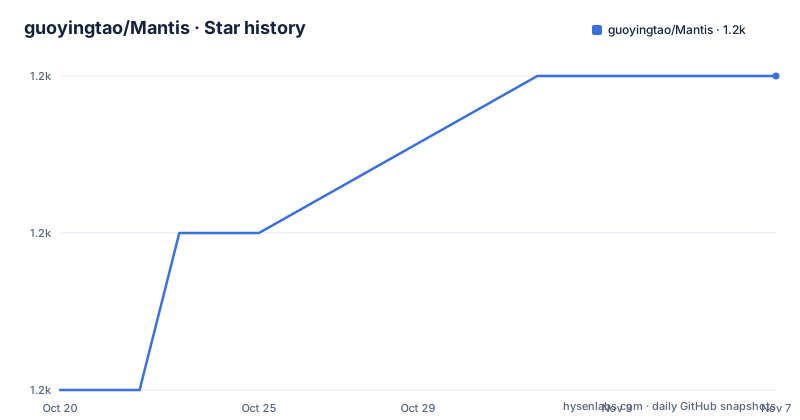
Star history
- guoyingtao/Mantis1,211 ★ · +2
| Repository | 2026-10-20 | 2026-11-07 |
|---|---|---|
| guoyingtao/Mantis | 1.2k | 1.2k |
2 Stars in the last 18 days, measured from the daily GitHub snapshot. Compare with other projects
Editorial analysis
Two APIs because SwiftUI and UIKit are different worlds
The library gives you both a UIKit and a SwiftUI surface, and the SwiftUI side has two APIs of its own. There is a modern declarative `ImageCropper` view with modifiers and an observable `CropSession`, and there is a binding-based `ImageCropperView`. The quick start shows the declarative form, where the shape and the aspect ratio are modifiers on the view and the result arrives in a closure:
import Mantis
import SwiftUI

struct AvatarCropView: View {
    let image: UIImage
    @State private var croppedImage: UIImage?

    var body: some View {
        ImageCropper(image: image)
            .cropShape(.circle)
            .aspectRatio(.fixed(1))
            .onCrop { result in
                croppedImage = result.croppedImage
            }
    }
}
The UIKit path is a view controller with a delegate, and the delegate callback carries three things: the cropped image, the transformation that was applied, and the crop info. The documentation is explicit that the modal presentation style must be set to fullScreen when presenting, which is the kind of detail that saves an afternoon of a blank cropper.
The feature set is the Photos feature set
The list is long and it is essentially a specification of the Photos crop screen. The interaction includes panning, zooming, resizing the crop box, rotating 90 degrees, flipping, and straightening with either a rotation dial or a slide dial, with the dials illustrated in the repository assets. Aspect ratios can be free or fixed, with built-in presets such as original, square and 16:9, plus custom ratios of your own. Crop shapes are the distinctive part: rectangle, square, circle, ellipse, rounded rectangle, diamond, polygon, heart or any custom path, with an optional mask-only mode, and the README notes they even ship a heart shape. Perspective correction is described as Apple Photos style vertical and horizontal adjustment with a real-time 3D preview, which is the hardest item on the list.
Undo, redo and a crop you can apply again later
There are two separate features here and they are worth separating. The first is the history: undo, redo and revert to original, with an independent history per cropper, and localized Mac Catalyst menus so the menu bar items read correctly on a Mac. The second is persistence: `CropInfo` is `Codable` from version 3.1, which lets you re-crop the original image offline in a later session, or reopen the editor at the state you saved rather than starting from scratch. That second one is the feature that changes how the library fits into an app, because it means the crop parameters are data you can store alongside a user profile and change later without the user having to crop again.
The install trick is a separate slim repository
The installation section contains a piece of practical engineering advice that is easy to miss. The recommended distribution is a separate, lightweight repository, Mantis-spm, which contains only the sources and is under 1 MB, whereas this repository's full history with the example apps and the README media is about 70 MB, and SwiftPM downloads all of it for every project that depends on it. In Xcode you add the package dependency by URL and pick the version rule of up to next major at 3.1.0, or in a Package.swift you add the package with a from requirement:
.package(url: "https://github.com/guoyingtao/Mantis-spm.git", from: "3.1.0")The requirements are iOS 15.0 or newer, macOS 12.0 or newer for Mac Catalyst, and Xcode 13.0 or newer, with Xcode 15 recommended because it enables the iOS 17 observation-based fine-grained tracking in `CropSession`. The library is MIT licensed and supports both Swift Package Manager and CocoaPods, with a `Mantis.podspec` in the root.
Customisation and the less obvious details
The library is meant to be taken apart. You can embed the cropper in your own view controller, build a custom toolbar, subclass `CropViewController`, and tweak colours, borders and dial styles, and the Example directory in the repository shows that in practice with a custom view controller, a customised crop toolbar, a customised toolbar without the list, a custom waiting indicator, a navigation crop toolbar and an embedded crop view controller. Beyond that there are the details that show the library has been used in real apps: light, dark and system appearance modes, localisation into fourteen languages including Arabic, Chinese, Japanese, Korean, Russian and Turkish with support for custom localisations, an async crop mode with pixel-count limiting for very large photos, and a privacy manifest included as `PrivacyInfo.xcprivacy`.
Where the 3.x line sits
The release history is managed with release-please, and the tags show two lines in the same year. v3.1.0 was released on 2026-07-09, v3.0.0 on 2026-07-06, and v2.31.2 on 2026-05-31, so the 2.x line ran for a long time before the 3.0 break. The documentation has a section on what is new in 3.x and a separate section on migrating from 2.x, which confirms that 3.0 was a breaking change rather than a routine release. The repository root is a normal Swift package with `Sources/`, `Tests/`, an `Example/` app, a `SwiftUIExample/`, a `Mantis.xcodeproj/`, a `.swiftpm/` directory, a `version.txt` and a `.swift-version` file that pins the toolchain, plus a `.swiftlint.yml` for linting. The last push to the master branch was on 2026-09-09, and the licence is MIT.
Editorial conclusion
Adopt Mantis if you are building an iOS app that needs a crop screen and you want the Photos interaction rather than a rectangle with two handles, since the shape support, the dials and the perspective correction are the expensive parts to build. Do not adopt it for a macOS app, because the platform is iOS and Mac Catalyst only. Verify first which SwiftUI API suits your code, since version 3 introduced a declarative view alongside the older binding-based one, and note that persisted crop info depends on 3.1 or newer.
Frequently asked questions
What is the Mantis image cropping library?
It is an open source Swift library for iOS and Mac Catalyst that gives an app an Apple Photos style crop and edit experience, with both UIKit and SwiftUI APIs, crop shapes, rotation and flip, perspective correction, undo and redo, and persisted crop info.
Which package should I depend on for Mantis?
The lightweight Mantis-spm distribution, which contains only the sources and is under 1 MB, rather than this repository whose full history is about 70 MB and which SwiftPM downloads for every dependent project. The version rule is up to next major at 3.1.0.
What crop shapes does Mantis support?
Rectangle, square, circle, ellipse, rounded rectangle, diamond, polygon, heart and any custom path, with an optional mask-only mode. The README notes that they even provide a heart shape.
Can I re-apply a crop to an image later in Mantis?
Yes. `CropInfo` is Codable from version 3.1, so you can re-crop the original image offline in a later session or reopen the editor at the saved state, and the crop callback also gives you the transformation that was applied.
What are the platform requirements for Mantis?
iOS 15.0 or newer, macOS 12.0 or newer for Mac Catalyst, and Xcode 13.0 or newer, with Xcode 15 recommended because it enables the iOS 17 observation-based fine-grained tracking in the crop session. The licence is MIT and it supports Swift Package Manager and CocoaPods.
Official sources
Add this badge to your README
If you maintain this project, the badge below links readers to this analysis and shows its maintenance status from the daily GitHub snapshot. Paste the markdown into your README; add ?metric=license or ?metric=stars to the image URL for a different field.

[](https://hysenlabs.com/projects/guoyingtao-mantis)Star history chart for your README
[](https://hysenlabs.com/projects/guoyingtao-mantis)Was this useful?