h3: a minimal HTTP framework for Node, Bun, Deno and workers
⚡️ Minimal H(TTP) framework built for high performance and portability
At a glance
- What is it?
- h3 is a small TypeScript HTTP framework whose exports map targets Node.js, Bun, Deno, Cloudflare workerd and service workers from one package. This review covers what v2 exposes, how to install it, and where the minimal surface becomes a cost.
- Who is it for?
- Adopt h3 when you want a small HTTP layer that runs unchanged across Node.js, Bun, Deno, Cloudflare workerd and service workers, and you are willing to assemble routing, validation and caching yourself or through the documented rules modules. Do not adopt it if you expect a batteries-included framework with an opinionated project layout.
- Can I use it commercially?
- Yes. MIT is a permissive licence: you can use, modify and sell software built on it, as long as you keep its copyright and licence notices.
- Is it still maintained?
- Yes. The repository last received commits 6 days ago.
- What is it written in?
- Mainly TypeScript, according to GitHub's language statistics.
Answers come from the project's GitHub data, last synced on November 22, 2026, and from our analysis. They are not legal advice.
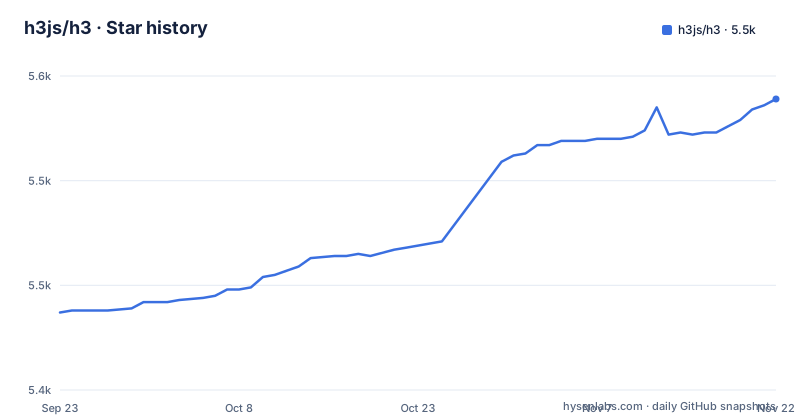
Star history
- h3js/h35,539 ★ · +102
| Repository | 2026-09-23 | 2026-11-22 |
|---|---|---|
| h3js/h3 | 5.4k | 5.5k |
102 Stars in the last 60 days, measured from the daily GitHub snapshot. Compare with other projects
Editorial analysis
What h3 solves, and who it is actually for
h3 describes itself as a "minimal h(ttp) framework built for high performance and portability." The portability half is the more concrete claim. The package.json exports map resolves a different built file depending on the condition your toolchain reports: deno, bun, workerd, browser, node, with a generic fallback. There are also explicit subpath exports for each of those targets plus ./tracing, ./rules, ./rules/cache, ./rules/proxy and ./rules/compiler. That is the design in one sentence: one source tree, one import specifier, and the runtime you deploy to picks the implementation.
That makes h3 a fit for library authors and for teams shipping the same handler code to more than one runtime. It is a weaker fit for someone who wants a framework to decide their folder structure, their validation library and their ORM. The README is short and points at h3.dev for documentation; it does not present an application scaffold, and the repository's examples directory is a flat set of single-topic .mjs files (auth, body, cookies, cors, errors, headers, middleware, router, websocket, server-sent-events) rather than a starter project. If you want a scaffold, this is not the layer that gives you one.
How the runtime-specific entry points work
The mechanism is conditional exports, not a runtime feature-detection shim. When you write an import of h3, the resolver reads the exports map and matches the first condition that applies to the current environment. A Node process gets dist/_entries/node.mjs, Bun gets dist/_entries/bun.mjs, workerd gets dist/_entries/cloudflare.mjs, and a browser or service-worker context gets dist/_entries/service-worker.mjs. Anything that matches none of those conditions falls through to dist/_entries/generic.mjs.
The package also sets "type": "module" and "sideEffects": false, so the published code is ESM and bundlers are told they may drop unused modules. Types resolve through dist/_entries/generic.d.mts. The practical consequence is that the same import line can produce a different file on disk depending on where it is built, which is convenient until it is not: a bug that reproduces under Node may not reproduce under Bun because a different entry file is in play. When you file an issue or read a stack trace, the resolved file path is the first thing worth noting.
The ./rules subpaths are a separate layer. cache, proxy and compiler ship as their own entry points rather than being folded into the main export, so a project that does not use them does not pull them in. The README does not describe what each rule does; that detail lives on h3.dev.
Installing h3 and running a first handler
The package is published on npm as h3, so installation is the ordinary npm-family command. The README does not publish a separate installation procedure for consumers; it documents local development of the repository itself, which uses Corepack, pnpm install and pnpm dev or pnpm test. For your own project, install the package:
npm install h3The repository ships an examples/ directory with one file per topic. The handler examples are the shortest path to a running server; examples/handler-obj.mjs and examples/handler-fetch.mjs cover the two handler styles, and examples/router.mjs covers routing. Because those files are .mjs and the package is ESM-only, your project needs "type": "module" in package.json or an .mjs extension.
The repository's own scripts show the intended local workflow. The package.json defines the following, listed here exactly as it appears:
pnpm dev
pnpm test
pnpm bench:node
dev runs vitest, test runs the suite, and bench:node runs node with --expose-gc and --allow-natives-syntax against test/bench/bench.ts. bench:bun is the separate Bun benchmark script. That tells you the project treats microbenchmarks as first-class, and it also tells you the benchmark harness needs V8 flags, so it is not a portable script you can run on Bun without switching to the other script. The README does not state expected numbers, so treat any figure you see elsewhere as unverified.
Where a minimal framework stops helping
The limitation is structural rather than a bug. h3's own description is "minimal," and the repository layout backs that up: src/, test/, examples/, docs/, playground/, and no bundled validation, database or authentication layer. Routing, body parsing, cookies, CORS and errors appear as separate example files, which means each is a thing you wire up rather than a thing that is already wired. On a small service that is a feature. On a team that expects conventions to be decided for them, it is unbudgeted work.
The second constraint is the version line. The published version is 2.0.8, released 2026-10-22, and the two preceding releases are v2.0.7 and v2.0.6. The README states plainly: "You are on the v2 active branch. Check out tree/v1 and v1.h3.dev for legacy v1." The presence of MIGRATION.md at the repository root signals that moving between major versions is an expected task.
The third constraint is the conditional exports map itself. It is the feature and the failure mode. Tooling that does not report a condition h3 recognizes will silently resolve the generic entry, which may behave differently from the Node or Bun entry you expected.
h3 against Hono, Fastify and Nitro
Hono, Fastify and Nitro are the usual points of comparison, and the differences are worth stating plainly. Fastify is a Node-first framework with a plugin system and schema-based validation built into its core; h3 does not ship an equivalent validation layer, and its exports map is aimed at non-Node runtimes that Fastify does not target in the same way. If your deployment is Node-only and you want request and response schemas handled by the framework, Fastify's approach is the more direct match.
Hono occupies the closest position: a small, multi-runtime HTTP framework. The difference visible in this repository is packaging strategy. h3 exposes one package with condition-based resolution and a generic fallback entry; Hono's runtime targeting is a separate design decision that the h3 repository does not document, so compare their documentation directly rather than inferring from h3's map. What can be said from h3's side is that the generic fallback exists specifically so an unrecognized environment still resolves something.
Nitro is a different kind of thing: a server toolkit that builds on h3 rather than competing with it. If you are already inside the Nuxt or Nitro build pipeline, you are likely consuming h3 indirectly and only need to know which version that pipeline pins.
Maintenance, release cadence and the MIT licence
The repository is not archived, and the last push was on 2026-10-22. Three releases, v2.0.6, v2.0.7 and v2.0.8, landed between 2026-10-20 and 2026-10-22, which is a fast cadence. That pace is a signal about how much churn to expect in a dependency you pin.
Upgrade cost depends on which major line you are on. The README directs v1 users to the tree/v1 branch and v1.h3.dev, and MIGRATION.md sits at the repository root, so the project maintains a written path between versions. Anyone upgrading from v1 to v2 should read that file before touching package.json, and should re-check each import path against the exports map, because the subpath list (./node, ./bun, ./deno, ./cloudflare, ./service-worker, ./generic, ./tracing, ./rules and its children) is the surface that can change between majors.
The licence is MIT, declared in package.json and in the LICENSE file, and the README states the project is "Published under the MIT license." MIT permits commercial use and modification with the copyright notice retained. This is a description of the licence text, not legal advice; if your organisation has rules about attribution or about shipping pre-release dependencies, run the specifics past whoever handles that.
Editorial conclusion
Adopt h3 when you want a small HTTP layer that runs unchanged across Node.js, Bun, Deno, Cloudflare workerd and service workers, and you are willing to assemble routing, validation and caching yourself or through the documented rules modules. Do not adopt it if you expect a batteries-included framework with an opinionated project layout. The package version is 2.0.8, and the README points v1 users at the tree/v1 branch and v1.h3.dev. Before you commit, open MIGRATION.md in the repository and check every export path you plan to import against the exports map in package.json, because that map is the contract that decides which runtime file your bundler resolves.
Frequently asked questions
What is h3js/h3?
h3 is a minimal HTTP framework written in TypeScript, described in its README as a "minimal h(ttp) framework built for high performance and portability." It publishes one npm package whose exports map resolves to different entry files for Node.js, Bun, Deno, Cloudflare workerd and service workers.
What does H3 stand for in HTML?
Nothing in the h3js/h3 repository describes an HTML heading element. The README explains the name differently: H3 is pronounced /eɪtʃθriː/, like h-3, and stands for h(ttp) framework.
What is H3 in Python?
The h3js/h3 repository is a TypeScript HTTP framework and does not document a Python package. Its package.json declares ESM JavaScript with TypeScript type definitions at dist/_entries/generic.d.mts.
Who developed H3?
The README credits @pi0 and the community, and package.json lists the repository as h3js/h3. The licence section reads "Made by @pi0 and community."
Official sources
Add this badge to your README
If you maintain this project, the badge below links readers to this analysis and shows its maintenance status from the daily GitHub snapshot. Paste the markdown into your README; add ?metric=license or ?metric=stars to the image URL for a different field.

[](https://hysenlabs.com/projects/h3js-h3)Star history chart for your README
[](https://hysenlabs.com/projects/h3js-h3)Was this useful?