Harness Open Source: A Drone Successor That Bundles Git, CI, and Registries
Harness Open Source is an end-to-end developer platform with Source Control Management, CI/CD Pipelines, Hosted Developer Environments, and Artifact Registries.
At a glance
- What is it?
- Harness Open Source is a Go-based developer platform that combines source control, pipelines, gitspaces, and artifact registries in one Docker image. It is a bold expansion of Drone that is not yet at pipeline parity with it, and this review looks at what the repository actually delivers.
- Who is it for?
- Adopt Harness Open Source if you want a single self-hosted platform that covers git hosting, pipelines, gitspaces, and a registry, and you are comfortable running it as a Docker container with Docker socket access. Do not adopt it if you need Drone's full pipeline maturity today, since the README states parity is still a goal.
- Can I use it commercially?
- Yes. Apache-2.0 is a permissive licence: you can use, modify and sell software built on it, as long as you keep its copyright and licence notices.
- Is it still maintained?
- Yes. The repository last received commits 3 days ago.
- What is it written in?
- Mainly Go, according to GitHub's language statistics.
Answers come from the project's GitHub data, last synced on November 15, 2026, and from our analysis. They are not legal advice.
Star history
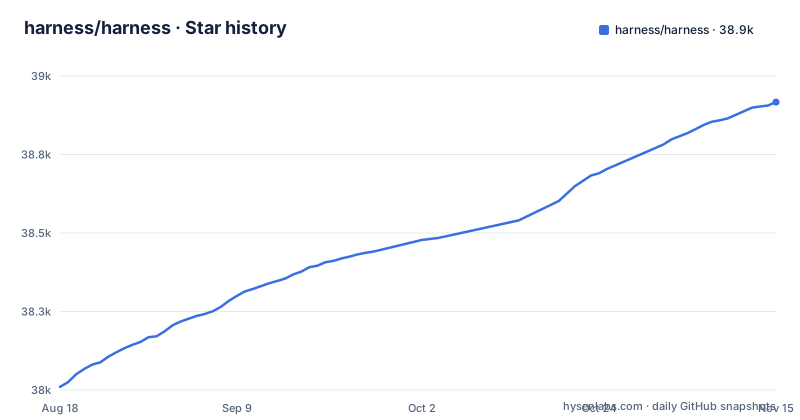
- harness/harness38,917 ★ · +907
| Repository | 2026-08-18 | 2026-11-15 |
|---|---|---|
| harness/harness | 38k | 38.9k |
907 Stars in the last 89 days, measured from the daily GitHub snapshot. Compare with other projects
Editorial analysis
What Harness Open Source Actually Bundles
Harness Open Source is not a single-purpose CI server. The repository presents an end-to-end platform: source control management, CI/CD pipelines, hosted developer environments called gitspaces, and artifact registries. The README positions it as the next generation of Drone, which previously focused only on continuous integration. The project is written in Go and licensed under Apache-2.0. The user interface is a separate web component built with yarn. The platform exposes a REST API with Swagger documentation, plus a separate Swagger endpoint for registry APIs. That split is a detail worth noting: if you plan to automate registry operations, you must hit a different URL than the main API.
How It Works: One Binary, One Docker Image, Multiple Services
The architecture, as far as the repository shows, is a single Go binary called gitness. It serves the UI, the REST API, and the Swagger specs. The README instructs you to run it with a .local.env file: ./gitness server .local.env. The binary also has subcommands for login and token generation. Pipelines run inside Docker containers, which means the server needs access to a Docker daemon. The application negotiates the Docker API version automatically, but you can pin it with GITNESS_DOCKER_API_VERSION. The data, including the database and repositories, is stored in a volume mounted at /data. This design keeps deployment simple: one container, one volume, one socket. But it also makes Docker a hard dependency for pipeline execution, not an optional extra.
Getting It Running: Docker First, Source Build Second
The quickest path is the published Docker image. The README gives a single docker run command that maps ports 3000 and 3022, mounts the Docker socket, and mounts a host directory at /data. The warning is explicit: without a bind mount or named volume, all data is lost when the container stops. For local development from source, the prerequisites are Node, Go 1.20 or higher, specific protobuf tool versions, and a few Go programs. You run make dep and make tools, then build the web UI with yarn install and yarn build, then make build. The resulting binary can run without Docker for the server itself, but pipelines still need a Docker socket. The README claims the project supports all OS/architectures that Go supports, but the documented build steps are Linux/macOS oriented, with Homebrew for protobuf.
Docker Socket Configuration: A Real Operational Friction
The README dedicates a section to Docker socket locations because this is a common failure point. On Docker Desktop, /var/run/docker.sock works by default. Rancher Desktop and Colima use different paths, and you must either create a symlink or set GITNESS_DOCKER_HOST. This is not a trivial detail. If you run Harness on a Mac with Colima, you cannot just start the container and expect pipelines to work. The README recommends a symlink, but that requires sudo and affects your whole system. Setting the environment variable in .local.env is cleaner but requires you to know the exact socket path. This friction is a direct consequence of the design: Harness pipelines run inside Docker containers, so the socket is a single point of failure. For teams already using a non-default Docker runtime, this is the first thing to verify.
Drone Migration: The Promise and the Gap
The README is candid about Drone. Harness Open Source is a massive investment in the next generation of Drone, but it is not yet at parity. The goal is full parity in pipeline capabilities, allowing seamless migration. To preserve Drone's existing functionality, the project keeps a feature branch called drone, with its own README, where development can continue. This is a significant admission. If you are a Drone user, you cannot assume your pipelines will run unchanged on Harness today. The README says parity will take time. That means the pipeline engine in Harness is likely less complete than Drone's, though the README does not enumerate specific missing features. For teams evaluating Harness purely for CI, this gap is a critical factor. You are trading Drone's maturity for a broader platform that is still catching up.
API and Client Generation: A Developer's Workflow
The project includes a Swagger specification accessible at /swagger and /openapi.yaml. The UI consumes an auto-generated API client, and the README explains how to regenerate it when you add new REST APIs. The command is ./gitness swagger > web/src/services/code/swagger.yaml, followed by yarn services in the web folder. This is a concrete workflow for contributors. It shows that the API surface is generated from the Go server, not hand-maintained. The registry Swagger is separate, at /registry/swagger/, and the README notes it will later be moved to the main endpoint. That temporary split is a maintenance cost: any tooling you build against the registry API must point to a different URL, and you will need to update it when the merge happens. For a platform that aims to be end-to-end, this inconsistency is a small but real rough edge.
Maintenance and Upgrade Considerations
The repository is actively maintained, with releases like v2.28.2 pushed in April 2026. The Apache-2.0 license is permissive, allowing commercial use with attribution. The project also relies on a specific protobuf version (v3.21.11) for development, which is a maintenance burden for contributors. For users running the Docker image, the main ongoing cost is keeping the image updated and ensuring the Docker socket access remains secure.
Alternatives and the Right Fit
The obvious alternative is Drone itself, which is the direct predecessor. Drone focuses only on CI, so it is lighter and more mature in that niche. The key difference is scope: Harness bundles git hosting, pipelines, gitspaces, and registries into one system, while Drone requires you to pair it with a git server and a registry. If you already have a git server and only need CI, Harness is overkill. If you want a single self-hosted platform that covers the whole DevOps loop, Harness covers all of these in one platform. The trade-off is clear: broader scope means more moving parts, and the Docker socket dependency is the price you pay for running pipelines.
Editorial conclusion
Adopt Harness Open Source if you want a single self-hosted platform that covers git hosting, pipelines, gitspaces, and a registry, and you are comfortable running it as a Docker container with Docker socket access. Do not adopt it if you need Drone's full pipeline maturity today, since the README states parity is still a goal. Before committing, verify that your Docker runtime is supported, that you can mount a persistent volume for /data, and that the registry's separate Swagger endpoint does not hinder your API automation.
Frequently asked questions
how to install harness
Harness Open Source is installed with a single container run: docker run -d with ports 3000 and 3022 published, the host Docker socket mounted at /var/run/docker.sock, /tmp/harness mapped to /data, and the image harness/harness. The README warns that without a bind mount or named volume all data is lost when the container stops.
how to use harness
For local development you build the web bundle first with yarn install and yarn build in the web folder, then make build, then start the server with ./gitness server .local.env and open http://localhost:3000. The REST API is documented at http://localhost:3000/swagger, and the API client for the UI is regenerated with ./gitness swagger followed by yarn services.
What is harness?
In this repository, Harness Open Source is an end-to-end developer platform under Apache-2.0 covering source control management, CI/CD pipelines, hosted developer environments called Gitspaces, and artifact registries. It is described as the next generation of Drone, with Drone's pipeline engine kept on a separate feature branch while main is developed.
Official sources
Add this badge to your README
If you maintain this project, the badge below links readers to this analysis and shows its maintenance status from the daily GitHub snapshot. Paste the markdown into your README; add ?metric=license or ?metric=stars to the image URL for a different field.

[](https://hysenlabs.com/projects/harness-harness)Star history chart for your README
[](https://hysenlabs.com/projects/harness-harness)Was this useful?