Envconsul: launching subprocesses with live Consul KV and Vault secrets as environment variables
Launch a subprocess with environment variables using data from @HashiCorp Consul and Vault.
At a glance
- What is it?
- Envconsul wraps a subprocess launch with environment variables pulled from a running Consul cluster or Vault instance. It requires neither backend to be changed, and the subprocess remains unaware of the source; it just reads environment variables.
- Who is it for?
- Envconsul is a good fit for teams that already run Consul or Vault and want to deliver configuration to 12-factor applications without modifying those applications. The binary has no runtime requirements, so deployment is adding one file to a container or server.
- Can I use it commercially?
- Yes, with conditions. MPL-2.0 is a weak copyleft licence: you can use it inside commercial and closed-source software, but if you distribute changes to its own files, you must publish those changes under the same licence.
- Is it still maintained?
- Yes. The repository received new commits within the last day.
- What is it written in?
- Mainly Go, according to GitHub's language statistics.
Answers come from the project's GitHub data, last synced on October 23, 2026, and from our analysis. They are not legal advice.
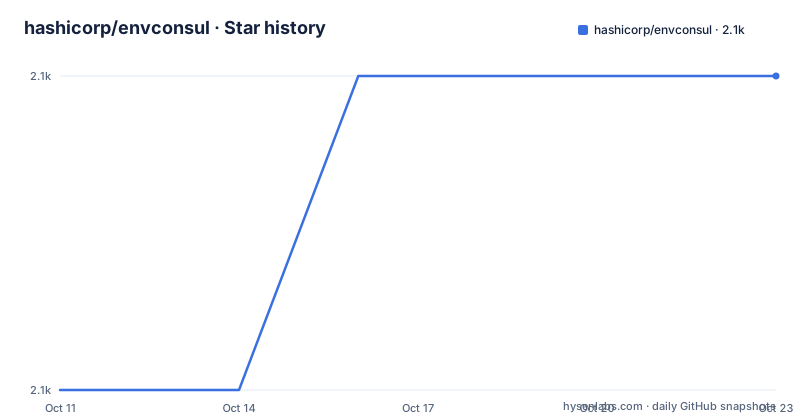
Star history
- hashicorp/envconsul2,073 ★ · +1
| Repository | 2026-10-11 | 2026-10-23 |
|---|---|---|
| hashicorp/envconsul | 2.1k | 2.1k |
1 Stars in the last 12 days, measured from the daily GitHub snapshot. Compare with other projects
Editorial analysis
Populating env vars from live Consul KV and Vault secrets without changing the application
A 12-factor application reads its configuration from environment variables, not from files or command-line arguments. Envconsul takes that contract seriously: it connects to Consul or Vault, reads whatever keys you specify, turns them into environment variables, and then exec's the subprocess you name. From the subprocess's perspective, those variables arrived the same way any other env var does.
The tool is inspired by envdir and envchain, both of which also wrap processes with environment variables. Envconsul's distinguishing characteristic is that its data source is a live distributed system rather than local files or a system keychain. The Consul KV store or Vault path can change independently of the subprocess, and every new process start gets the current values.
The intended audience is any team running Consul or Vault that wants to inject configuration or secrets into an existing application without rewriting it. A Ruby app, a Python script, a compiled binary: envconsul wraps them all the same way. The only requirement is that the subprocess reads standard environment variables.
How envconsul wraps a subprocess: connect, read, exec
Before the subprocess starts, envconsul connects to the Consul agent (by default at 127.0.0.1:8500) or to a Vault instance, reads the values at the paths you give it, and converts each key into an environment variable. Then it exec's the subprocess with that enriched environment.
The configuration places Consul and Vault as separate top-level blocks in HCL or JSON. A typical Consul block names the agent address, an optional ACL token (or the CONSUL_TOKEN environment variable), and a retry block. The retry block is where fault tolerance is configured, and its defaults are significant: attempts is set to 12 by default, backoff starts at 250ms, and each retry sleeps for an exponentially increasing time (250ms, 500ms, 1s, 2s, 4s for the first five retries). The comment in the config example notes that setting attempts to zero gives unlimited retries.
One design detail worth noting: the README recommends connecting to the local Consul agent rather than directly to a Consul server. The agent multiplexes connections and reduces the number of open HTTP connections. Connecting directly to a server is described as not recommended, even though the option exists.
Installing the binary and running the quick Consul example
Pre-compiled binaries are downloadable as zip or tarball from GitHub; extract and move the envconsul binary into your PATH. No runtime libraries are needed.
Building from source requires Go. Clone the repository and run the development make target:
git clone https://github.com/hashicorp/envconsul.git
cd envconsul
make dev
Or build for a specific platform:
make darwin/amd64The binary lands in pkg/OS_ARCH. For a first run with a local Consul agent, start Consul in dev mode, write three keys, then run envconsul with a -prefix flag:
consul agent -dev
consul kv put my-app/address 1.2.3.4
consul kv put my-app/port 80
consul kv put my-app/max_conns 5
envconsul -prefix my-app env
Passing env as the subprocess prints the environment. The three keys appear as address=1.2.3.4, max_conns=5 and port=80. Key names within the prefix become variable names; the prefix itself is stripped.
The -pristine flag: blocking the parent's environment from the subprocess
By default, envconsul copies the parent process environment into the subprocess alongside the Consul or Vault values. That means PATH, HOME, and any other variable set in the shell or container all pass through.
The -pristine flag changes that. With -pristine, the subprocess receives only the values from the specified prefixes or secrets, and nothing from the parent environment. For multiple data sources, list each prefix separately:
envconsul -pristine -prefix common -prefix my-app yarn startThis matters for reproducibility: a subprocess with -pristine gets the same environment regardless of what the calling shell has set. Without -pristine, a stray variable in the parent environment can interfere with the application's configuration logic.
Two additional flags alter how variable names are formatted. The -upcase flag converts all Consul KV key names to uppercase before setting them as environment variables. The -sanitize flag replaces characters that are not valid in environment variable names, such as dashes, with underscores. Combining them prepares keys like my-app/max-connections for systems that expect uppercase names without hyphens:
envconsul -upcase -sanitize -prefix my-app python my-app.myRetry configuration and the exponential backoff defaults for Consul connections
Envconsul does not exit when a Consul connection fails. Instead it retries using exponential backoff, and the retry block inside the consul configuration section controls the details.
A complete retry block looks like this:
consul {
  retry {
    enabled  = true
    attempts = 12
    backoff  = "250ms"
  }
}
With attempts set to 12, envconsul makes up to 12 tries before giving up. Setting attempts to 0 removes the cap and retries indefinitely. The backoff value of 250ms is the base sleep time; each retry doubles it. For 5 retries the sleep sequence is 250ms, 500ms, 1s, 2s, then 4s.
The README notes that a retry with a max backoff ceiling is also configurable, but the truncated configuration section does not show what the default ceiling is. An operator who expects envconsul to survive a long network partition should set the max backoff explicitly and test it before relying on the defaults in production.
envdir and envchain as the alternative: static files vs live backends
Envconsul names envdir and envchain as its inspirations, and comparing them shows what envconsul adds and what it drops.
envdir reads environment variables from a directory of files, where each filename is a variable name and each file's content is the value. It is simple, requires no network, and works anywhere with a filesystem. The limitation is that the source is static: changing a secret means changing a file and restarting the process.
envchain stores secrets in the system keychain on macOS or a similar secure store. It is well suited for developer workstations and places the value of not storing secrets in plaintext files above the operational cost of managing per-machine keystores. Neither system reaches a remote backend.
Envconsul replaces both by connecting to Consul or Vault, which run as services that many processes on many machines can query simultaneously. The trade-off is dependency: envconsul adds a network call and a live cluster to the process startup path. A failure in Consul or Vault delays or blocks process launch in a way that envdir never can.
IBM copyright in the Dockerfile and consul-template as the core dependency
The Dockerfile's copyright line reads "Copyright IBM Corp. 2014, 2025" rather than HashiCorp. The 2014 start year predates IBM's ownership, and both years appear together in the same notice without explanation. This is the kind of discrepancy a close reading surfaces: the copyright header and the repository's own organizational home no longer name the same entity.
The go.mod lists consul-template as the primary direct dependency rather than the Consul or Vault client libraries on their own. Envconsul defers the integration work to consul-template, which means security advisories for the Consul or Vault client code may need to be tracked through consul-template's own update history.
The last push was on 2026-10-05, the most recent release is v0.14.0 from 2026-07-09, and the project is licensed under MPL-2.0.
Editorial conclusion
Envconsul is a good fit for teams that already run Consul or Vault and want to deliver configuration to 12-factor applications without modifying those applications. The binary has no runtime requirements, so deployment is adding one file to a container or server. Skip it if you have no Consul or Vault cluster; the tool is purpose-built for those backends and nothing in the repository documents an alternative backend. Before depending on it in production, confirm your retry configuration in the consul block: the default backoff ceiling is not shown in the truncated README, and the default attempt count of 12 may not be enough for a network partition that lasts more than a few minutes.
Frequently asked questions
What is envconsul?
Envconsul is a tool that launches a subprocess with environment variables populated from HashiCorp Consul's key-value store or from Vault secrets. The subprocess receives the variables the same way it would receive any environment variable and has no knowledge of where they came from.
How do I install envconsul?
Download a pre-compiled binary from the releases page, extract it, and move it into your PATH. Building from source requires Go and running make dev inside the cloned repository; the binary is placed in pkg/OS_ARCH.
How does envconsul read from Vault?
Pass the -secret flag with a Vault path, such as envconsul -secret secret/my-app ./my-app. Envconsul reads the secret at that path and injects the key-value pairs as environment variables before starting the subprocess.
Does envconsul work in Docker?
Yes. A Docker image is available, and the Dockerfile in the repository uses Alpine as a base and runs the process as a non-root user with UID 100 and GID 1000.
What does the -pristine flag do in envconsul?
With -pristine, the subprocess receives only the variables from the specified Consul prefixes or Vault secrets, and nothing from the parent process environment. Without it, the parent environment is copied in alongside the Consul and Vault values.
Official sources
Add this badge to your README
If you maintain this project, the badge below links readers to this analysis and shows its maintenance status from the daily GitHub snapshot. Paste the markdown into your README; add ?metric=license or ?metric=stars to the image URL for a different field.

[](https://hysenlabs.com/projects/hashicorp-envconsul)Star history chart for your README
[](https://hysenlabs.com/projects/hashicorp-envconsul)Was this useful?