TuxGuitar: Java multitrack tablature editing and playback
Open source guitar tablature editor
At a glance
- What is it?
- TuxGuitar is an open source, Java-based multitrack tablature editor and player for Linux, Windows, macOS, FreeBSD, and Android. Packaged builds and recent releases suit musicians seeking a local tablature editor, while the README leaves build, compatibility, and migration details undocumented.
- Who is it for?
- TuxGuitar fits musicians who want an open source, multitrack tablature editor with ready-made packages for Linux, Windows, macOS, FreeBSD, or Android. It is a poorer fit for users who need a documented source-build procedure or confirmed compatibility with an existing music library.
- Can I use it commercially?
- Not without permission. GitHub finds no licence file in the repository, and without a licence all rights are reserved by default: you may read the code but not reuse it. Check the README, or ask the authors, before using it.
- Is it still maintained?
- Yes. The repository last received commits 1 day ago.
- What is it written in?
- Mainly Java, according to GitHub's language statistics.
Answers come from the project's GitHub data, last synced on November 7, 2026, and from our analysis. They are not legal advice.
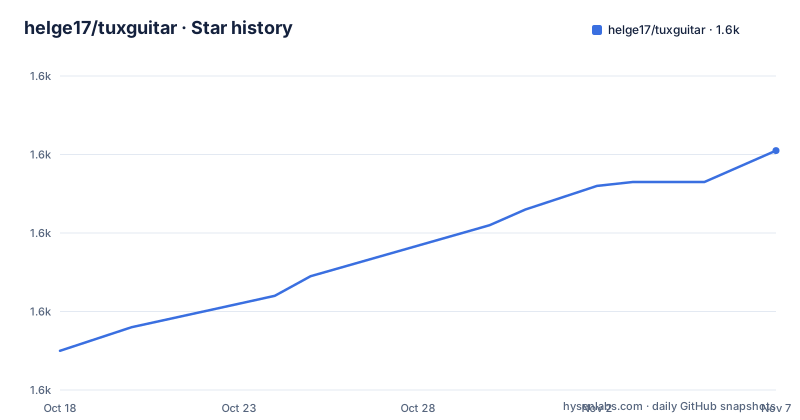
Star history
- helge17/tuxguitar1,621 ★ · +51
| Repository | 2026-10-18 | 2026-11-07 |
|---|---|---|
| helge17/tuxguitar | 1.6k | 1.6k |
51 Stars in the last 20 days, measured from the daily GitHub snapshot. Compare with other projects
Editorial analysis
TuxGuitar's multitrack tablature focus
TuxGuitar addresses the task of writing and playing guitar tablature, with particular emphasis on arranging material across multiple tracks. The README calls it an "open source multitrack tablature editor and player written in Java." That places it between a graphical notation workspace and a playback tool. Users create tab in an editor, while the player provides a way to hear the resulting arrangement.
The likely users are guitarists, teachers, students, and songwriters who need to transcribe or arrange guitar parts. The project may also be relevant to users interested in MIDI because MIDI is one of its repository topics. However, the README does not describe a MIDI import workflow, external MIDI routing, virtual instruments, or recording controls, so those functions cannot be inferred merely from the topic label.
TuxGuitar is not presented as a general-purpose digital audio workstation. Its stated scope is tablature, tracks, editing, and playback. That narrower scope may be preferable when the main task is guitar notation because it does not present the application as an all-purpose recording environment. The repository also has separate top-level directories for Android and desktop code, indicating distinct delivery targets rather than a single undifferentiated desktop project.
The product name TuxGuitar is relevant to these search results because the repository explicitly describes itself as a tablature editor and player. It is not a Linux configuration utility, a penguin-themed game, or an unrelated project sharing the same name. Its identity is defined by Java, tablature, multitrack editing, audio, and MIDI-related repository metadata.
Java architecture and platform-specific modules
TuxGuitar's central technical constraint is Java. The repository is primarily Java-based, and the README identifies Java and JavaFX as components used by the relevant client applications. It also lists SWT, the Standard Widget Toolkit, under third-party products. This points to a desktop architecture built around Java UI technologies, with separate native integrations likely serving different packaged editions.
The repository layout provides further separation. Directories named `android/`, `common/`, and `desktop/` indicate a shared codebase alongside platform-specific modules. The exact boundaries between those modules are not documented in the README, so it would be unsafe to claim which notation models, playback components, or file-format handlers are shared. The layout nevertheless shows that Android and desktop work is not confined to one source directory.
Playback is part of the product definition. The README lists Gervill, a Java software synthesizer, among incorporated third-party products, while the repository topics include both audio and MIDI. This establishes that audio generation and musical input formats are relevant to the project. It does not document sound-bank coverage, instrument quality, latency behavior, or MIDI device compatibility. Those details would need verification in application documentation or the configuration files before selecting TuxGuitar for a hardware-based performance setup.
TuxGuitar appears best suited to users who can tolerate a Java-oriented ecosystem. The README does not specify a minimum Java version, headless mode, or alternative front end. It also does not claim a web interface. Although the repository contains Android code, that does not make TuxGuitar a browser-based editor, and the project description does not support treating Android as merely a viewing client.
Installing TuxGuitar and opening the first score
The documented installation path for ordinary users is the official website or the GitHub releases page. The README does not include package names, shell commands, Java requirements, or configuration snippets, so there are no verified commands to reproduce here. It directs source builders to `INSTALL.md` instead.
Start at the official project site:
https://www.tuxguitar.app/
The README says that the site and its GitHub releases link to ready-to-use packages for Linux, Windows, macOS, FreeBSD, and Android. A new user should choose the package matching the target platform, complete that platform's normal installation process, and launch TuxGuitar. The README does not describe the menus or icons needed to create a score, so a more detailed first-score procedure cannot be verified.
For a source installation, consult `INSTALL.md` before downloading build tools or issuing commands. The README provides no build commands of its own. Engineers planning to compile TuxGuitar therefore need that file for the exact dependencies, build system, and required Java version. Repository contributors are also directed to `docs/CONTRIBUTING.md`, which is the relevant source for contribution setup.
The first useful acceptance check is limited to what the documentation establishes. Confirm that the packaged application starts on the selected platform and presents the multitrack tablature editor described by the README. Instructions for adding tracks, entering notes, configuring playback, or importing existing scores would require application documentation that the README does not provide.
Release history, maintenance, and upgrades
TuxGuitar offers prebuilt packages for five named platforms: Linux, Windows, macOS, FreeBSD, and Android. This is a concrete advantage over a project that exposes source code but offers no consumer package. Users can obtain an application without first compiling the Java source, assuming one of the published packages is appropriate for their system.
The repository is not archived, and its last push was on 2026-10-15. The release list includes `2.1.1beta1` on 2026-10-06 and `2.1.0` on 2026-07-22. These dates show recent project activity. The README does not define a beta support policy. The README does not define a beta support policy.
Upgrade planning is only partly documented. There is no stated rollback procedure, migration policy, compatibility matrix, or long-term-support branch. The official website and GitHub releases are the two documented download sources. Before replacing an installed copy, a user would need to preserve existing work and confirm that the destination version can reopen it. The README does not identify the file formats or promise backward compatibility, so those checks cannot be skipped safely.
The repository contains `CHANGES`, which is the relevant place to inspect release-specific modifications, but its contents are not quoted in the README. As a result, no claim can be made that a particular version changes imports, exports, playback, or platform support. Users should inspect the release entry and `CHANGES` rather than infer migration details from the version number.
LGPL licensing and bundled dependencies
TuxGuitar is released under the GNU Lesser General Public License. Its README attributes copyright to Julián Casadesús for 2005-2022 and to guiv42 and helge17 for 2023-2025. The exact license version is not printed in the README, so a repository license file or distribution package should be checked before relying on a particular version of the license.
The README also identifies third-party products included with the application. They are SWT, JavaFX, Gervill, iText, and Magic Sound Font v2.0. A deployed copy contains more than TuxGuitar's own editor code, which makes dependency review part of any adoption decision. The README does not state the version or license text for each component, so the project's LGPL declaration alone does not establish every applicable distribution condition.
Organizations planning to redistribute a package need to review the exact TuxGuitar license grant, required notices, source obligations that may apply, and the terms of each bundled dependency. This is not legal advice. It identifies the scope of the review without interpreting the license. In particular, the README does not answer whether a modified build can use a different license or whether a particular packaging method satisfies all applicable terms.
The listed components also affect technical review. JavaFX and SWT indicate different desktop UI technologies within the broader distribution, while iText relates to PDF functionality. The README does not document user-configurable linking between those components, so users should not assume that every dependency is optional at runtime. Package-level inspection is necessary before making a compliance claim.
TuxGuitar limitations and realistic alternatives
The clearest limitation is the depth of the public documentation. The README identifies packages and broad capabilities, but it gives no install commands, minimum Java version, supported tablature formats, export choices, undo behavior, plugin interface, or compatibility list. That makes TuxGuitar easy to locate while requiring engineers to inspect `INSTALL.md`, `CHANGES`, and application documentation before claiming a reproducible workflow.
A plain text editor is a practical alternative for users whose songs are stored as plain ASCII tablature and who need only small edits. Its approach is direct text manipulation: the user changes source lines without a graphical multitrack workspace or integrated player. TuxGuitar is the more relevant choice when arranging across tracks and hearing playback in one application matter. The text approach can remain simpler when the task is a one-line correction and no visual score or playback is required.
A browser-based tablature service represents another delivery model, although the README does not document interoperability with one. The meaningful distinction is local packaged software versus a web service. TuxGuitar has documented packages for local platforms and source directories organized around Java, Android, and desktop development. The README does not establish that its files can be exchanged with any hosted service, so compatibility must be checked rather than assumed.
TuxGuitar is the wrong choice when the primary requirement is a documented source build with copyable commands, a stated support commitment, or a verified exchange workflow with a proprietary notation catalog. It is also a weak fit for teams that will not inspect Java dependencies, bundled licenses, and file compatibility before deployment.
Choosing TuxGuitar for a local music workflow
TuxGuitar has a defined purpose: it combines multitrack guitar tablature editing and playback in an open source Java application. It is aimed at people who need a local music-writing tool, and the repository provides separate Android and desktop areas alongside common code. Ready-made packages for Linux, Windows, macOS, FreeBSD, and Android make the application more accessible than a source-only Java project.
The adoption decision still requires specific verification. Musicians should inspect `INSTALL.md`, select the current package for their operating system, and check how files already in their music library are handled. Developers and distributors should verify the exact GNU Lesser General Public License version and the terms associated with SWT, JavaFX, Gervill, iText, and Magic Sound Font v2.0. TuxGuitar is a credible fit when local tablature editing and integrated playback are the priority; its documented boundary is that the README does not provide enough build, compatibility, or migration detail to guarantee those workflows.
Editorial conclusion
TuxGuitar fits musicians who want an open source, multitrack tablature editor with ready-made packages for Linux, Windows, macOS, FreeBSD, or Android. It is a poorer fit for users who need a documented source-build procedure or confirmed compatibility with an existing music library. Before adopting it, inspect `INSTALL.md`, verify how existing tablature files are handled, and review the GNU Lesser General Public License plus bundled dependency terms against the intended distribution model.
Frequently asked questions
Which operating systems does TuxGuitar support?
The README lists ready-to-use installation packages for Linux, Windows, macOS, FreeBSD, and Android. Packages are available through the official website and the GitHub releases page.
Can TuxGuitar edit multiple tracks and play tablature?
Yes. The README describes TuxGuitar as a multitrack tablature editor and player. It does not document the exact playback controls or supported output devices.
How do I build TuxGuitar from source?
The README directs developers to `INSTALL.md` for source-build instructions. The README itself does not list build commands or Java requirements, so those details must be checked in that file.
What license does TuxGuitar use?
The README states that TuxGuitar is released under the GNU Lesser General Public License. It does not specify the exact license version in that description.
Which third-party components are included with TuxGuitar?
The README lists SWT, JavaFX, Gervill, iText, and Magic Sound Font v2.0 among its third-party products. Their individual versions are not stated in the README.
Official sources
Add this badge to your README
If you maintain this project, the badge below links readers to this analysis and shows its maintenance status from the daily GitHub snapshot. Paste the markdown into your README; add ?metric=license or ?metric=stars to the image URL for a different field.

[](https://hysenlabs.com/projects/helge17-tuxguitar)Star history chart for your README
[](https://hysenlabs.com/projects/helge17-tuxguitar)Was this useful?