Helm v4: What the Kubernetes Package Manager Changed and What It Still Cannot Do
The Kubernetes Package Manager
At a glance
- What is it?
- Helm is the standard way to package and deploy Kubernetes applications. The v4 release line is now stable, while v3 got bug fixes until July 8, 2026 and gets security fixes until November 11, 2026.
- Who is it for?
- Adopt Helm if you manage multiple Kubernetes workloads and need a repeatable way to install, upgrade, and roll back applications. Avoid it if your manifests are tiny, static, or already handled by Kustomize or a GitOps tool like Argo CD.
- Can I use it commercially?
- Yes. Apache-2.0 is a permissive licence: you can use, modify and sell software built on it, as long as you keep its copyright and licence notices.
- Is it still maintained?
- Yes. The repository received new commits within the last day.
- What is it written in?
- Mainly Go, according to GitHub's language statistics.
Answers come from the project's GitHub data, last synced on November 23, 2026, and from our analysis. They are not legal advice.
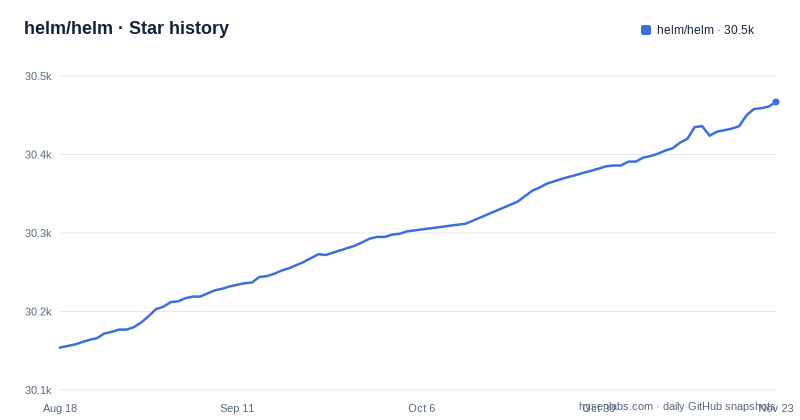
Star history
- helm/helm30,467 ★ · +313
| Repository | 2026-08-18 | 2026-11-23 |
|---|---|---|
| helm/helm | 30.2k | 30.5k |
313 Stars in the last 97 days, measured from the daily GitHub snapshot. Compare with other projects
Editorial analysis
What Helm Actually Solves
Helm solves the problem of managing Kubernetes manifest files by hand. If you have ever tried to update a deployment across ten environments by editing YAML files, you know the pain. Helm packages those manifests into charts, each with a Chart.yaml description and one or more templates. It renders the templates and talks to the Kubernetes API, so you do not have to. The target user is anyone running Kubernetes on a laptop, in CI/CD, or in a cluster, who wants reproducible installs. The README compares it to apt, yum, or Homebrew for Kubernetes. That comparison is fair for the install and upgrade workflow, but it breaks down when you look at dependency management, which is more complex than a package manager for a single OS.
How a Chart Becomes a Release
The core mechanism is template rendering plus API communication. A chart contains at least two things: a Chart.yaml file that describes the package, and one or more templates that hold Kubernetes manifest files. When you run helm install, Helm reads the chart, renders the templates with values you provide, and sends the resulting manifests to the Kubernetes API. It records what it installed as a release. That release record is what allows helm upgrade and helm rollback to work. The README does not go into the storage backend or the three-way strategic merge patch, but the pattern is clear: Helm is not just a file copier. It tracks state. This is the difference between Helm and a simple kubectl apply -f directory. The latter has no memory of what you applied last week.
Installation: More Options Than You Need
You can get the helm binary from the Releases page, unpack it, and add it to your PATH. That is the quickest path. The README also lists package manager installs: brew install helm on macOS, choco install kubernetes-helm on Windows, winget install Helm.Helm, scoop install helm, snap install helm --classic, and for newer tools, flox install kubernetes-helm and mise use -g helm@latest. The binary approach works everywhere, but you have to manage updates yourself. The package managers handle that for you. The README points to a Quick Start Guide and an installation guide for pre-releases, but it does not explain what a pre-release is or when you would want one. For most users, the stable binary is enough.
The v3 to v4 Transition Has a Hard Deadline
The README states that Helm v4 is the current stable release, developed on the main branch. Helm v3 is in support mode on the dev-v3 branch. Bug fixes for v3 run until July 8, 2026, and security fixes until November 11, 2026. That is a concrete timeline. If you are still on v3, you have until late 2026 to move. The release list shows v4.3.1 and v3.22.1 both published on October 15, 2026, which suggests the project is actively maintaining both lines. But the v3 branch is not getting features. Any chart that relies on v3-only behavior will eventually be stuck. The README does not list breaking changes between v3 and v4, so you cannot plan a migration from this document alone. You would need to consult the release notes for v4.0.0.
Where Helm Is the Wrong Tool
Helm is overkill if your Kubernetes setup is a handful of static manifests that change rarely. The template layer adds indirection, and the release tracking adds a hidden state that can confuse operators. If you need to debug a single deployment, a plain kubectl apply is simpler. Helm also assumes you want to manage releases through its own lifecycle. If you use a GitOps workflow where the cluster state is pulled from a Git repository, Helm's push model can conflict. The README does not mention GitOps at all, which is telling. There is no support for drift detection or continuous reconciliation. Helm installs once and then sits. If someone edits a resource outside Helm, Helm will not notice until the next upgrade, and then it may overwrite or fail depending on the resource type. That is a real failure mode for teams that mix manual kubectl edits with Helm.
Alternatives: Kustomize and GitOps Tools
The most direct alternative is Kustomize, which is built into kubectl. Kustomize does not use templates. It overlays patches on top of base YAML files. You write plain manifests and then apply transformations. That approach is easier to read and debug, but it has no release concept. There is no rollback, no upgrade history, and no chart repository. For GitOps, tools like Argo CD or Flux take a different approach. They watch a Git repository and sync the cluster to match. They can use Helm as a backend for rendering charts, but they do not need it. The difference is in the model: Helm is imperative, you run a command and it acts. GitOps is declarative, the tool continuously reconciles. If you want your cluster to self-heal when someone deletes a resource, GitOps wins. If you want a simple install command, Helm wins.
Maintenance, License, and Upgrade Cost
Helm is licensed under Apache-2.0, which is permissive and does not impose copyleft obligations on your charts. The project is a CNCF project, as shown by the Linux Foundation insights link in the README. Maintenance is active: the last push was November 1, 2026, and releases are frequent. The upgrade cost is moderate. The README does not say whether existing releases carry over unchanged from v3 to v4. The support timeline for v3 is the main cost driver. If you stay on v3 past November 2026, you will have no security fixes. The project provides no migration tool in the README, so you must test your charts manually. This is not a zero-effort upgrade.
Editorial conclusion
Adopt Helm if you manage multiple Kubernetes workloads and need a repeatable way to install, upgrade, and roll back applications. Avoid it if your manifests are tiny, static, or already handled by Kustomize or a GitOps tool like Argo CD. Before adopting, verify that your existing charts and custom templates are compatible with v4, since v3 only gets security fixes until November 11, 2026. Also confirm that your CI/CD environment can fetch the helm binary from the Releases page or install it through a package manager.
Frequently asked questions
What is Helm used for?
Helm manages Charts, which the README defines as packages of pre-configured Kubernetes resources. It is used to find and run shared software packaged as charts, to publish your own applications as charts, to create reproducible builds of Kubernetes applications, to manage manifest files, and to manage releases of Helm packages.
What are Helm and Helm charts?
Helm is the tool and a chart is the package. A chart contains at least two things: a description of the package in Chart.yaml, and one or more templates containing Kubernetes manifest files. Helm renders those templates and communicates with the Kubernetes API, and charts can live on disk or be fetched from remote chart repositories.
Is Helm free to use?
Helm is published under the Apache-2.0 license, with the LICENSE file at the repository root, and the README describes no paid tier or subscription. Installing the client costs nothing, since it is available as a binary from the releases page and through seven package managers.
Is a Helm chart the same thing as Helm?
No. Helm is the client that renders templates and talks to the Kubernetes API. The chart is the package it renders, made of a Chart.yaml description plus one or more template files containing manifest files, stored on disk or fetched from a remote chart repository.
What are the differences between Helm 2 and Helm 3?
The README does not discuss Helm 2. It states that Helm v4 is the current stable release developed on the main branch, and that Helm v3 is in support mode on the dev-v3 branch with bug fixes until 2026-07-08 and security fixes until 2026-11-11.
Official sources
Add this badge to your README
If you maintain this project, the badge below links readers to this analysis and shows its maintenance status from the daily GitHub snapshot. Paste the markdown into your README; add ?metric=license or ?metric=stars to the image URL for a different field.

[](https://hysenlabs.com/projects/helm-helm)Star history chart for your README
[](https://hysenlabs.com/projects/helm-helm)Was this useful?