hlissner/dotfiles: A Personal NixOS Configuration and CLI
And I say hey, what's going on?
At a glance
- What is it?
- hlissner/dotfiles is an experimental NixOS configuration built around the `hey` command dispatcher, with personal workstation settings rather than a general-purpose distribution. It suits experienced NixOS users who can audit and adapt the configuration, not newcomers seeking supported defaults.
- Who is it for?
- Adopt this repository only if you already understand NixOS and want to inspect, modify, and own a personal declarative configuration. Do not treat it as a general NixOS distribution, support channel, or ready-made desktop setup.
- Can I use it commercially?
- Yes. MIT is a permissive licence: you can use, modify and sell software built on it, as long as you keep its copyright and licence notices.
- Is it still maintained?
- Yes. The repository last received commits 1 day ago.
- What is it written in?
- Mainly Nix, according to GitHub's language statistics.
Answers come from the project's GitHub data, last synced on October 23, 2026, and from our analysis. They are not legal advice.
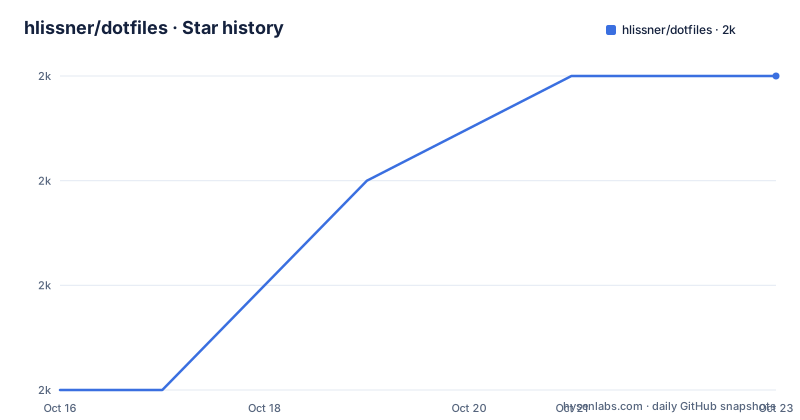
Star history
- hlissner/dotfiles1,956 ★ · +3
| Repository | 2026-10-16 | 2026-10-23 |
|---|---|---|
| hlissner/dotfiles | 2k | 2k |
3 Stars in the last 7 days, measured from the daily GitHub snapshot. Compare with other projects
Editorial analysis
What hlissner/dotfiles Actually Solves
hlissner/dotfiles solves the problem of maintaining one personal NixOS configuration across installation, host setup, rebuilding, package access, and operational commands. The repository combines a Nix flake, host definitions, modules, overlays, packages, user configuration, scripts, and tests. Its stated shell, compositor, editor, terminal, launcher, and browser choices include zsh with zpm, Hyprland with Noctalia, Doom Emacs and Neovim, foot, rofi, and LibreWolf.
The intended reader is not someone looking for a conventional Linux distribution with a small installer and familiar defaults. The README explicitly says this is not a community framework or NixOS distribution. It describes the project as an ongoing, haphazard experiment used to explore NixOS and the Nix language for its author's own purposes. That disclaimer is the central adoption criterion. The repository can serve as an example or starting point for an experienced user, but the owner does not position it as a supported base for unrelated systems.
Its management problem is more specific than dotfile customization. The author wants one declarative source of truth for a machine fleet, while avoiding what the README describes as brittle deployment scripts and scattered Nix commands. The `bin/hey` interface puts rebuilds, garbage collection, profile operations, service reloads, host dispatch, remote operations, and information reporting behind one command. This is useful only for users who accept that another local abstraction now sits between them and the underlying NixOS tools.
The Nix Flake, Host Layout, and Installer Flow
The repository layout shows a flake-based configuration rather than a single shell script. `flake.nix` and `flake.lock` define the Nix entry point and its locked inputs, while `hosts/` holds machine-specific configurations. Other directories separate reusable areas such as `modules/`, `overlays/`, `packages/`, `config/`, `lib/`, `bin/`, and `test/`. `install.zsh` performs the initial installation after a host configuration has been placed in `/mnt/etc/dotfiles/hosts/`.
The quick start begins by downloading the current `nixos-unstable` minimal ISO for `x86_64-linux`. After booting that image, the user partitions the target system and mounts its root filesystem at `/mnt`. The dotfiles repository can then be fetched directly or cloned recursively. A host configuration is required when the installer is run locally. The repository includes examples under `hosts/`, but the README does not explain how to derive one safely for arbitrary hardware.
This architecture makes machine identity explicit. It also means installation is not just copying dotfiles into an existing home directory. The repository's files under `/mnt/etc/nix` and related system paths, as described by the required clone location and installation procedure, are part of a broader system configuration. The repository does not provide a release artifact, migration service, or compatibility matrix for different machines. The source configuration is the deliverable.
Installing NixOS 26.11 and Running install.zsh
The documented installation path requires care because it writes an installation image to a physical device and initializes a mounted root filesystem. First, download the image named by the README:
$ wget -O nixos.iso https://channels.nixos.org/nixos-unstable/latest-nixos-minimal-x86_64-linux.isoThis saves the `nixos-unstable` minimal image as `nixos.iso` in the current directory. The README labels the image NixOS 26.11+, although the download URL points to the moving `nixos-unstable` channel. That distinction matters: the badge and instructions describe a version floor, while the URL itself is not a pinned release URL.
Next, copy the image to the intended USB partition. Replace `/dev/sdX` with the correct device before executing the command.
$ cp nixos.iso /dev/sdXThe expected result is a bootable installation medium containing the downloaded image. Selecting the wrong block device would overwrite a different drive, so the README's partition warning should be treated as an operational boundary, not routine syntax.
Boot the installer, partition the disk, and mount the root filesystem at `/mnt`. For a new host configuration, clone the repository to the required location:
$ git clone --recursive https://github.com/hlissner/dotfiles /mnt/etc/dotfilesThe recursive clone matters because the repository may contain submodule content. After creating a host configuration under `/mnt/etc/dotfiles/hosts/`, run the installer as root:
$ sudo /mnt/etc/dotfiles/install.zshThe README states that the installer's `nixos` user has passwordless sudo. After the script completes, reboot into the installed system. The documented default `root` and `$USER` passwords are both `nixos`, so passwords must be changed immediately after installation.
How the hey Command Dispatches System Work
`hey` is the repository's management entry point. According to its embedded usage text, it accepts commands and dispatches work to scripts or established NixOS interfaces. The command syntax is `hey [-?|-??|-???|-!] [-h|--help] COMMAND [ARGS...]`. Increasing question-mark counts enable increasingly verbose debug modes, while `-!` requests a dry run. The dry-run warning is important because the README says compliance depends on the called scripts honoring that option.
The command surface covers several distinct operations. `build` or `b` builds Nix images and can recompile `bin/hey`. `sync` or `s` rebuilds the flake with `nixos-rebuild`, while `profile` and `pr` operate on the NixOS profile. `gc` garbage-collects and optimizes the Nix store. `reload` reloads running services. `host` dispatches to `hosts/$HOST/bin`, and `wm` dispatches to `config/$WM/bin`, making host and window-manager behavior available through consistent entry points.
Other commands expose specialized interfaces. `ops` operates on remote HeyOS-powered hosts, `vars` manages userspace session or persistent state, and `pull` updates one or all inputs. `info` prints current-system information as JSON. `which` resolves a command without running it, `exec` executes a program found on `$PATH`, and `repl` opens a Nix or Janet REPL with the flake preloaded. Dot-prefixed, path-prefixed, and `@` dispatch forms search host, window-manager, general, or named configuration directories.
This does not replace NixOS tools so much as centralize entry points. The README motivates `hey` as a response to NixOS commands being spread across `nix`, `nix-collect-garbage`, `nixos-rebuild`, `nix-env`, and `nix-shell`. Contributors therefore need to inspect the relevant script headers and implementations before assuming that a familiar `hey` subcommand has standard NixOS semantics.
Where the Personal Configuration Creates Friction
The strongest limitation is stated by the project itself: this is a personal experiment with over-engineered modifications. The visual stack is specific to the author's preferences, so adopting it unchanged does not produce a neutral, broadly compatible desktop. The configuration also assumes an x86_64 Linux installation path for the documented quick start. The README does not document ARM installation, graphical installation, or a rollback procedure for a failed install.
NixOS itself introduces a substantial learning cost according to the README. The author says the Nix language is obtuse, the toolchain is not intuitive, and users need enough Linux and service knowledge to distinguish NixOS issues from Linux or upstream issues. The same FAQ argues that the configuration overhead rarely pays for itself on three systems or fewer, suggesting another distribution with Nix on top may fit those users better. That is a direct warning against installing this repository merely to try an unfamiliar compositor or editor.
The host configuration step is another unresolved boundary for a new user. Existing examples are available, but the README does not document a host-detection command, hardware inventory, generated partition layout, or a supported process for adapting an example to a new machine. It also says screenshots are coming soon and directs NixOS questions to the NixOS discourse rather than the issue tracker. There are no GitHub releases, so users should inspect the current `master` branch and `flake.lock` directly.
Alternatives to the Full HeyOS Installation
The most direct alternative is an official NixOS installation using the standard tooling rather than cloning this repository. That approach avoids the author's host conventions, `hey` abstraction, preferred application set, and personal scripts. It also avoids inheriting configuration decisions whose ownership and compatibility are tied to one workstation.
For a user interested in Nix but not yet committed to NixOS, the README itself suggests another distribution with Nix layered on top. That approach can provide access to the Nix language without adopting NixOS as the entire operating system. It does not reproduce this repository's declarative system model, though, and the README does not claim that the dotfiles can be transferred unchanged to such a setup.
A third choice is to treat the repository as reference material and extract selected patterns, such as a flake entry point, a module, or the shape of `bin/hey`. That is different from running `install.zsh`: the adopter avoids inheriting the complete environment while still learning how the project organizes configuration. The trade-off is losing the integrated workstation that makes the repository coherent. The project is under the MIT license, so its source can be inspected and adapted under that license, subject to preserving the license notice and other applicable license terms.
Editorial conclusion
Adopt this repository only if you already understand NixOS and want to inspect, modify, and own a personal declarative configuration. Do not treat it as a general NixOS distribution, support channel, or ready-made desktop setup. Verify the installer against your partitions, replace the documented default passwords, and confirm that its host configuration matches your hardware and services before booting the installed system.
Frequently asked questions
Is hlissner/dotfiles a NixOS distribution?
No. The README explicitly says it is not a community framework or NixOS distribution, but an ongoing personal experiment involving NixOS and the Nix language.
How do I install hlissner/dotfiles?
The documented process downloads `nixos-unstable`, writes its ISO to a USB device, mounts the target root at `/mnt`, clones the repository recursively to `/mnt/etc/dotfiles`, creates a host configuration under `hosts/`, and runs `install.zsh` as root.
What does the `hey` command do in hlissner/dotfiles?
It provides one interface for operations such as building Nix images, rebuilding the flake, garbage collection, profile changes, service reloads, host dispatch, remote operations, state inspection, and input updates.
Does hlissner/dotfiles use agenix for secrets?
Yes. The README's FAQ names agenix as the method used to manage secrets.
Official sources
Add this badge to your README
If you maintain this project, the badge below links readers to this analysis and shows its maintenance status from the daily GitHub snapshot. Paste the markdown into your README; add ?metric=license or ?metric=stars to the image URL for a different field.

[](https://hysenlabs.com/projects/hlissner-dotfiles)Star history chart for your README
[](https://hysenlabs.com/projects/hlissner-dotfiles)Was this useful?