Home Assistant Supervised Installer for Debian
Installer for a generic Linux system
At a glance
- What is it?
- Home Assistant Supervised is an advanced installation method for putting the Home Assistant Supervisor on a regular Linux system instead of Home Assistant OS. It offers appliance-style management, but the README places responsibility for operating-system, Docker, networking, and dependency maintenance on the administrator.
- Who is it for?
- Home Assistant Supervised is appropriate for an administrator who can maintain Debian, Docker, DNS, networking, and system services, and who accepts that the Supervisor may reset configuration. It is not appropriate for someone who wants the supported Home Assistant OS experience or cannot investigate Docker and systemd failures.
- Can I use it commercially?
- Yes. Apache-2.0 is a permissive licence: you can use, modify and sell software built on it, as long as you keep its copyright and licence notices.
- Is it still maintained?
- Yes. The repository last received commits 81 days ago.
- What is it written in?
- Mainly Shell, according to GitHub's language statistics.
Answers come from the project's GitHub data, last synced on October 23, 2026, and from our analysis. They are not legal advice.
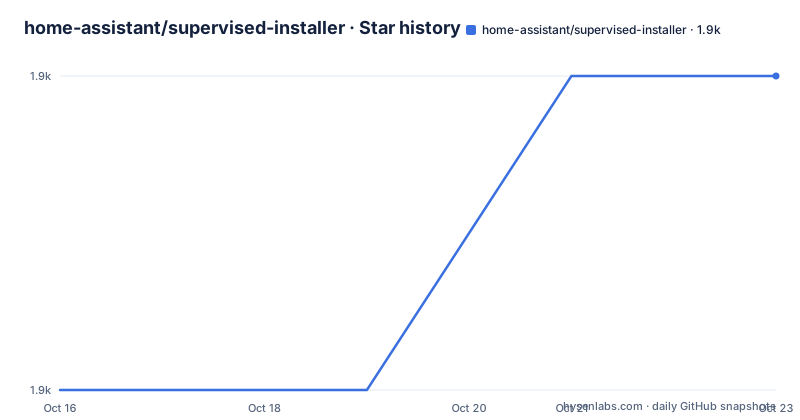
Star history
- home-assistant/supervised-installer1,936 ★ · +1
| Repository | 2026-10-16 | 2026-10-23 |
|---|---|---|
| home-assistant/supervised-installer | 1.9k | 1.9k |
1 Stars in the last 7 days, measured from the daily GitHub snapshot. Compare with other projects
Editorial analysis
Supervised Installer's appliance model
The home-assistant/supervised-installer repository provides an advanced way to run the Home Assistant Supervisor on a regular operating system rather than Home Assistant Operating System. The README says this method uses all components from the Home Assistant method except Home Assistant OS. In practical terms, the package adds the Supervisor layer to a Debian installation, while the administrator remains responsible for the Linux system underneath it.
The Supervisor is described as a full appliance that manages the whole system. It can clean up, repair, or reset settings when they no longer match expected values. That behavior is the main engineering trade-off. It gives Home Assistant a managed appliance model on a general-purpose host, but it also means that the installer is not an isolated application deployment. Host configuration, service managers, networking, storage, Docker, and upgrades all form part of the operating boundary.
This repository is not positioned as a lightweight Home Assistant package or a conventional application installer. Its own warning calls the method suitable for advanced users and says that the supervised Debian installation is opinionated. It bundles default configuration files for system services and has many dependencies. The README also limits accepted bug reports to issues reproduced on a freshly installed, fully updated Debian without additional packages. That is a narrower support boundary than the name `supervised-installer` might suggest.
Network transition before package installation
The documented installation begins by changing Debian networking rather than immediately downloading the Home Assistant package. The first command installs `network-manager` and `systemd-resolved`. The README warns that Internet access is lost at this point because `systemd-resolved` does not yet know the machine's DNS setup.
The next step removes the old `ifupdown` path from active use. It restarts `systemd-resolved`, disables `networking.service`, renames `/etc/network/interfaces` to `/etc/network/interfaces.disabled`, and restarts `NetworkManager`. This sequence is presented for a default Debian setup using DHCP. The actual interface name can differ, which is why the installation output refers to an interface such as `enp1s0` rather than treating every host as identical.
A real consequence is that the host may receive a different IP address after `NetworkManager` starts, because its DHCP server identification can differ from the previous service. The administrator should therefore keep local or out-of-band access available while changing networking. The README does not document a rollback procedure for this transition, so a host with customized interfaces, static addressing, or non-Debian network management should not copy the default commands without understanding its current configuration.
Installing Supervised Debian package
After networking has been moved, the README installs `curl` and `udisks2`, then installs Docker-CE through Docker's convenience script. The OS Agent is a separate step, with its instructions linked from the `home-assistant/os-agent` repository. The final package installation downloads the latest `homeassistant-supervised.deb` from the supervised-installer releases and passes it to `apt`.
The package is configured for `$DATA_SHARE`, which defaults to `/var/lib/homeassistant` and was previously `/usr/share/hassio`. The README shows how to select another path while installing:
DATA_SHARE=/my/own/homeassistant dpkg --force-confdef --force-confold -i homeassistant-supervised.debThis changes the storage location passed to `dpkg`, but the README does not describe a migration procedure for an existing `/var/lib/homeassistant` directory. It also does not specify permissions, backup steps, or a rollback command for a failed installation. Those details must be checked in the linked requirements and OS Agent instructions before changing the default path.
The supported machine list is limited to specific identifiers: `generic-x86-64`, `odroid-c2`, `odroid-c4`, `odroid-n2`, `qemuarm-64`, `qemux86-64`, `raspberrypi3-64`, `raspberrypi4-64`, `raspberrypi5-64`, and `khadas-vim3`. A machine architecture alone does not establish support. The selected identifier must correspond to the actual platform.
First Debian installation walkthrough
The installation instructions are explicitly root commands. The README says to use `su -`, or `sudo su -` when `sudo` is installed. The documented sequence is shown below without adding parameters or commands that are not in the repository.
Install the networking packages:
apt install \
network-manager \
systemd-resolved
For the README's default DHCP arrangement, transition the host to `NetworkManager`:
systemctl restart systemd-resolved.service && \
systemctl disable --now networking.service && \
mv /etc/network/interfaces /etc/network/interfaces.disabled && \
systemctl restart NetworkManager
Install the dependencies listed for Docker-CE, OS Agent, and Supervised:
apt install \
curl \
udisks2
Install Docker-CE:
curl -fsSL get.docker.com | shInstall the OS Agent using the instructions linked by the README, then install Supervised:
curl -L -o homeassistant-supervised.deb https://github.com/home-assistant/supervised-installer/releases/latest/download/homeassistant-supervised.deb
apt install ./homeassistant-supervised.deb
The README does not document a Home Assistant UI initialization step, account creation flow, or a command that performs the first configuration. Its first operational check is log inspection with `journalctl -f`. The expected result is service and Supervisor messages in the system log. The README warns that Home Assistant OS 2025.12.0 does not support this installation method, so that warning takes precedence over the package download step.
Scope, failure modes, and support boundaries
The strongest constraint is the division of responsibility. Home Assistant does not install or maintain every required component for the host operating system. Required components and versions can change over time, and the administrator must keep the system dependencies aligned. The README also warns that the Supervisor may reset configuration that differs from its expected state. This is particularly relevant on a host where administrators customize service files or networking manually.
The project is explicitly not a good fit for a Linux beginner. The README says that users should understand requirements and that the method is for experts managing Linux, Docker, and networking. The troubleshooting section points to `journalctl -f`, but it does not explain how to diagnose Docker daemon failures, DNS failures, storage problems, or conflicts introduced by existing packages. It sends users who are not familiar with Linux logs to Home Assistant OS instead.
The package installation also assumes a Debian-oriented host. Although the repository description says generic Linux, the documented commands use `apt`, Debian service names, `/etc/network/interfaces`, and Debian package installation. The README calls the installation method Supervised Debian, so a reader should not treat the supported machine list as evidence that arbitrary Linux distributions have identical support.
Home Assistant OS versus Supervised
The README explicitly recommends Home Assistant OS to people who are not familiar with Linux or who cannot manage issues found in system logs. That alternative avoids exposing the administrator to the documented networking transition, Docker installation, host dependency maintenance, and the possibility of Supervisor repairs or resets.
Supervised takes a different approach. It keeps the user on a regular operating system and places the Home Assistant Supervisor over it. The user gains control over the Linux environment and can use the supported machine types, but also accepts responsibility for host configuration and maintenance. The choice is therefore between an appliance managed as a dedicated system and a managed Home Assistant layer running on an operating system the administrator understands and maintains.
The project is licensed under `Apache-2.0`. That license identifies the repository's licensing basis, but the README does not describe licensing for Home Assistant OS, OS Agent, Docker, or the Home Assistant components installed through the package. Reviewing the terms of each separately deployed component remains necessary when building a deployment plan. The last repository push was on 2026-08-03, and the listed releases include 4.0.1 on 2025-12-29, 4.0.0 on 2025-11-22, and 3.1.0 on 2025-05-24.
Editorial conclusion
Home Assistant Supervised is appropriate for an administrator who can maintain Debian, Docker, DNS, networking, and system services, and who accepts that the Supervisor may reset configuration. It is not appropriate for someone who wants the supported Home Assistant OS experience or cannot investigate Docker and systemd failures. Verify the current Home Assistant support warning, the machine type in the supported list, and whether the chosen Debian network configuration can move from `ifupdown` to `NetworkManager` before installing it. For this project, the first installation check is whether `systemctl` and `journalctl` behave correctly after the documented package installation.
Frequently asked questions
What is the home-assistant/supervised-installer project used for?
It installs the Home Assistant Supervisor on a regular operating system instead of Home Assistant OS. The README describes this as an advanced, opinionated appliance with host and dependency maintenance left to the administrator.
Does home-assistant/supervised-installer support Home Assistant OS 2025.12.0?
No. The README contains an explicit warning that this installation method is unsupported with Home Assistant OS 2025.12.0. It links to Home Assistant's post about deprecating Core and Supervised installation methods and 32-bit systems.
What should I check before installing home-assistant/supervised-installer?
Confirm that the machine type appears in the documented supported list, that the host is a Debian installation suitable for the documented `apt` commands, and that its networking can transition from `ifupdown` to `NetworkManager`. The README also requires expertise with Linux, Docker, and networking.
Official sources
Add this badge to your README
If you maintain this project, the badge below links readers to this analysis and shows its maintenance status from the daily GitHub snapshot. Paste the markdown into your README; add ?metric=license or ?metric=stars to the image URL for a different field.

[](https://hysenlabs.com/projects/home-assistant-supervised-installer)Star history chart for your README
[](https://hysenlabs.com/projects/home-assistant-supervised-installer)Was this useful?