LoopX: A State Kernel for Long-Running Agent Loops
GitHub describes it as Lightweight loop engineering state kernel for long-running AI agent teams. Agent-loop agnostic across Codex, Claude Code, and other coding agents, with durable goals, quota-aware auto-wake, executable todos, evidence logs, and verifiable handoffs.. The repository metadata lists Python as its primary language. The metadata lists the MIT license. This article stays within the project description and details documented in the GitHub repository README.
At a glance
- What is it?
- LoopX is a Python-based, provider-neutral control plane that keeps goals, todos, evidence, and quotas durable across agent harnesses like Codex and Claude Code. It is not an agent framework; it is the state layer that governs long-horizon work.
- Who is it for?
- Adopt LoopX if you run multi-day engineering, research, or monitoring loops that must survive restarts and handoffs across different agent harnesses, and if you want the human to keep final authority over dangerous actions. Do not adopt it if you need an autonomous production controller or if you expect it to replace your agent runtime.
- Can I use it commercially?
- Yes. Apache-2.0 is a permissive licence: you can use, modify and sell software built on it, as long as you keep its copyright and licence notices.
- Is it still maintained?
- Yes. The repository last received commits 19 days ago.
- What is it written in?
- Mainly Python, according to GitHub's language statistics.
Answers come from the project's GitHub data, last synced on October 4, 2026, and from our analysis. They are not legal advice.
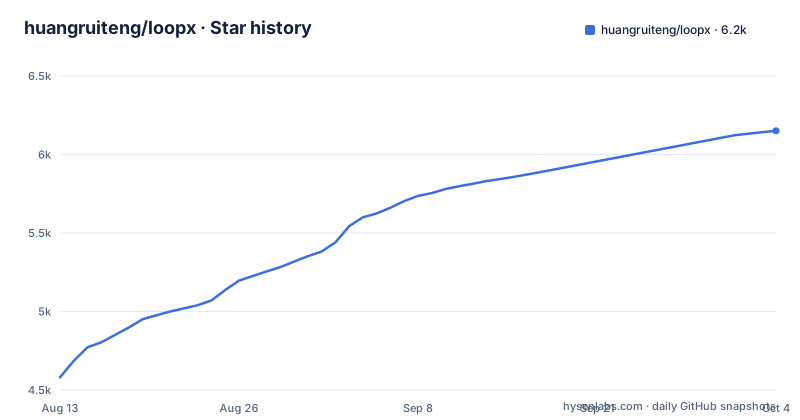
Star history
- huangruiteng/loopx6,151 ★ · +1,570
| Repository | 2026-08-13 | 2026-10-04 |
|---|---|---|
| huangruiteng/loopx | 4.6k | 6.2k |
1,570 Stars in the last 52 days, measured from the daily GitHub snapshot. Compare with other projects
Editorial analysis
What LoopX Solves
Long-running agent work fails when a single session ends. Objectives change, evidence goes stale, and a scheduler can keep spending tokens after no useful transition remains. LoopX addresses this by keeping the durable control state in one compact layer, separate from the agent runtime. It is built for engineering, research, benchmark, and experiment objectives that span days, as well as recurring heartbeat or monitor work. The intended user is a team or individual running peer-agent teams where ownership, leases, and handoff matter, and where progress must remain legible to a non-engineering operator. The README is explicit that LoopX is not an autonomous production controller. Dangerous permissions, publishing, production writes, and final ownership stay with the human.
The Mechanism: State, Not Orchestration
LoopX does not execute agent turns. Instead, it governs the state that lets loops continue across runs. The data flow is visible in the README's diagram: an objective, issue, or project feeds into LoopX state, which holds objectives, gates, todos, scope, evidence, and quota. If human judgment is needed, the system asks a concrete question and waits. If a safe fallback exists, it runs one bounded agent slice. The agent runtime, whether Codex, Claude Code, Cursor, or a shell agent, executes one turn. After that, evidence and a handoff are written, and the quota decides the next tick. The README offers a mental model: an agent-native Kanban for long-running work. Cards carry identity, authority, evidence, and continuation. Moves are validated operators such as claim, gate, monitor, and writeback. The board is a projection; LoopX state remains the source of truth. Registered agents are peers, and no durable leader identity is required.
Getting It Running
The primary entry point is the dashboard. The README gives the command `loopx dashboard` as the supported browser/PWA launch path. For a native window, there is an experimental source-built Tauri shell that reuses the same loopback status and Chat services. The commands are `cd apps/desktop/loopx-control-plane`, `npm install`, and `npm run dev`. Both entry points share the same loopback services and can be started in either order. `loopx dashboard` reuses an already-running LoopX Chat service instead of starting a second one. The README points to a getting-started guide at `docs/guides/getting-started.md` and a personal workspace user guide at `docs/guides/personal-workspace-user-guide.md`. There is also a five-minute tour at `docs/guides/personal-workspace-trial-guide.md`. The installation details beyond the dashboard command are not in the README excerpt, so you will need to consult the docs for exact setup steps.
Quota-Aware Auto-Wake and Evidence Logs
Two features stand out in the README: quota-aware auto-wake and evidence logs. The quota decides when the next tick happens, which is a concrete mechanism to prevent runaway spending. The README warns that a scheduler can keep spending after no useful transition remains, and LoopX addresses this by making quota part of the state. Evidence logs are written after each bounded turn, and they persist across sessions. The public OpenViking contribution sequence and the Auto ML showcase each span 200+ hours of elapsed loop lifetime, though the README is careful to say this is wall-clock project time, not continuous model execution. This is a useful distinction: the state persists, but the model is not running the whole time. The evidence logs also support verifiable handoffs, which is critical when multiple agents or a human operator need to review what happened.
Limitations and Wrong-Tool Cases
LoopX is not an autonomous production controller. If your goal is to let an agent autonomously publish, write to production, or take dangerous actions, this is the wrong tool. The README states that final ownership stays with the human. Another limitation is that the dashboard is the primary path, and the native desktop shell is experimental. The README notes that closing the window stops only the service processes that the shell started, but the durability of the state depends on the LoopX services remaining intact. The README also implies that chat memory and a timer are not enough to govern long-running work, which is the core problem LoopX solves, but it also means you must adopt its state model. If you prefer a simpler approach, you might be fine with a plain task tracker and manual handoffs. The documentation mentions a public-private boundary in `docs/public-private-boundary.md`, which suggests that some state may be sensitive, and you need to understand that boundary before using it for private data.
Alternatives and the Difference in Approach
The most direct alternative is not another agent framework but a combination of a task tracker and a scheduler. Tools like GitHub Issues with a cron-based CI job can track todos and run periodic tasks, but they lack the semantic state that LoopX provides. The difference is that LoopX treats the loop as a first-class entity with gates, evidence, and quota, whereas a traditional tracker only stores text. Another alternative is to use the agent harness's built-in memory, such as Claude Code's conversation memory, but the README argues that chat memory is not enough because it does not survive restarts or handoffs across harnesses. LoopX's approach is to make the state authoritative and the harness a disposable executor. If you need cross-harness portability, this is a significant advantage. If you are only using one harness and your loops are short, the overhead of a separate state kernel may not be worth it.
Maintenance, Upgrades, and License
LoopX is licensed under MIT, which permits commercial use, modification, and redistribution with attribution. The repository shows recent releases, with v0.5.3 pushed on 2026-08-27, and earlier patch versions in the same month. This indicates active maintenance, but the release cadence is not specified beyond these dates. The README references a release-readiness document at `docs/product/release-readiness.md`, which likely details what is expected before a release is considered production-ready. The project is not archived, and the default branch is `main`. For upgrades, you will need to track the changelog or release notes, which are not included in the provided material. The desktop shell is experimental, so upgrading that component may involve more risk than the core Python package. The documentation site is at `https://huangruiteng.github.io/loopx/docs/`, and the user manual is on Feishu, which may be a consideration if you prefer open documentation.
Editorial conclusion
Adopt LoopX if you run multi-day engineering, research, or monitoring loops that must survive restarts and handoffs across different agent harnesses, and if you want the human to keep final authority over dangerous actions. Do not adopt it if you need an autonomous production controller or if you expect it to replace your agent runtime. Before adopting, verify that the documented installation path matches your environment, review the public-private boundary in docs/public-private-boundary.md, and check the release-readiness notes in docs/product/release-readiness.md. LoopX is a state kernel, not a scheduler; confirm that its quota and gate model fits your workflow.
Frequently asked questions
What does LoopX need on a clean machine before the loopx command works?
Python 3.11 or newer, plus a system Node.js at or above 22.22.3. The package declares no Python runtime dependencies, but the TypeScript control plane needs that Node version and pip cannot install it for you.
How does LoopX 1.0.3 Heartbeat score against plain Codex on the same tasks?
0.4948 mean reward over 46 tasks with GPT-5.6 Sol, which is 17.3 percent above Plain Codex and 10.6 percent above native Codex Goal in the same run.
Can the LoopX desktop app update itself on Windows?
Not on its own. Windows preview installers use manual updates and a separately installed CLI. Apple Silicon macOS builds get signed updates plus repair and recovery, and loopx dashboard is the supported browser and PWA launch path.
Official sources
Add this badge to your README
If you maintain this project, the badge below links readers to this analysis and shows its maintenance status from the daily GitHub snapshot. Paste the markdown into your README; add ?metric=license or ?metric=stars to the image URL for a different field.

[](https://hysenlabs.com/projects/huangruiteng-loopx)Star history chart for your README
[](https://hysenlabs.com/projects/huangruiteng-loopx)Was this useful?