Hubot: A Chat Bot Framework for Teams That Want Scripts, Not Platforms
A customizable life embetterment robot.
At a glance
- What is it?
- Hubot is an MIT-licensed JavaScript framework for building chat bots that run your own scripts across Slack, Discord, Teams or IRC. It ships a command bus with argument validation, permissions and confirmation prompts, but it is a library you assemble, not a hosted product.
- Who is it for?
- Adopt Hubot if you want a bot whose behaviour lives in your own JavaScript files and you are willing to host it. Do not adopt it if you need a hosted dashboard or a no-code builder, and do not adopt it if your team cannot maintain a Node process.
- Can I use it commercially?
- Yes. MIT is a permissive licence: you can use, modify and sell software built on it, as long as you keep its copyright and licence notices.
- Is it still maintained?
- Yes. The repository last received commits 13 days ago.
- What is it written in?
- Mainly JavaScript, according to GitHub's language statistics.
Answers come from the project's GitHub data, last synced on November 14, 2026, and from our analysis. They are not legal advice.
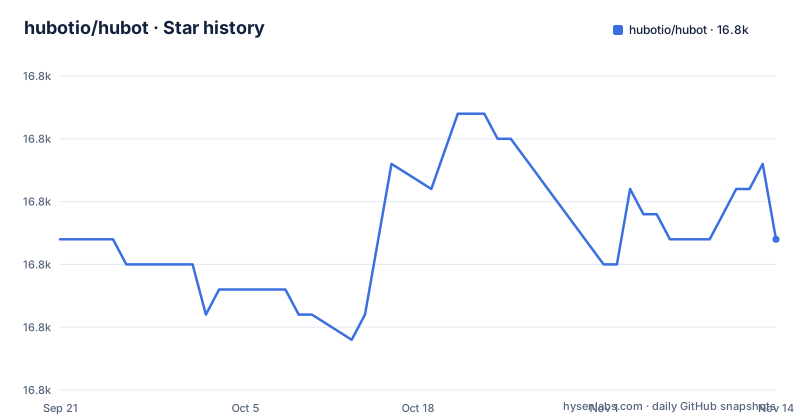
Star history
- hubotio/hubot16,796 ★ · +0
| Repository | 2026-09-21 | 2026-11-14 |
|---|---|---|
| hubotio/hubot | 16.8k | 16.8k |
0 Stars in the last 54 days, measured from the daily GitHub snapshot. Compare with other projects
Editorial analysis
What Hubot Solves, and Who It Is Actually For
Hubot is a framework for building chat bots, modeled after GitHub's Campfire bot of the same name. The README is explicit that this repository distributes a library through npm that you use for building your own bots, and that in most cases you will never have to modify the repository itself. That sentence defines the audience: engineers who want a bot whose behaviour is expressed as code they own, not as configuration inside a vendor's product.
The problem it addresses is the gap between a chat service and the internal actions a team performs in chat. Deploying a service, creating a ticket, checking a status endpoint: these are scriptable, and Hubot gives them a home in a scripts folder. The README points to scripts/example.mjs and says to create more scripts in the scripts folder. That is the whole model. You write JavaScript modules, the bot loads them, and the bot speaks through whichever adapter you installed.
The project is not aimed at people who want to click through a bot builder. There is no hosted control panel described in the README, and the only configuration surface it documents is code and a small set of options passed when constructing the command bus. If your team has no one comfortable reading a Node module, Hubot will feel like a pile of files rather than a product.
The Command Bus: Deterministic Slash-Style Commands Inside a Chat Bot
The most substantial mechanism in the README is robot.commands, described as a deterministic command subsystem for slash-style commands that is safe by default and does not interfere with legacy hear and respond listeners. That last clause matters. Hubot historically matched messages with regular expressions, which is flexible and also easy to make ambiguous. The command bus adds a second path where a command has an id, a description, aliases, typed arguments and a handler.
Registration takes an object. The README example registers tickets.create with aliases 'ticket new' and 'new ticket', an args schema containing a required string title and a priority enum with values low, medium and high and a default of medium, a sideEffects array, and an async handler that receives a context object and reads ctx.args.title. Invocation is by addressing the bot, either with flags or with key:value pairs. The README gives both forms, and the second one is the one people will actually type in a chat client.
Two behaviours are worth calling out because they are design decisions, not features. First, commands that declare side effects require confirmation before execution, and the README shows the user replying with yes, no or cancel. Second, aliases are for discovery and search only; they do not execute commands or create proposals, and the README calls them intent utterances. That is a deliberate narrowing. An alias will help you find a command, but typing it will not run anything, which removes a class of accidental execution that regex-based bots are prone to.
The bus also ships a help command that is registered automatically. It lists all commands, filters by prefix, and searches by keyword across alias, description or example. Search is exposed programmatically too: robot.commands.search('ticket new') returns scored results with a matchedOn field.
Installing Hubot and Creating a Working Bot Instance
Hubot requires Node 18 or newer and npm 9 or newer, per the engines field in package.json. There is no global install step in the README. The documented path is npx, which creates a directory called myhubot in the current working directory. The README lists four adapter packages, one per chat service.
npx hubot --create myhubot --adapter @hubot-friends/hubot-slackSubstitute @hubot-friends/hubot-discord, @hubot-friends/hubot-ms-teams or @hubot-friends/hubot-irc for the adapter if you use a different service. After the command finishes you should have a myhubot directory containing a scripts folder. The README then says to review scripts/example.mjs and to create more scripts in the scripts folder. The package.json in the framework repository defines bin/hubot as the executable and a start script that runs it.
A first real script is a command registration. The README's own example is the clearest template, and it is worth reading closely before writing your own because the argument schema is what produces the help text and the validation.
export default (robot) => {
	robot.commands.register({
		id: 'tickets.create',
		description: 'Create a ticket',
		aliases: ['ticket new', 'new ticket'],
		args: {
			title: { type: 'string', required: true },
			priority: { type: 'enum', values: ['low', 'medium', 'high'], default: 'medium' }
		},
		sideEffects: ['creates external ticket'],
		handler: async (ctx) => {
			return `Created ticket: ${ctx.args.title}`
		}
	})
}
Once that file is in the scripts folder, the README says you invoke the command by addressing the bot, for example with a title and a priority. Because the command declares side effects, the bot asks for confirmation and waits for yes, no or cancel. That confirmation step is the difference between a demo and something you would let near a production system.
Custom argument types are supported through registerTypeResolver. The README shows a project_id resolver that rejects values not starting with PRJ- and upper-cases the rest, then a projects.deploy command that uses it as a required argument. This is where Hubot stops being a regex matcher and starts behaving like a small internal CLI that happens to live in chat.
Permissions, Confirmation Timeouts and the NDJSON Event Log
The command bus takes configuration options when a CommandBus instance is created: prefix, proposalTTL, logPath, disableLogging and permissionProvider. The defaults are stated in the README, and two of them deserve attention.
proposalTTL defaults to 300000 milliseconds, which is five minutes. A pending confirmation that is not answered within that window expires. For a command that creates a ticket this is fine. For a command that restarts a service at 3am, a five-minute window is a design constraint you should think about before you rely on it.
logPath defaults to .data/commands-events.ndjson, and disableLogging defaults to true, meaning event logging to disk is off unless you turn it on. That is a conservative default and also a trap: an operator who assumes there is an audit trail will not find one until someone sets disableLogging to false. The README does not describe the event schema or a rotation strategy for that file, so treat retention as your problem.
Permissions come in two flavours. Room-based permissions are always enforced, and the README shows a rooms array restricting a command to #admin and #ops, with users elsewhere receiving a permission denied message. Role-based permissions are only enforced when a permissionProvider is supplied; without one, the README states that role-based permissions are ignored and access is allowed by default. That asymmetry is the single most important thing to check before exposing a destructive command. A roles array with no provider behind it looks like a restriction and behaves like an open door.
Where Hubot Is the Wrong Tool
Hubot is a library, and that is the limitation as much as the pitch. There is no hosted runtime described in the README. You supply the process, the credentials for your chat service, and the uptime. The repository does include examples/hubot.service and examples/hubot-start.ps1, which indicates systemd and Windows service deployment are anticipated, but the README does not document those files or a rollback path. If you need a managed bot platform with a web console, this is not it.
The adapter is a hard dependency you choose at creation time. The README lists four adapter packages, and the framework repository itself does not contain them; they are separate packages under the @hubot-friends scope. If your chat service is not covered by one of those adapters, the README does not describe how to write your own, so you are reading source rather than documentation.
There is also a migration boundary in the project's own notes. The README warns that v10.0.4 accidentally contains the removal of CoffeeScript and that v10.0.5 puts it back, and that v11 removes CoffeeScript and converts the codebase to ESM. Any Hubot instance written before v11 is CommonJS and CoffeeScript-era. The command bus examples are all .mjs with export default, so older scripts will not drop into a current instance unchanged. If you are inheriting a long-lived bot, budget for that conversion rather than assuming it is a version bump.
Finally, the default-off event log and the allow-by-default role checks mean the framework's safety properties are opt-in. That is a reasonable choice for a library, and it is the opposite of what a team expecting guardrails will assume.
Hubot Compared with a General Automation Bot
The closest alternative in practice is a general-purpose automation bot built on a workflow engine, where triggers, steps and credentials are declared in configuration and the runtime is managed for you. The difference is where the logic lives. In that model you compose steps in a definition file and the platform executes them. In Hubot you write JavaScript modules in a scripts folder and the framework loads them, which means the full language is available: loops, conditionals, calls into internal libraries, and custom argument type resolvers registered against the command bus.
The trade is operational. A workflow bot usually hands you retries, run history and a visual editor. Hubot hands you a Node process and a command bus, and the README documents proposalTTL, logPath and disableLogging rather than a dashboard. You get exact control over validation and confirmation, and you get to run the thing.
Within Hubot's own model there is a second comparison worth making: legacy hear and respond listeners versus the command bus. The README states the command bus does not interfere with legacy listeners, so both can coexist. Legacy listeners are regex-driven and untyped; the command bus is id-based with declared arguments, aliases for discovery, side-effect confirmation and permission hooks. For a new command that touches anything real, the bus is the better default, and leaving a few legacy listeners in place for chatty responses is a reasonable split.
Licence, Maintenance and the Cost of Upgrading
Hubot is MIT licensed. The README defers to the LICENSE.md file for rights and limitations, and the package.json carries "license": "MIT". MIT is permissive, so the practical constraint is attribution rather than copyleft obligations. This is a description of the licence terms, not legal advice; read LICENSE.md before shipping anything you distribute.
The repository is not archived, and the last push was on 2026-11-01. Recent releases are v14.1.1 on 2026-10-28, v14.1.0 on 2026-02-24 and v14.0.1 on 2026-02-09. The runtime floor is Node 18 and npm 9, declared in the engines field. The dependency list in package.json is short: express, express-basic-auth and pino. A short dependency list is the main reason upgrade cost stays low here, because most of the surface you would have to re-verify is your own scripts and the adapter package.
The real upgrade cost is in your scripts, not the framework. The v11 ESM conversion is the precedent: it changed how modules are written, and the README still carries a note about the CoffeeScript removal and restoration around v10.0.4 and v10.0.5. The README does not document a codemod or a compatibility shim for that. If you maintain a large scripts folder, the honest estimate is that every major version is a review of your own code, and the framework's release notes are the only guide to what changed.
Editorial conclusion
Adopt Hubot if you want a bot whose behaviour lives in your own JavaScript files and you are willing to host it. Do not adopt it if you need a hosted dashboard or a no-code builder, and do not adopt it if your team cannot maintain a Node process. Before writing anything, run npx hubot --create myhubot --adapter @hubot-friends/hubot-slack, open scripts/example.mjs, and confirm which adapter package matches your chat service, because the adapter choice determines how the bot receives messages.
Frequently asked questions
What is Hubot and who is it for?
Hubot is a JavaScript framework for building chat bots, distributed through npm as a library you use for your own bots. It is aimed at engineers who want bot behaviour expressed as scripts they own, running against a chat service through an adapter. The README notes that in most cases you will never have to modify the framework repository itself.
How do I install Hubot and create my first bot?
The README documents a single npx command that creates a directory called myhubot in the current working directory, with an adapter flag choosing your chat service, for example @hubot-friends/hubot-slack. You then review scripts/example.mjs and add your own scripts to the scripts folder. Node 18 or newer and npm 9 or newer are required.
How does the Hubot command bus handle confirmation and permissions?
Commands that declare side effects require confirmation before execution, and the user replies with yes, no or cancel. Room-based permissions are always enforced, while role-based permissions are ignored and access is allowed by default unless a permissionProvider is supplied. Pending confirmations expire after proposalTTL, which defaults to 300000 milliseconds.
What are the alternatives to Hubot?
A general-purpose automation bot built on a workflow engine is the usual alternative: triggers and steps are declared in configuration and the platform runs them, often with a dashboard and run history. Hubot instead loads JavaScript modules from a scripts folder and leaves hosting to you, which gives full language control at the cost of operating the process yourself.
Official sources
Add this badge to your README
If you maintain this project, the badge below links readers to this analysis and shows its maintenance status from the daily GitHub snapshot. Paste the markdown into your README; add ?metric=license or ?metric=stars to the image URL for a different field.

[](https://hysenlabs.com/projects/hubotio-hubot)Star history chart for your README
[](https://hysenlabs.com/projects/hubotio-hubot)Was this useful?