ec-devtools: A WYSIWYG Debugger for EasyCanvas Projects
ec-devtools is a Chrome debugging tool for the canvas library easycanvas (https://github.com/chenzhuo1992/easycanvas), letting you modify a canvas element's style and physical properties for a what-you-see-is-what-you-get effect that improves debugging efficiency.
At a glance
- What is it?
- ec-devtools is a Chrome extension that lets you edit EasyCanvas element styles and physics properties live. It is a niche tool for a specific canvas library, and its real value is as a working example of DevTools messaging.
- Who is it for?
- Adopt ec-devtools if you build with EasyCanvas and want to tweak element styles or physics properties without re-rendering. Do not adopt it if you use other canvas libraries, as it only supports EasyCanvas.
- Can I use it commercially?
- Not without permission. GitHub finds no licence file in the repository, and without a licence all rights are reserved by default: you may read the code but not reuse it. Check the README, or ask the authors, before using it.
- Is it still maintained?
- Probably not. The repository last received commits 100 months ago, on August 5, 2018.
- What is it written in?
- Mainly Vue, according to GitHub's language statistics.
Answers come from the project's GitHub data, last synced on October 22, 2026, and from our analysis. They are not legal advice.
Star history
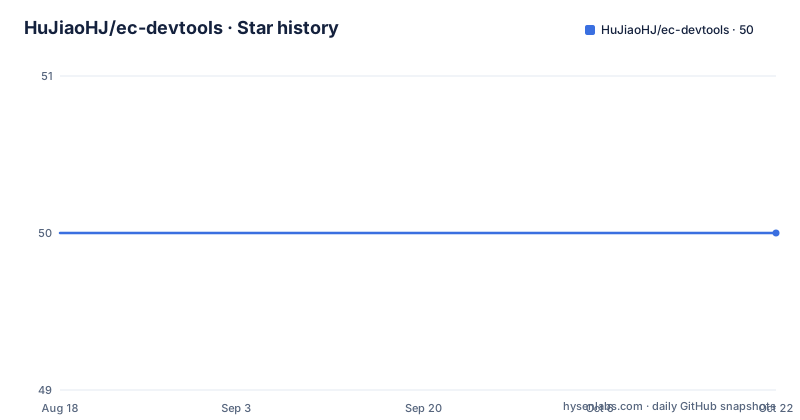
- HuJiaoHJ/ec-devtools50 ★ · +0
| Repository | 2026-08-18 | 2026-10-22 |
|---|---|---|
| HuJiaoHJ/ec-devtools | 50 | 50 |
0 Stars in the last 65 days, measured from the daily GitHub snapshot. Compare with other projects
Editorial analysis
What ec-devtools Actually Fixes
EasyCanvas is a canvas drawing library, and debugging canvas output is painful. You change a style or a physics value in code, reload the page, and hope the visual matches your intent. ec-devtools targets that loop. It is a Chrome DevTools extension that lets you modify the styles and physical properties of EasyCanvas elements directly in the browser, with a what-you-see-is-what-you-get effect. The intended user is a developer already committed to EasyCanvas, not someone evaluating canvas libraries. The README is explicit about this: it supports EasyCanvas and nothing else. If you use a different canvas library, this tool is useless to you.
How the Extension Talks to the Page
The README spends most of its length explaining the communication architecture, not the feature set. That is a hint about where the project's real value lies. Chrome DevTools extensions have three parts: the DevTools Page (the panel you see), the Background Page (a script), and the Content Script (a script injected into the page context). The page cannot talk to the DevTools Page directly. Instead, the Content Script listens for window.postMessage events from the page, then calls chrome.runtime.sendMessage() to forward the data to the Background Page. The Background Page uses chrome.runtime.onMessage.addListener() to receive that message, and it keeps a record of which tab sent it. The DevTools Page opens a long-lived connection to the Background Page via chrome.runtime.connect(), and the Background Page acts as a bridge, forwarding messages between the two sides. The README shows this flow with code snippets for each hop.
Sending Messages Back to the Page
The reverse direction, from the DevTools Page to the webpage, has two supported routes. The first is chrome.devtools.inspectedWindow.eval(), which executes JavaScript directly in the context of the inspected page. The README recommends this method. The second route is to send the message over the long-lived connection to the Background Page, which then calls chrome.tabs.executeScript() to run code in the page. The README shows both, but it explicitly says the first is preferred. That preference makes sense: eval() is simpler, and it avoids the extra hop through the Background Page. For a debugging tool, that simplicity is a real advantage. You want the least amount of moving parts between your edit and the canvas update.
Getting It Running
The README does not include installation steps. It only points to the EasyCanvas repository for usage details. That is a gap. For a Chrome extension, the standard installation path would be to load the repository as an unpacked extension through chrome://extensions, but the README never says that. The repository is written in Vue, which suggests the DevTools Page is a Vue application, but there are no build commands or configuration keys in the material. If you want to try it, you will have to clone the repository and figure out the build process yourself. The README's code examples show the key API calls: window.postMessage in the page, chrome.runtime.sendMessage in the content script, chrome.runtime.onMessage.addListener in the background script, and chrome.runtime.connect in the DevTools Page. Those are the moving parts you need to understand, but the actual setup steps are undocumented.
Where It Falls Short
The most obvious limitation is scope. This tool only works with EasyCanvas. The README does not claim otherwise, but it also does not explain what happens if you try to use it on a page that does not use EasyCanvas. The extension would likely do nothing, because there are no EasyCanvas elements to inspect. The second limitation is maintenance. The repository has no recent releases listed, no license, and the last push date is unknown. That is a red flag. Chrome extensions break as Chrome updates its APIs, and a project with no release history and no license is a risk. You cannot legally modify or redistribute it without permission, and you have no guarantee it will keep working. The README also contains a typo: it writes chrome.tab.excuteScript instead of chrome.tabs.executeScript. That is a minor issue, but it suggests the documentation was not carefully proofread.
The Real Alternative Is the DevTools API Itself
If you need to debug canvas output and you are not tied to EasyCanvas, the alternative is to write your own DevTools extension using the same APIs ec-devtools demonstrates. The README is essentially a tutorial for that. It walks through the entire message flow, from page to content script to background to DevTools Page, and back. You could take that pattern and apply it to any canvas library. The difference in approach is that ec-devtools is a finished tool, while building your own gives you full control over which properties you expose and how you render them. If you only need to tweak a few values, a generic eval() call in the DevTools console might be enough. Chrome's built-in console can run JavaScript in the page context, so you can inspect and modify canvas objects without any extension. That is the simplest alternative, and it costs nothing. ec-devtools is only worth installing if you want a dedicated UI for EasyCanvas.
Maintenance and License Reality
The repository has no license field, which means the default copyright rules apply. You cannot legally copy, modify, or distribute the code without explicit permission from the author. That is a practical constraint if you want to adapt it for your own use. The README does not mention any contribution guidelines or release process. The last push date is unknown, and there are no releases listed, so there is no way to track changes over time. The project is not archived, which is a small positive sign, but it is far from an actively maintained tool. The communication patterns it demonstrates are stable Chrome APIs, so the underlying concepts will age well, but the extension itself may not. If you depend on it, you are relying on the author to keep it compatible with future Chrome versions.
Editorial conclusion
Adopt ec-devtools if you build with EasyCanvas and want to tweak element styles or physics properties without re-rendering. Do not adopt it if you use other canvas libraries, as it only supports EasyCanvas. Before installing, verify the extension is still maintained and that it works with your Chrome version, since the repository shows no recent releases and the license is unknown. The project's main strength is as a reference for DevTools communication patterns, not as a production-grade tool.
Frequently asked questions
What is DevTools used for, in the context of ec-devtools?
In this repository DevTools refers to Chrome's developer tools, and the panel is described as the DevTools Page, the part you touch while using the browser. The extension adds a panel for editing canvas element styles and physical properties through the easycanvas library.
How do I access DevTools from an ec-devtools panel?
The panel reads the inspected tab's id from chrome.devtools.inspectedWindow.tabId and posts it to the background page over a connection opened with chrome.runtime.connect. To run code in the page it uses chrome.devtools.inspectedWindow.eval with a JavaScript string.
How does ec-devtools get a message from a page to the panel?
A content script listens for window message events and forwards them with chrome.runtime.sendMessage, the background page receives them through chrome.runtime.onMessage.addListener, and the panel is reached over a long connection. The background page holds a map of connections keyed by tab id so it knows which panel port to forward to.
How does the ec-devtools panel change styles on a canvas element?
The panel executes JavaScript in the inspected page's own context using chrome.devtools.inspectedWindow.eval, which is the method the README recommends. An alternative route sends the code over the long connection to the background page, which then runs a script against the tab, though the snippet for that path is printed with a misspelled method name.
Official sources
Add this badge to your README
If you maintain this project, the badge below links readers to this analysis and shows its maintenance status from the daily GitHub snapshot. Paste the markdown into your README; add ?metric=license or ?metric=stars to the image URL for a different field.

[](https://hysenlabs.com/projects/hujiaohj-ec-devtools)Star history chart for your README
[](https://hysenlabs.com/projects/hujiaohj-ec-devtools)