Hux Blog: the original Jekyll theme behind huxpro.github.io
My Blog / Jekyll Themes / PWA
At a glance
- What is it?
- Hux Blog is Huxpro's original Jekyll blog and theme, preserved as a public repository. It is a Grunt-built, PWA-enabled Jekyll site with a Liquid layout layer and a manual that most of the README points you toward.
- Who is it for?
- Adopt Hux Blog if you want a working Jekyll blog with a PWA layer and you are willing to run Grunt for theme edits; skip it if you expect modular, transpiled front-end tooling, since the README states there is none. Before committing, check _doc/Manual.md against your Jekyll and Bundler versions, confirm that bundle exec jekyll serve reaches localhost:4000 on your machine, and read the Apache-2.0 LICENSE alongside the MIT-licensed Clean Blog origin noted in the README.
- Can I use it commercially?
- Yes. Apache-2.0 is a permissive licence: you can use, modify and sell software built on it, as long as you keep its copyright and licence notices.
- Is it still maintained?
- Yes. The repository last received commits 62 days ago.
- What is it written in?
- Mainly HTML, according to GitHub's language statistics.
Answers come from the project's GitHub data, last synced on November 14, 2026, and from our analysis. They are not legal advice.
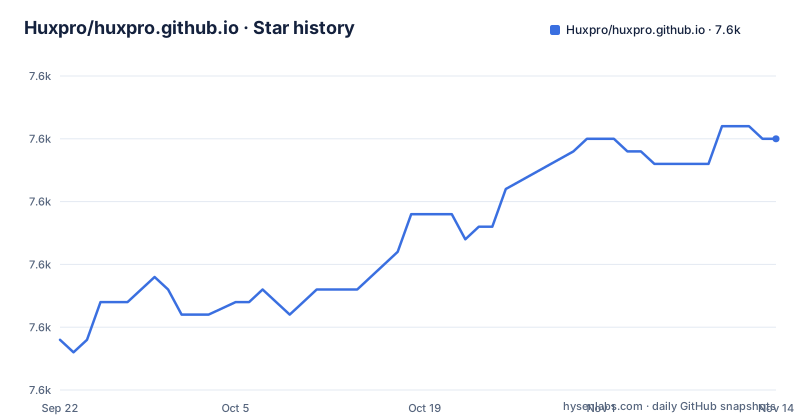
Star history
- Huxpro/huxpro.github.io7,625 ★ · +16
| Repository | 2026-09-22 | 2026-11-14 |
|---|---|---|
| Huxpro/huxpro.github.io | 7.6k | 7.6k |
16 Stars in the last 53 days, measured from the daily GitHub snapshot. Compare with other projects
Editorial analysis
What Hux Blog actually is, and who it is for
Hux Blog is the original Jekyll blog and theme behind huxpro.github.io, kept in a public repository while Hux's current site lives at hux.pro. The README is explicit about that split, so the repository is best read as a preserved theme rather than the author's live site.
The audience is narrow and identifiable. Someone who wants a Jekyll blog with a service worker, an offline page and a search.json endpoint already wired in, and who does not mind a build pipeline that the README itself calls old-fashioned. The README links a starter at huxblog-boilerplate, which it flags as out of date and asks for help updating.
If you want a theme you configure through a handful of YAML keys and never touch again, this is more machinery than you need. If you want to see how a working Jekyll blog is assembled end to end, including the parts most themes hide, the repository is unusually complete.
How the Jekyll site, Grunt pipeline and PWA fit together
The architecture is split into two layers that fail independently.
The Jekyll layer produces the site. The README states that the critical Jekyll code lives in _includes/ and _layouts/, and that most of it consists of Liquid templates. Content sits in _posts/, configuration in _config.yml, and the top-level entries include archive.html, about.html, 404.html, feed.xml and search.json. Syntax highlighting comes from Rouge, Jekyll's default highlighter, which the README notes is compatible with Pygments themes: you pick a Pygments theme CSS and replace the contents of highlight.less.
The front-end layer is built by Grunt. Gruntfile.js holds tasks for minifying JavaScript, compiling .less to .css, and adding banners that keep the Apache 2.0 license intact. That last task is worth noting: the build writes licence banners into compiled output, so the licence obligation travels with the generated CSS and JS, not just the source.
The PWA parts are separate files rather than a plugin. There is a sw.js service worker at the repository root, an offline.html fallback, and a pwa/ directory. Because the service worker is a hand-written file, caching behaviour is something you read and edit directly, not something a build step generates for you.
Installing Hux Blog and serving it on localhost:4000
The README's Getting Started section assumes Ruby and Bundler. It links to the Jekyll guide on using Jekyll with Bundler for the environment, so the exact Ruby version is not pinned in the README itself.
Install the gems declared in the Gemfile:
bundle installThen serve the site. The README gives two equivalent commands, and the default port is 4000:
bundle exec jekyll serve
# alternatively
npm start
The npm start script in package.json is exactly bundle exec jekyll serve, so both routes run the same Jekyll command. If the build succeeds, the site is reachable at http://localhost:4000.
If you intend to change the theme rather than just write posts, the README says you need Grunt and points at Gruntfile.js for the available tasks. The package.json dev script runs Grunt in watch mode alongside the Jekyll server:
npm run devThat is the loop for editing .less files: Grunt watches, recompiles, and the Jekyll server picks up the regenerated CSS. The README also points to _doc/Manual.md for the full user manual, and notes a Chinese translation at _doc/README.zh.md that it describes as a little out of date.
The build tooling is the main limitation
The README does not soften this. It says the Grunt tasks were inherited, are extremely old-fashioned, and that there is no modularization or transpilation. That is a direct statement from the project about its own front-end pipeline, and it has practical consequences.
The devDependencies are Grunt plugins: grunt, grunt-banner, grunt-contrib-less, grunt-contrib-uglify and grunt-contrib-watch. There is no bundler for JavaScript modules and no transpiler, so any modern syntax you write has to survive uglify as-is. If your team's expectation is ES modules, a package manager workflow and hot reload through a dev server, this repository does not provide that, and retrofitting it means replacing the pipeline rather than configuring it.
A second limitation is documentation drift. The README points to a starter boilerplate that it says is out of date, and to a Chinese manual it describes as somewhat out of date. Two of the entry points the README itself recommends carry that warning. The English manual at _doc/Manual.md is the one the README treats as authoritative, so treat it as the reference and the others as hints.
The third is scope. This is a personal blog theme preserved in place. The README does not document a versioned release process, and the repository has no published releases. If you need upgrade guarantees between versions, nothing in the repository promises them.
Choosing between Hux Blog and Clean Blog Jekyll
The README states that Hux Blog is derived from Clean Blog Jekyll, which is MIT licensed and copyright 2013-2016 Blackrock Digital LLC. That relationship is the most useful comparison available, because it tells you what Hux Blog added on top of the Bootstrap-era original.
Hux Blog ships sw.js, offline.html, a pwa/ directory and a search.json endpoint alongside the theme. It also carries its own Grunt pipeline for LESS compilation and JavaScript minification, and it applies Apache 2.0 with licence banners written into build output.
So the decision is not about layout quality. It is about whether you want the offline and search plumbing included and are willing to maintain a Grunt build to keep it working. The README's own attribution makes that lineage explicit. The README also lists ports by other authors, a Hexo version and a React-SSR branch, for readers who want the same design outside Jekyll.
Maintenance status, licence and upgrade cost
The repository is not archived, and the last push was on 2026-09-13. That is recent enough that the code is not abandoned, but it says nothing about the release cadence, and the repository has no published releases. The package.json version is 1.8.2, which is the only version identifier visible in the repository files.
Upgrade cost has two components. The Ruby side depends on Bundler resolving the Gemfile against your Jekyll version; the README does not pin versions, so a fresh bundle install today may resolve differently from when the theme was last edited. The Node side depends on Grunt plugins whose version ranges are declared in package.json, and a package-lock.json is present, which is what pins the actual resolved tree.
On licensing: the repository is Apache-2.0, copyright 2015-present Huxpro, and it is derived from Clean Blog Jekyll under MIT, copyright 2013-2016 Blackrock Digital LLC. Apache 2.0 and MIT are both permissive, but they are not identical in their notice and patent terms, and the Grunt banner task exists specifically to keep the Apache 2.0 notice in compiled output. If you redistribute a modified theme, preserve the notices the build already writes. This is a description of what the files say, not legal advice; read LICENSE and the upstream MIT notice before you ship.
Editorial conclusion
Adopt Hux Blog if you want a working Jekyll blog with a PWA layer and you are willing to run Grunt for theme edits; skip it if you expect modular, transpiled front-end tooling, since the README states there is none. Before committing, check _doc/Manual.md against your Jekyll and Bundler versions, confirm that bundle exec jekyll serve reaches localhost:4000 on your machine, and read the Apache-2.0 LICENSE alongside the MIT-licensed Clean Blog origin noted in the README.
Frequently asked questions
Is it free to host websites on GitHub?
The repository does not discuss GitHub hosting costs. What it does show is that the theme is built for GitHub Pages style static hosting: the homepage is huxpro.github.io, and the site is plain Jekyll output with a service worker and an offline page.
What do I need installed before running Hux Blog locally?
The README says you need Ruby and Bundler to use Jekyll, and links to the Jekyll guide on using Jekyll with Bundler for the environment. After that, bundle install resolves the dependencies declared in the Gemfile.
Which port does Hux Blog serve on by default?
The README states the site is served on localhost:4000 by default, using bundle exec jekyll serve, or npm start, which package.json maps to the same command.
Do I need Grunt to use Hux Blog, or only to change the theme?
The README presents Grunt as a requirement for modifying the theme, since Gruntfile.js handles minifying JavaScript, compiling .less to .css and adding license banners. For writing posts and serving the site, the Bundler and Jekyll steps are the ones the Getting Started section lists.
Where is the Hux Blog user manual?
The README points to _doc/Manual.md as the full user manual, and also notes a Chinese translation at _doc/README.zh.md that it describes as somewhat out of date.
Official sources
Add this badge to your README
If you maintain this project, the badge below links readers to this analysis and shows its maintenance status from the daily GitHub snapshot. Paste the markdown into your README; add ?metric=license or ?metric=stars to the image URL for a different field.

[](https://hysenlabs.com/projects/huxpro-huxpro-github-io)Star history chart for your README
[](https://hysenlabs.com/projects/huxpro-huxpro-github-io)Was this useful?