coost: a minimal C++ base library with go-style coroutines and logging
A tasteful, minimal C++ base library.
At a glance
- What is it?
- coost bundles coroutines, sockets, RPC, logging, flags and unit testing into one C++ base library. It installs from source and from xmake, and its documentation is published at coostdocs.github.io in English and Simplified Chinese.
- Who is it for?
- Adopt coost if you want coroutines, sockets, logging and flag parsing from one C++ library without pulling in a separate runtime per component, and you are willing to read the include/co headers alongside the documentation site. Skip it if you need a formally specified, fully documented API surface, or if your build already standardises on a different coroutine or logging stack.
- Can I use it commercially?
- Check first. The repository uses a licence we do not classify automatically, so read its LICENSE file before any commercial use.
- Is it still maintained?
- Yes. The repository last received commits 16 days ago.
- What is it written in?
- Mainly C++, according to GitHub's language statistics.
Answers come from the project's GitHub data, last synced on November 14, 2026, and from our analysis. They are not legal advice.
Star history
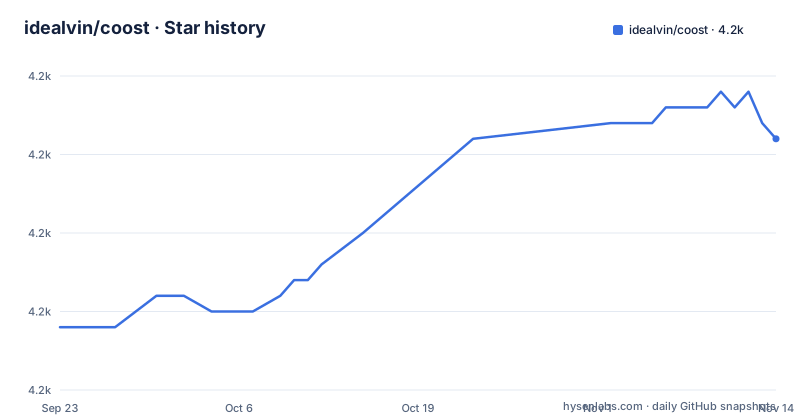
- idealvin/coost4,226 ★ · +12
| Repository | 2026-09-23 | 2026-11-14 |
|---|---|---|
| idealvin/coost | 4.2k | 4.2k |
12 Stars in the last 52 days, measured from the daily GitHub snapshot. Compare with other projects
Editorial analysis
What coost solves and who it is for
coost is a C++ base library, not an application framework. It collects the pieces a backend service usually re-implements: command-line and config parsing, coroutines, a socket API, TCP helpers, an RPC layer, logging, a memory allocator, unit testing and benchmarking. The README describes the goal plainly: to make C++ programming simple and enjoyable.
The audience is C++ developers building network services who want a synchronous coding style without giving up concurrency. The README states that coost implements a coroutine mechanism similar to goroutine in Golang, and that the coroutine-based socket API lets users familiar with socket programming write high-performance network programs in a synchronous style. That is the central promise: you write blocking-looking code, and the scheduler moves other coroutines forward while yours waits.
It is not aimed at people who want header-only convenience or a single-purpose library. coost is a collection. You can use the flag component alone, or the logging component alone, but the components are designed to sit together in one project.
How the coroutine scheduler and network stack fit together
The mechanism visible in the README is a multi-thread scheduler. By default the number of scheduling threads equals the number of CPU cores. Coroutines in the same thread share several stacks, with a default size of 1MB, which the README presents as the reason memory usage stays low. Sharing stacks rather than allocating one per coroutine is the design decision that separates coost from a naive thread-per-connection model.
The networking layer sits on top of that scheduler. coost provides a socket API similar in form to the system socket API, a TCP encapsulation that is compatible with IPv6, and an RPC framework that uses JSON for serialization. Because the socket calls are coroutine-aware, a read that would block parks the coroutine instead of the OS thread.
Synchronisation follows the same model: the README lists coroutine synchronisation events, coroutine locks and waitgroup. The waitgroup example in the README spawns two coroutines with go(), each calling wg.done(), and the main path calls wg.wait(). That is a familiar shape for anyone who has written Go, and it is the clearest signal of the intended programming style.
Installing coost and writing a first coroutine program
The repository root contains CMakeLists.txt and xmake.lua, so those are the two build entry points a reader should inspect before starting. The README itself builds and runs the unit tests with xmake b unitest and xmake r unitest.
The smallest useful program is the flag example, which also shows the logging-style print helpers. Create a file and include the flag and print headers, declare a few flags with the DEF_ macros, parse argv, then read the FLG_ values.
#include "co/flag.h"
#include "co/print.h"

DEF_bool(x, false, "Comment here");
DEF_int32(n, 0, "Comment here");
DEF_string(s, "hello world", "Comment here");

int main(int argc, char** argv) {
    flag::parse(argc, argv);
    co::println("x: ", FLG_x);
    co::println("n: ", FLG_n);
    co::println("s: ", FLG_s);
    return 0;
}
After compiling and running it, you should see the three values printed. The README states that flag supports flag aliases and automatic config file generation, so the same definitions also back a generated config file.
The second program shows the coroutine API. It includes co/co.h for go() and co::wait_group, and co/flag.h because flag::parse is called first.
#include "co/co.h"
#include "co/flag.h"
#include "co/print.h"

int main(int argc, char** argv) {
    flag::parse(argc, argv);

    co::wait_group wg(2);

    go([wg](){
        co::println("hello world");
        wg.done();
    });

    go([wg](){
        co::println("hello again");
        wg.done();
    });

    wg.wait();
    return 0;
}
The wait_group is constructed with a count of 2, each coroutine decrements it once, and wg.wait() returns after both have finished. Expect two lines of output, in whichever order the scheduler runs them.
Where coost is the wrong choice
The first consideration is documentation: it lives on a separate site, coostdocs.github.io, in English and Simplified Chinese, so for a library that exposes coroutine semantics, locks and an RPC layer, expect to read the include/co headers alongside it.
The second limitation is scope. coost is a base library with many components. If your project already standardises on another logging or coroutine stack, adding coost for one piece means carrying the rest.
The coroutine model itself is a constraint. Coroutines in the same thread share stacks, and the README gives a default stack size of 1MB. Shared stacks are what keep memory low, but they also mean the runtime manages stack growth and reuse on your behalf. If your workload depends on deep, predictable per-task stacks, that trade-off deserves testing on your own code before you commit.
Finally, the benchmark and unit test directories in the repository are the project's own. The performance tables in the README are the project's published results, not independent measurements, and they compare against glog and spdlog under conditions the README describes.
coost compared with Boost and a standalone logging library
The obvious alternative for C++ developers is Boost. Boost covers far more ground and has a much larger documentation and review process behind it. The difference in approach is that Boost is a federation of separately reviewed libraries with a heavy build and dependency footprint, while coost is a single repository with a CMakeLists.txt and an xmake.lua at the root and a small set of components under include/co. If you already depend on Boost, adding coost duplicates ground: Boost has its own logging and its own networking facilities, and its coroutine support comes through a different mechanism than the go() style the README shows.
For logging specifically, the README compares co/log against glog and spdlog. It reports single-thread write speed of 1023MB/s on Linux SSD against 54MB/s for glog, and a multi-thread table where co/log finishes 1 million logs in 0.087235 seconds on one Linux thread against 2.076172 for spdlog. Those are the project's numbers. The practical difference in approach is that co/log is built to be used with the rest of coost, including the flag component that configures it, whereas spdlog is a logging library you can drop into any project without adopting a scheduler.
If your only need is logging, a standalone logger is the smaller dependency. If you need coroutines and networking as well, coost's value is that the pieces were designed against each other.
Licence and the cost of staying current
The repository contains LICENSE.md, and the README's badge identifies the licence as MIT. GitHub's own classifier reports NOASSERTION for the repository, which means the automated detection did not match a standard template. Read LICENSE.md directly rather than relying on either label. This is not legal advice; if the licence terms matter to your organisation, have someone qualified review the file.
The README also documents a commercial support offering. It states that coost remains open source and that the author offers paid commercial support for custom development, architecture adaptation for RISC-V and MIPS, coroutine hooks, performance optimisation and team training. Pricing and process are linked from the README, and contact is through GitHub Issues or the author's email. A free initial diagnosis is described as available to assess scope and feasibility. For teams that need a supported path, that option exists, but it is separate from the open source licence.
On upgrade cost: the last push to the repository was on 2026-10-30, and the most recent release listed is v4.0.1 from 2026-09-28, after v4.0.0 on 2026-09-15. The release before that was v3.0.2 in 2023, so check the include/co headers for the API you actually call before upgrading across that gap.
Editorial conclusion
Adopt coost if you want coroutines, sockets, logging and flag parsing from one C++ library without pulling in a separate runtime per component, and you are willing to read the include/co headers alongside the documentation site. Skip it if you need a formally specified, fully documented API surface, or if your build already standardises on a different coroutine or logging stack. Before committing, verify the exact build path against CMakeLists.txt and xmake.lua, and check that the components you depend on have unit tests under unitest/.
Frequently asked questions
What does coost mean?
The README states that coost is abbreviated as co, and the headers live under include/co. The name is the library's own short form, not an acronym expanded anywhere in the README.
Does coost need a separate coroutine runtime?
No. The README describes coost as implementing a coroutine mechanism similar to goroutine in Golang, with multi-thread scheduling, shared stacks and coroutine synchronisation primitives built in. The go() function and co::wait_group come from co/co.h.
How do I install coost?
The repository root contains CMakeLists.txt and xmake.lua as the two build entry points, and the README builds and runs the unit tests with xmake b unitest and xmake r unitest.
Is coost documentation up to date?
The README links to documentation at coostdocs.github.io in English and Simplified Chinese. For the exact API in a given release, the include/co headers are the most direct reference.
What licence is coost released under?
The README badge identifies the licence as MIT, and the repository contains LICENSE.md. GitHub's classifier reports NOASSERTION, so read LICENSE.md directly rather than relying on either label.
Official sources
Where developers are discussing it
Posts on Hacker News, dev.to and Lobsters that link to this repository, found by our scan of those communities. 0 in the last 30 days; newest first.
- Coost v4.0.0 ReleasedHacker News · Sep 15, 2026 · 1 points · 0 comments
Add this badge to your README
If you maintain this project, the badge below links readers to this analysis and shows its maintenance status from the daily GitHub snapshot. Paste the markdown into your README; add ?metric=license or ?metric=stars to the image URL for a different field.

[](https://hysenlabs.com/projects/idealvin-coost)Star history chart for your README
[](https://hysenlabs.com/projects/idealvin-coost)Was this useful?