RazzleDazzle: A Swift Keyframe Animation Framework for iOS App Intros
GitHub describes it as A simple keyframe-based animation framework for iOS, written in Swift. Perfect for scrolling app intros.. The repository metadata lists Swift as its primary language. The metadata lists the MIT license. This article stays within the project description and details documented in the GitHub repository README.
At a glance
- What is it?
- RazzleDazzle is IFTTT's Swift port of JazzHands, a keyframe animation framework that ties view animations to UIScrollView content offset. It also provides an AutoLayout-friendly paging scroll view controller, but its age and maintenance status raise questions for new projects.
- Who is it for?
- Adopt RazzleDazzle if you are building a Swift app intro with scroll-driven animations and you value a simple, declarative API that handles AutoLayout paging correctly. Avoid it if you need Swift 4+ compatibility, continuous maintenance, or modern async patterns.
- Can I use it commercially?
- Yes. MIT is a permissive licence: you can use, modify and sell software built on it, as long as you keep its copyright and licence notices.
- Is it still maintained?
- Probably not. The repository last received commits 36 months ago, on October 11, 2023.
- What is it written in?
- Mainly Swift, according to GitHub's language statistics.
Answers come from the project's GitHub data, last synced on October 22, 2026, and from our analysis. They are not legal advice.
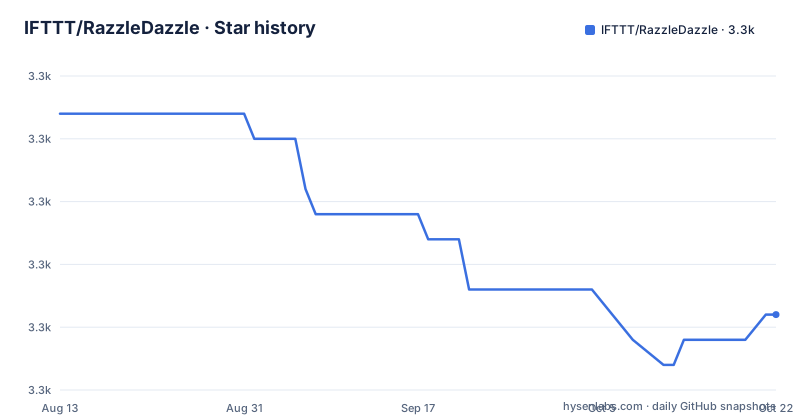
Star history
- IFTTT/RazzleDazzle3,338 ★ · -8
| Repository | 2026-08-13 | 2026-10-22 |
|---|---|---|
| IFTTT/RazzleDazzle | 3.3k | 3.3k |
-8 Stars in the last 70 days, measured from the daily GitHub snapshot. Compare with other projects
Editorial analysis
What RazzleDazzle Solves and Who It Targets
RazzleDazzle addresses a specific, narrow problem: animating views in response to a UIScrollView's content offset, typically for app intro screens that page horizontally. The README states it is 'perfect for scrolling app intros' and that it grew from JazzHands, IFTTT's Objective-C library. The intended audience is Swift developers building iOS apps who want to avoid writing manual scroll-view delegate logic and frame calculations. It also claims to solve a second problem: laying out paging scroll views in an AutoLayout world. The AnimatedPagingScrollViewController is designed to keep views on specific pages even when the view size changes due to rotation or iPad split-screen. This is a real pain point, and the framework's approach is to generate x-position constraints automatically, which is a concrete mechanism rather than a vague promise.
How the Animation Engine Works
The core mechanism is an Animator class that holds animations and advances them based on a time value. The README shows that you create an Animator, instantiate an animation like AlphaAnimation, register it, and add keyframes using subscript syntax: alphaAnimation[30] = 1 and alphaAnimation[60] = 0. Then, in the scroll view's delegate method, you call animator.animate(scrollView.contentOffset.x). This is a simple data flow: the content offset becomes the time, and each animation interpolates between keyframes. The framework supports a range of animation types, including alpha, background color, rotation, scale, translation, corner radius, hidden, and several CAShapeLayer properties like stroke start and end. It also includes PathPositionAnimation for moving a view along a path. The keyframe model is linear interpolation between discrete points, which is fine for intros but lacks easing or curve options, a limitation the README does not mention.
Getting It Running: Installation and Setup
Installation is straightforward with either Carthage or CocoaPods. For Carthage, add github "IFTTT/RazzleDazzle" to your Cartfile. For CocoaPods, add pod "RazzleDazzle" to your Podfile, and the README reminds you to include use_frameworks! because the library is written in Swift. The demo app is available by opening Example/RazzleDazzle.xcworkspace and running the RazzleDazzleDemo target. For actual usage, you subclass AnimatedPagingScrollViewController, override numberOfPages() to return the page count, add views to contentView in viewDidLoad, and call keepView(_:onPage:) to pin a view to a page. You can also pass an array of pages or a fractional page like 1.25. The README warns not to set x-position constraints on views you use with keepView, because the framework generates its own animated constraints. This is a concrete constraint that affects how you design your layout.
A Genuine Limitation: Age and Swift Compatibility
The repository's last push was November 15, 2016, and the latest release is 0.1.5 from that date. The 0.1.4 release notes say 'Swift 3 Support', which means the framework is frozen at Swift 3 era APIs. Swift 3 was released in 2016, and the language has since gone through Swift 4, 4.2, 5, and 5.5 with major changes. The README's example code uses 'override func numberOfPages() -> Int' and 'func scrollViewDidScroll(_ scrollView: UIScrollView)', which still look valid in Swift 5, but the internal implementation may rely on APIs that have been deprecated or changed. For example, the use of NSLayoutConstraint with attribute .CenterY is old syntax; modern code uses .centerY. The framework has not been updated for newer iOS versions, so it may not compile without modifications. This is not a hypothetical concern; the release notes themselves indicate the last change was fixing access modifiers, not adding compatibility. If you are targeting iOS 13 or later, you will likely need to fork and adjust the code.
The AutoLayout Paging Controller: A Differentiator
RazzleDazzle's AnimatedPagingScrollViewController is arguably more valuable than the animation engine itself. The README emphasizes that it solves the tricky problem of paging scroll views in AutoLayout when the view size changes, such as on rotation or iPad split-screen. The keepView(onPage:) method lets you specify which page a view belongs to, and the controller handles the constraints. You can also keep a view on multiple pages, so it stays fixed while others scroll past. This is a concrete feature that goes beyond simple keyframing. The trade-off is that you must adopt the controller as a base class, which couples your view controller to the framework. There is no way to use the paging layout in isolation. The README also warns about constraint conflicts, which means you need to understand the generated constraints to avoid breaking your layout. This is a sharp edge that could trip up developers who are not familiar with AutoLayout internals.
Alternative Approaches and How They Differ
A direct alternative is the original JazzHands, which is the Objective-C version and is still maintained separately. JazzHands uses the same keyframe concept but is written for Objective-C, so it is not suitable for Swift-only projects unless you use a bridging header. Another alternative is to build your own animation using UIScrollViewDelegate and UIView animations, which gives you full control but requires writing the interpolation logic yourself. More modern alternatives include Facebook's Pop framework, which provides spring and decay animations, but Pop is not specifically tied to scroll views. The key difference with RazzleDazzle is that it bakes in the scroll-view-to-time mapping and the paging controller, so you do not have to write that glue. However, Pop is actively maintained and supports a broader range of animation physics. If you need easing or spring effects, RazzleDazzle's linear keyframes will not suffice, and you would need to extend or replace it.
Maintenance and License Implications
The project is licensed under MIT, which permits commercial use, modification, and redistribution with attribution. However, the repository has seen no activity since 2016, and it is not archived, but it is effectively dormant. The README does not mention any contribution guidelines or a roadmap. The lack of maintenance means that if you adopt it, you take on the cost of maintaining it yourself. For example, if a future iOS release changes a UIKit API, you will have to patch the framework. The release history shows only three versions, with the last being a fix for access modifiers, indicating a low level of ongoing development. There is no mention of testing or CI, so you cannot verify the framework's reliability from the repository alone. The demo app exists, but the README does not describe its test coverage. This is a significant consideration for production use, especially for a library that touches AutoLayout and scroll views, where subtle bugs can cause layout glitches.
Editorial conclusion
Adopt RazzleDazzle if you are building a Swift app intro with scroll-driven animations and you value a simple, declarative API that handles AutoLayout paging correctly. Avoid it if you need Swift 4+ compatibility, continuous maintenance, or modern async patterns. Before adoption, verify that the 0.1.5 release compiles with your Xcode version and iOS deployment target, and test the paging controller in split-view on iPad. Check the MIT license for your use case, but note that the last push was in 2016, so you may need to fork and patch for future iOS versions.
Frequently asked questions
What is RazzleDazzle?
A keyframe animation framework for iOS written in Swift and described as AutoLayout-friendly, aimed at scroll-driven app intros. It also provides a paging scroll view that handles rotation and split screen, and it grew out of an Objective-C library by the same company.
How do I use RazzleDazzle?
Subclass its paging scroll view controller, say how many pages there are, add your views to its content view, constrain them vertically, and tell the controller which page each view should stay on. For animation, create an animator, add animation objects with keyframes set by scroll position, and call the animator with the scroll offset from the scroll delegate.
What is RazzleDazzle's relationship to JazzHands?
RazzleDazzle grew out of JazzHands, an Objective-C scrolling keyframe library by the same company that is used in its own apps. For an Objective-C app intro the README points you at JazzHands instead, so the two are meant to coexist during a migration.
When was the last RazzleDazzle release?
Version 0.1.5 in November 2016, titled as a fix to access modifiers, preceded by version 0.1.4 in October 2016 which added Swift 3 support. The most recent commit on the default branch is dated 2023-10-11.
Official sources
Add this badge to your README
If you maintain this project, the badge below links readers to this analysis and shows its maintenance status from the daily GitHub snapshot. Paste the markdown into your README; add ?metric=license or ?metric=stars to the image URL for a different field.

[](https://hysenlabs.com/projects/ifttt-razzledazzle)Star history chart for your README
[](https://hysenlabs.com/projects/ifttt-razzledazzle)