Internet-in-a-Box: An Offline Learning Hotspot for Raspberry Pi
Internet-in-a-Box - Build your own LIBRARY OF ALEXANDRIA with a Raspberry Pi !
At a glance
- What is it?
- Internet-in-a-Box (IIAB) is an offline digital library and learning hotspot for schools, clinics, prisons, libraries, communities, and families. It combines selected content, local apps, and an administration interface on a Raspberry Pi or supported Linux system.
- Who is it for?
- IIAB suits organizations that need a locally controlled learning library on a Raspberry Pi or another supported Linux system. It is less suitable for a team that needs a continuously synchronized copy of the public web, because its documented model depends on selected offline content and local services.
- Can I use it commercially?
- Yes, with conditions. GPL-2.0 is a copyleft licence: if you distribute software that includes it, you must release that software's source code under the same licence. Running it internally without distributing it does not trigger that obligation.
- Is it still maintained?
- Yes. The repository last received commits 1 day ago.
- What is it written in?
- Mainly Jinja, according to GitHub's language statistics.
Answers come from the project's GitHub data, last synced on October 23, 2026, and from our analysis. They are not legal advice.
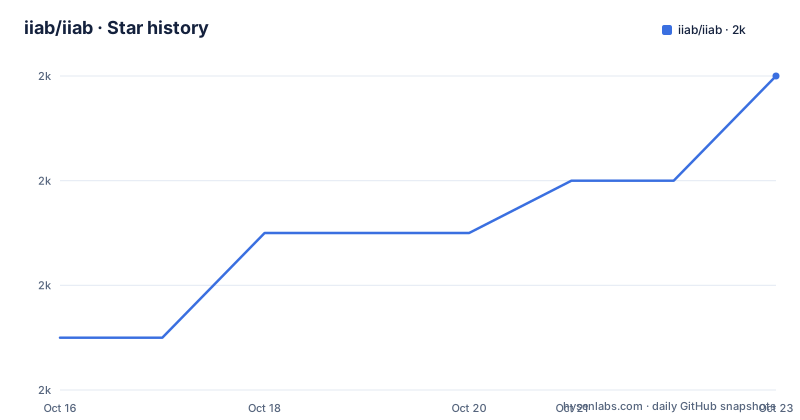
Star history
- iiab/iiab1,986 ★ · +5
| Repository | 2026-10-16 | 2026-10-23 |
|---|---|---|
| iiab/iiab | 2k | 2k |
5 Stars in the last 7 days, measured from the daily GitHub snapshot. Compare with other projects
Editorial analysis
Why IIAB Serves Offline Learning Communities
Internet-in-a-Box addresses a specific connectivity problem: people may have nearby smartphones, tablets, or laptops but lack dependable or affordable access to online services. The README describes IIAB as a "learning hotspot" that brings selected knowledge resources to people without an internet connection. The stated settings include a school, medical clinic, prison, region, library, and family.
That focus makes IIAB relevant to community networks, education programs, clinics, and public institutions where users can reach a local server but cannot assume continuous external connectivity. The project presents the hotspot as an offline digital library rather than a general proxy for the entire web.
The resource collection is intentionally selective. The README names Wikipedia in multiple languages, Khan Academy videos, OpenStreetMap, electronic books, WordPress journaling, and electronics projects such as "Toys from Trash." It also describes support for exchanging local or indigenous knowledge with nearby communities. That local content angle matters where globally available services do not represent the language, history, or educational priorities of a particular community.
IIAB is therefore most useful when an organization can define a bounded information service. It is less aligned with a requirement for unrestricted browsing, real-time web access, or content that changes continuously outside the local server.
How IIAB Combines Ansible, Content Packs, and Local Apps
The repository is built around Ansible automation. The README states that Ansible is used to install, deploy, configure, and manage IIAB software components. Top-level entries such as `iiab-install`, `iiab-setup`, `iiab-configure`, `iiab-stages.yml`, `runroles`, and `run-one-role.yml` indicate a staged, role-based deployment rather than a single conventional application package.
The user-facing result is a local service collection. Once IIAB is installed, users can reach the hotspot at `http://box` or `http://box.lan`. The README says the home page can be customized with a drag-and-drop Admin Console at `http://box.lan/admin`, where administrators arrange Content Packs and IIAB Apps.
The model separates selected material from locally hosted services. Content Packs provide offline library resources. IIAB Apps provide educational or related services, with more than 30 educational apps mentioned in the README. An optional complete LMS is also available. The exact internal implementation of each app is not described in the README, so the reliable distinction is the one the project gives: content packs are arranged alongside installed services through the Admin Console.
The project also mentions possible mesh networking. The README does not document the exact network topology, supported devices, or configuration steps, so mesh networking should be evaluated against the project's technical documentation rather than assumed to work automatically.
Installing IIAB on Raspberry Pi and Linux
The README gives two installation routes. The first is the one-line installer available through `download.iiab.io`. It is described as installing the latest version and working on different Linux distributions. The README says a typical installation may take about an hour, but that is an estimate rather than a guaranteed duration.
The second route uses prefab disk images. The README says these image files can be flashed onto a microSD card for insertion into a Raspberry Pi, and it links to the repository releases as a source for image files. The documentation does not provide a literal flashing command in this section, so the project installation wiki should be followed for the exact image selection and flashing procedure.
After installation, the local home page can be reached at the following documented address. A successful installation should present the Internet-in-a-Box home page, where an administrator can begin adding content.
http://boxThe README also documents a second local address for the same service:
http://box.lanFor Raspberry Pi deployments, the prefab image route is the more direct documented option because it is explicitly intended for a microSD card. For other Linux systems, the README points to the IIAB platform documentation and distinguishes systems that have already been tried from those that have not. That distinction is important. A project intended for local deployment still depends on the host operating system, storage, and network environment being compatible.
Adding Content and Performing the First Real Use
The first useful action after installation is adding content. The README links to the installation documentation's add-content section and warns that Content Packs can involve multi-gigabyte downloads. The device must therefore have enough storage for the selected packs, and the administrator should allow time for the initial transfer.
The README does not document a specific command for selecting a Content Pack from the command line. It instead directs users to add content after installation and then customize the home page. The documented management interface is below:
http://box.lan/adminThe Admin Console provides a drag-and-drop arrangement for Content Packs and IIAB Apps. A first deployment can start with a limited collection aimed at a defined audience, such as a school or clinic, rather than installing every available service. The README does not prescribe a particular minimum content set, so the appropriate selection depends on the community and the storage plan.
The optional LMS and the larger set of educational apps extend the possible local service catalog. They also expand the number of components that an administrator must configure and maintain. A sensible first-use test is therefore operationally simple: confirm that the local home page opens, place selected material in the Admin Console, and make that material available to the intended users. The README confirms this workflow, but it does not define a separate smoke-test command.
Content exchange is also part of the project concept. The README says nearby communities can exchange local or indigenous knowledge through the Manage Content workflow and possible mesh networking. That is a content-distribution feature, not evidence that all internet services are available offline.
Maintenance, Upgrades, and GPL-2.0 Cost
The repository is not archived, and its last push was on 2026-10-16. The release list also includes IIAB Daily Build entries dated 2026-10-08, 2026-10-08, and 2026-10-07. This indicates ongoing repository and release activity, but the README does not promise a particular support interval, upgrade path, or compatibility guarantee.
The daily build naming described in the README suggests a pre-release distribution model. The project says pre-releases undergo continuous QA, continuous integration, and continuous deployment, and it strongly recommends installing the latest pre-release. That policy can provide current fixes, but it also means adopters should expect release tracking and may need to retest the local deployment after updates. The README does not document rollback.
Because IIAB manages multiple services, upgrades may involve more than the repository itself. The documentation does not state whether Content Pack migrations, app upgrades, or database changes are automated. Administrators should treat content storage and service configuration as operational assets that need backups appropriate to their deployment.
The repository lists `GPL-2.0`, and it contains `LICENSE` and `LICENSING.md`. That identifies the project's licensing basis. Anyone considering redistribution, modification, or integration should review those files and comply with the applicable GPL-2.0 terms. This article does not provide legal advice.
IIAB Compared with Online Access and a Conventional Web Server
The main alternative is direct online access through the user's existing network. That approach automatically follows changes published by websites and services, but it depends on connectivity and may provide little offline availability when the network is slow, intermittent, or unavailable.
IIAB takes a different approach. It downloads selected resources, hosts them locally, and presents them through a local hotspot and Admin Console. This can improve access to a defined educational collection and supports locally authored content. The trade-off is freshness. IIAB does not claim to mirror the entire web, so selected resources require deliberate downloading and updating.
A conventional web server is another useful comparison. A standard server can host a site or proxy a service, but it does not by itself provide IIAB's Content Pack selection, educational app catalog, drag-and-drop arrangement, or community content workflow. IIAB is therefore closer to a managed local information appliance than to a general hosting platform.
The choice depends on the requirement. Choose direct online access when current web coverage is more important than offline availability. Choose IIAB when a school, clinic, library, prison, or family needs controlled local access to a curated set of learning resources.
The Limits of a Curated Offline Library
IIAB has a clear limitation: it cannot provide content that has not been selected and installed locally. The README's examples cover useful educational and reference resources, but it does not claim unrestricted access to arbitrary websites or live services. If users need frequently changing information that is not included in a Content Pack, IIAB may not satisfy the requirement.
The project also has a deployment cost. A Raspberry Pi must be prepared, the base software must be installed, content must be downloaded, and local services must be arranged. Multi-gigabyte Content Packs can take time and storage. The README does not document minimum hardware requirements, exact storage calculations, rollback procedures, or a complete compatibility matrix in the project description.
The optional LMS and many educational apps make IIAB more flexible, but they also introduce more configuration decisions. A team that wants a simple offline cache with minimal administration may find that the app-selection and Admin Console workflow requires more planning than a plain file server.
IIAB is the wrong tool when the primary need is unrestricted live browsing, continuous synchronization with remote services, or a centrally managed commercial application catalog. It is a better fit when the organization values a defined local library, nearby access, and control over the content placed on the device.
Editorial conclusion
IIAB suits organizations that need a locally controlled learning library on a Raspberry Pi or another supported Linux system. It is less suitable for a team that needs a continuously synchronized copy of the public web, because its documented model depends on selected offline content and local services. Before adoption, verify the target platform against the IIAB platform documentation, plan storage for multi-gigabyte Content Packs, and confirm that the required apps and content can be managed through the Admin Console.
Frequently asked questions
What is Internet-in-a-Box used for?
It is an offline digital library and learning hotspot for locations such as schools, medical clinics, prisons, libraries, regions, and families. It can provide selected Wikipedia content, Khan Academy videos, OpenStreetMap, books, journaling, and other local services.
How do I install Internet-in-a-Box on a Raspberry Pi?
The README offers two routes: the one-line installer through `download.iiab.io`, or a prefab disk image from the project releases that can be flashed onto a microSD card. Platform and image details are provided through the linked IIAB installation documentation.
Can I manage Internet-in-a-Box content without editing configuration files?
The README describes a drag-and-drop Admin Console at `http://box.lan/admin` for arranging Content Packs and IIAB Apps. It also points to a Manage Content workflow for local or indigenous knowledge, but it does not document a command-line content selection workflow.
What license does Internet-in-a-Box use?
The repository lists `GPL-2.0` as its license. The repository includes `LICENSE` and `LICENSING.md` for project licensing details, which should be reviewed when redistribution or integration is planned.
Official sources
Add this badge to your README
If you maintain this project, the badge below links readers to this analysis and shows its maintenance status from the daily GitHub snapshot. Paste the markdown into your README; add ?metric=license or ?metric=stars to the image URL for a different field.

[](https://hysenlabs.com/projects/iiab-iiab)Star history chart for your README
[](https://hysenlabs.com/projects/iiab-iiab)Was this useful?