iRedMail installation and deployment considerations
Full-featured, open source mail server solution for mainstream Linux/BSD distributions.
At a glance
- What is it?
- iRedMail packages mail-server deployment across selected Linux and BSD distributions. It suits administrators who want an integrated installation, but its broad scope makes platform fit and upgrade planning important.
- Who is it for?
- Administrators running a listed Linux or BSD release should adopt iRedMail when they want an integrated mail-server stack and can operate its interacting services. Organizations needing unsupported platforms, undocumented rollback behavior, or a transactional-mail library should choose another approach.
- Can I use it commercially?
- Yes, with conditions. GPL-3.0 is a copyleft licence: if you distribute software that includes it, you must release that software's source code under the same licence. Running it internally without distributing it does not trigger that obligation.
- Is it still maintained?
- Yes. The repository last received commits 4 days ago.
- What is it written in?
- Mainly Shell, according to GitHub's language statistics.
Answers come from the project's GitHub data, last synced on October 23, 2026, and from our analysis. They are not legal advice.
Star history
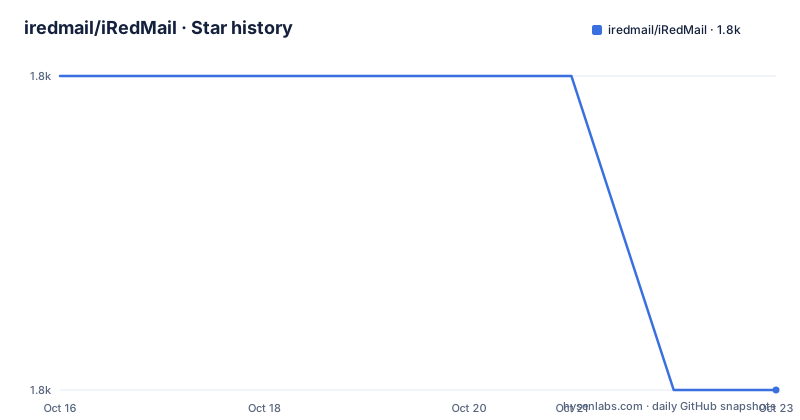
- iredmail/iRedMail1,847 ★ · -1
| Repository | 2026-10-16 | 2026-10-23 |
|---|---|---|
| iredmail/iRedMail | 1.8k | 1.8k |
-1 Stars in the last 7 days, measured from the daily GitHub snapshot. Compare with other projects
Editorial analysis
iRedMail's deployment scope and intended operators
iRedMail addresses the operational problem of assembling and configuring a complete mail server. The repository is primarily written in Shell and is organized around an installer, package definitions, service samples, helper functions, documentation, and an update directory. Its stated target users are system administrators deploying mail infrastructure on mainstream Linux and BSD distributions.
The supported list is narrower than the broad phrase "mainstream Linux and BSD" might imply. The README names CentOS Stream 9 and 10, Rocky Linux 9 and 10, AlmaLinux 9 and 10, Debian 12 and 13, Ubuntu 22.04, 24.04, and 26.04, FreeBSD 14.x, and OpenBSD 7.8. Ubuntu 24.04 is marked as recommended. A distribution or version outside that list should not be treated as supported from the repository's stated compatibility information.
The project is not presented as a hosted email provider or as a lightweight component for adding SMTP submission to an existing application. Its purpose is broader: deploying a mail server solution on a managed operating system. That makes it more relevant to server administrators than to developers who only need to send transactional mail from an application.
How the iRedMail installer organizes the server stack
Based on the repository layout, `iRedMail.sh` is the central entry point, while `dialog/`, `functions/`, and `pkgs/` contain the interactive installer, supporting logic, and package-related files. The `samples/` tree shows that deployment brings together several separately recognized server components rather than one monolithic application. Named directories include `postfix/`, `dovecot/`, `nginx/`, `amavisd/`, `spamassassin/`, `fail2ban/`, and `sogo/`.
The tree also exposes the database choices available to the deployment flow. Separate sample directories exist for `mysql/`, `postgresql/`, and `openldap/`. Webmail is represented by `roundcubemail/`, while logging, monitoring, rotation, firewall, and operating-system integration have dedicated directories such as `rsyslog.d/`, `netdata/`, `logrotate/`, `firewall/`, and `systemd/`.
That structure suggests a configuration-led installation process in which the installer coordinates packages, writes configuration, and places service-related files for the selected stack. The README does not provide a detailed component sequence or an interactive transcript, so a particular installation order cannot be confirmed. It also does not document a rollback procedure. Administrators should therefore treat the linked installation guide as separate operational documentation rather than assume that `iRedMail.sh` provides automatic recovery.
Preparing the supported operating system before installation
The repository gives no self-contained command sequence, so this tutorial does not invent installer flags or package names. The first documented step is to obtain the latest stable release from `https://www.iredmail.org/download.html`. The README specifically directs users to follow the installation guides at `https://docs.iredmail.org/#install` strictly.
Before following that guide, match the target host against the versions listed in the README. Ubuntu administrators should locate the guide for their exact Ubuntu release rather than treating the listed versions as interchangeable. Rocky Linux, AlmaLinux, and CentOS Stream likewise have separate major-version entries. FreeBSD and OpenBSD have different system layouts, so Linux instructions should not be applied to them without the relevant guide.
The first real deployment also requires a deliberate selection of the services and data backend offered by the installer. Repository directories show choices involving SMTP, Dovecot, web and administration services, spam filtering, databases, logging, and firewall samples. The README does not say which selections are mandatory or provide defaults, so the documentation at the linked installation section is the authority for those choices. iRedMail Easy is presented as the recommended deployment platform, with one-click upgrade and ticket-based technical support. It is an option, not a stated requirement for using the installer itself.
iRedMail Easy versus the separate dockerized repository
The project names two deployment paths. The first is the supported-host installation process associated with iRedMail Easy. According to the README, that platform offers easier deployment, one-click upgrade, and technical support through a ticket system. These services have operational value because changing several mail-service configurations at once can be difficult to control, although the README provides no test data or measurements to quantify that difficulty.
The second path is the official `iredmail/dockerized` repository, described as an all-in-one Docker edition. Its architecture differs because containers package service processes and their filesystems, while the native repository organizes an installation directly across supported Linux and BSD hosts. The README does not compare host networking, DNS assumptions, persistent storage, backup behavior, or upgrade mechanics between the two editions, so those points cannot support a claim that one is easier in every environment.
This distinction matters for an existing data center. A team with a container platform may examine the official Docker edition as an alternative to a native deployment. A team requiring one of the listed BSD targets should examine the native installation documentation instead, because the README does not state that the Docker edition supports those targets.
Maintenance boundaries, releases, and upgrade effort
The repository is not archived, and its last push was on 2026-10-14. That date indicates recent repository activity, but push recency alone does not define release quality or compatibility. The repository has no GitHub releases, and the README instead directs users to the download page for the latest stable release. This creates an important difference between source activity and production release discovery: a recent commit is not the same artifact as a named stable package.
The `update/` directory shows that upgrade-related code is part of the source tree, while the README attributes one-click upgrade to iRedMail Easy. It does not document migration paths, supported upgrade jumps, rollback behavior, or whether an existing configuration can be restored automatically. Those omissions matter for a mail server because the repository integrates multiple services and backend options.
Paid support is also available through `https://www.iredmail.org/support.html`, but that is separate from the GPL-3.0 project code. Teams should compare what the support offering includes with the operational work they expect to own. The README documents neither response times nor covered incidents, so paid support cannot be treated as a substitute for an internal change plan.
GPL-3.0 implications for modified iRedMail deployments
The repository identifies the project under GPL v3 and includes a top-level `LICENSE` file. The README also notes that source packages patched or modified for RHEL or CentOS are published in its source RPM directory, while other RPM packages are obtained from official yum repositories and EPEL. This separation makes it easier to identify which components are upstream packages and which source packages have project-specific changes.
For organizations that redistribute a modified iRedMail package, the GPL-3.0 license terms govern their handling of covered software. This review does not provide legal advice, and local counsel should determine obligations for a particular distribution model. The practical point is to preserve applicable license notices and source information when working with modified covered code. The public source RPM location does not remove the need to identify which packages and modifications an operator distributes.
Configuration files and third-party packages may have separate terms, but the repository does not map licenses for every component. An adoption decision should therefore include a package-level review rather than assuming that every file beneath `samples/` is governed in exactly the same way as the main installer.
Deployment cases where iRedMail is the wrong fit
iRedMail is a poor fit when the host uses an operating-system version absent from the README's support list. The project gives explicit distribution and release boundaries, and treating an unlisted release as equivalent would bypass the compatibility information the maintainers provide. It is also a poor fit for an application that merely needs outbound message delivery because the repository is designed as a broad mail-server solution rather than a documented application-mail integration library.
The Docker edition is another case that requires scrutiny. An organization may favor the official `iredmail/dockerized` repository for containerized deployment, but the README does not state whether it meets its DNS, network, storage, or operational requirements. Native BSD support should not be inferred from the existence of a Docker project.
Most importantly, iRedMail should not be adopted by a team unable to own several interacting services. The sample tree includes mail transport, mailbox access, web components, filtering, databases, logging, monitoring, firewall configuration, and operating-system integration. The README does not promise that one person or one command makes those operational decisions disappear.
Editorial conclusion
Administrators running a listed Linux or BSD release should adopt iRedMail when they want an integrated mail-server stack and can operate its interacting services. Organizations needing unsupported platforms, undocumented rollback behavior, or a transactional-mail library should choose another approach. First verify the target operating-system version, download channel, selected components, backup method, and upgrade path in the project documentation.
Frequently asked questions
Which operating systems does iRedMail support?
The README lists CentOS Stream 9 and 10, Rocky Linux 9 and 10, AlmaLinux 9 and 10, Debian 12 and 13, Ubuntu 22.04, 24.04, and 26.04, FreeBSD 14.x, and OpenBSD 7.8. It marks Ubuntu 24.04 as recommended.
Where can I download the latest stable iRedMail release?
The README directs users to `https://www.iredmail.org/download.html` for the latest stable release. It also directs installers to the guides at `https://docs.iredmail.org/#install`.
Does iRedMail offer a Docker edition or managed deployment option?
The README identifies `iredmail/dockerized` as an all-in-one Docker edition. It also describes iRedMail Easy as a deployment platform offering one-click upgrade and technical support.
Official sources
Add this badge to your README
If you maintain this project, the badge below links readers to this analysis and shows its maintenance status from the daily GitHub snapshot. Paste the markdown into your README; add ?metric=license or ?metric=stars to the image URL for a different field.

[](https://hysenlabs.com/projects/iredmail-iredmail)Star history chart for your README
[](https://hysenlabs.com/projects/iredmail-iredmail)Was this useful?