Auto3D 3.1: One command from SMILES to ranked low-energy conformers, with trade-offs you should know
Auto3D generates low-energy conformers from SMILES/SDF
At a glance
- What is it?
- Auto3D turns SMILES strings into energy-ranked 3D conformers using neural network potentials. It is fast to start, but GPU handling and engine choices need attention.
- Who is it for?
- Adopt Auto3D if you work with small organic molecules, need tautomer and stereoisomer enumeration in one pipeline, and want a single command that writes an SDF with energies. Skip it if you need heavy metals beyond its element set, if you cannot meet Python 3.11 and PyTorch 2.8, or if you require deterministic GPU fallback.
- Can I use it commercially?
- Yes. MIT is a permissive licence: you can use, modify and sell software built on it, as long as you keep its copyright and licence notices.
- Is it still maintained?
- Yes. The repository last received commits 1 day ago.
- What is it written in?
- Mainly Python, according to GitHub's language statistics.
Answers come from the project's GitHub data, last synced on October 24, 2026, and from our analysis. They are not legal advice.
Star history
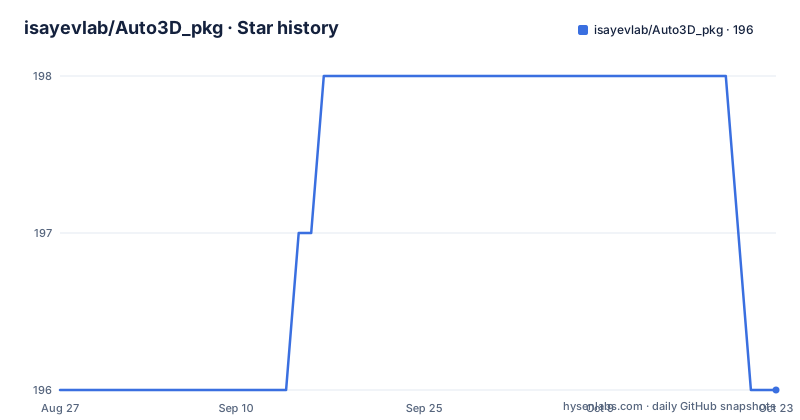
- isayevlab/Auto3D_pkg196 ★ · +0
| Repository | 2026-08-27 | 2026-10-24 |
|---|---|---|
| isayevlab/Auto3D_pkg | 196 | 196 |
0 Stars in the last 58 days, measured from the daily GitHub snapshot. Compare with other projects
Editorial analysis
What Auto3D actually automates
Auto3D solves a specific chore: going from a flat SMILES string to a set of 3D conformers that are both chemically sensible and ranked by energy. That sounds trivial, but the pipeline involves several steps that are usually done by hand. The README lists them: enumerate tautomers and stereoisomers, embed and optimize each with a neural network potential, remove duplicates by RMSD, then rank by energy. The output is an SDF where each conformer carries its total energy, relative energy, and optimizer diagnostics. The intended user is someone doing computational chemistry or drug discovery who needs low-energy 3D structures as input to docking, QM calculations, or other downstream tools. The one-command design means you do not need to write a script that chains RDKit, a force field, and a QM optimizer yourself.
The mechanism: neural network potentials and duplicate removal
The core mechanism is the use of neural network potentials (NNPs) for geometry optimization. Auto3D supports several engines: AIMNet2 variants, ANI2x, and ANI2xt. The default is AIMNET, which evaluates one network per step. ANI2x uses an ensemble of eight networks per step, which is slower but may be more robust for certain elements. The engine selection is controlled by the optimizing_engine parameter, which can also accept a path to a custom NNP. After optimization, Auto3D removes duplicates based on an RMSD threshold, default 0.3 Å, then ranks conformers by energy. The ranking is not a simple energy sort; it respects the k or window constraint you set. The README notes that the default AIMNet2 energies differ from version 2.x because the registry externalizes D3 dispersion, so rankings may shift slightly. That is a real change you should be aware of if you upgrade.
Getting it running: commands and config keys
Installation is straightforward: pip install Auto3D, or with extras for ANI and ASE: pip install "Auto3D[ani,ase]". You need Python 3.11 or newer and PyTorch 2.8 or newer. The first run downloads AIMNet2 weights to ~/.cache/aimnet, so network access is required. The CLI is auto3d run molecules.smi --k=1. You must provide exactly one of --k or --window. For example, --k=5 gives the top five conformers per molecule, while --window=3.0 gives everything within 3 kcal/mol. GPU is used by default, and if no CUDA device is visible, the run is a fatal error, not a fallback. You must pass --no-gpu on a CPU-only machine. The Python API is equally simple: from Auto3D import Auto3DOptions, main; config = Auto3DOptions(path="molecules.smi", k=1); output_path = main(config). For small batches, smiles2mols returns RDKit molecules directly. Config files can be managed with auto3d config init, show, and validate.
Limitations: GPU, elements, and output gaps
The GPU behavior is a genuine limitation. If you request GPU without a CUDA device, the program exits with a fatal error. That is deliberate, but it means a user on a laptop with no GPU must remember the --no-gpu flag every time. The element coverage is also restricted. AIMNet2 covers H, B, C, N, O, F, Si, P, S, Cl, As, Se, Br, I. ANI2x and ANI2xt cover only H, C, N, O, F, S, Cl. If your molecules contain, say, a metal or a halogen beyond iodine, Auto3D will not work without a custom NNP. The README does not state what happens when an unsupported element is encountered, so you need to test it. Another gap: the input SMILES is not written to the output SDF. You must join on _Name or ID against your input file. That can be annoying if you lose the original file.
Engines and their trade-offs
The engine table is honest about what it does not know. It reports how many networks each engine evaluates per step, not speed. AIMNET uses one network per step, ANI2x uses eight. That means ANI2x is likely slower, but it may offer better accuracy for the elements it covers. The README explicitly says no engine speed benchmark is maintained in this repository, so you have to time your own workload. That is a refreshing admission. The default AIMNET engine comes from the aimnet package, which is pip-only. If you use conda, the conda-forge package does not include aimnet because of a pip-only dependency. You have to pip install aimnet inside the conda environment. That is a real friction point for conda users. The README suggests using the installation.yml to set up a supported combination, which is a practical workaround.
Beyond conformer generation: energy, optimization, thermo, and tautomers
Auto3D is not only a conformer generator. The README lists several subcommands that wrap Python API functions: auto3d energy for single-point energies, auto3d optimize for geometry optimization of an existing SDF, auto3d thermo for enthalpy, entropy, and Gibbs free energy (requires ASE), auto3d tautomers for enumerating stable tautomers, and auto3d validate for checking input without running. There is also auto3d models list, info, and test to inspect and smoke-test engines. These commands give you a broader toolkit. For example, you could generate conformers with one engine, then re-optimize with another, or compute thermochemistry without leaving the CLI. The --json flag is available on run, validate, and the four property commands, which is useful for scripting. The exit codes are documented: 0 success, 2 config/input error, 4 GPU unavailable, 6 partial success, 130 interrupted. That is a concrete detail that helps automation.
Maintenance, upgrades, and license
The project is active, with the latest release v3.1.1 pushed on 2026-08-27. The README includes a migration guide from 2.x, which is a good sign. The main changes are: AIMNet2 is now served by the aimnet package rather than bundled .jpt files, the default energies differ because of externalized D3 dispersion, and the thermochemistry SDF property S_hartree is now S_hartree_per_K. Python 3.11 and PyTorch 2.8 are required, which may force environment upgrades. The license is MIT, which is permissive and generally favorable for adoption. There is no mention of a maintenance cost, but the dependency on PyTorch and the aimnet package means you inherit their update cycles. The first-run network download is a one-time cost, but it can be a problem in air-gapped environments.
Alternatives and when to choose them
The most direct alternative is RDKit's own conformer generation, which uses the ETKDG method and a force field like MMFF. That approach is fast, works offline, and covers a broad element range. But it does not enumerate tautomers or stereoisomers by default, and it does not rank conformers by a neural network potential energy. You would have to add your own energy evaluation, perhaps with a QM package. Another alternative is the commercial tool Omega from OpenEye, which is known for high-quality conformer generation but is not open source. Auto3D's advantage is the integration of enumeration, optimization, and energy ranking in one pipeline. The trade-off is the element coverage and the GPU requirement. If your molecules are simple organics and you already have an RDKit workflow, you may not need Auto3D. If you need tautomer enumeration and NNP-based energies, Auto3D is a strong fit. The README does not mention any competitor by name, but the comparison is implicit in the feature set.
Editorial conclusion
Adopt Auto3D if you work with small organic molecules, need tautomer and stereoisomer enumeration in one pipeline, and want a single command that writes an SDF with energies. Skip it if you need heavy metals beyond its element set, if you cannot meet Python 3.11 and PyTorch 2.8, or if you require deterministic GPU fallback. Before adopting, verify the engine element coverage against your molecules, confirm the first-run network download is acceptable, and test the exact k or window behavior on a small set.
Frequently asked questions
What does Auto3D do with a SMILES string?
It enumerates tautomers and stereoisomers, embeds and optimizes them with a neural network potential, removes duplicates, and ranks the result by energy. The output is a timestamped directory containing an SDF with the lowest energy conformers per molecule, each carrying its energy.
Why does Auto3D fail instead of using the CPU when no GPU is present?
Requesting a GPU with no visible CUDA device is treated as a fatal error rather than a fallback, and the run exits with code 4. Pass --no-gpu, or use_gpu=False in Auto3DOptions, on a machine without CUDA.
Which engines does Auto3D support and what are their limits?
AIMNET is the default with one network per step, named aimnet2 variants are also available, ANI2x uses an eight network ensemble, and ANI2xt uses one. The ANI engines cover only H, C, N, O, F, S and Cl, while AIMNet2 also covers B, Si, P, As, Se, Br and I.
What are the exit codes of the Auto3D command line?
0 for success, 2 for a config or input error, 4 when a GPU was requested but is unavailable, 6 for partial success, and 130 when interrupted. Every command except models list takes a verbose flag, which the documentation calls the only way to get a traceback.
How do I get RDKit molecules back from Auto3D without writing files?
For batches of 150 molecules or fewer, smiles2mols returns RDKit molecule objects directly and skips the job directory. It takes a list of SMILES and an Auto3DOptions instance, for example Auto3DOptions(k=1, use_gpu=False).
What changed between Auto3D 2.x and 3.x?
AIMNet2 is now served by a separate package rather than bundled weight files, and default AIMNet2 energies differ from 2.x because the registry model externalises dispersion, so rankings may shift slightly. Python 3.11 and PyTorch 2.8 are now required.
Official sources
Add this badge to your README
If you maintain this project, the badge below links readers to this analysis and shows its maintenance status from the daily GitHub snapshot. Paste the markdown into your README; add ?metric=license or ?metric=stars to the image URL for a different field.

[](https://hysenlabs.com/projects/isayevlab-auto3d-pkg)Star history chart for your README
[](https://hysenlabs.com/projects/isayevlab-auto3d-pkg)Was this useful?