react-native-fs: A Direct Filesystem Bridge for React Native, With Version Caveats
GitHub describes it as Native filesystem access for react-native. The repository metadata lists C++ as its primary language. The metadata lists the MIT license. This article stays within the project description and details documented in the GitHub repository README.
At a glance
- What is it?
- react-native-fs gives React Native apps native read, write, and upload access to the filesystem. It is pragmatic and widely used, but its setup depends heavily on your React Native version, and Android support is narrower than iOS.
- Who is it for?
- Adopt react-native-fs if you need direct filesystem operations in a React Native app and can tolerate manual native linking and version-specific installs. It suits iOS-heavy projects where you need read, write, unlink, and upload with minimal abstraction.
- Can I use it commercially?
- Yes. MIT is a permissive licence: you can use, modify and sell software built on it, as long as you keep its copyright and licence notices.
- Is it still maintained?
- Probably not. The repository last received commits 31 months ago, on March 18, 2024.
- What is it written in?
- Mainly C++, according to GitHub's language statistics.
Answers come from the project's GitHub data, last synced on October 21, 2026, and from our analysis. They are not legal advice.
Star history
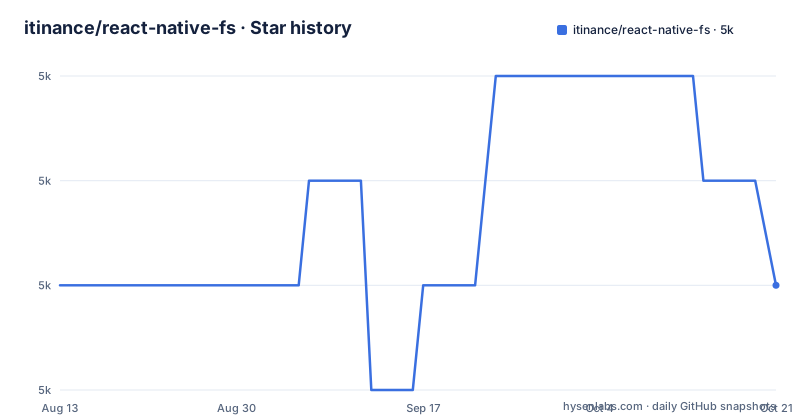
- itinance/react-native-fs5,043 ★ · +0
| Repository | 2026-08-13 | 2026-10-21 |
|---|---|---|
| itinance/react-native-fs | 5k | 5k |
0 Stars in the last 69 days, measured from the daily GitHub snapshot. Compare with other projects
Editorial analysis
What It Solves and Who It Is For
React Native does not expose the filesystem to JavaScript. You get AsyncStorage for small key-value data, but no way to list a directory, read a file as a string, or upload a file with a progress callback. react-native-fs fills that gap with a native module that maps JavaScript calls to C++ and platform-specific code. The intended user is a React Native developer who needs to manage files on the device: download a PDF, cache images, write logs, or upload a recording. The README's examples show exactly that: reading a directory, writing a text file, deleting it, and uploading an array of files. It is not a high-level storage abstraction; it is a bridge to the underlying filesystem, and it expects you to know what you want to do with a path.
The Mechanism: Native Modules and a Promise-Based API
Under the hood, react-native-fs is a native module. The repository is primarily C++, with platform-specific implementations for iOS, Android, and Windows. The JavaScript side exposes a singleton object, typically imported as RNFS, with methods like readDir, stat, readFile, writeFile, unlink, and uploadFiles. Each method returns a Promise, which fits React Native's async patterns. For example, readDir returns an array of file objects, each with a path property that you can pass to stat or readFile. The README shows a chain: readDir, then stat on the first result, then readFile if it is a file. That is the core flow. The module does not manage paths for you; you construct them from constants like RNFS.DocumentDirectoryPath. On iOS, MainBundlePath is read-only, and DocumentDirectoryPath is writable. On Android, only DocumentDirectoryPath exists, and it maps to the app's files directory. This is a thin wrapper, not a filesystem abstraction layer.
Getting It Running: Commands and Config Keys
Installation is straightforward but version-sensitive. The README opens with a warning: for React Native below 0.57 or Gradle below 3, you must install react-native-fs at version 2.11.17. For RN 0.57 and up, use 2.13.2 or later. For RN 0.61 and up, use 2.16.0 or later. The basic install is npm install react-native-fs --save, and then react-native link react-native-fs for automatic linking on iOS and Windows. For iOS with CocoaPods, you add pod 'RNFS', :path => '../node_modules/react-native-fs' to your Podfile and run pod install. Manual Xcode setup is also documented, requiring you to add the .xcodeproj and link lib*.a, plus set Header Search Paths. Android requires manual edits: add include ':react-native-fs' and project(':react-native-fs').projectDir = new File(settingsDir, '../node_modules/react-native-fs/android') to settings.gradle, add implementation project(':react-native-fs') to build.gradle dependencies, and register RNFSPackage in MainApplication.java or MainActivity.java depending on your RN version. Windows uses the same react-native link command. The README does not mention autolinking, which is standard in newer React Native versions, so expect manual steps if you use RN 0.60 or later.
Where It Falls Short: Android Limits and Version Traps
The most concrete limitation is Android support. The README states plainly: Android support is currently limited to only the DocumentDirectory, which maps to the app's files directory. That means no access to external storage, SD cards, or the root of the filesystem on Android. If your app needs to read files from a user-selected URI or write to public Downloads, this library will not do it without extra work. Another trap is the version matrix. The README lists three different version requirements depending on your RN and Gradle versions, and it warns that for RN below 0.40 you need a specific release candidate tag. This is not a set-and-forget install. If you upgrade React Native, you must re-check which react-native-fs version you are on. The last release was v2.20.0 on 2022-05-04, and the repository has not had a push since. That means no updates for new React Native versions or Android API changes. For a native module, that is a real risk: it may break with newer toolchains, and there is no active maintenance to fix it.
The Alternative: expo-file-system and Its Different Approach
A direct alternative is expo-file-system, which is part of the Expo SDK. The difference is not just the API; it is the integration model. react-native-fs requires manual native linking and version-specific installation, as shown above. expo-file-system works out of the box in an Expo managed workflow, where the native code is handled by the Expo client. You do not touch Gradle or Xcode project files. However, expo-file-system is tied to the Expo runtime, so if you use bare React Native, you would need to install the expo-modules-core and configure it, which is a different setup. The API surface is similar: readDirectoryAsync, writeAsStringAsync, deleteAsync. But expo-file-system also provides a base64 encoding option and integrates with expo-asset for bundling. The trade-off is clear: react-native-fs gives you raw control and works in any React Native project, but you own the native build steps. expo-file-system gives you convenience but locks you into Expo's module system, which may not suit every project.
Maintenance and Upgrade Cost
The project is MIT licensed, which means you can use it freely, modify it, and redistribute it. The license has no copyleft obligations, so it is safe for commercial apps. The maintenance cost is where you need to be careful. The last push was in May 2022, and the release notes show a steady cadence up to that point: v2.20.0, v2.19.0, v2.18.0. But since then, nothing. The README's version warnings suggest that each React Native release can break the module, and the maintainers have historically issued patch releases to address that. With no active releases, you are on your own if a new RN version breaks compilation. The changelog is linked but not included in the material, so I cannot confirm what changed in v2.20.0. You should read it before upgrading. The upgrade cost is not just running npm install; it is re-verifying that the native code still links and that the API has not changed. For a long-lived app, that is a recurring task.
Editorial conclusion
Adopt react-native-fs if you need direct filesystem operations in a React Native app and can tolerate manual native linking and version-specific installs. It suits iOS-heavy projects where you need read, write, unlink, and upload with minimal abstraction. Avoid it if you expect Android support beyond the DocumentDirectory, or if you want a zero-config, autolinked module. Before adopting, verify your exact React Native and Gradle versions against the README's version requirements, and check the changelog for any breaking changes since the last push in 2022. The project is not archived, but its last release was over two years ago, so confirm it still builds with your current toolchain.
Frequently asked questions
what is react native fs
A native filesystem module for React Native, MIT licensed, with Objective-C sources at the root for iOS plus android/ and windows/ directories. It exposes path constants such as RNFS.DocumentDirectoryPath and calls like readDir, stat, readFile, writeFile and unlink, with FS.common.js as the entry point and index.d.ts for typings.
install react native fs
Run npm install react-native-fs --save, then register the native side. The README gives react-native link react-native-fs as the automatic path, CocoaPods lines for iOS, two Gradle edits for Android, and a csproj path for Windows. On React Native 0.61 or newer the documented minimum is 2.16.0.
Does react-native-fs expose the same paths on iOS and Android?
No. Android support is limited to only the DocumentDirectory, which maps to the app's files directory, and MainBundlePath is not defined on Android at all. DocumentDirectoryPath is the constant that exists on both platforms and is writable, while on iOS you cannot write into MainBundlePath.
How do I add react-native-fs on Windows?
The link command works there too: react-native link react-native-fs. For a manual Visual Studio setup, the README sends you to the Linking Libraries instructions on the react-native-windows repository and says the solution path should be ../node_modules/react-native-fs/windows/RNFS/RNFS.csproj. react-native-windows is declared as an optional peer dependency.
Official sources
Add this badge to your README
If you maintain this project, the badge below links readers to this analysis and shows its maintenance status from the daily GitHub snapshot. Paste the markdown into your README; add ?metric=license or ?metric=stars to the image URL for a different field.

[](https://hysenlabs.com/projects/itinance-react-native-fs)Star history chart for your README
[](https://hysenlabs.com/projects/itinance-react-native-fs)