svelte-commerce: A SvelteKit Storefront With 26 Backend Connectors
Open-source headless SvelteKit storefront for 26 commerce backends — Medusa, Shopify, Saleor, Vendure, WooCommerce, Litekart and more — plus GoCommerce via an early connector.
At a glance
- What is it?
- svelte-commerce is an MIT-licensed headless storefront built with SvelteKit and TypeScript. Its connector architecture separates the customer-facing Svelte application from commerce APIs, but connector support varies substantially and the README says none has been run against a live production instance.
- Who is it for?
- Adopt svelte-commerce when a SvelteKit storefront and connector-based backend switching fit the project, and do not assume every listed service works. Verify the exact connector coverage, required environment variables, authentication behavior, and production deployment path before committing to it.
- Can I use it commercially?
- Yes. MIT is a permissive licence: you can use, modify and sell software built on it, as long as you keep its copyright and licence notices.
- Is it still maintained?
- Yes. The repository last received commits 1 day ago.
- What is it written in?
- Mainly Svelte, according to GitHub's language statistics.
Answers come from the project's GitHub data, last synced on November 7, 2026, and from our analysis. They are not legal advice.
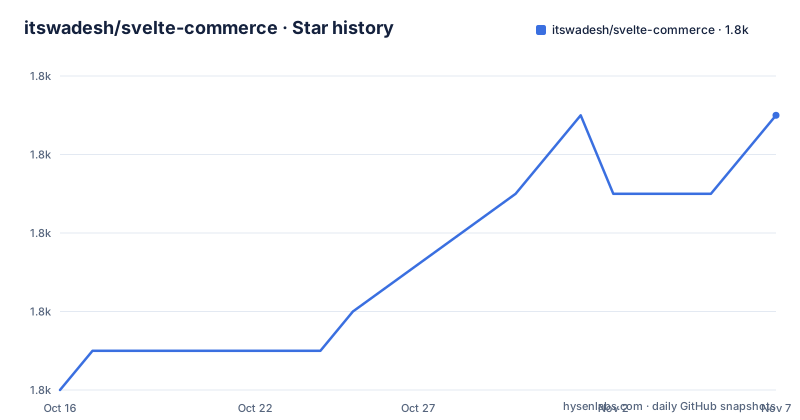
Star history
- itswadesh/svelte-commerce1,827 ★ · +7
| Repository | 2026-10-16 | 2026-11-07 |
|---|---|---|
| itswadesh/svelte-commerce | 1.8k | 1.8k |
7 Stars in the last 22 days, measured from the daily GitHub snapshot. Compare with other projects
Editorial analysis
Why svelte-commerce separates the storefront from commerce APIs
svelte-commerce targets teams that want to control the storefront independently of the commerce platform that owns products, carts, checkout, orders, and customer data. The project uses SvelteKit and TypeScript for the presentation and server-side application layer, while separate connector packages translate requests to backend APIs. That split is useful for teams evaluating Shopify, WooCommerce, Medusa, Saleor, Vendure, Litekart, and other platforms without committing the interface to one platform's conventions.
The advertised scope is broader than a simple catalog demo. The shared service surface contains 43 services, including `product`, `cart`, `checkout`, `order`, `auth`, and `address`. The repository describes catalog browsing, cart, checkout, order management, server-side rendering, and responsive storefront UI. It also lists PWA, faceted-search, and filter topics, indicating that the application includes more storefront infrastructure than a bare product list.
This is a headless arrangement, not a bundled commerce server. The repository does not provide the database or business logic for every listed platform. Instead, it expects an existing backend and its API. The connector becomes the boundary between Svelte Commerce's shared application services and platform-specific endpoints, credentials, and data shapes.
That architecture creates a clear fit for organizations with an existing commerce operation. It also creates an evaluation requirement. A platform may support checkout while lacking auth, or may implement cart and order services without exposing country, vendor, review, or page operations. Connector support should therefore be checked service by service rather than inferred from a platform appearing in the table.
How the connector resolution and service boundary work
The README states that no repository file names the active connector. Services resolve through `$lib/core/services`, while the installed package in `package.json` determines which connector answers. `vite.config.ts` exposes the selected package as `$connector`, and `src/lib/core/connectors/active.ts` wraps that package for every backend. This keeps backend-specific selection out of the main service calls.
The default package is `@misiki/litekart-connector`, which is also declared as a peer dependency of `@misiki/kitcommerce-core`. The Vite configuration includes a shim that redirects that Litekart import when another connector is installed. If Litekart remains installed, the shim does nothing. The documented switch therefore consists of replacing the connector package and configuring the matching environment variables.
`PUBLIC_CONNECTOR` provides a second selection mechanism. It can select a connector when several are installed or point to a package the repository has never previously known, such as a custom package. The README presents this as an extension point, but it does not document the complete contract that a custom connector must implement beyond the shared service surface and connector selection conventions.
The repository also describes coverage measurement. A script traces which services reach the HTTP layer by following each connector's request helpers. The resulting numbers vary considerably. Litekart and Vendure are listed at 39 of 43 services, while OpenCart is listed at 9 of 43. The table distinguishes wired services from services that throw `NotSupportedError`. That distinction is important because a listed backend can support the main shopping path while still leaving several storefront functions unavailable.
According to the README, endpoints were written from authoritative platform material such as OpenAPI specifications, RAML, router registration, or controller code. It also explicitly says none of the connectors has been run against a live production instance. The documented endpoint research is therefore not the same as production validation.
Installing a connector and starting the first SvelteKit run
The project does not provide a standalone installer in the README. The documented setup starts from the repository's environment example and the package manager workflow. The example instructs users to copy `.env.example` to `.env`, then activate exactly one backend block that matches the installed connector.
The following command creates the local environment file exactly as shown in the repository instructions. It does not configure a backend by itself, so the next step is to edit the resulting file:
cp .env.example .envFor example, the README documents replacing the stock Litekart connector with Shopify or another connector. The exact package name must match the connector selected by the user, so the command below is shown in the form documented by the README:
npm uninstall @misiki/litekart-connector
npm i @misiki/shopify-connector   # or vendure, medusa, saleor, ...
The environment convention is `PUBLIC_<BACKEND>_API_URL`, with additional credentials using the same prefix. The repository gives `PUBLIC_SHOPIFY_API_URL`, `PUBLIC_MEDUSA_API_URL`, and the Litekart trio as examples. The active connector and the environment block must match. The example file also documents `PUBLIC_CONNECTOR` as an override for selecting an installed connector or attaching a custom package.
After dependencies and environment values are in place, the package scripts define the development command:
bun run devThis invokes the `dev` script, which is `vite dev`. The README does not document a specific URL, port for the development server, or a universal first-page test. The Docker Compose file uses port `3000` for the production service, but that is a container mapping rather than a documented development-server port.
For a production-oriented check, the package also exposes `build` and `start`. The repository files identify `build` as `vite build`, `start` as `node build`, and `check` as `svelte-kit sync && svelte-check --tsconfig ./tsconfig.json`. These are repository scripts, not claims that every connector has passed a live deployment.
Connector coverage differences that affect storefront scope
The connector table makes the project's main trade-off visible. The 43-service surface is shared conceptually, but support is not uniform. Litekart and Vendure each show 39 wired services and support cart, checkout, order, and auth. Broadleaf Commerce, Saleor, and Shopware show 28 services, but their limitations differ. Saleor lacks several commerce operations in the table, including address, auth, cart, category, checkout, coupon, order, page, payment-method, search, and user. Shopware's listed missing capability is coupon.
Medusa shows 31 of 43 services, with checkout, order, and category support shown as wired, while address, auth, cart, payment-method, product, search, and user are listed as needing work. The table marks auth with `NotSupportedError` for several platforms, including Medusa, Saleor, WooCommerce, PrestaShop, CS-Cart, and OpenCart. An application that depends on customer accounts may therefore not fit simply because its backend is present in the connector list.
Shopify is listed at 16 of 27 rather than 16 of 43, and the README calls out country, page, profile, review, vendor, and wishlist as areas needing help. Magento Open Source, Spree, X-Cart, EverShop, Spryker, nopCommerce, PrestaShop, Sylius, and other platforms occupy different points on the same coverage spectrum. OpenCart is the clearest boundary in the table at 9 of 43, with many listed services unavailable.
These numbers describe repository coverage claims, not guarantees of backend quality. The README says coverage was measured by tracing connector requests to the HTTP layer, and it distinguishes missing platform endpoints from unimplemented wiring. It also warns that none of the connectors has been run against a live production instance. Backend version, credentials, custom extensions, and merchant configuration could still change the result.
Docker deployment requires process environment values
The repository includes a Dockerfile and a Docker Compose service. The image uses `node:24-slim`, installs Bun, runs `bun i`, builds with `bun run build`, and starts with `bun start`. The Compose service maps `3000:3000` and sets `NODE_ENV=production` and `PORT=3000`.
A deployment detail is easy to miss. The Compose file states that the production Node server reads `PUBLIC_*` values from the process environment, not from a shipped `.env` file. Under `vite dev` and `vite preview`, the `.env` file applies, but production requires the values to be supplied by the deployment platform or container environment. Missing values can cause SSR pages to fail because the API URL or store resolution is unavailable.
The Compose example includes four required values for its Litekart-oriented configuration:
- PUBLIC_LITEKART_API_URL=${PUBLIC_LITEKART_API_URL:-https://staging.litekart.in}
- PUBLIC_LITEKART_STORE_ID=${PUBLIC_LITEKART_STORE_ID}
- PUBLIC_LITEKART_DOMAIN=${PUBLIC_LITEKART_DOMAIN}
- PUBLIC_SITEMAP_URL=${PUBLIC_SITEMAP_URL}
The file says `PUBLIC_LITEKART_STORE_ID` is required in Docker or production when a domain cannot be resolved to a store. This makes deployment configuration part of the adoption decision. A team should identify where its connector reads each value, whether the values are public by design, and whether its hosting platform injects them into the built server process.
The repository also includes `vercel.json`, `svelte.config.js`, `tests/`, `playwright.config.ts`, and `vitest.config.ts`, but the README does not define a complete deployment or test procedure for every backend.
Licence, releases, and the cost of changing backends
The project is released under the MIT licence. The repository identifies version `4.0.0`, and the release information says that version upgraded the project to `svelte4` and shadcn. Earlier listed releases are `3.0.3` from 2024-10-03 and `3.0.2` from 2024-10-01. The repository is not archived, and its last push was on 2026-10-16.
Changing backends is documented as a two-step operation at the package and configuration level. The trade-off is that this convenience is limited by service coverage and by the compatibility of each connector. Installing a different connector does not create missing auth, cart, checkout, review, country, vendor, or other operations. It changes the package and its environment contract, not the platform's capabilities.
Upgrades may also involve dependency and configuration work. The README points to per-backend guides under `docs/`, while the repository includes `docs/README.md`. It does not state a general connector upgrade policy or a compatibility matrix for backend versions. The listed release information does not establish whether connectors are upgraded in lockstep with storefront releases.
Svelte Commerce should therefore be evaluated as a shared storefront layer with connector-specific operational costs. A team that relies on one backend and a small set of services may find the switching model convenient. A team that needs every service across several platforms must inspect the connector package, its documented coverage, and its own backend configuration before adoption.
When svelte-commerce is the wrong storefront choice
The clearest wrong-tool case is a project that requires a connector with substantial missing coverage. OpenCart is listed at 9 of 43 services, and several connectors lack auth or cart. If the storefront depends on authenticated accounts, reviews, wishlists, vendor information, coupons, or complete checkout flows, the connector table may disqualify an otherwise attractive backend choice.
The README also says none of the connectors has been run against a live production instance. That makes it unsuitable as evidence that an untested connector will work with a particular merchant account, custom theme, extension, currency configuration, payment provider, or API version. The absence of live validation is not proof of failure, but it is a concrete adoption risk that the documentation itself calls out.
A real alternative is to use a backend's own storefront or a storefront package dedicated to that platform. That approach avoids a connector translation layer and keeps the implementation closer to one backend's API, but it gives up Svelte Commerce's ability to switch the active backend through a connector package. The choice is between backend-specific integration and connector abstraction, not between a confirmed production connector and a documented alternative.
For teams already operating SvelteKit, TypeScript, and a supported commerce API, the project can reduce the work required to build a storefront shell. For teams needing validated production coverage, a backend-native storefront or an existing platform-specific implementation may be the more predictable starting point.
Editorial conclusion
Adopt svelte-commerce when a SvelteKit storefront and connector-based backend switching fit the project, and do not assume every listed service works. Verify the exact connector coverage, required environment variables, authentication behavior, and production deployment path before committing to it.
Frequently asked questions
How do I install svelte-commerce?
The repository does not document a single installer command. It instructs users to copy `.env.example` to `.env`, install the connector selected for the backend, configure its `PUBLIC_*` variables, and use the `dev` script through `bun run dev`.
Which commerce backends does svelte-commerce support?
The README lists 26 connectors, including Litekart, Vendure, Medusa, Broadleaf Commerce, Saleor, Shopware, Virto Commerce, WooCommerce, Magento Open Source, Spree Commerce, X-Cart, EverShop, Spryker, nopCommerce, PrestaShop, Sylius, Swell, Bagisto, commercetools, OroCommerce, Sharetribe, CS-Cart, Shuup, Shopify, Django Oscar, and OpenCart.
Can I use Shopify with svelte-commerce?
Yes. The README documents `@misiki/shopify-connector` as the package used when switching from the stock Litekart connector. Its table reports coverage of 16 of 27 services, with country, page, profile, review, vendor, and wishlist listed as needing help.
Are svelte-commerce connectors tested in production?
No. The README explicitly states that none of the connectors has been run against a live production instance. It says the coverage figures were measured by tracing which services reach the HTTP layer.
What licence does svelte-commerce use?
The repository identifies the project as MIT licensed. The README and package metadata do not provide additional licence terms beyond that declaration.
Official sources
Add this badge to your README
If you maintain this project, the badge below links readers to this analysis and shows its maintenance status from the daily GitHub snapshot. Paste the markdown into your README; add ?metric=license or ?metric=stars to the image URL for a different field.

[](https://hysenlabs.com/projects/itswadesh-svelte-commerce)Star history chart for your README
[](https://hysenlabs.com/projects/itswadesh-svelte-commerce)Was this useful?