JamesIves/github-pages-deploy-action: pushing a build folder to a Pages branch
🚀 Automatically deploy your project to GitHub Pages using GitHub Actions. This action can be configured to push your production-ready code into any branch you'd like.
At a glance
- What is it?
- A GitHub Action that takes a folder produced by your build step and pushes it to a branch such as gh-pages. It is a good fit for pre-built static output and cross-repository deployments, and the wrong tool if you want GitHub's artifact-based Pages pipeline.
- Who is it for?
- Adopt it if your site is already a folder of static files and you want that folder pushed to a branch you control, especially across repositories or on GitHub Enterprise. Skip it if you want GitHub's artifact-based Pages flow, since this action writes to a branch instead.
- Can I use it commercially?
- Yes. MIT is a permissive licence: you can use, modify and sell software built on it, as long as you keep its copyright and licence notices.
- Is it still maintained?
- Yes. The repository last received commits 5 days ago.
- What is it written in?
- Mainly TypeScript, according to GitHub's language statistics.
Answers come from the project's GitHub data, last synced on November 6, 2026, and from our analysis. They are not legal advice.
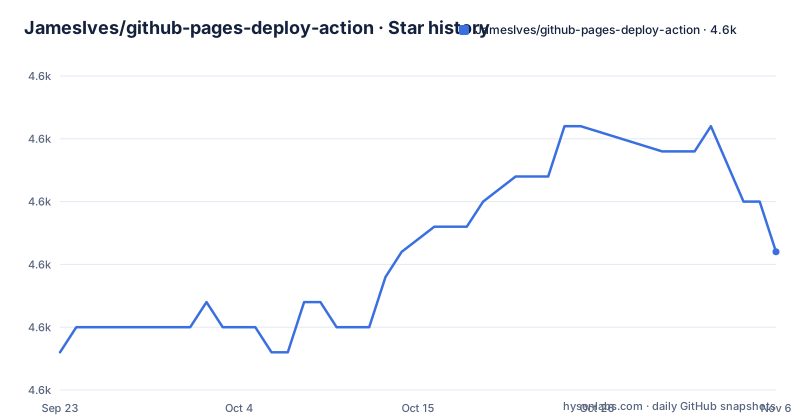
Star history
- JamesIves/github-pages-deploy-action4,613 ★ · +4
| Repository | 2026-09-23 | 2026-11-06 |
|---|---|---|
| JamesIves/github-pages-deploy-action | 4.6k | 4.6k |
4 Stars in the last 44 days, measured from the daily GitHub snapshot. Compare with other projects
Editorial analysis
The deploy step that most static sites still need
GitHub Actions builds a site, then the build output has to get somewhere GitHub Pages will serve it. The marketplace listing describes the action as one that pushes "your production-ready code into any branch you'd like, including gh-pages and docs". That sentence is the whole scope. It does not build anything, it does not run your test suite, and it does not configure Pages for you. It takes a folder that already exists on the runner and commits it to a branch.
The audience is therefore narrow and specific. If you run a static site generator, a documentation tool, or any pipeline whose last step writes HTML, CSS and JavaScript into a directory, this action replaces the shell script you would otherwise write to clone a branch, copy files, commit and force-push. It also covers two cases a hand-rolled script handles badly: deploying to a different repository than the one running the workflow, and running on GitHub Enterprise.
The README is explicit that the workflow needs an actions/checkout step before this one. That ordering is not a suggestion. The action operates on the checked-out workspace, so a workflow that skips checkout has nothing to deploy from.
How the action moves files from a runner to a branch
The mechanism is a branch write, not an artifact upload. The action reads the folder you name, prepares a commit, and pushes it to the target branch. If that branch does not exist yet, the README states the action creates it. That detail matters for first runs: you do not have to seed an empty gh-pages branch by hand.
The repository is TypeScript. package.json points main at lib/lib.js, and the build script is rimraf lib && tsc --declaration, so the published action is compiled output from src/. The runtime dependencies are the official toolkit packages: @actions/core, @actions/exec, @actions/github and @actions/io.
Because the deploy is a git push, the permission model follows git. The example workflow in the README sets permissions: contents: write at the job level. The README warns that without it, or an access token or SSH key, you may run into permission issues. The README also warns that rapid successive deployments can overlap and points at the concurrency parameter as the remedy, with the example using concurrency: ci-${{ github.ref }}. That is a real constraint of branch-based deployment: two pushes racing to the same branch can leave the branch in an unexpected state.
Installing it and getting a first deploy through
There is nothing to install locally. The action is consumed from a workflow file. The workflow below is the shape the README gives: checkout, build, deploy. The build step is illustrative of a project whose output lands in a build folder, and the README says to replace it with your own commands or drop it if the site is pre-built.
name: Build and Deploy
on: [push]
permissions:
  contents: write
jobs:
  build-and-deploy:
    concurrency: ci-${{ github.ref }}
    runs-on: ubuntu-latest
    steps:
      - name: Checkout
        uses: actions/checkout@v6
      - name: Install and Build
        run: |
          npm ci
          npm run build
      - name: Deploy
        uses: JamesIves/github-pages-deploy-action@v4
        with:
          folder: build
The only input shown here is folder, which names the directory to publish. The README notes that gh-pages is the default target branch.
After the workflow runs, one more step happens outside the workflow file. The README instructs you to open the repository settings, click Pages, choose Deploy from a Branch from the Source dropdown, and select the branch you supplied to the action. Skip that and the action still pushes successfully while Pages serves nothing. The failure is silent from the workflow's point of view.
Where a branch-push deploy stops being the right answer
The action commits generated files into a branch. Every deploy adds a commit, and the branch accumulates build history. For a site rebuilt on every push to main, that history grows steadily, and the repository carries the weight of it.
The second limitation is conceptual rather than mechanical. GitHub Pages now has a separate pipeline built around artifact upload. If your Pages source is configured for that artifact flow, this action is not part of it: it writes to a branch, and the two models do not mix. Choosing this action means choosing the branch model deliberately.
The third case is a site that is not pre-built. The README's example runs npm ci and npm run build before the deploy step, so the action assumes the folder already contains final output. If your toolchain emits files somewhere unpredictable, or needs a server running during generation, the folder input will point at the wrong place and the action will publish whatever it finds there.
Finally, because each deploy is a commit on the target branch, recovery can mean working with git history on that branch directly.
How it differs from peaceiris/actions-gh-pages
peaceiris/actions-gh-pages is the other branch-pushing action people name alongside this one. Both publish a folder to a branch, so the difference is not the deployment model. It is the surface area and the defaults.
The README's required setup is a single input, folder, with the target branch defaulting to gh-pages. The trade-off is that anything the action does not expose as an input has to happen in a step before it, in your own shell commands.
If your requirement is a branch push and nothing more, the two are close enough that the deciding factor is usually which one your team already has in its workflows. The meaningful divergence appears when you leave the branch model entirely, at which point neither of these actions is the answer and the artifact-based Pages pipeline is.
Maintenance, versioning and the MIT licence
The repository is not archived. The last push was on 2026-10-26. Releases are not frequent: v4.9.0 landed on 2026-08-08, v4.8.0 on 2026-01-09, and v4.7.6 on 2025-12-09. The cadence is roughly one release every several months, which for an action whose job is a git push is a reasonable pace rather than a sign of neglect. The README credits contributors and sponsors as the reason maintenance is possible, which is worth reading as a signal about how the work is funded.
If you reference a major tag such as v4, patch and minor releases arrive without a workflow edit, and major version bumps are the ones that require attention. Pinning to a full version instead of v4 trades automatic updates for reproducibility, and that choice belongs in your own policy, not in the action.
The licence is MIT, declared both in the repository's LICENSE file and in package.json. MIT permits commercial and private use and requires the licence and copyright notice to be preserved. That is a general description of the licence text, not advice about your situation.
Editorial conclusion
Adopt it if your site is already a folder of static files and you want that folder pushed to a branch you control, especially across repositories or on GitHub Enterprise. Skip it if you want GitHub's artifact-based Pages flow, since this action writes to a branch instead. Before wiring it in, confirm that your repository's Pages source is set to Deploy from a Branch and that the branch name matches the action's input, because a mismatch produces a green workflow with no published site.
Frequently asked questions
How can I deploy GitHub Actions to GitHub Pages with JamesIves/github-pages-deploy-action?
Add an actions/checkout step, a build step that produces a folder of static files, and then the action with the folder input set to that directory. The README's example sets permissions: contents: write on the job so the push to the target branch is allowed.
How do I deploy something to GitHub Pages using this action?
The action pushes a folder to a branch, and if the branch does not exist the README states it creates it. You then set the repository's Pages source to Deploy from a Branch and pick the branch you supplied, which the README describes as usually gh-pages.
What are the limitations of GitHub Pages that affect JamesIves/github-pages-deploy-action?
One documented constraint is on the deploy side: rapid successive deployments can overlap, and the README points at the workflow concurrency parameter as the way to prevent that.
Can GitHub Actions deploy with JamesIves/github-pages-deploy-action?
Yes. The action is consumed as a step inside a GitHub Actions workflow, and the README notes it can trigger on any event GitHub Actions supports. It also works with GitHub Enterprise and can handle cross repository deployments.
Official sources
Add this badge to your README
If you maintain this project, the badge below links readers to this analysis and shows its maintenance status from the daily GitHub snapshot. Paste the markdown into your README; add ?metric=license or ?metric=stars to the image URL for a different field.

[](https://hysenlabs.com/projects/jamesives-github-pages-deploy-action)Star history chart for your README
[](https://hysenlabs.com/projects/jamesives-github-pages-deploy-action)Was this useful?