mirador: a Rust terminal dashboard built to be glanced at, not watched
An opinionated personal dashboard for your terminal — world clocks, calendar and agenda, weather, tasks, notes, markets and live system metrics in a tab you leave open all day. Rust + ratatui.
At a glance
- What is it?
- mirador packs world clocks, a calendar, weather, a real task list, notes, a market watchlist, news headlines and live CPU, memory and network charts into one terminal tab. It keeps every scrap of your data in TOML files you own, and it says plainly that most of the code was written with AI assistance.
- Who is it for?
- mirador suits someone who already lives in a terminal and wants one tab that answers small questions all day: what time is it there, what is next, what is due, what is the weather, how busy is this machine. The design discipline is the reason to try it, since a dashboard that refuses to blink and lets you delete the parts you do not want is easier to keep open than a dense monitor.
- Can I use it commercially?
- Yes. MIT is a permissive licence: you can use, modify and sell software built on it, as long as you keep its copyright and licence notices.
- Is it still maintained?
- Yes. The repository last received commits 1 day ago.
- What is it written in?
- Mainly Rust, according to GitHub's language statistics.
Answers come from the project's GitHub data, last synced on November 22, 2026, and from our analysis. They are not legal advice.
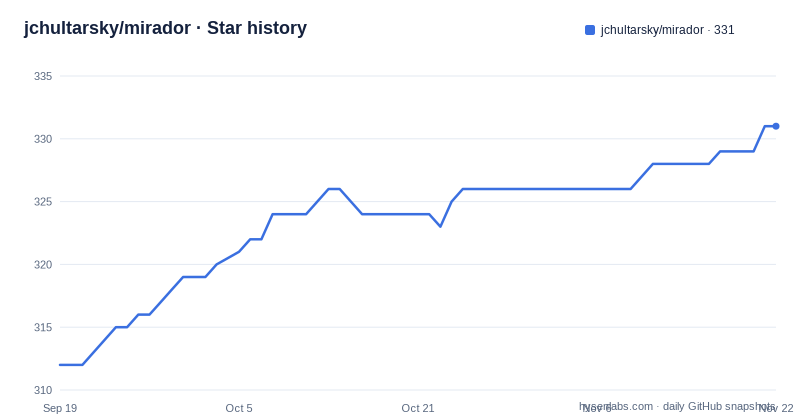
Star history
- jchultarsky/mirador331 ★ · +19
| Repository | 2026-09-19 | 2026-11-22 |
|---|---|---|
| jchultarsky/mirador | 312 | 331 |
19 Stars in the last 64 days, measured from the daily GitHub snapshot. Compare with other projects
Editorial analysis
What mirador is built for
mirador is a personal dashboard for the terminal, written in Rust on ratatui. The README frames it around a single constraint: it is meant to sit in a terminal tab you leave open all day and glance at. Most terminal dashboards are built to be watched, the way a system monitor is opened when something is wrong. This one is built to be glanced at, and the README says everything follows from that. Nothing blinks or shimmers, unfocused panels dim so exactly one thing is at full brightness, and a notice retires on your first keypress.
The name is explained in the README. A mirador is a lookout, the tower you climb to see everything at once.
The current release is 1.13.1, published 2026-09-15, with Cargo.toml in the repository at version 1.13.1, edition 2024, and a minimum Rust version of 1.95. The last push in view is 2026-09-16.
Sixteen widgets, fourteen on screen by default
The panel set is wide enough that most people will switch some of it off. The default layout carries world clocks with IANA zones, current weather with an hourly forecast, a task list, free-form notes, a market watchlist with intraday sparklines, a calendar month grid, an agenda of upcoming events, a watch log of changes made while you were away, a news panel, a pomodoro timer, a calculator with a tape, and live CPU, memory and network charts.
Two more exist but are not placed by default: battery, using the starship-battery crate because sysinfo does not read batteries, and temperature, showing the hottest sensor reading.
Two design choices stand out. The calendar panel is deliberately offline and never invents a calendar, and the agenda reads local .ics files you already own rather than talking to a calendar service. Complex recurrence rules are expanded only for their first occurrence, which is the kind of limit worth knowing before you rely on it.
Charts are drawn with braille, which the README describes as two samples and four levels per character, giving twice the horizontal resolution of block elements.
Your data stays in files you own
This is the part of the pitch worth checking first, because it is concrete. Tasks, notes and the watchlist are plain TOML you can hand-edit, keep in git, or delete. There is no database, no sync service, no account, no API key and no telemetry, and nothing phones home unless you ask it to, including the updater, which runs only when you run it, and an update check that stays off until you turn it on.
The file names are documented. Tasks live in todos.toml unless the config points elsewhere, the watchlist lives in watchlist.toml, clock zones in zones.toml, and keyboard-changed state in state.toml, with an update-check.toml cache alongside. The README is careful about the distinction: those are data files, not configuration.
Configuration itself is TOML, and one command line flag prints where it lives. You can point at a different file with another flag or with an environment variable whose name is documented in the README. Themes are separate files in a themes directory beside the config. A reset is non-destructive: both reset options rename the old file to a .bak rather than deleting it.
The three network panels and what they cost you
Only three panels reach the network, and all three use free, key-less endpoints. Weather comes from Open-Meteo. News comes from whichever RSS feeds you configure, with NASA, Phys.org and Ars Technica shipped by default and changeable or emptiable under [news.feeds], refreshed hourly.
Prices are the one to read the fine print on. The market panel reads Yahoo's public chart endpoint at query1.finance.yahoo.com, and the README states directly that this is not a public or supported API and carries no third-party permission, so it can change, throttle or disappear. mirador behaves as a guest there: at most one request per symbol per minute, requests made sequentially, and nothing written to disk. Access is limited per IP, so datacenter and VPN addresses can see HTTP 429. The quote source sits behind a trait and can be replaced, and the project says it will never ship an API key. If that is not acceptable, remove the stocks panel.
The distinction the README draws is that these panels fetch the data their panels exist to show, which is not the same as phoning home: nothing about you is sent, and switching a panel off stops its requests entirely.
Keyboard model and layout control
Focus moves with Tab and Shift+Tab, and number keys jump to panels. The help overlay opens with ? and scrolls when there is more than fits, so each panel documents its own keys in its bottom border rather than in a manual.
Layout is edited in place. w opens the panel picker, and switching a panel off makes the grid close over the gap. m starts arrange mode, where a panel moves along its row and into the row above until it takes a row of its own, with Esc reverting. t cycles themes and Ctrl with the arrow keys resizes.
The task panel gets the deepest key set, which matches the README calling it a real task list rather than a checklist: due dates, priorities, notes, tags, filtering, and full editing without leaving the dashboard. j and k move, Space completes, a and n add, e edits, d removes, s sorts, c toggles completed items, and / filters.
The calculator is a nice example of the same care. Each answer appears as you type, and Enter feeds it up the tape, where results line up on their decimal points.
Installing mirador and checking what you downloaded
From crates.io, if you have Rust:
cargo install miradorWithout Rust, on macOS or Linux:
curl --proto '=https' --tlsv1.2 -LsSf https://github.com/jchultarsky/mirador/releases/latest/download/mirador-installer.sh | shAnd on Windows:
irm https://github.com/jchultarsky/mirador/releases/latest/download/mirador-installer.ps1 | iexBoth fetch the right archive for your platform and unpack the binary, and both are ordinary files at those URLs if you would rather read them first.
Updating is in your hands rather than the network's. The README documents an explicit update command, and the update check itself stays off until you turn it on, so nothing is fetched on a schedule you did not set.
Verification is where the two installers differ. The shell installer checks the archive against its published sha256, while the PowerShell one does no verification, and neither verifies the updater binary. The README attributes that to cargo-dist rather than to a choice of its own, and points at SECURITY.md for what that does and does not buy you. For a manual download the README shows checksum checks per platform, and every archive also carries a GitHub provenance attestation, which it describes as the stronger check and the one to run if you care.
How it was built, stated plainly
The README has a section that most projects do not: a statement that mirador was written with heavy AI assistance, that the implementation, the tests and most of the documentation were written by Claude from the author's direction and review, and that the product decisions are the author's. The reason given is that anyone evaluating the code deserves to know how it was made.
What backs that up is process rather than assertion. Every change lands through CI running the test suite on macOS, Linux and Windows, plus clippy with warnings denied, rustdoc with warnings denied, a minimum-supported-Rust-version check, a publish dry run, and cargo-deny for advisories, licences and sources. Behavioural claims in the commit history are measured rather than asserted, several fixes were verified by reverting them to confirm the new test actually failed, and two tests in the repository were found to be pinning the bug they existed to catch. CLAUDE.md records the design decisions, including the ones that were reversed and why.
The Cargo.toml in the repository matches that posture. Unsafe code is forbidden by lint, the release profile enables fat LTO with a single codegen unit and strips symbols, and the direct dependency list is short: ratatui 0.30.2 for the interface, sysinfo 0.39.6 for system metrics, ureq 3.4.2 for HTTP, toml 1.1.3 and serde 1.0.229 for configuration, jiff 0.2.34 for time, quick-xml 0.42.0 for feeds, starship-battery 0.11.1, unicode-width 0.2.2, anyhow 1.0.104 and dirs 7.0.0.
Licence, platforms and what to check first
mirador is MIT licensed and published on crates.io. Platforms covered are macOS on Apple Silicon and Intel, Linux on x86_64 and aarch64, Windows on x86_64, and NetBSD through pkgsrc. Windows on ARM is called out as unsupported because a dependency in the tree does not build there.
Compared with a system monitor such as btop, the difference is intent. A monitor is dense, refreshes as fast as it can and expects your full attention. mirador spreads fewer numbers across a tab you never close, and trades refresh drama for calm. Compared with a hosted dashboard, it trades convenience for ownership: no account, no sync, no key, and files you can open in an editor.
The trade-offs are the ones you would expect. You get a toolbox rather than a curated product, so the first hour goes into switching off panels you do not want and arranging what is left. The market panel rests on an endpoint no one promised you. And the clock panel only recently gained a 12-hour mode, since 1.13.0 added it and 1.13.1 fixed its key hint, which tells you the project is moving quickly and still settling its own details.
Editorial conclusion
mirador suits someone who already lives in a terminal and wants one tab that answers small questions all day: what time is it there, what is next, what is due, what is the weather, how busy is this machine. The design discipline is the reason to try it, since a dashboard that refuses to blink and lets you delete the parts you do not want is easier to keep open than a dense monitor. Check two things before adopting it. Decide how you feel about the market panel, because the README is explicit that the Yahoo endpoint is unsupported, rate limited and replaceable rather than guaranteed. And decide how you feel about the development disclosure, because the author states that Claude wrote the implementation and most of the documentation, and asks you to judge the code as you would judge any other. Installation is a one-liner either way, and uninstalling means deleting files you can read.
Frequently asked questions
What does the word mirador mean?
A mirador is a lookout, the tower you climb to see everything at once. The README uses that as the name for a dashboard meant to show clocks, weather, tasks and system metrics in one terminal tab.
Where does mirador store my tasks and notes?
In plain TOML files you can edit by hand. Tasks go in todos.toml, the watchlist in watchlist.toml and clock zones in zones.toml, while `mirador --config-path` prints the location of the configuration file itself.
Does mirador need an API key or an account?
No. The README states there is no account, no API key, no telemetry and no sync service. The three network panels use free key-less endpoints: Open-Meteo for weather, Yahoo's public chart endpoint for prices, and your own RSS feeds for news.
Can I remove panels I do not want?
Yes. w opens the panel picker so you can switch a panel off and let the grid close over the gap, m starts arrange mode for moving panels between rows, and switching off a network panel stops its requests entirely.
Official sources
Add this badge to your README
If you maintain this project, the badge below links readers to this analysis and shows its maintenance status from the daily GitHub snapshot. Paste the markdown into your README; add ?metric=license or ?metric=stars to the image URL for a different field.

[](https://hysenlabs.com/projects/jchultarsky-mirador)Star history chart for your README
[](https://hysenlabs.com/projects/jchultarsky-mirador)Was this useful?