jenil/chota CSS Framework: A Small Grid-First Starting Point
A micro (3kb) CSS framework
At a glance
- What is it?
- jenil/chota is a small CSS framework for projects that need a lightweight grid, a few components, and CSS-variable customization without a preprocessor. It is best suited to small sites and prototypes where the framework should impose little structure and little build overhead.
- Who is it for?
- Adopt chota when a small HTML page or lightweight site needs a basic grid without a preprocessor or framework configuration. Do not choose it as the default when the application requires a large component library, a documented SASS workflow, or a mature release history beyond the versions documented here.
- Can I use it commercially?
- Yes. MIT is a permissive licence: you can use, modify and sell software built on it, as long as you keep its copyright and licence notices.
- Is it still maintained?
- Yes. The repository last received commits 26 days ago.
- What is it written in?
- Mainly HTML, according to GitHub's language statistics.
Answers come from the project's GitHub data, last synced on November 7, 2026, and from our analysis. They are not legal advice.
Star history
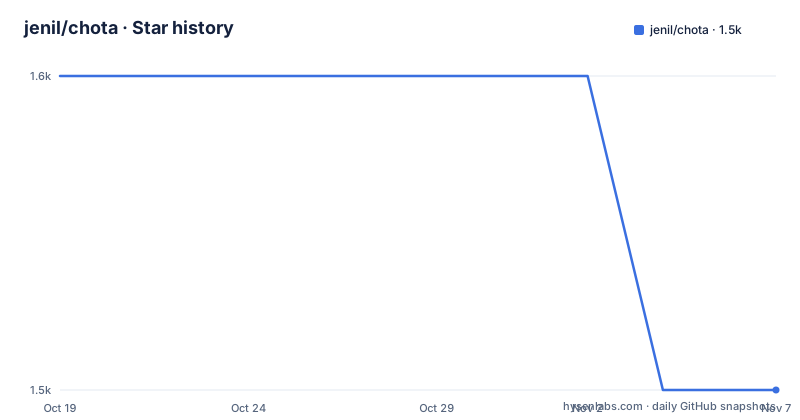
- jenil/chota1,549 ★ · -1
| Repository | 2026-10-19 | 2026-11-07 |
|---|---|---|
| jenil/chota | 1.6k | 1.5k |
-1 Stars in the last 19 days, measured from the daily GitHub snapshot. Compare with other projects
Editorial analysis
Why chota suits small HTML projects
Chota addresses a narrow front-end problem: adding useful layout and component rules without introducing a large dependency or a build-oriented styling workflow. The README describes it as a micro CSS framework of roughly 3kb minified and gzipped. That positioning makes it relevant to a static landing page, a documentation page, a small marketing site, or an HTML prototype where the page needs a grid but does not need a full application framework.
The target audience is developers who want something they can include with one stylesheet link and begin using. The project explicitly avoids a preprocessor. Its documented features are a 12-column grid, a small collection of components and utilities, CSS-variable extension points, semantic markup support, and Icongram icon support. This is a compact starting point rather than a complete design system. It does not describe themes, JavaScript behavior, form validation, or a large set of application-specific components.
The repository layout reinforces that distinction. `src/` contains the source CSS, `dist/` contains distributable output, `docs/` contains documentation work, and `postcss.config.js` supports the project’s own CSS build. The package entry is `dist/chota.min.css`, while the `files` array publishes `src/`, `dist/`, and `README.md`. That is a small package with a clear CSS-first distribution path, but it also means the framework’s capabilities are concentrated in the stylesheet and its documented classes.
How chota’s CSS-first package is organized
The package metadata defines Chota as `chota` and points its main entry at `dist/chota.min.css`. Consumers do not need to import JavaScript to obtain the framework. A browser receives the compiled stylesheet, and the page supplies ordinary HTML markup that uses the framework’s documented classes. The package has no runtime `dependencies`, which keeps the installation surface small and avoids pulling a separate component or JavaScript layer into the page.
The source is built with PostCSS. The package scripts run Stylelint against `src/*.css`, process `src/chota.css` into `dist/`, and use a production PostCSS invocation to create the minified output. The development dependency list includes `autoprefixer`, `caniuse-lite`, `cssnano`, `postcss`, `postcss-csso`, and `postcss-import`. This is useful information for maintainers and contributors, but it is separate from using the published stylesheet. Most page authors can consume the CDN file or install the package without reproducing this build pipeline.
The `browserslist` value is `last 2 versions`, and the README’s support table lists IE11 and Edge alongside the last two versions of Firefox, Chrome, Safari, iOS Safari, Samsung Internet, and Opera. The README is therefore explicit about a compatibility target, but it does not explain how older browser edge cases are handled for each component. Projects with unusual browser requirements should inspect the generated CSS rather than relying only on the summary table.
Installing chota and adding the first stylesheet
For a quick first use, the README provides a CDN link. Add it to the document head, then write the page markup using the classes documented in the linked documentation. The browser should request the stylesheet from the specified CDN URL and apply its grid, component, and utility rules.
<link rel="stylesheet" href="https://unpkg.com/chota">If the project already uses npm or yarn, the documented package installation is:
npm install chotaThe npm command installs the package locally. The repository’s `package.json` identifies `dist/chota.min.css` as the package’s main file, so an application can load that published CSS file according to its own bundler or asset pipeline. The README does not provide a framework-specific JavaScript initialization command because the package is a CSS framework. There is no documented server, database, environment variable, or runtime configuration step.
The first real verification should be visual and structural rather than a setup wizard. Add a small page that uses the documented grid, then check that columns occupy the intended row arrangement and that the component classes render as described in the documentation. The README does not include a complete grid snippet, so consult the linked grid documentation and `src/chota.css` for the exact class names.
SASS support belongs outside the core package
Chota is intentionally not a preprocessor framework. The README states that it does not use a preprocessor or a complex build process. This is a direct design choice, and it makes sense for a small static page, a quick prototype, or a project whose CSS build is already simple. Consumers who want to extend Chota with SASS are directed to `palmiak`’s fork rather than being told that Chota includes first-class SASS support.
That separation matters when comparing Chota with conventional CSS frameworks. A SASS-based project may expect variables, mixins, partial imports, and a compiler configuration. Chota’s documented customization route is CSS variables. The project therefore fits a plain CSS workflow better than a codebase organized around a large Sass dependency. It also leaves a specific boundary around tooling: the package’s build dependencies exist to compile and lint the framework, while application authors are not required to run a preprocessor.
The SASS fork is an alternative path, not evidence that the main package supports SASS. A team that needs the core grid but has mandatory Sass conventions can evaluate that fork separately. A team that wants the published Chota package unchanged should plan to customize it through the documented CSS-variable mechanism and ordinary stylesheet rules.
Components, utilities, and semantic markup boundaries
The README promises a handful of components and utilities rather than a broad catalog. The homepage links to separate sections for components and utilities, but the README does not list their names or enumerate their states. This limits a precise feature comparison. It is reasonable to expect basic presentational building blocks, but it is not supported to claim that Chota includes controls such as menus, dialogs, tables, notifications, or a complete form system.
The stated support for good semantics should be read as a documentation and markup principle, not as a guarantee that every interactive pattern is implemented. Chota is CSS, so the browser receives presentation rules rather than the JavaScript behavior needed to open a dropdown, validate a form, manage a modal, or implement an accessible interactive widget. The README does not document those behaviors.
The CSS-variable extension point can help teams define a small visual language without copying the entire stylesheet. However, variable support does not establish a theming API on its own. The documentation does not specify whether there are named themes, how variables cascade, or which defaults are intended to remain stable. Before adoption, inspect `src/chota.css` and the customization section of the documentation for the actual variable names and component coverage.
Browser support and the cost of owning a small framework
Chota’s size is attractive when a page needs only a small CSS dependency, but the 3kb figure is a framework-size claim, not a guarantee about the total page weight. Images, fonts, application JavaScript, custom CSS, and third-party services can dominate the final transfer size. The README’s stated support table gives a useful baseline, including IE11 and Edge, while `browserslist` in `package.json` is `last 2 versions`. Those are different kinds of information: one describes the project’s documented support policy, and the other configures tooling used during the build.
Maintenance is represented by repository facts. The repository is not archived, and the last push was on 2026-10-13. The listed releases are v0.8.1 on 2023-01-18, v0.8.0 on 2020-06-14, and v0.7.1 on 2019-09-22. The package metadata currently declares version `0.9.2`, but the listed release history does not include that version as a recent release. This discrepancy is worth checking before pinning a version in a production application.
The MIT license permits use, modification, distribution, and private use under its terms, with the license notice retained. That is a license identification, not legal advice. Teams should read the `LICENSE` file themselves when vendoring or redistributing CSS. The main upgrade cost is likely dependency and browser-checking work rather than a framework migration guide, since the README does not document a version-to-version upgrade process.
When to choose chota instead of a broader CSS system
Chota is a sensible alternative when a team wants a plain CSS file, a compact grid, and a small set of presentation utilities without committing to a large framework. Its CDN example makes it useful for a simple page, and its npm package exposes a stylesheet rather than a runtime component system. The 12-column layout and CSS-variable customization points provide enough structure for lightweight work while leaving the rest of the design under ordinary CSS control.
A broader CSS system may be the better choice when the project needs an extensive documented component inventory, established theme conventions, extensive state and accessibility patterns, or a standard workflow shared by many teams. The README does not establish those capabilities for Chota. Its small component scope can become a limitation when product requirements expand beyond a handful of page elements.
There is also a trade-off between low initial setup and limited library surface. Chota has no runtime dependencies and requires no preprocessor according to the README, which can simplify an HTML project. That simplicity can turn into maintenance work if the application later needs many repeated patterns. In that case, the team must create and document its own CSS abstractions instead of relying on features that the README does not claim.
Editorial conclusion
Adopt chota when a small HTML page or lightweight site needs a basic grid without a preprocessor or framework configuration. Do not choose it as the default when the application requires a large component library, a documented SASS workflow, or a mature release history beyond the versions documented here. Check the 12-column grid, CSS-variable customization, and the required components before replacing an existing styling system, then confirm that the generated dist/chota.min.css fits the browser targets in the project.
Frequently asked questions
How do I install jenil/chota?
Use the documented CDN link or run `npm install chota`. The package exposes `dist/chota.min.css` as its main file.
Does jenil/chota require SASS or another preprocessor?
No. Chota is designed without a preprocessor or complex build process. The README directs users who want SASS support to `palmiak`’s fork.
What layout system does jenil/chota provide?
The README documents a 12-column CSS grid. It does not list the exact class names, so consult the linked grid documentation before writing layout markup.
Official sources
Add this badge to your README
If you maintain this project, the badge below links readers to this analysis and shows its maintenance status from the daily GitHub snapshot. Paste the markdown into your README; add ?metric=license or ?metric=stars to the image URL for a different field.

[](https://hysenlabs.com/projects/jenil-chota)Star history chart for your README
[](https://hysenlabs.com/projects/jenil-chota)Was this useful?