Skills Manager: One Skill Directory, Thirty-Two AI Coding Tools
Free, open-source desktop manager for AI Agent Skills. Write a skill once, sync it to 32 AI coding tools (Claude Code, Codex, Cursor, Gemini CLI, and more) via symlinks. Local-first, MIT licensed. macOS, Windows, Linux.
At a glance
- What is it?
- Skills Manager is an MIT-licensed Tauri desktop app and a companion skm CLI that keep a single hub of AI agent skills and push them into each tool's config directory by symlink. The idea is sound and the Windows fallback chain is unusually honest; the cost is that you are betting your tool configs on one project's link bookkeeping.
- Who is it for?
- Adopt Skills Manager if you already keep skills in more than two or three tools' directories and you are willing to run skm adopt --dry-run first and read the diff before anything moves. Do not adopt it on a machine where the tool config directories live on a different filesystem, a network mount, or a synced folder, because the symlink and junction strategies assume a local filesystem and the tracked-copy fallback exists precisely because that assumption breaks.
- Can I use it commercially?
- Yes. MIT is a permissive licence: you can use, modify and sell software built on it, as long as you keep its copyright and licence notices.
- Is it still maintained?
- Yes. The repository last received commits 72 days ago.
- What is it written in?
- Mainly TypeScript, according to GitHub's language statistics.
Answers come from the project's GitHub data, last synced on November 21, 2026, and from our analysis. They are not legal advice.
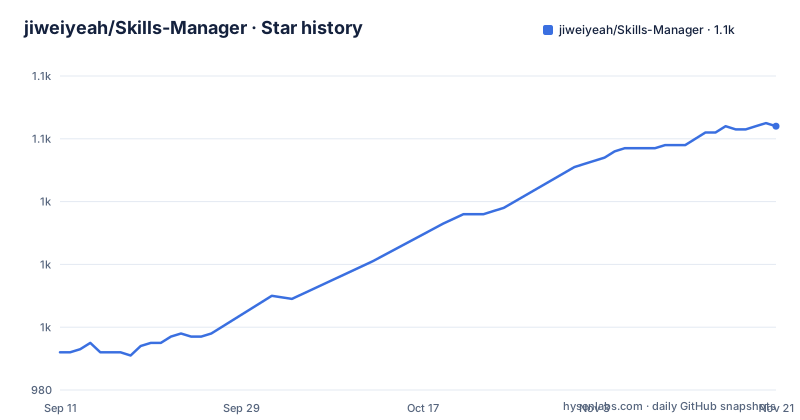
Star history
- jiweiyeah/Skills-Manager1,064 ★ · +72
| Repository | 2026-09-11 | 2026-11-21 |
|---|---|---|
| jiweiyeah/Skills-Manager | 992 | 1.1k |
72 Stars in the last 71 days, measured from the daily GitHub snapshot. Compare with other projects
Editorial analysis
The problem is duplicated skill files, not missing features
Every AI coding tool has invented its own place to look for skills. Claude Code reads one directory, Codex another, Cursor another. If you write a useful skill for one of them, the README's framing of the problem is accurate: you end up maintaining parallel copies, and the copies drift. A skill you fixed last week is still broken in the tool you use on a different machine.
Skills Manager's answer is a hub directory that you choose on first launch, plus a link from each tool's config directory back into that hub. The README describes this as a symlink synchronization mechanism and claims support for 32 tools out of the box, with custom tools addable by specifying a path and an optional icon. The audience is narrow and identifiable: developers who run three or more of these tools on the same machine, or who move between a laptop and a desktop and want the same skill set in both.
If you use exactly one tool, this is overhead. You would be introducing a hub, a link layer, and a desktop app to manage a directory you could edit directly.
The sync mechanism is a link plus a source marker
The data flow visible in the README is straightforward. Skills live in the hub. When you enable a skill for a tool, the app creates a link from that tool's config directory to the hub entry. Disabling removes the link and leaves the original file alone, which is the whole point of the enable/disable model: you get per-tool granularity without deleting anything.
Windows is where the mechanism gets interesting, and the README is more candid about it than most project docs. The app tries three strategies in order. First, a directory symlink, used when Developer Mode is enabled or when the app happens to be running elevated. Second, a directory junction via mklink /J, described as the normal path on a standard account because it needs no special permission. Third, a tracked copy: if junctions are blocked too, the folder is copied and its source path is recorded in .skills-manager-source.json so the copy stays traceable and can still be disabled from the app.
That third tier is the design decision worth pausing on. A tracked copy is not a link. Editing the hub copy will not update the tool's copy, and the README does not describe a reconciliation step that would detect the divergence. The marker file tells the app where the copy came from, which preserves the disable operation, but it does not preserve synchronization. If you land on tier three, you have a managed copy, not a synced skill.
Installing it, and the macOS quarantine detail
The README points at the official site for platform detection or the Releases page for manual picks: .dmg for macOS with separate aarch64 and x64 builds, .msi or .exe for Windows, .deb, .AppImage or .rpm for Linux. The Homebrew route on macOS is two commands:
brew tap jiweiyeah/tap brew install --cask jiweiyeah/tap/skills-manager
The README is explicit that you should use the full jiweiyeah/tap/skills-manager path rather than the bare token, because Homebrew's official cask repository contains an unrelated cask that happens to share the skills-manager name. That is a real footgun and the documentation flags it clearly.
The same section states the app is ad-hoc signed but not notarized by Apple, and that the cask strips the quarantine attribute on install. The README defers to the tap README for what that means and how to opt out. This is a legitimate trade-off to accept or reject on your own terms, but you should know you are accepting it before you run the install, not after.
The CLI ships as a separate archive per release: skm-<target>.tar.gz, or .zip on Windows. Extract it and put the binary on your PATH. From there the documented surface is skm init, skm adopt with --dry-run and --yes, skm list with --tool and --json, skm enable and skm disable with a --for flag, skm doctor with --json, and skm fix --yes. Both skill and tool arguments accept a unique prefix, so claude matches claude-code. The README states the CLI reads and writes the same config and symlinks as the desktop app, so the two are interchangeable, and that skm init plus skm adopt gives a fully terminal-only workflow for headless machines.
adopt is the command that can hurt you
The most consequential command in the CLI is skm adopt, described as moving skills already in tool directories into the hub and relinking them. That is a migration that touches files you already depend on, in directories owned by other applications. It ships with --dry-run and --yes, which tells you the authors expected it to be run carefully.
The failure mode is not exotic. If a tool's config directory contains a skill that is not a plain directory, or a path the app cannot relink, the move and relink are two separate operations and the window between them is where a broken state lives. The README does not describe transactional rollback for adopt. It does describe skm doctor for detecting sync issues and skm fix --yes for repairing them, which implies the project expects drift to happen and has built a repair path rather than preventing it entirely.
There is a second, quieter failure mode. The README notes that if a tool is not detected, elevation will not help: the tool's own config directory has to exist on the machine. So a tool you have installed but never launched will not be found, and its skills will not be linked. The documented remedy is to check the compatibility matrix for the exact path each tool reads, or add it manually as a custom tool. That is a fine answer, but it means the 32-tool figure is a ceiling, not a guarantee, and your actual count depends on which tools have written their config directory yet.
Where symlinks stop being the right tool
Symlinks and junctions are filesystem-local constructs. If your hub lives on one volume and a tool's config directory lives on another, or on a network mount, or inside a folder that a sync client rewrites underneath you, the link is the wrong mechanism and the app falls back to the tracked copy. The README does not promise cross-volume linking, and the existence of tier three suggests the authors know it does not always work.
This matters for a common setup: a dotfiles repository or a cloud-synced home directory. Those tools frequently replace files rather than editing them in place, which breaks hard links and can break symlinks depending on how the client handles them. If that describes your environment, the tracked copy is what you will get, and you should read the previous section again before running adopt.
The project is also young in release terms. The release list shows v2.2.0 on 2026-08-25, v2.1.9 on 2026-08-19, and v2.1.8 on 2026-08-09. Three releases in about two weeks is a fast cadence. Fast cadence on a tool that rewrites other applications' config directories is a double-edged property: fixes arrive quickly, and so does churn.
What it does that a dotfiles repo does not
The obvious alternative is a dotfiles repository with your own symlink script, which is what many developers already have. The difference in approach is real. A dotfiles repo symlinks whole directories that you choose by hand, and it has no concept of which tool is installed, no per-tool enable and disable, and no repair command. When a link breaks because you reinstalled an app, you find out when the tool behaves oddly.
Skills Manager adds three things a hand-rolled script does not have. It detects which tools are present and where each one reads from, which is the tedious part of the script. It tracks link state per skill per tool, so skm list can report status and skm doctor can report problems. And it has a repair path in skm fix. The cost is that the source of truth for your link topology now lives in the app's config, and the README states the CLI and GUI share that config, so you are not locked into the GUI. That is the right design choice and it is what makes the headless workflow possible.
A second alternative is to stop sharing skills at all and keep each tool's skills directory independent. That is the correct choice if your skills are tool-specific by nature, because a skill written against one tool's conventions may not transfer cleanly. The 32-tool promise is about file placement, not about semantic portability, and the README does not claim otherwise.
Maintenance cost and what the licence actually gives you
The licence is MIT. That permits commercial use, modification, and redistribution provided the copyright notice and permission notice are included. It grants no patent rights and comes with no warranty, which is standard for MIT but worth stating plainly when the software is writing links into directories owned by other applications. Nothing here is legal advice; read the LICENSE file in the repository if the distinction matters to your organisation.
The maintenance cost is the part that is easy to underestimate. You are adding a hub directory, a config file shared between the GUI and the CLI, and a set of links in other tools' directories. Every time a supported tool changes where it reads skills from, that link breaks and you are dependent on a release to fix the mapping. The README's compatibility matrix is the artifact to watch: it is the list that has to stay current for the tool to keep working, and it is maintained by the project, not by the tools.
The upgrade path is cheap on macOS via brew upgrade, and manual elsewhere. The CLI archive has to be re-downloaded per release unless you script it yourself. The README also mentions that installing the CLI copies a skills-manager-cli companion skill into the hub and enables it for every detected tool, so other agents can drive skm without guessing flags. That is a nice touch, and it also means installing the CLI changes the state of your hub and your tool links. If you want a clean install with no side effects, that behaviour is worth knowing about before you run skm init.
Editorial conclusion
Adopt Skills Manager if you already keep skills in more than two or three tools' directories and you are willing to run skm adopt --dry-run first and read the diff before anything moves. Do not adopt it on a machine where the tool config directories live on a different filesystem, a network mount, or a synced folder, because the symlink and junction strategies assume a local filesystem and the tracked-copy fallback exists precisely because that assumption breaks. Verify three things before you commit: that skm doctor reports every tool you actually use, that the hub path you choose sits on the same volume as those tools' config directories, and that you are comfortable with the app stripping the quarantine attribute on macOS install.
Frequently asked questions
How does Skills Manager keep one copy of a skill across many AI coding tools?
It stores skills in one directory chosen at first launch and links them into each tool's configuration directory. On macOS and Linux that link is a symlink; on Windows it falls back from a directory symlink to a junction made with mklink /J, and then to a tracked copy whose source path is recorded in .skills-manager-source.json.
Does Skills Manager need Administrator rights on Windows?
No. Three strategies are tried in order: a directory symlink when Developer Mode is on, a directory junction on a standard account, and a tracked copy if junctions are blocked. Elevation does not help when a tool is not detected, because that tool's own configuration directory has to exist on the machine first.
Is the Skills Manager macOS app signed and notarized by Apple?
It is ad-hoc signed and not notarized by Apple. Because of that, the Homebrew cask strips the quarantine attribute on install, and the tap README explains what it means and how to opt out of that behaviour.
How do I install the skm command-line tool that ships with Skills Manager?
Download skm-<target>.tar.gz, or a .zip on Windows, from the releases page, extract it and put the binary on your PATH. There is no package manager entry for skm. skm init followed by skm adopt gives a fully terminal-only workflow on a headless machine.
What does installing the Skills Manager CLI change in my other AI tools?
Installing it, from Settings or by running skm init, also copies the skills-manager-cli companion skill into the hub and enables it for every AI tool currently detected. That same skill is published to ClawHub automatically on every version bump, gated on the local version being strictly newer.
Official sources
Add this badge to your README
If you maintain this project, the badge below links readers to this analysis and shows its maintenance status from the daily GitHub snapshot. Paste the markdown into your README; add ?metric=license or ?metric=stars to the image URL for a different field.

[](https://hysenlabs.com/projects/jiweiyeah-skills-manager)Star history chart for your README
[](https://hysenlabs.com/projects/jiweiyeah-skills-manager)Was this useful?