PdfiumAndroidKt: A Kotlin-First Pdfium Binding with Three API Styles
Pdfium Android binding with Bitmap rendering ( >= API 21 )
At a glance
- What is it?
- PdfiumAndroidKt wraps Google's Pdfium for Android, offering suspend, Arrow, and plain Java-friendly APIs. It targets API 21 and up, with bitmap and Surface rendering, but leaves UI to you.
- Who is it for?
- Adopt PdfiumAndroidKt if you need a low-level Pdfium binding for Android with coroutine or Arrow support and you are comfortable building your own UI. Skip it if you want a ready-made PDF viewer or need to customize the underlying Pdfium library.
- Can I use it commercially?
- Check first. The repository uses a licence we do not classify automatically, so read its LICENSE file before any commercial use.
- Is it still maintained?
- Yes. The repository last received commits 89 days ago.
- What is it written in?
- Mainly Kotlin, according to GitHub's language statistics.
Answers come from the project's GitHub data, last synced on October 22, 2026, and from our analysis. They are not legal advice.
Star history
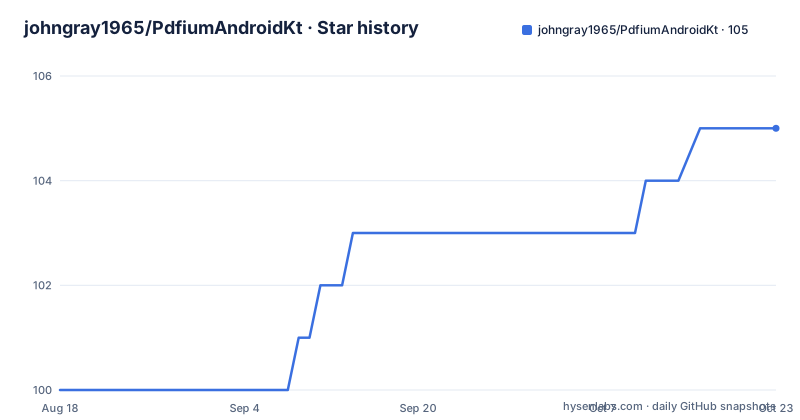
- johngray1965/PdfiumAndroidKt105 ★ · +5
| Repository | 2026-08-18 | 2026-10-22 |
|---|---|---|
| johngray1965/PdfiumAndroidKt | 100 | 105 |
5 Stars in the last 65 days, measured from the daily GitHub snapshot. Compare with other projects
Editorial analysis
What Problem This Solves and Who It Is For
PdfiumAndroidKt solves the problem of rendering PDF pages on Android without building a whole viewer. It provides bindings to Google's Pdfium library, which is the same engine behind Chrome's PDF viewer. The target audience is Android developers who need to display PDFs inside their own app, with their own UI. The project explicitly states it does not do user interfaces. That makes it a fit for teams that already have a custom PDF workflow, such as document scanners, annotation tools, or apps that need to extract text or render thumbnails. It is not for someone who wants a drop-in PDF viewer with toolbar, zoom, and scrolling out of the box.
Three API Styles: Suspend, Arrow, and Plain
The library offers three distinct APIs. The plain API uses classes like PdfiumCore, PdfDocument, PdfPage, and PdfTextPage, and it works from Java. The suspend API uses PdfiumCoreKt and returns PdfDocummentK, PdfPageKt, and PdfTextPageKt, all with suspend functions. The Arrow API uses PdfiumCoreKtF and returns PdfDocummentKF, PdfPageKtF, and PdfTextPageKtF, which use Arrow-kt functions. All classes implement Closable, which is a Kotlin interface for resource management. The key design point is that the Kt and KtF variants run their work on a dispatcher passed in at construction time. That means you can keep native calls off the main thread without manually managing threads. The plain API does not offer that convenience, so you must handle threading yourself. This three-way split is unusual and adds complexity, but it gives Java callers a simple path and Kotlin callers a choice between coroutines and Arrow.
How the Architecture Works: Object Model and Data Flow
The architecture is object-oriented, which is a departure from the original PdfiumAndroid library. In the original, you often pass a document handle around. Here, PdfiumCore opens a PDF and returns a PdfDocument. From PdfDocument, you get PdfPage and PdfTextPage objects. Operations on pages are methods on those objects. The README notes that opening documents and pages is relatively expensive. That suggests you should open a page once and keep it open, rather than opening it on demand for each render. The data flow for rendering is straightforward: you open a document, get a page, render it to a Bitmap or directly to a Surface. The README mentions that rendering to a Surface is fast and avoids bitmap memory overhead. The internal Pdfium native code is called through these wrappers, and the coroutine versions offload that work to a dispatcher.
Getting It Running: Gradle Setup and Version Notes
To use the core library, add this to your app's build.gradle: implementation("io.legere:pdfiumandroid:2.0.3"). For Arrow support, add a separate module: implementation("io.legere:pdfium-android-kt-arrow:2.0.3"). The README shows version 2.0.3, but the repository also has a 3.0.4-alpha01 release from 2026-07-26. Version 2.0.3 is from 2026-07-26 as well, while 2.0.2 is from 2026-07-14. The README says Version 2 removes deprecated APIs. That means if you are upgrading from an older version, you may need to change your code. The project is written in Kotlin, but the plain API should work from Java. The minimum API level is 21, as stated in the description. You will need to add the dependency and then create a PdfiumCore instance with a dispatcher if you use the Kt or KtF variants.
Performance Notes: RGB_565 Is Slow, ARGB_8888 Is Fast
The README gives concrete performance guidance. Rendering with RGB_565 bitmap format is slow because the underlying Pdfium APIs work with ARGB_8888. To support RGB_565, the library has to allocate a buffer for ARGB_8888, get the data, convert it, and release the buffer. ARGB_8888 writes directly to the bitmap without any buffer allocation or conversion. This is a real trade-off. If you use RGB_565 to save memory, you pay a performance penalty. The README also states that rendering directly to a Surface is fast and does not require the memory overhead of bitmaps. That is a useful tip for apps that render full-screen pages and do not need to keep the bitmap around. The advice to open pages and keep them open is repeated, which suggests that page opening is a bottleneck. In practice, you should design your code to cache page objects rather than reopening them for each frame.
Limitations and When This Is the Wrong Tool
The most obvious limitation is the lack of a UI layer. If you need a complete PDF viewer with pinch-to-zoom, scrolling, and page navigation, this library will not give it to you. You must build that yourself. Another limitation is the project's scope policy. The README says they do not accept PRs that customize the Pdfium libraries. That means you cannot modify the native rendering behavior through this project. If you need to patch Pdfium for a specific rendering bug or add a custom feature, you are on your own. The license is listed as NOASSERTION, which is a warning sign. You should check the actual license files before using it in a commercial product. Also, the API split into three variants can be confusing, and the Arrow module adds a dependency that you may not want. If you only need to render PDFs and do not need text extraction or fine-grained control, Android's built-in PdfRenderer might be simpler, though it has its own limitations.
Alternatives: PdfRenderer and Other Bindings
The most direct alternative is Android's own PdfRenderer, which is part of the Android framework since API 21. PdfRenderer also uses Pdfium internally, but it exposes a simpler API. You can open a ParcelFileDescriptor and render pages to a Bitmap. The key difference is that PdfRenderer does not give you access to text pages or the same level of control over rendering. PdfiumAndroidKt, by contrast, provides PdfTextPage for text extraction, which PdfRenderer does not. Another alternative is the original PdfiumAndroid library by barteksc, which this project is based on. That library is Java-based and does not have coroutine or Arrow support. PdfiumAndroidKt is a rewrite that adds those features. If you need suspend functions, this project is a clear upgrade. But if you are happy with the old API and do not need Kotlin-specific features, the original may still work. The choice depends on whether you value the modern API or the stability of the older project.
Maintenance and Upgrade Cost
The repository shows active development. The latest release is 3.0.4-alpha01, which indicates ongoing work. Version 2.0.3 is a stable release, and the README describes Version 2 as removing deprecated APIs. That means upgrading from Version 1 to Version 2 will require code changes. The maintainer is open to PRs but only within the scope of Android bindings for Pdfium. That limits community contributions to the binding layer, not the native code. The use of Closable means you must remember to close documents, pages, and text pages to avoid native memory leaks. The coroutine dispatcher design means you can control threading, but you need to decide which dispatcher to use. The library has no homepage, so documentation is limited to the README. You will likely need to read the source code to understand the full API. Given the alpha release, you should test thoroughly before adopting it in production.
Editorial conclusion
Adopt PdfiumAndroidKt if you need a low-level Pdfium binding for Android with coroutine or Arrow support and you are comfortable building your own UI. Skip it if you want a ready-made PDF viewer or need to customize the underlying Pdfium library. Before adopting, verify the license, since the repository lists NOASSERTION, and check whether the 3.0.4-alpha01 release is stable enough for your use. Also confirm that the maintainer's stance on not accepting Pdfium customizations fits your needs. If you need a different rendering path, consider alternatives like Android's built-in PdfRenderer for simpler cases, but note that PdfiumAndroidKt offers more control over pages and text.
Frequently asked questions
What does PDFium do?
Pdfium is a library that Google produces, and PdfiumAndroidKt provides Android bindings for it. The project supplies the document, page and text page objects and coroutine wrappers, and explicitly does not do user interfaces.
How do I add PdfiumAndroidKt to an Android project?
Add implementation("io.legere:pdfiumandroid:2.0.3") to your app's build.gradle. The minimum platform is API 21, and the Arrow variant lives in a separate artifact at implementation("io.legere:pdfium-android-kt-arrow:2.0.3").
What is the difference between the three PdfiumAndroidKt APIs?
PdfiumCore is a plain API that should work from Java, PdfiumCoreKt exposes suspend functions and runs them on the dispatcher passed to its constructor, and PdfiumCoreKtF does the same with Arrow return values. Each returns a matching document type that hands out page and text page objects.
Should I use RGB_565 or ARGB_888 for bitmap rendering?
Use ARGB_888. RGB_565 is supported but slow, because the underlying Pdfium APIs work with ARGB_888, so RGB_565 has to allocate a buffer, copy the data out, convert it and release the buffer. ARGB_888 writes directly to the bitmap with no allocation or conversion.
How should I handle pages for good performance in PdfiumAndroidKt?
Avoid opening pages on demand. Opening documents, pages and text pages are described as relatively expensive, so open a page and keep it open until you are done with it. PdfDocument, PdfPage, PdfTextPage and their Kt and KtF versions all implement Closable, so closing them is your job.
Does PdfiumAndroidKt include a PDF viewer UI?
No. The project states it does not do user interfaces and offers help integrating the bindings with your UI on a contract basis. Pull requests are accepted only if they stay within the scope of the Android binding, and changes that customize the Pdfium libraries are not accepted.
Official sources
Add this badge to your README
If you maintain this project, the badge below links readers to this analysis and shows its maintenance status from the daily GitHub snapshot. Paste the markdown into your README; add ?metric=license or ?metric=stars to the image URL for a different field.

[](https://hysenlabs.com/projects/johngray1965-pdfiumandroidkt)Star history chart for your README
[](https://hysenlabs.com/projects/johngray1965-pdfiumandroidkt)