Agent Campus: A LangGraph Multi-Agent Simulator with Personality Drift and Durable Checkpoints
A multi-agent campus social simulation built with LangGraph, featuring memory, RAG, personality evolution, and durable execution.
At a glance
- What is it?
- Agent Campus is a Python project that simulates three AI characters in a campus setting using LangGraph, with memory, RAG, personality evolution, and SQLite-backed durable execution. This review examines its architecture, setup, limitations, and who should consider it.
- Who is it for?
- Adopt Agent Campus if you are a developer or researcher prototyping multi-agent social simulations with LangGraph and need a concrete reference for memory, tool use, and durable execution. Do not use it as a production-ready product; it is an MVP with three fixed characters, a single campus, and no license specified.
- Can I use it commercially?
- Not without permission. GitHub finds no licence file in the repository, and without a licence all rights are reserved by default: you may read the code but not reuse it. Check the README, or ask the authors, before using it.
- Is it still maintained?
- Yes. The repository last received commits 59 days ago.
- What is it written in?
- Mainly Python, according to GitHub's language statistics.
Answers come from the project's GitHub data, last synced on October 4, 2026, and from our analysis. They are not legal advice.
Star history
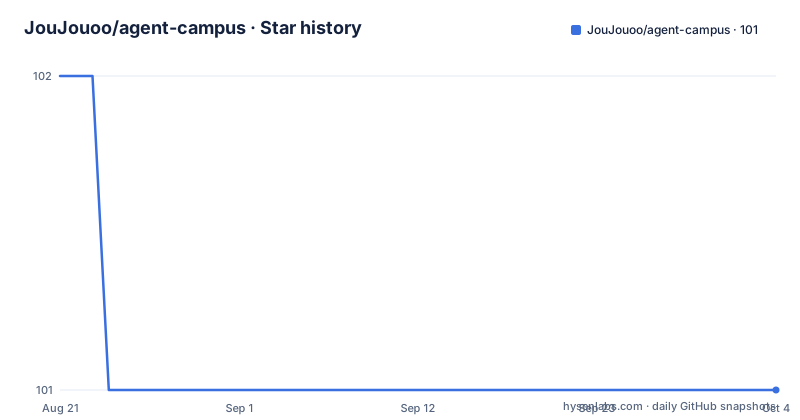
- JouJouoo/agent-campus101 ★ · -1
| Repository | 2026-08-21 | 2026-10-04 |
|---|---|---|
| JouJouoo/agent-campus | 102 | 101 |
-1 Stars in the last 44 days, measured from the daily GitHub snapshot. Compare with other projects
Editorial analysis
What Agent Campus Actually Solves
Agent Campus addresses a narrow but real problem: how to build a multi-agent simulation where characters have distinct personalities, goals, and memory, and where their interactions produce observable social dynamics. The README states its goal: let AI characters with different personalities, goals, memories, and resource limits interact in a continuously running campus environment and observe how they cooperate, conflict, spread information, and complete tasks. The intended audience is developers and researchers prototyping such simulations, not end users. The MVP scope is deliberately small: three characters (Alice, Bob, Charlie), one campus with five locations, and seven base actions. This is not a general-purpose agent framework; it is a specific implementation that demonstrates one way to structure such a system.
The LangGraph Flow: Observation, Decision, Execution
The core mechanism is a LangGraph-based pipeline that the README describes as an observation, LLM decision, execution flow. Each agent turn begins with observations, which include scene information generated by four generators: schedule, time, weather, and activities. The LLM can choose to call tools like get_schedule, get_time, get_weather, and get_activities, and the query results feed into the next observation. The LLM selects an action via tool calls, but the simulator executes it and records the result. This separation is important: the LLM does not directly modify WorldState. A bounded ReAct loop limits how many reasoning steps each agent can take per turn, and the LLM can end its turn early by calling finish_turn. This design prevents runaway loops and gives the simulator control over state changes, which is a pragmatic choice for a simulation that must remain consistent.
Memory and RAG: Two Separate Retrieval Paths
Agent Campus implements two memory systems that run in parallel. The first is an agent's private long-term memory, built from historical conversations and events. The second is a campus-wide public knowledge base stored as Markdown files under data/campus_knowledge/. The README explains that CombinedMemoryRetriever merges both sources and injects them into the retrieve_memory node of the state graph. The public knowledge base is chunked by a custom module that preserves paragraph and sentence boundaries, with a default maximum chunk size of 600 characters and an 80-character overlap. Embeddings are generated via the embedding-3 API from ZhipuAI, and the chunks are stored in a local Qdrant collection. Retrieval uses cosine similarity with a default threshold of 0.60, and chunks below that are filtered out. The README notes that on a small evaluation set of five positive examples and two no-answer samples, this threshold achieved 5/5 hits and 2/2 correct rejections. That is a very small test set, so the threshold should be revalidated on your own data before trusting it.
Durable Execution and Resumable Simulations
A notable feature is durable execution via SQLite checkpoints. The README states that the WorldState, including personality_state.history, is saved to a SQLite database, and that using the same thread_id, state-db, and duration-days allows a simulation to resume from where it left off. This is not just a save file; it is a checkpoint that records the full simulation state, including agent personalities and memory. The --thread-id flag identifies a resumable session. For example, running with --duration-days 3 and then rerunning with the same parameters continues to the original simulation time target without appending extra days. This is a concrete mechanism for long-running simulations that may be interrupted. The README also notes that agent state commits remain serial, even though memory retrieval uses asyncio.gather for parallel calls. This is a deliberate trade-off to maintain consistency, and it is worth noting if you expect high concurrency.
Personality Evolution: Slow and Evidence-Based
The personality system is one of the most distinctive parts of the project. Each agent has a stable personality baseline and a personality_state that tracks continuous preferences across four MBTI dimensions: E/I, S/N, T/F, and J/P. Actions generate evidence: talk increases E/F, argue increases T, trade increases F/J, attend_class increases S/J, and join_event increases E/N. However, the README emphasizes that evidence accumulation does not immediately change personality. Only after at least five consistent experiences and a simulated seven-day interval does a personality integration occur, and a single integration can change any dimension by at most 0.05. This is a slow, conservative drift mechanism. The README also warns that this is a simplified model for behavior simulation, not a psychological diagnostic. This is an honest limitation, and it means personality changes will not be dramatic in short simulations. If you want rapid character development, this system will feel too slow.
Context Compression and Its Failure Mode
Agent Campus includes a context compression mechanism that is conditional and non-destructive in normal operation. Each agent estimates the token count of its semantic summary, historical memory, and learned knowledge. Only if the estimate exceeds a threshold, defaulting to about 2000 tokens, does it call a DeepSeek LLM to produce a factual summary. The threshold is adjustable via --context-compression-threshold-tokens. The estimate uses a rough heuristic of about 2 characters per token, so it is not precise. The README states that if the summarization call fails, an error is thrown and original memories are not silently deleted. This is a good safety property. However, the compression only occurs when the threshold is exceeded, and the summary itself is written back into agent state. The failure mode is that the heuristic may be inaccurate, leading to either unnecessary summarization calls or context overflow. The README does not provide a way to calibrate the heuristic, so you may need to experiment with the threshold for your specific LLM.
Getting It Running: Commands and Configuration
The README provides clear setup instructions. Locally, you use conda to activate an environment named agent-campus, then run pytest -q to run tests, and then python -m agent_campus.main --rounds 3 to run a simulation. For a resumable session, you add --thread-id and --state-db flags, as well as --max-react-steps and --max-decision-retries to control the ReAct loop. For a time-based simulation, use --duration-days 3 instead of --rounds; the two flags cannot be used together. The Docker path is also documented: copy .env.example to .env, fill in DEEPSEEK_API_KEY and ZHIPUAI_API_KEY, then run docker compose up --build. The SQLite checkpoint is stored in runtime/agent_campus.sqlite and Qdrant data in data/qdrant/, both persisted via Compose volumes. Before first use, you must build the RAG index with a command like docker compose run --rm agent-campus python -m agent_campus.rag_index --qdrant-path /app/data/qdrant. The README also notes that the .env file is Git-ignored, so keys are not committed. This setup is straightforward for a developer familiar with Docker and Python.
Limitations and Wrong Tool Cases
Agent Campus is an MVP with several constraints that make it unsuitable for certain uses. First, it is limited to three fixed characters and one campus scenario; you cannot easily add new characters without modifying the codebase. Second, the RAG evaluation set is tiny, so the 0.60 cosine threshold is not proven for general use. Third, the personality evolution is intentionally slow, so it is not suitable for simulations that need quick behavioral changes. Fourth, the project has no specified license, which is a legal risk if you plan to use or modify the code in a commercial product. Fifth, the README notes that the RAG ablation evaluation runs real DeepSeek agents and compares target action success rates, but it does not give any results, so the effectiveness of RAG in this context is unverified. Finally, the context compression heuristic is rough and may not work well with different LLMs or tokenizers. If you need a production-grade multi-agent framework with extensive customization, this is the wrong tool. If you are prototyping and want a reference implementation, it is a useful starting point.
Alternative Approaches and a Comparison
A direct alternative is to use LangGraph directly without a pre-built simulation layer. LangGraph provides the graph orchestration, state management, and checkpointing, but you would need to implement your own memory, RAG, and personality systems. Agent Campus essentially is that implementation, so it saves you the work of designing these components. Another alternative is to use a generic multi-agent framework like AutoGen or CrewAI, which offer more flexible agent definitions and communication patterns. However, those frameworks do not come with a campus simulation domain, a personality evolution model, or a RAG pipeline tailored to a knowledge base. The key difference is that Agent Campus couples the agent logic to a specific domain (campus) and a specific set of actions. If you want to build a simulation in a different domain, you would need to replace the action set, knowledge base, and personality evidence rules. That is a significant refactor, so the alternative of starting from a more general framework might be better for non-campus scenarios.
Maintenance and Upgrade Cost
The README does not mention a release history or a maintenance plan, and the repository shows no recent releases. The project is not archived, but the last push date is unknown, so the maintenance status is unclear. The codebase is structured with clear modules: chunking.py, embedding_pipeline.py, qdrant_store.py, effects.py, and campus_knowledge.py. This modularity suggests that upgrading individual components, such as swapping Qdrant for a remote vector store, is feasible. The README explicitly notes that open_local_qdrant() can be replaced with a remote Qdrant connection for production. However, there is no documentation on how to upgrade the LangGraph version or migrate checkpoints. The dependency on DeepSeek and ZhipuAI APIs means that changes to those APIs could break the project. The license is unknown, which is a significant maintenance concern because you cannot legally redistribute or modify the code without permission. Before adopting, you should contact the author or check the repository for a license file.
Editorial conclusion
Adopt Agent Campus if you are a developer or researcher prototyping multi-agent social simulations with LangGraph and need a concrete reference for memory, tool use, and durable execution. Do not use it as a production-ready product; it is an MVP with three fixed characters, a single campus, and no license specified. Before adopting, verify the license, test the RAG threshold on your own data, and confirm that the DeepSeek and ZhipuAI API costs fit your budget. The project's value lies in its explicit design choices: serial state commits, bounded ReAct loops, and a 0.05 personality update cap, all of which you can inspect and modify.
Frequently asked questions
What is the hardest part of running Agent Campus?
The two API keys and the index step. You need a DeepSeek key for decisions, dialogue and summarisation and a ZhipuAI key for the embedding model behind memory and knowledge retrieval, and you must build the Qdrant index yourself before retrieval returns anything, since the compose file does not do it for you.
How long does an Agent Campus run take?
A round advances world time by thirty minutes, and the default with no flags is a single round. The duration flag runs for a number of simulated days instead and truncates at the final step to land on the exact target time, and the two flags cannot be used together. Real time depends on the model calls, since each turn is bounded by a ReAct step limit.
Can an Agent Campus simulation be resumed?
Yes, through the thread identifier and the state database. Running again with the same thread identifier, the same state database and the same duration in days continues to the previously saved simulated time target instead of appending the days again, because checkpoints are stored in SQLite through a LangGraph checkpoint plugin.
What happens when Agent Campus cannot find an answer in its documents?
In mandatory evidence mode the agent ends its turn and reports that it cannot answer reliably rather than asking the model to guess. The filter drops chunks below a cosine similarity of 0.60 by default and deduplicates by parent identifier, and you can pass retrieval_required to the lower-level turn functions to get the same refusal behaviour.
Official sources
Add this badge to your README
If you maintain this project, the badge below links readers to this analysis and shows its maintenance status from the daily GitHub snapshot. Paste the markdown into your README; add ?metric=license or ?metric=stars to the image URL for a different field.

[](https://hysenlabs.com/projects/joujouoo-agent-campus)Star history chart for your README
[](https://hysenlabs.com/projects/joujouoo-agent-campus)