jQuery UI: what the maintenance-only widgets still give you, and how to install them
The official jQuery user interface library.
At a glance
- What is it?
- jQuery UI is the official widget and interaction library for jQuery, now in maintenance-only mode. This covers how the build is assembled, how to install it, and when a datepicker is still the right call.
- Who is it for?
- Adopt jQuery UI when you already ship jQuery and need a datepicker, dialog, autocomplete or sortable without adding a second runtime, and pin to 1.14.2 rather than tracking main. Do not adopt it for a new component system: the README states the project is in maintenance-only mode, so new features should not be expected.
- Can I use it commercially?
- Check first. The repository uses a licence we do not classify automatically, so read its LICENSE file before any commercial use.
- Is it still maintained?
- Yes. The repository last received commits 63 days ago.
- What is it written in?
- Mainly JavaScript, according to GitHub's language statistics.
Answers come from the project's GitHub data, last synced on November 15, 2026, and from our analysis. They are not legal advice.
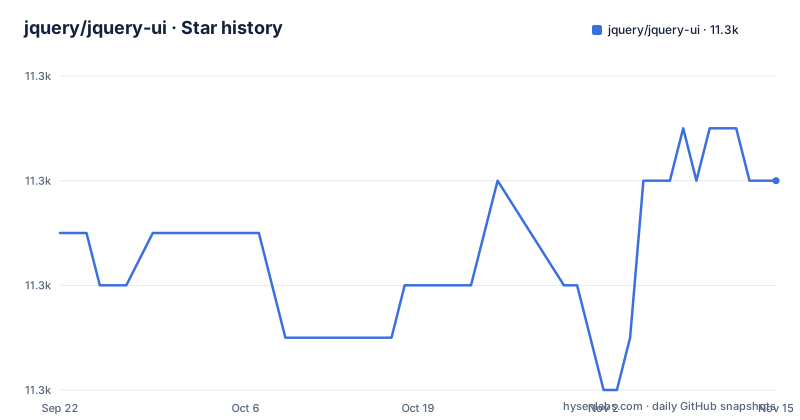
Star history
- jquery/jquery-ui11,336 ★ · +1
| Repository | 2026-09-22 | 2026-11-15 |
|---|---|---|
| jquery/jquery-ui | 11.3k | 11.3k |
1 Stars in the last 54 days, measured from the daily GitHub snapshot. Compare with other projects
Editorial analysis
The problem jQuery UI solves, and who still has it
jQuery UI packages the things a jQuery page always ends up needing and nobody wants to write twice: a date picker bound to a text input, a modal dialog with focus handling, autocomplete over a remote list, draggable and sortable lists, accordions and tabs. The README describes it as "a curated set of user interface interactions, effects, widgets, and themes built on top of jQuery," and the word curated matters. Each widget is a jQuery plugin with a shared lifecycle, so you call .datepicker(), .dialog(), .sortable() on a selection and get consistent option, method and event conventions across all of them.
The audience is narrow and specific. It is a project for teams that already load jQuery, usually inside a server-rendered application, a CMS theme, an admin panel, or a legacy codebase where the page is built from HTML templates rather than components. In that setting the alternative is not a modern framework. The alternative is writing a datepicker. jQuery UI is also common in WordPress-era and Rails-era stacks where the asset pipeline already knows how to serve a CSS file and a script file next to each other.
The README opens with a status note that changes how you should read everything else: jQuery UI is in maintenance-only mode, with a link to a 2021 blog post on the jQuery project's modernization efforts. Maintenance-only means bug fixes and compatibility work, not new widgets. The repository is not archived and the last push was on 2026-09-13, so the code is still being touched, but the scope is deliberately fixed.
How the widgets are structured in the repository
The repository layout tells you how the library ships. The ui/ directory holds the widget sources, themes/ holds the CSS themes, build/ holds the build tooling, and demos/ holds the example pages. The root has a Gruntfile.js, a package.json, and a bower.json left over from the Bower era.
The package.json declares "main": "ui/widget.js", which is the widget factory, the base every individual widget extends. It also declares a single runtime dependency: "jquery": ">=1.12.0 <5.0.0". That range is the real compatibility contract. The range admits jQuery 4.x, because the upper bound is below 5.0.0. The version field reads 1.14.3-pre on main, which is the development line, while the most recent release is 1.14.2 from 2026-01-29.
The build is driven by Grunt: the scripts block maps build to grunt build and lint to grunt lint. Tests run through jtr, the jQuery Test Runner, with test:server starting a local server and test:unit running the suite; the README points contributors at CONTRIBUTING.md for environment setup and says tests can be run with npm run test:unit -- --help. That is a contributor workflow, not something an application needs to reproduce.
Installing jQuery UI and wiring up a datepicker
The README does not carry install instructions; it sends you to jqueryui.com to get started. The package name in package.json is jquery-ui, so npm is the distribution channel named by the repository itself.
npm install jquery-uiThat installs jQuery UI under the name declared in package.json. The version you get is the latest published release, 1.14.2 at the time of writing. If you need to pin, install [email protected] explicitly.
To build the library from a checkout rather than installing a release, the package.json scripts block gives the command. This runs the Grunt build defined in Gruntfile.js.
npm run buildThe repository also exposes the test entry points. The README states that unit tests can be run with the command below, and package.json defines npm run test:server to start a local server.
npm run test:unit -- --helpFor a page without a bundler, the README points at jqueryui.com and the demos at jqueryui.com/demos/ for working examples,. The API reference for each widget, including the datepicker, is at api.jqueryui.com. The repository does not document a CDN host in the README itself, so treat the file list on the project site as the source of truth for which script and stylesheet to link.
Where jQuery UI is the wrong tool
The maintenance-only status is the first limitation, and it is not cosmetic. A widget library that receives bug fixes but not features will not grow the components you are missing. If your product needs a virtualized data grid, a combobox with async grouping, or a date range picker with a two-month layout, jQuery UI does not have it and the README gives no indication that it will.
The second limitation is the jQuery dependency range. package.json allows >=1.12.0 <5.0.0. jQuery 5 would fall outside that range, and the README does not document a forward-compatibility plan.
The third is styling. jQuery UI themes are built around its own class naming and a theme CSS file, not around utility classes or CSS-in-JS. If your application's design system is Tailwind or styled-components, you will be fighting the theme layer or writing overrides for every widget. The repository ships themes/ and a bower-era bower.json, which is a fair signal of the era the styling model belongs to.
Finally, the README does not document a rollback or migration path between major versions. If you upgrade and a widget's markup changes, the documentation to consult is the release notes and the API site, not the README.
jQuery UI against a component library like Bootstrap's
The closest real alternative for the same audience is the JavaScript component set that ships with Bootstrap. The difference is architectural rather than cosmetic. Bootstrap's components are built on its own data-attribute API and its own CSS framework; you adopt the grid and the utility classes to get the modal and the dropdown. jQuery UI is the inverse: it assumes you have jQuery and gives you behavior, with theming as a separate, replaceable layer.
That matters when you already have a layout system. Dropping Bootstrap into a page to get a datepicker means importing a second CSS framework and accepting its reset, spacing scale and class names. Dropping jQuery UI into a jQuery page means importing one stylesheet and one script. For a server-rendered admin panel that already has its own CSS, the second option is usually smaller and less invasive.
The trade-off runs the other way for new applications. Bootstrap's components are maintained alongside a framework that is still adding features; jQuery UI's README states the project is maintenance-only. If you are starting from nothing, you are choosing between a component set that is still growing and one that is frozen by policy. That is the whole decision, and it is not close.
Maintenance cost, licensing and what the version numbers mean
The release cadence visible in the repository is slow and deliberate: 1.14.0 in August 2024, 1.14.1 in October 2024, 1.14.2 in January 2026. Two of those are patch releases more than a year apart. Budget accordingly: you are not going to get a quarterly stream of fixes, and you should not plan a feature request around the release train. The last push to the repository was on 2026-09-13, so commits continue, but the README's maintenance-only note sets the expectation for what they contain.
Upgrade cost is dominated by the theme. Because the widgets render their own markup and rely on a theme stylesheet, a version bump can change class names or DOM structure, and any CSS you wrote against that markup needs rechecking. The README does not document a migration guide, so the practical source of truth is the release notes and the API documentation site.
On licensing, package.json declares "license": "MIT", while the repository metadata is reported as NOASSERTION. NOASSERTION means the metadata makes no assertion, so the LICENSE.txt file at the root is the one to read before you rely on either. The package.json author field lists the OpenJS Foundation and other contributors. This is not legal advice; if the MIT declaration matters to your distribution terms, confirm it against LICENSE.txt rather than the package metadata.
Editorial conclusion
Adopt jQuery UI when you already ship jQuery and need a datepicker, dialog, autocomplete or sortable without adding a second runtime, and pin to 1.14.2 rather than tracking main. Do not adopt it for a new component system: the README states the project is in maintenance-only mode, so new features should not be expected. Before committing, verify that the jQuery version you ship satisfies the >=1.12.0 <5.0.0 range in package.json, and check the theme you intend to use still matches the markup your widgets render.
Frequently asked questions
What is jQuery UI used for?
It provides user interface interactions, effects, widgets and themes built on top of jQuery, so a page can add a datepicker, dialog, autocomplete, accordion, tabs, draggable or sortable without writing them from scratch. The README describes it as a curated set of those components.
What is the latest jQuery UI version?
The most recent release is 1.14.2, published on 2026-01-29. The version field in package.json on the default branch reads 1.14.3-pre, which is the unreleased development line.
How do I install jQuery UI?
The README sends you to jqueryui.com to get started rather than listing install steps. The package name in package.json is jquery-ui, so npm install jquery-ui is the distribution path named by the repository itself.
Is jQuery UI still supported?
The README states that jQuery UI is in maintenance-only mode and links to a 2021 blog post about the project's modernization efforts. The repository is not archived and the last push was on 2026-09-13, so fixes continue, but the stated scope does not include new features.
How do I use the jQuery UI datepicker?
The widget is part of the ui/ sources and its API reference lives at api.jqueryui.com, with worked examples at jqueryui.com/demos/. The README does not show a datepicker call, so the demo pages are the place to copy the initialisation from.
What is jQuery UI min js?
The repository ships the sources under ui/ and the build tooling under build/, and the build runs through Grunt (npm run build). The README does not describe the minified file names, so check jqueryui.com for the distributed files.
Official sources
Add this badge to your README
If you maintain this project, the badge below links readers to this analysis and shows its maintenance status from the daily GitHub snapshot. Paste the markdown into your README; add ?metric=license or ?metric=stars to the image URL for a different field.

[](https://hysenlabs.com/projects/jquery-jquery-ui)Star history chart for your README
[](https://hysenlabs.com/projects/jquery-jquery-ui)Was this useful?