JuliaRegistries/General: The Default Registry's Rules, Robots, and Review Gates
The official registry of general Julia packages
At a glance
- What is it?
- General is the default Julia package registry, run as a GitHub repository with automated merge bots and human review. This review covers how registration works, the waiting periods, the license rules, and where the process can trip you up.
- Who is it for?
- Adopt General if you are a Julia package author who wants your package installable by name with Pkg.add and visible to the whole ecosystem. Do not use it for personal or experimental packages that are not ready for public scrutiny, and do not register if your package lacks an OSI-approved license or wraps proprietary code without proper notices.
- Can I use it commercially?
- Yes. MIT is a permissive licence: you can use, modify and sell software built on it, as long as you keep its copyright and licence notices.
- Is it still maintained?
- Yes. The repository received new commits within the last day.
- What is it written in?
- Mainly Julia, according to GitHub's language statistics.
Answers come from the project's GitHub data, last synced on October 22, 2026, and from our analysis. They are not legal advice.
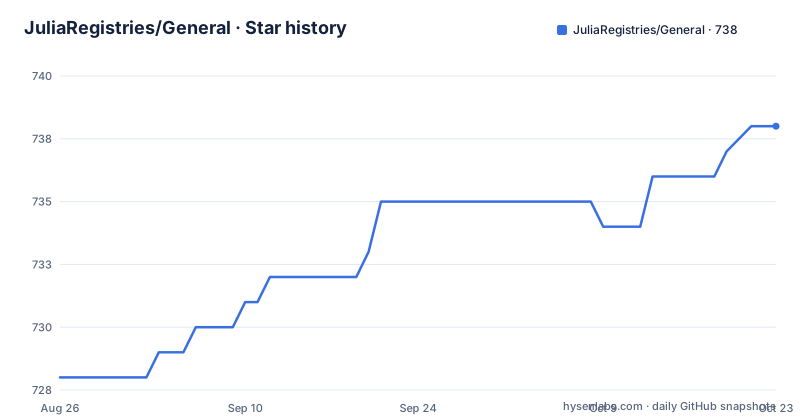
Star history
- JuliaRegistries/General738 ★ · +10
| Repository | 2026-08-26 | 2026-10-22 |
|---|---|---|
| JuliaRegistries/General | 728 | 738 |
10 Stars in the last 57 days, measured from the daily GitHub snapshot. Compare with other projects
Editorial analysis
What the General Registry Actually Does
General is the default package registry for Julia. It is a GitHub repository, not a service. The repository stores metadata about packages: versions, dependencies, and compatibility constraints. Julia's package manager, Pkg.jl, reads this metadata to resolve environments. Without a registry, you can still install a package directly from a URL with Pkg.add(url="..."), but then the URL is saved in Manifest.toml and that file becomes necessary to reproduce the environment. Registration in General changes the install command to Pkg.add("PackageName"), which is the normal way Julia users expect to install packages. The registry is open to everyone, but the entry process is controlled by pull requests and automated checks.
The Registration Pipeline: Pull Requests, Registrator, and TagBot
New packages and new versions enter General through pull requests against the repository. The README strongly recommends using Registrator.jl, which can run as a GitHub App or through a web interface. When Registrator is triggered, it opens a pull request. Some pull requests are merged automatically, but only those opened by Registrator. Others require human review. The README also recommends TagBot, which tags a release in your package repository after the registry merge. This split between automated and manual merging is the core mechanism: it lets routine version bumps flow quickly while new packages get a community feedback window. The waiting periods are explicit: three days for new packages, 15 minutes for new versions of existing packages, and 15 minutes for JLL packages (binary dependencies), whether new or updated. These times are not negotiable in the README; they are the registry's public policy.
Getting a Package In: Commands and Configuration
You do not install the registry itself; you interact with it through Pkg and Registrator. To add a package without registering, the README gives two commands: using Pkg; Pkg.add(url="https://github.com/JuliaLang/Example.jl") and, in the Pkg REPL mode, ] add https://github.com/JuliaLang/Example.jl. To register, you trigger Registrator, which opens the pull request. There are no config keys to set in the registry itself; the configuration lives in your package repository. The README points to the Contributing Guidelines for the full process. The practical setup is: have a package with a license file, a README, and tests. The README explicitly says registered packages must have an Open Source Initiative approved license, clearly marked via a license file. It also requires that wrapping proprietary libraries is acceptable only if the wrapped library's license permits open source distribution of the Julia wrapper, and the more restrictive license must be mentioned in a third party notice file or the license file, preferably the third party notice.
The AutoMerge Gates and Their Failure Modes
Automatic merging is not guaranteed. The README states that only pull requests opened by Registrator are candidates, and the full guidelines live in the RegistryCI documentation. The waiting period for new packages is three days, which is a deliberate delay for community feedback. If your package has a problem, such as a name conflict or a license issue, the pull request may not meet the guidelines and will sit for human review. A realistic failure mode is a package that lacks an OSI-approved license file; the registry will reject it. Another is a package that wraps a proprietary library without the required notice; the README says this is not acceptable without the notice. The registry is also not a place for personal packages, as the truncated README hints. If your package is not intended for others, registration is the wrong move. The three-day wait for new packages can be a problem if you need a fix out immediately, but new versions of existing packages only wait 15 minutes, so the pain is limited to first releases.
Maintenance and Upgrade Cost for Registry Users
For a package author, the ongoing cost is keeping your package compliant. The registry has consistency tests, shown in the README's workflow badges, that run on every pull request. These tests check that the registry metadata is valid. If your package's dependencies change, you need to register a new version to update the compatibility constraints. The README does not describe a deprecation process, but the registry is a living repository with active workflows: AutoMerge, Registry consistency tests, TagBot Triggers, and Update Manifests. The Update Manifests workflow suggests that the registry itself maintains manifest files, which is a maintenance burden handled by the maintainers, not by you. The license is MIT, which applies to the registry repository itself, not to the packages in it. Each package has its own license. You should check the license of any package you depend on, but that is standard practice. The registry does not impose a license on your package beyond requiring an OSI-approved one.
Alternatives: Direct URL Installation and Custom Registries
The README explicitly offers an alternative to registration: installing directly from a URL. This is a real difference in approach. With Pkg.add(url="..."), you bypass the registry entirely. The trade-off is that the URL is recorded in Manifest.toml, so anyone who wants to reproduce your environment needs that file. This is fine for a personal project or a package not ready for public release. The README also mentions that you can create your own registry. This is a more involved alternative: you host your own registry repository, and users add it to their Pkg configuration. Then Pkg.add("PackageName") works, but only for users who have your registry installed. This gives you control over the merging rules and waiting periods, but you lose the visibility that General provides. For most package authors, General is the default choice because it is what most Julia users have configured. The alternative of a custom registry is for internal or niche use cases.
Who Should Adopt It and What to Verify First
Adopt General if you have a package that is useful to others and you want it installable by name. It is the standard path for Julia packages. Do not adopt it if your package is personal, incomplete, or lacks documentation and tests. The README asks for documentation, tests, and CI as best practices, and the registry's consistency tests will catch metadata errors. Before registering, verify three things. First, your package has a license file that is OSI-approved. Second, if you wrap a proprietary library, you have a third party notice file or license file that mentions the more restrictive license. Third, read the package naming rules in the Contributing Guidelines, because a name conflict can delay your pull request. The three-day wait for new packages is a hard constraint, so plan for it. If your package is a JLL package, the wait is only 15 minutes, but the same license and naming rules apply. The registry is not a magic bullet; it is a gatekeeper with clear rules and automated checks. If you follow the rules, the process is mostly automatic. If you do not, you will wait for a human reviewer.
Editorial conclusion
Adopt General if you are a Julia package author who wants your package installable by name with Pkg.add and visible to the whole ecosystem. Do not use it for personal or experimental packages that are not ready for public scrutiny, and do not register if your package lacks an OSI-approved license or wraps proprietary code without proper notices. Before registering, verify your package has a README, tests, and a license file, and read the package naming rules in the repository's CONTRIBUTING.md. The registry's automated merge gates are real: new packages wait three days, new versions wait 15 minutes, and JLL packages get the same short wait, so plan your release timing accordingly.
Frequently asked questions
Do I need to register a package with Julia's General registry before I can install it?
No. `using Pkg; Pkg.add(url=...)` or the Pkg REPL form `] add <url>` installs a package straight from its repository. The URL is saved in Manifest.toml, so that file is needed to resolve a Pkg environment that has unregistered packages installed.
How long does a package or a new version wait in the General registry?
New Julia packages wait 3 days, which leaves time for community feedback. New versions of existing packages wait 15 minutes. JLL packages, which are binary dependencies, also wait 15 minutes, for either a new package or a new version. Only pull requests opened by Registrator are candidates for automatic merging.
What license does a package need to be registered in Julia's General registry?
An OSI approved license, clearly marked in a license file inside the package repository. Packages wrapping proprietary libraries are accepted when those libraries permit open source distribution of the wrapper code, and then the more restrictive license must be mentioned in the third party notice file or the license file, preferably the former, and should be mentioned in the README.
Which file names does the General registry look for when it checks a license?
A license file named `LICENSE.md`, `LICENSE`, `COPYING` or something similar, a third party notice file named `THIRD_PARTY_NOTICE.md`, `THIRD_PARTY_NOTICE` or something similar, and a README file named `README.md`, `README` or something similar.
What is actually inside the JuliaRegistries/General repository?
Single letter directories from A/ through Z/, a separate lower case jll/ directory for binary packages, Registry.toml at the root, the .ci/ and .github/ directories, and policy files including NAMING_GUIDELINES.md, CONTRIBUTING.md, LICENSE.md, AGENTS.md and CLAUDE.md. The repository publishes no GitHub releases.
Official sources
Add this badge to your README
If you maintain this project, the badge below links readers to this analysis and shows its maintenance status from the daily GitHub snapshot. Paste the markdown into your README; add ?metric=license or ?metric=stars to the image URL for a different field.

[](https://hysenlabs.com/projects/juliaregistries-general)Star history chart for your README
[](https://hysenlabs.com/projects/juliaregistries-general)