Just-Some-Bots/MusicBot: the original Discord music bot, self-hosted in Python
:musical_note: The original MusicBot for Discord (formerly SexualRhinoceros/MusicBot)
At a glance
- What is it?
- MusicBot is the original Discord music bot, written in Python 3.8+ on discord.py. It is for people who want to run their own bot and queue YouTube audio rather than rent a hosted one, and it asks you to accept a config file, a Docker volume set and a Python 3.8 base image.
- Who is it for?
- Adopt MusicBot if you want a self-hosted Discord music bot you can read end to end, you are comfortable with Python 3.8 and a config/options.ini you create by hand, and you accept that the bot runs the audio extraction itself. Do not adopt it if you need managed hosting, a Spotify source, or a supported release artifact: the repository lists no recent releases.
- Can I use it commercially?
- Yes. MIT is a permissive licence: you can use, modify and sell software built on it, as long as you keep its copyright and licence notices.
- Is it still maintained?
- Activity is slowing. The repository last received commits 8 months ago.
- What is it written in?
- Mainly Python, according to GitHub's language statistics.
Answers come from the project's GitHub data, last synced on November 24, 2026, and from our analysis. They are not legal advice.
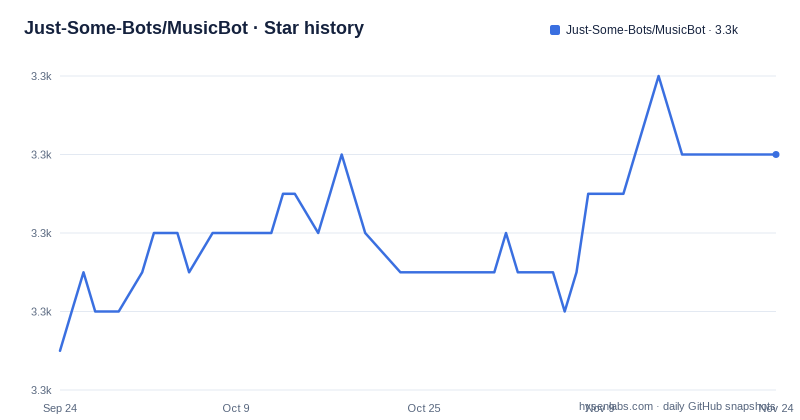
Star history
- Just-Some-Bots/MusicBot3,294 ★ · +5
| Repository | 2026-09-24 | 2026-11-24 |
|---|---|---|
| Just-Some-Bots/MusicBot | 3.3k | 3.3k |
5 Stars in the last 61 days, measured from the daily GitHub snapshot. Compare with other projects
Editorial analysis
What MusicBot actually solves, and who ends up running it
A Discord voice channel has no built-in queue, no source resolution and no per-command permissions. MusicBot fills that gap: it joins a voice channel, takes a URL or search from a text command, downloads the audio, and plays it. The README describes it as the original Discord music bot, written for Python 3.8+ on discord.py, and says it can serve one server or multiple servers. When the queue empties, it falls back to a configurable list of existing songs rather than going silent.
The audience is narrow but real. This is for a server owner or a small group who wants the bot process on their own machine or VPS, with their own token, their own cache directory and their own permission rules. The README points to a permission system that lets owners restrict commands to certain people. That matters if you run the bot in a server where not everyone should be able to skip a track or clear the queue. It is not a hosted service and there is no account to create.
How the bot is put together: discord.py, yt-dlp and a config file
The dependency list in requirements.txt tells most of the architecture story. discord.py comes from a git URL with the voice and speed extras, so the voice gateway and the Opus encoder are part of the install. yt-dlp handles extraction from YouTube and similar sites. pynacl and libsodium sit underneath for voice encryption, and ffmpeg is installed separately in the Dockerfile. colorlog and colorama handle console output, with colorama pinned to Windows.
The data flow is direct. A command arrives over the Discord gateway, the bot passes the URL to yt-dlp, the resulting audio goes through ffmpeg, and the encoded stream is sent to the voice channel. The README calls live media streaming into a voice channel experimental, so treat that path as less settled than ordinary track playback.
Configuration is a plain INI file. The README is explicit that config/options.ini is not included by default and that you copy example_options.ini and rename it. That single file holds the token and the behaviour switches, which means the deployment is easy to inspect and easy to leak if you commit it. The .gitignore in the repository layout suggests the project expects that file to stay out of version control.
One design choice worth naming: the bot does the downloading. Hosted bots hide that work behind someone else's infrastructure. Here, every play command is CPU and network on your machine, and the audio_cache volume exists because of it.
Installing MusicBot and playing a first track
The README says setup means following one of the guides on the project site, then configuring the bot so it can connect to Discord. The repository also ships install scripts for the three platforms, and a Dockerfile plus docker-compose.example.yml for container deployment.
On Linux, the install script is the documented path. Run it from the repository root:
./install.shThe Dockerfile builds from python:3.8-alpine, copies the source into /musicbot, copies the config directory to a sample_config directory, installs ffmpeg, opus-dev and libsodium through apk, then installs requirements.txt with pip3. It declares four volumes: /musicbot/audio_cache, /musicbot/config, /musicbot/data and /musicbot/logs, and sets APP_ENV=docker. The entrypoint is docker-entrypoint.sh.
Before the first run you need the config file the README describes:
cp config/example_options.ini config/options.iniThen edit config/options.ini and fill in the bot token and the settings you want. The README points at example_options.ini for the available options. Once the file exists, start the bot:
./run.shWith the bot running and invited to a server, the README gives play <url> as the command to download, process and play a song from YouTube or a similar site, preceded by your command prefix. The full command list lives on the project site rather than in the README. If you are deploying with Docker instead, the repository provides docker-compose.example.yml to adapt, and the four volumes are the directories you need to map so config and cache survive a container restart.
The Python 3.8 base image is the constraint you will hit first
The README badge lists Python 3.8, 3.7 and 3.6, and the Dockerfile pins python:3.8-alpine. That is an old interpreter line. If your host has moved to a newer Python, the install scripts may still work, but the project's own stated support stops at 3.8, and the container path is fixed at 3.8. You are choosing between matching an old runtime or testing an unsupported one.
The second constraint is ffmpeg. It is not a Python package; the Dockerfile installs it with apk, and a bare-metal install needs it on the host plus libsodium for voice. A missing ffmpeg will not fail at startup. It will fail when someone asks the bot to play something, which is a worse place to find out.
The third is the discord.py dependency. requirements.txt pulls it from a git URL rather than a pinned release, so an install depends on that repository being reachable and on the current default branch still working with this code. The commented line in requirements.txt shows the intent, discord.py [voice, speed] >= 2.4.0, but the active line is the git reference. That is a reproducibility trade-off, not a bug.
Finally, the README marks live media streaming as experimental. If your use case is a continuous stream rather than queued tracks, you are outside the part of the bot the documentation treats as settled.
Hosted bots and Lavalink: where MusicBot differs
The practical alternative for most people is a hosted Discord music bot. The difference is not features, it is who operates the process. A hosted bot needs no Python install, no ffmpeg, no token file and no cache directory, and it stays online when your machine does not. MusicBot needs all of those things and goes down with your host. If your server only needs music occasionally and nobody wants to maintain a process, the hosted route is the better fit.
The other alternative is a bot built on Lavalink, where a separate Java audio server does the extraction and streaming and the Discord bot only forwards commands. That splits the workload MusicBot keeps in one process. The trade-off is a second service to run and a network hop between the bot and the audio node. MusicBot's appeal is the opposite: one Python process, one config/options.ini, one set of volumes, and the whole path readable in the repository.
A note on the search results around this project. Many of the phrases people type are about other bots entirely, and several are about hosted services that shut down. MusicBot has nothing to do with those. It is also not a Telegram bot, despite the naming overlap in searches. What it is: a self-hosted Discord bot, MIT licensed, with the source in the repository.
Maintenance, upgrades and what the MIT licence leaves you
The repository is not archived, and the last push was on 2026-03-14. That is the only maintenance signal available here; the material lists no recent releases, so there is no tagged version to pin to and no changelog to read. Upgrades therefore mean pulling the repository and re-running the install script, then checking whether your config/options.ini still matches example_options.ini. Because the config file is yours and the example is the reference, a diff between the two is the cheapest way to see what changed.
The Dockerfile adds its own upgrade cost. It rebuilds from python:3.8-alpine and reinstalls requirements.txt each time, which includes the git reference for discord.py. A rebuild is not guaranteed to reproduce the previous image.
The licence is MIT. That permits use, modification and redistribution with the licence text retained, and it comes with no warranty. The README links to the LICENSE file rather than restating terms. I am not giving legal advice: if you plan to redistribute a modified bot or run it commercially, read the LICENSE file itself, and note that the audio sources the bot extracts from are governed by their own terms, not by the MIT grant.
Editorial conclusion
Adopt MusicBot if you want a self-hosted Discord music bot you can read end to end, you are comfortable with Python 3.8 and a config/options.ini you create by hand, and you accept that the bot runs the audio extraction itself. Do not adopt it if you need managed hosting, a Spotify source, or a supported release artifact: the repository lists no recent releases. Verify three things first: that your Python is 3.6 to 3.8 as the badge states, that ffmpeg and libsodium are present on the host or in the image, and that the git URL in requirements.txt for discord.py resolves when you run the install. The last push to the repository was on 2026-03-14.
Frequently asked questions
How do I install Just-Some-Bots/MusicBot?
The README says to follow one of the guides on the project site, then configure the bot for its Discord connection. The repository also ships install.sh, install.bat and install.ps1, plus a Dockerfile and docker-compose.example.yml for container deployment. Either way you must create config/options.ini by copying example_options.ini, because it is not included by default.
How do I use MusicBot once it is running?
The README gives play <url> as the main command, preceded by your command prefix, and says it will download, process and play a song from YouTube or a similar site. A full command list is on the project site rather than in the README. Configuration lives in config/options.ini, and the bot will play a configurable list of existing songs when the queue is empty.
What is Just-Some-Bots/MusicBot?
It is the original Discord music bot, written in Python 3.8+ using the discord.py library. It plays requested songs from YouTube and other services into one or several Discord servers, and it includes a permission system so owners can restrict commands to certain people.
Does MusicBot need Python 3.8 specifically?
The README badge lists Python 3.8, 3.7 and 3.6, and the Dockerfile builds from python:3.8-alpine. The stated support stops at 3.8, so running it on a newer interpreter is outside what the documentation claims.
What else does MusicBot need besides Python?
The Dockerfile installs ffmpeg, opus-dev and libsodium through apk, and requirements.txt pulls discord.py with the voice and speed extras plus pynacl and yt-dlp. On a bare-metal install those system packages have to be present on the host, and a missing ffmpeg will only surface when a track is requested.
Official sources
Add this badge to your README
If you maintain this project, the badge below links readers to this analysis and shows its maintenance status from the daily GitHub snapshot. Paste the markdown into your README; add ?metric=license or ?metric=stars to the image URL for a different field.

[](https://hysenlabs.com/projects/just-some-bots-musicbot)Star history chart for your README
[](https://hysenlabs.com/projects/just-some-bots-musicbot)Was this useful?