undercut-f1: a live timing screen you delay on purpose
F1 Live Timing TUI for all F1 sessions with variable delay to sync to your TV. Supports replaying previously recorded sessions.
At a glance
- What is it?
- undercut-f1 is an open source terminal client for the F1 Live Timing data stream, with an adjustable delay so the screen lines up with a delayed television broadcast, session recording and replay, and a driver tracker on a live track map. It is aimed at fans who want the timing data rather than the TV pictures.
- Who is it for?
- Adopt undercut-f1 if you follow Formula 1 closely enough to want sector times, tyre ages, pit strategy and race control messages in a terminal, and you want the screen aligned with your own broadcast delay. Skip it if you need the live driver positions on the track map, since the feed stopped publishing them after the 2025 Dutch Grand Prix and that feature now needs an F1 TV subscription.
- Can I use it commercially?
- Yes, with conditions. GPL-3.0 is a copyleft licence: if you distribute software that includes it, you must release that software's source code under the same licence. Running it internally without distributing it does not trigger that obligation.
- Is it still maintained?
- Yes. The repository last received commits 7 days ago.
- What is it written in?
- Mainly C#, according to GitHub's language statistics.
Answers come from the project's GitHub data, last synced on November 7, 2026, and from our analysis. They are not legal advice.
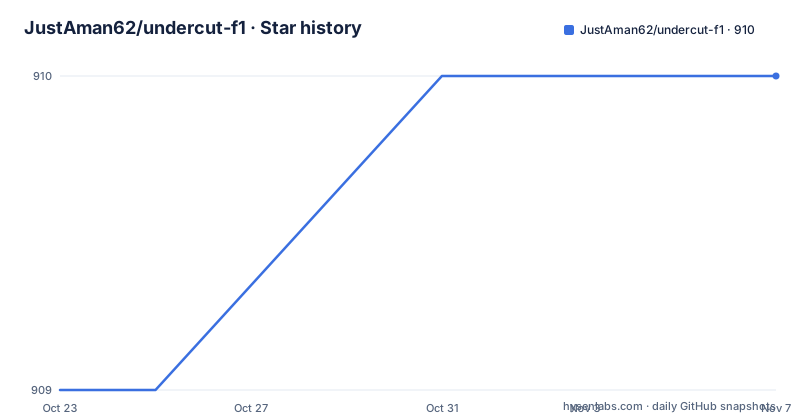
Star history
- JustAman62/undercut-f1910 ★ · +1
| Repository | 2026-10-23 | 2026-11-07 |
|---|---|---|
| JustAman62/undercut-f1 | 909 | 910 |
1 Stars in the last 15 days, measured from the daily GitHub snapshot. Compare with other projects
Editorial analysis
Delaying the data is the feature, not a workaround
undercut-f1 is an open source F1 Live Timing client. The `undercutf1` executable is a TUI application which uses `UndercutF1.Data` to show a Live Timing screen during sessions, and records the data for future session replays.
The reason the delay control exists is stated in the README in one sentence. F1 live broadcasts are usually delayed by some indeterminable amount, usually 30 to 60 seconds, so the TUI allows you to delay the data being displayed so that you can match up what you see on your screen to what you see on your TV.
That is the design decision that makes this project unlike a timing page on a website. A timing screen is only interesting if it is synchronised with the pictures, and the delay is unknown per broadcast rather than fixed, so it has to be adjustable at runtime. The documentation has a section on managing delay, and a separate one on pausing the session clock when you pause an external video player such as Kodi, so your timing screen stays in sync with your feed.
The second half of that sentence, recording the data for future session replays, is what makes the project more than a live viewer. The README also says that the `UndercutF1.Data` library provides connectivity with the F1 Live Timing data stream and handles all the processing of the incoming data, and that it allows for simulated streams where previously recorded data streams can be played back to allow for easy development and testing.
What the timing tower shows
The Timing Tower is the main screen, and it shows for each driver a fairly wide set of fields.
Live sector times with colouring for personal and overall fastest, so you can see at a glance who is purple on which sector. Last and best lap. The current tyre and the age of that tyre. The interval to the driver in front and the gap to the leader. And a gap column between a selected driver and all other drivers, which the README says is useful for monitoring pit windows.
The relative gap feature is driven by a cursor. The cursor is controlled by the down and up arrow `Cursor` actions in the `Timing Tower` screen, and selecting a driver with it shows the relative interval between that driver and all others. The README gives the reasoning: this is useful for determining where a driver will fall to after a pit stop, or for looking at pit windows during undercuts.
The gap between the selected driver and those around them over the last four laps is displayed at the bottom of the screen, so you can watch the gaps evolve rather than take a snapshot.
There is also a persistent compare mode. Using the `C` `Select for Compare` action over a driver, and then doing the same for a second driver, replaces the normal comparison panel with a persistent comparison between those two. The README's use case is two drivers who are not next to each other on track, for example on contra tyre strategies, or monitoring one driver's pit window against another's. Once both are selected, moving the cursor back to the top makes the Compare column show relative gaps to the first selected driver.
Other screens in the README's table of contents cover the Pit Stop Strategy view, which gives at-a-glance information about all the drivers' strategies, the Race Control page with investigations, penalties, lap deletions and weather, the Driver Tracker showing the position of selected drivers on a live track map, and lap-by-lap Timing History for observing gaps over time.
The live feed stopped publishing some of its data
There is a warning in the README that any reader should not skip, because it changes what the tool can do in real time.
Since the 2025 Dutch Grand Prix, the F1 Live Timing feed no longer freely publishes some of the data needed to provide all existing functionality. The listed functionality that is now only available to those with an active F1 TV subscription is the Driver Tracker, meaning the live position of each car is unavailable, the DRS indicator in the timing screens, the team and driver championship tables, and pit stop times, in box and in pitlane.
The mitigation is stated just as plainly. Importing a session after it finishes still fetches all the data, so all functionality is available if you use undercut-f1 after a race finishes.
That sentence explains the shape of the project. Live viewing is degraded, and replay after the event is complete. The recording and replay feature is therefore not a convenience, it is the path to the full feature set for anyone without an F1 TV subscription. The Driver Tracker screenshot in the README is, for most viewers, a picture of something they can only see after the race.
Linking an F1 TV account is described as simple. You run `undercutf1 login` before starting your session and follow the instructions displayed, with a section in the README titled F1 TV Account Login covering the details.
Four ways to install it
The Getting Started section documents four installation routes, which is what you would expect from a project that serves both casual users and people who want to run it in a container.
The first is as a dotnet tool, so it is installed and run through the .NET SDK tooling. The second is from Homebrew, for macOS and Linux. The third is the standalone executable, which is the route for people who do not want a .NET SDK on their machine. The fourth is the Docker image.
The Dockerfile is where the interesting details are. The runtime image is `mcr.microsoft.com/dotnet/aspnet:10.0`, with ffmpeg and libgdiplus installed, and the Dockerfile comments note that ffmpeg needs libgdiplus.
FROM mcr.microsoft.com/dotnet/aspnet:10.0 AS base
WORKDIR /app

# ffmpeg libgdiplus required for ffmpeg
RUN apt-get update && apt-get install ffmpeg libgdiplus -y
The build stage uses `mcr.microsoft.com/dotnet/sdk:10.0-aot` on the build platform, copies the source generation projects under `gen/` and the two main projects, restores, then publishes with `-a $TARGETARCH` and `/p:PublishTrimmed=false`.
FROM base AS final
WORKDIR /app
COPY --from=build /app/publish .

ENV UNDERCUTF1_DATADIRECTORY=/data
ENV UNDERCUTF1_LOGDIRECTORY=/logs

ENTRYPOINT ["./undercutf1"]
Two environment variables are set for the container, `UNDERCUTF1_DATADIRECTORY` and `UNDERCUTF1_LOGDIRECTORY`, pointing at `/data` and `/logs`, which tells you where the recorded sessions and the log files go and therefore which paths you need to mount as volumes. The entrypoint is the `undercutf1` executable itself.
Configuration, the control API and the data API
The table of contents lists a Configuration section with subsections for default directories and the F1 TV account login, and a separate Logging section. The repository layout backs this up: there is a `config.schema.json` at the top level, which is the schema for the configuration file, a `version.json`, a `Sample Data/` directory, and a `Directory.Build.props` and `Directory.Packages.props` pair for the build.
Two APIs are documented. The Control API and the Data API.
That split matters for anything you build on top. The control API is the surface for driving the application, which is how the session clock can be paused when you pause an external video player, and how a session can be started or stopped from outside. The data API is the surface for reading the timing data itself, which is how the same processed stream that feeds the TUI becomes available to another program.
The Data API is what makes the library half of the project reusable. `UndercutF1.Data` handles connectivity to the stream and all the processing of the incoming data, and the repository contains `UndercutF1.Data.Tests/`, so the processing layer is tested separately from the terminal front end. The project structure separates `UndercutF1.Console/`, which is the TUI, from `UndercutF1.Data/`, which is the library, and from the source generation projects in `gen/`.
The recorded sessions are the other reusable artefact. Because the app records the data during a session and can play a recorded stream back as a simulated stream, you can develop against a real race's data without a live feed, which is the point the README makes about easy development and testing.
GPL-3.0 and a release line that tracks the season
The licence field on the repository says GPL-3.0, and there is a LICENSE file at the top level. GPL-3.0 is a strong copyleft licence, and for a desktop application rather than a library the practical question is what happens if you distribute a modified build.
The release history is the most telling thing about this project, because the versions are not just code releases, they are responses to the feed. The tags are v4.0.73 on 2026-04-18, named Workaround heartbeat issue for Japan GP 2026, v4.0.89 on 2026-05-25, named Strategy Analysis Improvements, and v4.0.103 on 2026-07-20, named Smooth driver tracker movements. The last push was on 2026-07-20, the same day as the newest tag.
A heartbeat workaround for a specific Grand Prix is a data feed changing shape mid-season. It means the project tracks the upstream service closely, and it means a version you install in April may not behave correctly against a feed in July. The fix, in practice, is to keep up with the releases.
The patch version numbers tell you something too. Going from 73 to 89 to 103 within a season is a high number of releases, which is consistent with a project that ships small changes as the feed shifts and as new features are added, rather than cutting a release every few weeks.
Two other details in the tree are worth knowing about. There is a `BUILDING.md` for people working on the project itself, and a `docs/` directory with the screenshots the README links to, including the race timing screen and the relative gap view.
Editorial conclusion
Adopt undercut-f1 if you follow Formula 1 closely enough to want sector times, tyre ages, pit strategy and race control messages in a terminal, and you want the screen aligned with your own broadcast delay. Skip it if you need the live driver positions on the track map, since the feed stopped publishing them after the 2025 Dutch Grand Prix and that feature now needs an F1 TV subscription. Verify first that your provider still exposes the data you care about during a live session, and that the version you install has the fixes for the current season's feed quirks, since the release notes show a heartbeat workaround added for the 2026 Japanese Grand Prix. The licence field on the repository says GPL-3.0, and the last push was on 2026-07-20.
Frequently asked questions
What is undercut-f1?
It is an open source F1 Live Timing client. The `undercutf1` executable is a TUI application that uses the `UndercutF1.Data` library to show a Live Timing screen during sessions and records the data for future session replays.
Why does undercut-f1 have a delay control?
F1 live broadcasts are usually delayed by an indeterminable amount, usually 30 to 60 seconds, so the TUI lets you delay the displayed data until it matches what you see on your TV. There is also a way to pause the session clock when you pause an external video player such as Kodi.
Which undercut-f1 features now need an F1 TV subscription?
Since the 2025 Dutch Grand Prix the live feed no longer publishes some data. The Driver Tracker live car positions, the DRS indicator in timing screens, the team and driver championship tables and pit stop times are now only available with an active F1 TV subscription, and you link the account by running `undercutf1 login` before starting a session.
How do I install undercut-f1?
The README documents four routes: install and run as a dotnet tool, install from Homebrew, download the standalone executable, or run using the Docker image. The Docker image sets `UNDERCUTF1_DATADIRECTORY=/data` and `UNDERCUTF1_LOGDIRECTORY=/logs` and runs `./undercutf1` as its entrypoint.
Can I use undercut-f1 with a previously recorded session?
Yes. The `UndercutF1.Data` library allows simulated streams where previously recorded data streams can be played back, which the README says allows for easy development and testing. There is also a documented command for downloading a previous session's data for replay.
What licence is undercut-f1 released under?
The licence field on the repository says GPL-3.0, with a LICENSE file at the top level. The releases are v4.0.73 on 2026-04-18, v4.0.89 on 2026-05-25 and v4.0.103 on 2026-07-20, with the last push on 2026-07-20.
Official sources
Add this badge to your README
If you maintain this project, the badge below links readers to this analysis and shows its maintenance status from the daily GitHub snapshot. Paste the markdown into your README; add ?metric=license or ?metric=stars to the image URL for a different field.

[](https://hysenlabs.com/projects/justaman62-undercut-f1)Star history chart for your README
[](https://hysenlabs.com/projects/justaman62-undercut-f1)Was this useful?