logo-design-skill: an agent skill that stops at a concept checkpoint and tests marks at 16 px
A comprehensive logo-design skill for Claude, Gemini CLI, Codex and other AI agents: principles, process, SVG craft, testing tools and a 1,400+ logo reference library.
At a glance
- What is it?
- kaankiziltug/logo-design-skill packages logo-design principles, a 1,400+ SVG reference library and dependency-free Python tools as an Agent Skills folder for Claude, Gemini CLI, Codex CLI and other agents. It always pauses after showing concepts and builds the full kit only once you pick a direction.
- Who is it for?
- Use logo-design-skill if you want an agent to produce SVG logo concepts that are checked at 16 px, in one colour and reversed before you see them, and you are willing to approve one direction before the kit is built. It is not a replacement for a trademark search; the README says the reference library is for avoiding look-alikes, never for copying, and the examples are fictional briefs.
- Can I use it commercially?
- Yes. MIT is a permissive licence: you can use, modify and sell software built on it, as long as you keep its copyright and licence notices.
- Is it still maintained?
- Yes. The repository last received commits 12 days ago.
- What is it written in?
- Mainly HTML, according to GitHub's language statistics.
Answers come from the project's GitHub data, last synced on November 25, 2026, and from our analysis. They are not legal advice.
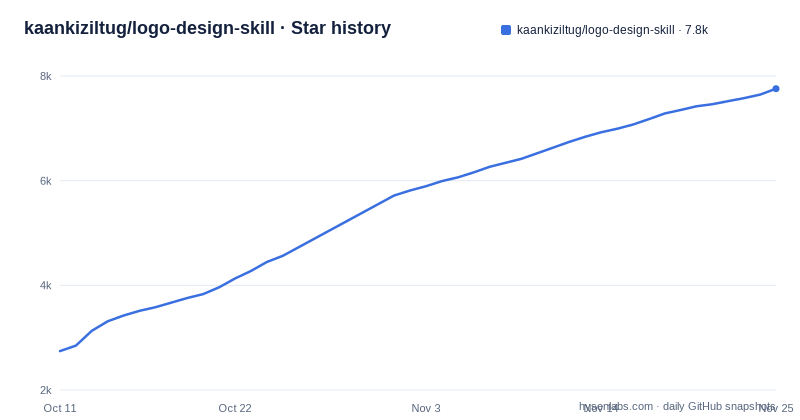
Star history
- kaankiziltug/logo-design-skill7,758 ★ · +5,015
| Repository | 2026-10-11 | 2026-11-25 |
|---|---|---|
| kaankiziltug/logo-design-skill | 2.7k | 7.8k |
5,015 Stars in the last 45 days, measured from the daily GitHub snapshot. Compare with other projects
Editorial analysis
The skill always stops at a checkpoint before it builds the kit
The workflow is drawn as a flowchart in the README: brief, research, concepts, test and refine, then a checkpoint. At the checkpoint the skill shows the concepts as one overview image with a recommendation and offers the full kit. Nothing else is produced until you choose a direction.
The reasoning given is that the kit is most of the work and only makes sense for an approved idea. The kit covers colour, lockups, a presentation board, icons and guidelines. If you ask for changes, the flow loops back to concepts instead of moving forward.
Concepting is specific. The skill writes 8 to 12 one-line ideas and builds 3 of them in SVG. Before that, research looks up category conventions in the reference library.
In the examples, four of the latest ten briefs ended with the client choosing a different concept than the one recommended. The skill refined that choice before colouring it, which the README presents as the purpose of the checkpoint.
Every install path reduces to one folder copy, and the plugin route has two commands
For Claude Code the recommended route is the plugin marketplace:
/plugin marketplace add kaankiziltug/logo-design-skill
/plugin install logo-design@logo-design-skill
A manual route copies skills/logo-design into the personal skills directory at ~/.claude/skills/logo-design, or into .claude/skills/logo-design for one project. On Claude.ai and Claude Desktop, you download logo-design.zip from Releases, or build it with python3 tools/package_skill.py, and upload it under Settings, Capabilities, Skills. If the upload has a size limit, logo-design-lite.zip contains everything except the SVG files themselves.
Other agents use the open Agent Skills format, a folder with a SKILL.md. Clone once:
git clone https://github.com/kaankiziltug/logo-design-skill.gitThen copy the folder into the agent's skills directory. Gemini CLI uses ~/.gemini/skills/logo-design or .gemini/skills/logo-design per project, and Codex CLI uses ~/.codex/skills/logo-design or .codex/skills/logo-design. The .claude-plugin folder only matters to Claude Code and is ignored elsewhere.
The reference library holds 1,400+ SVG logos classified by seven attributes, for study and not for copying
The library is the heaviest part of the repository. It contains more than 1,400 real-world SVG logos, each classified by mark type, technique, geometry, subject, typography, mood and industry. It is searchable from the command line and browsable in a local gallery.
The stated use is to study construction, map category conventions and avoid look-alikes. The README adds that it is never for copying. A TRADEMARKS.md sits in the repository root.
The size has a cost. The SVG files are why a lite zip exists, and a Claude.ai upload with a size limit may need that smaller package.
The repository's primary language is shown as HTML, although the tools are Python.
Sixteen pixels, one colour, reversed and squint are tests the skill runs on its own drafts
The tools are dependency-free Python. They can audit an SVG against logo principles, build concept overview sheets and test sheets, create client presentation boards with industry-specific mockups, render PNGs, and export a complete favicon, app-icon and web-manifest set.
The test sheet covers a 16 px pixel test, one-colour, reversed, squint and mirror variants, contexts, and a competitor shelf test. In the examples, later batches push vivid, saturated palettes while still passing the one-colour and 3 to 1 contrast checks.
Any test that needs a picture requires the model to see it. The skill renders its own drafts to PNG and checks them before showing you anything, so it works best with a model that can view images. A text-only model can run the Python but cannot judge the render.
The repository has a tests directory and an evals directory, and a GitHub Actions badge for a test workflow.
Twenty-eight fictional briefs show what the checkpoint output looks like
The examples section runs twenty-eight fictional briefs end to end, from quiet luxury and neon festivals to B2B SaaS, fintech and health. Each shows greyscale concepts at true 64, 32 and 16 px sizes with a recommendation, followed by a colour preview of the chosen direction on mockups picked for that industry.
The table lists brands such as Kiln, a specialty coffee roaster that chose a letterform with a custom wordmark, and Maison Orvelle, a luxury fashion atelier that chose a monogram. Keyfort, a password manager, ended on an abstract symbol with a strict grid in electric indigo and mint.
The newest batch targets crowded categories with explicit bans. SaaS avoids chat bubbles, charts and padlocks, finance avoids coins, piggy banks and bank blue, and health avoids crosses, pills and heartbeat lines.
These are demonstrations by the skill's author on made-up clients, so they show the output format and not client results.
Releases arrive in quick steps, and the version tags skip numbers
The repository is MIT licensed and not archived. The last push is dated 2026-10-20, the same day as v1.4.5. The earlier tags are v1.4.3 and v1.4.1, both on 2026-09-27, less than an hour apart in the timestamps.
The recent releases jump from 1.4.1 to 1.4.3 to 1.4.5, so check the Releases page for anything in between. Pin the version you copied, since the skill folder is plain files and an update means copying it again.
The README lists a Contents line with How it works, Install, Examples, Tests, Use, What's inside and Library at a glance, which is the order to read it in. The description names Claude, Gemini CLI and Codex, and the intro adds Cursor and GitHub Copilot. For those two the table says to see your agent's skills docs, so the exact folder is not given.
Editorial conclusion
Use logo-design-skill if you want an agent to produce SVG logo concepts that are checked at 16 px, in one colour and reversed before you see them, and you are willing to approve one direction before the kit is built. It is not a replacement for a trademark search; the README says the reference library is for avoiding look-alikes, never for copying, and the examples are fictional briefs. Test it first with a model that can view images, because the skill renders its own drafts to PNG and inspects them.
Frequently asked questions
What is the logo designer skill in Claude?
It is an Agent Skills folder that guides Claude through logo design from brief to SVG files and brand guidelines. It includes principles, Python test tools and a 1,400+ SVG logo reference library.
Which agents can use logo-design-skill?
Claude Code, Claude.ai and Claude Desktop, Gemini CLI and Codex CLI have install steps. Cursor, GitHub Copilot and OpenCode are named too, with their folders left to each agent's skills docs.
Does logo-design-skill build the full brand kit straight away?
No. It stops at a checkpoint, shows the concepts as one overview image with a recommendation, and builds the kit only after you pick a direction.
Official sources
Add this badge to your README
If you maintain this project, the badge below links readers to this analysis and shows its maintenance status from the daily GitHub snapshot. Paste the markdown into your README; add ?metric=license or ?metric=stars to the image URL for a different field.

[](https://hysenlabs.com/projects/kaankiziltug-logo-design-skill)Star history chart for your README
[](https://hysenlabs.com/projects/kaankiziltug-logo-design-skill)Was this useful?