kkFileView: a Spring Boot service that previews Office, CAD and archive files in the browser
Universal File Online Preview Project based on Spring-Boot
At a glance
- What is it?
- kkFileView converts uploaded documents server-side and renders them in a web viewer, covering formats from docx and dwg to mp4 and zip. It is aimed at teams that need in-app file preview without sending documents to a third party, and it carries a real operational cost in JDK 21, LibreOffice and a long security history.
- Who is it for?
- Adopt kkFileView if you need self-hosted preview across Office, CAD, archive and media formats and can run JDK 21 plus LibreOffice or OpenOffice alongside it. Do not adopt it if you only need PDF and image preview, where a browser-native viewer avoids the conversion pipeline and the attack surface entirely.
- Can I use it commercially?
- Not without permission. GitHub finds no licence file in the repository, and without a licence all rights are reserved by default: you may read the code but not reuse it. Check the README, or ask the authors, before using it.
- Is it still maintained?
- Yes. The repository last received commits 37 days ago.
- What is it written in?
- Mainly Java, according to GitHub's language statistics.
Answers come from the project's GitHub data, last synced on November 14, 2026, and from our analysis. They are not legal advice.
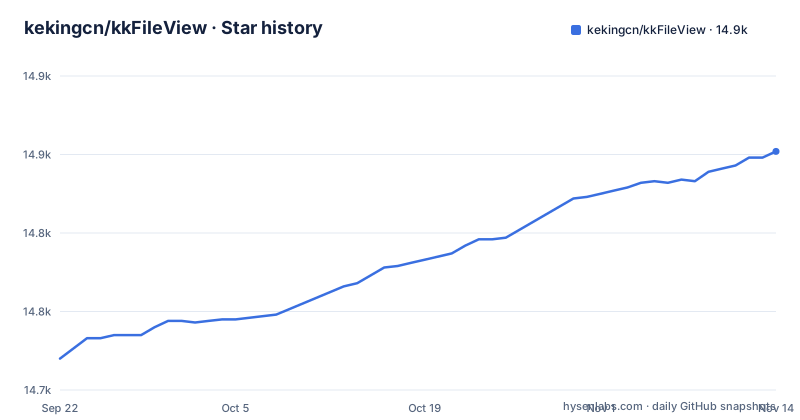
Star history
- kekingcn/kkFileView14,852 ★ · +132
| Repository | 2026-09-22 | 2026-11-14 |
|---|---|---|
| kekingcn/kkFileView | 14.7k | 14.9k |
132 Stars in the last 53 days, measured from the daily GitHub snapshot. Compare with other projects
Editorial analysis
What kkFileView actually solves
Browsers render PDFs, images and plain text natively. They do not render docx, xlsx, vsdx, dwg, psd, eml, epub or 3D model files. kkFileView sits between a stored file and the browser and turns those formats into something the browser can display, without the user downloading the original and without the document leaving infrastructure you control.
The README lists the supported range explicitly: Office documents including doc, docx, xls, xlsx, xlsm, ppt and pptx, domestic WPS formats such as wps, dps and et, OpenOffice and LibreOffice formats such as odt and ods, Visio files, Windows metafiles, Photoshop files, pdf and ofd and rtf, xmind, bpmn, email formats eml and msg, epub, 3D models such as obj, stl and gltf, CAD files such as dwg, dxf and dwf, source and text files, archives including zip, rar and 7z, images, audio and video, dcm and drawio. That list is the product. Nothing else in the project is unusual; the format coverage is what teams come for.
The audience is therefore narrow and specific. It is for application teams that already store user files and want a preview endpoint inside their own product. It is not a document management system, and the README describes it as a preview project rather than a platform.
How the conversion and preview pipeline is put together
The project is a Spring Boot application. The README names the stack as Spring Boot, Freemarker, Redisson and Jodconverter. Freemarker renders the viewer pages, Redisson handles Redis access when Redis is enabled, and Jodconverter is the bridge to the office suite that performs document conversion.
That last dependency explains the runtime shape. The README states that OpenOffice or LibreOffice is integrated on Windows, installed automatically on Linux, and must be installed manually on macOS. Redis is listed as optional and unnecessary by default. So the minimum deployment is a JVM plus an office suite; Redis appears only when you turn it on.
The README describes the design intent as an abstract file preview interface, which is what makes the long format list tractable: each format family is handled by a preview implementation behind a common interface, so adding an extension means adding a handler rather than editing the request path. The project also exposes a REST API, and the live demo at file.kkview.cn is a public instance of the same service.
One consequence is worth stating plainly. Conversion is server-side and stateful in the sense that it depends on an external office process. If you operate this at volume, the office suite process is the component you will end up monitoring.
Installing kkFileView and previewing a first document
The README gives a source route: clone the repository and run the main class. The path is given as /server/src/main/java/cn/keking/ServerMain.java, and after startup the service is reachable on port 8012.
git clone https://github.com/kekingcn/kkFileView.git
cd kkFileView
Run the main method of ServerMain from your IDE, or build with Maven and start the jar. The README states that after starting you visit http://localhost:8012/ to reach the viewer.
There is also a Dockerfile in the repository root. It builds on keking/kkfileview-base:5.0.0, unpacks the server tarball into /opt/, sets KKFILEVIEW_BIN_FOLDER, and starts the jar with an external Spring configuration file.
FROM keking/kkfileview-base:5.0.0
ADD server/target/kkFileView-*.tar.gz /opt/
ENV KKFILEVIEW_BIN_FOLDER=/opt/kkFileView-5.0.3/bin
ENTRYPOINT ["java","-Dfile.encoding=UTF-8","-Dspring.config.location=/opt/kkFileView-5.0.3/config/application.properties","-jar","/opt/kkFileView-5.0.3/bin/kkFileView-5.0.3.jar"]
Note the version mismatch inside that file: the base image tag is 5.0.0 while the paths and jar name are 5.0.3. Anyone building from this Dockerfile should confirm which base image the release is meant to pair with, because the repository file as shown does not line up.
For a first real use, the practical check is the demo endpoints rather than the home page. The release notes reference /addTask, /listFiles and /deleteFile as real endpoints, and the v5.0.1 notes describe /listFiles taking a directory parameter scoped to the demo directory. That is the surface to exercise after startup: confirm the home page loads, then confirm a preview request returns rendered output rather than a download prompt. For the preview request format, consult the documentation at kkview.cn.
The security record is part of the deployment decision
Three consecutive releases carry security fixes, and the pattern matters more than any single advisory. v5.0.1 fixed /addTask bypassing trusted-host and local-directory filters, which the release notes describe as allowing server-side request forgery (GHSA-gwwj-52hv-6g2m). The same release fixed the /listFiles directory parameter escaping the demo directory, described as allowing path traversal and directory information disclosure (GHSA-pmp8-g8p2-p6jq). v5.0.2 sandboxed untrusted HTML previews in an opaque-origin iframe with embedded JavaScript disabled by default (GHSA-9wcf-jxxf-w2g2), and disabled the demo file deletion endpoint by default, changed it to POST, and required an explicitly configured password with exact comparison (GHSA-f3qx-xrwc-5428). v5.0.3, a further security release, rejects control characters in FTP command arguments, confines uploads to demo storage, validates every preview source URL, removes the public /directory endpoint and exposes only aggregate health status by default.
A file preview service is a service that ingests untrusted files and, in some formats, executes or interprets their contents. Both SSRF and path traversal are the expected failure modes of that shape, and the maintainers have been fixing them release by release. That is a sign of attention, not a sign of safety. The honest reading is that this class of bug is inherent to the feature set, and that running an older release means running the unfixed version of it.
The v5.0.2 upgrade notes are unusually direct: all users running v5.0.1 or earlier are strongly encouraged to upgrade. They also state that file deletion is now disabled unless KK_DELETE_PASSWORD or an external delete.password is set to an independent strong password, and that integrations must call /deleteFile with POST. If your code calls that endpoint with GET, it breaks on upgrade. The note that kk.scriptjs now defaults to false is a second behavior change: script execution in previewed content is off unless you turn it on, and even then it runs only inside the isolated iframe sandbox.
Where kkFileView is the wrong tool
The clearest case against it is a product that only needs to preview PDFs and images. Browsers already do that. Adding kkFileView in that scenario buys you a JVM, an office suite process, a conversion pipeline and the SSRF and traversal surface described in its own advisories, in exchange for nothing the browser was not already doing.
The second case is a deployment that cannot run JDK 21. The v5.0.2 and v5.0.3 upgrade notes state that JDK 21 or higher remains required. If your platform is pinned to an older JDK, this project is not a candidate regardless of format coverage.
The third case is high-volume conversion on constrained hardware. Conversion runs through Jodconverter against OpenOffice or LibreOffice, so a team that expects to convert hundreds of documents per minute should test throughput before committing.
Finally, upgrades are not always configuration-free: the v5.0.3 notes require existing external configuration files to set management.endpoints.web.exposure.include=health and management.endpoint.health.show-details=never.
How it compares with a browser-side document renderer
The real alternative for Office formats is client-side rendering, where a JavaScript library parses the file in the browser and draws it, with no server conversion step. The difference in approach is where the work happens and what that implies.
Server-side conversion, which is what kkFileView does, means the original file must reach the server and the office suite must be able to open it. That gives broad and consistent output across formats, because the rendering engine is a real office application, and it means the browser receives a rendered artifact rather than the original bytes. It also means every preview is a server-side job, the office process is a shared resource, and the server is the component that must be hardened.
Client-side rendering keeps the file in the browser and removes the conversion service from the request path. It also means the parser runs in the user's tab, so a malformed file is a client problem rather than a server one, and output fidelity depends on the library rather than on LibreOffice. For the subset of formats a browser library handles well, that trade is usually worth taking. The long tail in this project's format list, including dwg, vsd, psd, eml, epub and the 3D model formats, is the ground kkFileView occupies.
A second alternative is delegating preview to a hosted conversion API. That removes the LibreOffice process from your infrastructure but sends document contents to a third party, which is exactly what a self-hosted preview service exists to avoid. The choice between the two is a data-residency decision, not a technical one.
Licence, maintenance and the cost of staying current
The repository contains a LICENSE file at the top level, but the licence identifier is not given in the repository metadata, so the specific terms cannot be stated. Read that file before depending on the project, and note that the Dockerfile builds on a separate base image, keking/kkfileview-base, whose own licensing is a distinct question from the application's.
The last push to the default branch was on 2026-10-08, and the repository is not archived. Releases have come at a steady cadence through 2026: v5.0.1 on 2026-07-13, v5.0.2 on 2026-08-14 and v5.0.3 on 2026-10-08. The v5.0.2 notes say v5.0.1 configuration can be reused, but the v5.0.3 notes require existing external configuration files to add two management settings.
The real upgrade cost is not configuration, it is security response. Three releases between July and October 2026 each shipped fixes for exploitable issues in the request-handling surface. A team running this in production needs a realistic path to apply a patch release quickly, because the gap between releases has been where the fixes live. Treat the version pin as something you revisit monthly, not annually. On the licence question, nothing here constitutes legal advice; the repository has a LICENSE file and a SECURITY.md, and both are worth reading before a deployment review.
Editorial conclusion
Adopt kkFileView if you need self-hosted preview across Office, CAD, archive and media formats and can run JDK 21 plus LibreOffice or OpenOffice alongside it. Do not adopt it if you only need PDF and image preview, where a browser-native viewer avoids the conversion pipeline and the attack surface entirely. Before deploying, verify three things: that your JDK is 21 or higher, that you have set KK_DELETE_PASSWORD or an external delete.password if any integration needs file deletion, and that you are on v5.0.3, since the release notes state that all v5.0.2 and earlier users should upgrade to v5.0.3.
Frequently asked questions
What JDK version does kkFileView require?
The v5.0.2 and v5.0.3 upgrade notes state that JDK 21 or higher remains required. A deployment pinned to an older JDK cannot run these releases.
Does kkFileView need Redis and LibreOffice to run?
The README lists Redis as optional and unnecessary by default. OpenOffice or LibreOffice is a real dependency: it is integrated on Windows, installed automatically on Linux, and must be installed manually on macOS.
Why did file deletion stop working after upgrading kkFileView?
The v5.0.2 upgrade notes state that deletion is disabled unless KK_DELETE_PASSWORD or an external delete.password is set to an independent strong password. The same notes say integrations must call /deleteFile with POST, so GET callers break on upgrade.
Can kkFileView preview CAD and 3D model files?
The README lists CAD formats including dwg, dxf, dwf, iges, igs, dwt, dng, ifc, dwfx, stl, cf2 and plt, and 3D model formats including obj, 3ds, stl, ply, gltf, glb, off, 3dm, fbx, dae, wrl, 3mf, ifc, brep, step, iges, fcstd and bim. Those formats are the main reason to run a server-side converter rather than a browser-side renderer.
Official sources
Add this badge to your README
If you maintain this project, the badge below links readers to this analysis and shows its maintenance status from the daily GitHub snapshot. Paste the markdown into your README; add ?metric=license or ?metric=stars to the image URL for a different field.

[](https://hysenlabs.com/projects/kekingcn-kkfileview)Star history chart for your README
[](https://hysenlabs.com/projects/kekingcn-kkfileview)Was this useful?