keras-io: the generator behind the keras.io documentation site
Keras documentation, hosted live at keras.io
At a glance
- What is it?
- keras-io is not a deep learning library. It is the Apache-2.0 repository that builds keras.io from tutobooks, and its contribution workflow is stricter than most documentation repos.
- Who is it for?
- Adopt keras-io if you are writing or fixing a Keras example or guide and want it rendered on keras.io, or if you need to run the site locally. Do not adopt it as a library, a model zoo, or a way to learn Keras, because it contains no importable package and its examples are deliberately small.
- Can I use it commercially?
- Yes. Apache-2.0 is a permissive licence: you can use, modify and sell software built on it, as long as you keep its copyright and licence notices.
- Is it still maintained?
- Yes. The repository last received commits 4 days ago.
- What is it written in?
- Mainly Jupyter Notebook, according to GitHub's language statistics.
Answers come from the project's GitHub data, last synced on November 14, 2026, and from our analysis. They are not legal advice.
Star history
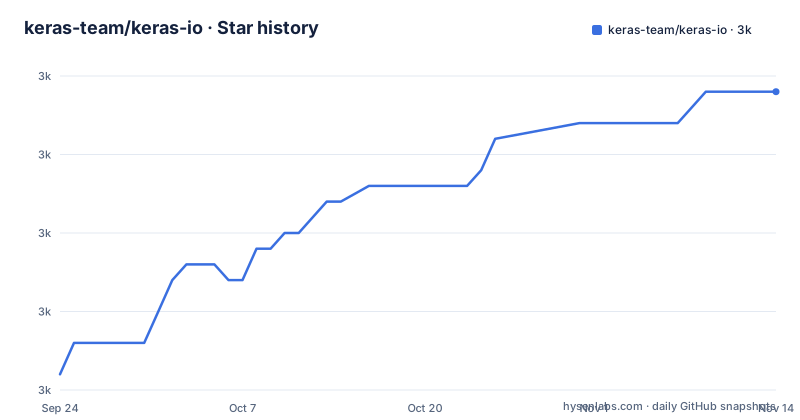
- keras-team/keras-io3,024 ★ · +18
| Repository | 2026-09-24 | 2026-11-14 |
|---|---|---|
| keras-team/keras-io | 3k | 3k |
18 Stars in the last 51 days, measured from the daily GitHub snapshot. Compare with other projects
Editorial analysis
What keras-io actually is, and who ends up using it
The name invites a wrong assumption. keras-io is not the Keras API and not a library you install into a training script. It is the code that generates the keras.io website, and the README describes it plainly as the documentation generator. The audience follows from that: people who write Keras examples and guides, people who fix typos in them, and people who want to read or preview the site from their own machine.
If you arrived looking for a model, a dataset, or a wrapper around Keras, this repository will disappoint you. It contains Jupyter Notebooks and Python scripts organized by domain rather than an importable package. The top-level layout shows what kind of project this is: examples/, guides/, quickstarts/, templates/, theme/, scripts/, plus a Dockerfile, a Makefile, and a requirements.txt. Every one of those directories exists to turn source scripts into a rendered static site.
Tutobooks: one script that is a notebook, a Python file and a webpage
The central mechanism is the tutobook. A tutobook is a single artifact that exists simultaneously as a notebook, a Python file, and a rendered webpage. The README states that the source of truth for manual editing and version control is the Python script form, and that you can also start from a notebook and convert it with nb2py.
Prose inside a tutobook lives in markdown-formatted comment blocks. The first line of such a block, starting with a triple quote, can carry an annotation: shell, which executes the block while prefixing each line with an exclamation mark, or invisible, which keeps the block out of the rendered page. The script itself opens with a header carrying Title, Author, Date created, Last modified, Description, and Accelerator fields, where the accelerator is GPU, TPU, or None.
The generation step is one-directional. Running the add_example command produces the ipynb, markdown, and image renderings under the example's folder. The README is explicit that those generated files must not be modified by hand, and it lists the read-only trees: site/*, sources/*, templates/examples/*, templates/guides/*, examples/*/md/*, examples/*/ipynb/*, examples/*/img/*, and the equivalent guides paths. Only templates/*.md outside those two subtrees, examples/*/*.py, guides/*.py, theme/* and scripts/*.py are meant to be edited. That separation is the most consequential design decision in the repository, and it is also the one most likely to trip up a first-time contributor.
Installing keras-io and previewing an example locally
The README gives two installation paths. The first is pip against requirements.txt, followed by an upgrade of Keras itself, then the generation and serve commands from inside the scripts directory.
pip install -r requirements.txt
# Update Keras version
pip install -U keras
cd scripts
python autogen.py make
python autogen.py serve
The second path uses Docker, and the README notes that the GPU version of Docker is not needed. The image builds the site at build time, because the Dockerfile copies the repository and runs autogen.py make before setting the serve command as the container entrypoint.
FROM python:3.11

COPY requirements.txt ./
RUN pip install -r requirements.txt
RUN pip install keras --upgrade

COPY ./ ./
WORKDIR scripts
RUN python autogen.py make

CMD ["python", "-u", "autogen.py", "serve"]
Building and running that image publishes the site on port 8000, so the local URL is 0.0.0.0:8000. The README warns that the first build takes a while because it pulls the image and the dependencies, and that later builds are faster. There is also a Makefile target, container-test, which builds the image, starts it detached on port 8000 under the name keras-io-server, sleeps for ten seconds, execs a liveness echo into the container, and then kills it. That target is a smoke test of the build, not a development server.
For a first real use, previewing a new example is the shortest path. From the scripts directory, the README gives this command, assuming the tutobook is examples/vision/script_name.py.
cd scripts
python autogen.py add_example vision/script_name
After that, python autogen.py make followed by python autogen.py serve, then navigating to 0.0.0.0:8000/examples, is what the README describes as the way to see the rendered result. The requirements file pins tensorflow==2.20.0 and tf-keras==2.20.0 alongside keras-cv, keras-nlp, keras-tuner, keras-hub, keras-rs, jupyter, black, and pymdown-extensions==11.0.1, which tells you the generation environment is heavier than the site it produces.
The execution limit on examples is a real constraint
The most useful sentence in the README is a warning: the add_example command errors out if any cell takes too long to execute. The instruction that follows is direct. Make your code lighter or faster, and remember that examples are meant to demonstrate workflows rather than train state-of-the-art models.
This is a hard boundary on what can be published, and it is worth taking literally. An example that trains something substantial, downloads a large checkpoint, or depends on a GPU being present will not pass generation on a typical contributor machine. The Accelerator header field exists precisely because some published examples do need hardware, but the generation check still applies.
There is a second, quieter failure mode in the same area. The conversion path from a notebook to a tutobook warns that the conversion script may make mistakes when it tries to shorten long lines, and it asks you to proofread the generated Python file in full. The recommended alternative is to keep lines under roughly ninety characters before converting so the script has nothing to shorten. Anyone who converts a notebook and submits it without reading the output is likely to send a broken example.
The contribution workflow is a two-stage review, and that is deliberate
keras-io splits contributions by size. For a simple typo fix, the README asks for a single pull request that updates the .py, the .md and the .ipynb files together. For anything larger, the request is the opposite: send a pull request containing only the .py file, so the other two are regenerated once the code has been reviewed and approved.
New examples follow the same logic in a longer sequence. Starting from a notebook, you convert with nb2py into the target examples subfolder, fill in the headers, proofread, run add_example, and submit a pull request with only the .py. After review and approval, you add the files that add_example produced and the pull request is merged. Starting from a Python script, the first step is formatting with black, then the header, then placement in the relevant subfolder, and from there the sequence is identical.
This is more ceremony than most documentation repositories impose, and the reason is visible in the read-only folder list. The generated trees are derived artifacts, so accepting hand-edited versions of them would let the site drift away from the scripts that are supposed to produce it. The cost is that a contributor cannot see the final rendered example in the same pull request that contains the code, which is unusual and occasionally frustrating.
What keras-io is not, and what to use instead
If your goal is to read and run working Keras code, the keras.io website is the product and this repository is the factory. Cloning keras-io to learn Keras means reading scripts in examples/vision, examples/nlp, examples/audio, examples/generative, examples/graph, examples/rl, examples/structured_data, examples/timeseries, examples/keras_recipes and examples/keras_rs, and then installing Keras separately anyway, because the repository does not ship the framework.
The closer alternative is the Keras repository itself. It holds the library, its tests, and its own documentation sources, and its contribution surface is the framework code rather than the site generator. The difference in approach matters: keras-io treats documentation as generated output from executable scripts and enforces that with read-only trees and a two-stage review, while a library repository normally treats documentation as prose that lives next to the code it describes. If you want to change what Keras does, keras-io is the wrong repository. If you want to change what keras.io shows, it is the only one.
The documentation itself does not describe a rollback path for a published example, and the README does not document how a merged example is later removed or corrected beyond the ordinary typo-fix pull request.
Maintenance, licence and the cost of keeping a local copy working
The repository is not archived, and its last push was on 2026-09-23, so the project is current as of that date. The repository has no published GitHub releases, which fits a repository that publishes a website rather than versioned artifacts: there is no package to upgrade and no changelog to follow. Upgrades here mean dependency drift. The requirements file pins tensorflow and tf-keras at 2.20.0 and pymdown-extensions at 11.0.1, while the README's local instructions tell you to run pip install -U keras, and the Dockerfile adds its own pip install keras --upgrade on top of the pinned requirements. Those two instructions pull in opposite directions, and a local build that breaks after a Keras release is the predictable result.
The practical maintenance cost is the dependency set rather than the generator. Installing requirements.txt brings in TensorFlow, jupyter, matplotlib, pandas, boto3, pydot, tokenizers, sentencepiece, and the Keras ecosystem packages keras-cv, keras-nlp, keras-tuner, keras-hub and keras-rs. That is a large environment to keep working, and the Docker path exists because of it.
The licence is Apache-2.0, which is a permissive licence with an explicit patent grant and requires preservation of notices. This is a description of the licence identifier in the repository, not legal advice; if you plan to reuse the theme, templates or generated pages, read the LICENSE file and the notices it carries.
Editorial conclusion
Adopt keras-io if you are writing or fixing a Keras example or guide and want it rendered on keras.io, or if you need to run the site locally. Do not adopt it as a library, a model zoo, or a way to learn Keras, because it contains no importable package and its examples are deliberately small. Before opening a pull request, verify two things: that your script is formatted with black and carries the tutobook header fields, and that python autogen.py add_example runs to completion on your machine, since the command errors out when any cell takes too long to execute.
Frequently asked questions
What is Keras and why is it used?
This repository does not answer that question directly. keras-io is the documentation generator for the keras.io website, and it installs Keras as a dependency rather than defining it, so the README describes the site build, not the framework's purpose.
Is Keras still being used?
The repository that generates keras.io is not archived and its last push was on 2026-09-23. The README also points to a call_for_contributions.md file and a call for examples, which shows the project is still accepting submissions.
Is Keras made by Google?
The README does not state who makes Keras. The repository is hosted under the keras-team organization and the README points to keras.io as the live site, but it makes no claim about corporate ownership.
Is Keras the same as TensorFlow?
keras-io treats them as separate things. Its requirements.txt pins tensorflow==2.20.0 and tf-keras==2.20.0 as distinct entries, and the README instructs you to upgrade Keras separately with pip install -U keras.
Official sources
Add this badge to your README
If you maintain this project, the badge below links readers to this analysis and shows its maintenance status from the daily GitHub snapshot. Paste the markdown into your README; add ?metric=license or ?metric=stars to the image URL for a different field.

[](https://hysenlabs.com/projects/keras-team-keras-io)Star history chart for your README
[](https://hysenlabs.com/projects/keras-team-keras-io)Was this useful?