CAPEv2: a Cuckoo-derived malware sandbox built around unpacking and config extraction
Malware Configuration And Payload Extraction
At a glance
- What is it?
- CAPEv2 runs Windows malware in an isolated guest, hooks API calls, captures network traffic, and adds automated unpacking plus static and dynamic configuration extraction. It is for analysts who need payloads and C2 configs, not just a behaviour report.
- Who is it for?
- Adopt CAPEv2 if you analyse Windows malware and need unpacked payloads and extracted configs rather than a behaviour report alone, and you can maintain a Windows guest, a hypervisor and the Python 3.10 to 3.x service stack. Do not adopt it if you need a one-command container that analyses samples without a guest VM, or if your samples are not Windows PE.
- Can I use it commercially?
- Check first. The repository uses a licence we do not classify automatically, so read its LICENSE file before any commercial use.
- Is it still maintained?
- Yes. The repository received new commits within the last day.
- What is it written in?
- Mainly Python, according to GitHub's language statistics.
Answers come from the project's GitHub data, last synced on November 15, 2026, and from our analysis. They are not legal advice.
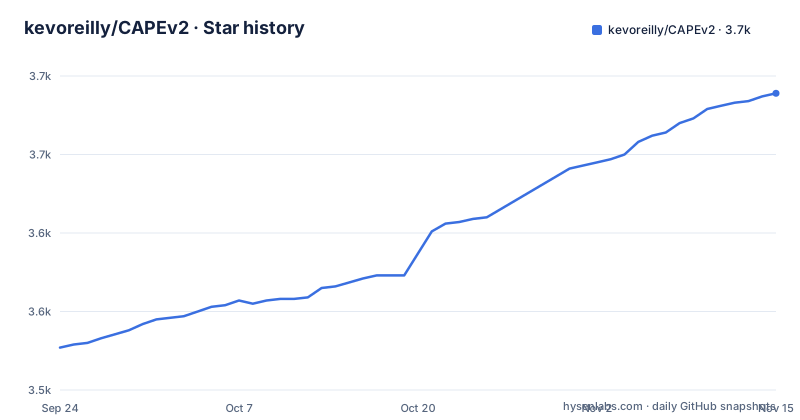
Star history
- kevoreilly/CAPEv23,689 ★ · +162
| Repository | 2026-09-24 | 2026-11-15 |
|---|---|---|
| kevoreilly/CAPEv2 | 3.5k | 3.7k |
162 Stars in the last 52 days, measured from the daily GitHub snapshot. Compare with other projects
Editorial analysis
What CAPEv2 adds on top of a Cuckoo-style sandbox
CAPEv2 executes malicious files in an isolated environment while instrumenting their dynamic behaviour and collecting forensic artefacts. The README describes it as derived from Cuckoo v1, keeping the Windows core capabilities: behavioural instrumentation based on API hooking, capture of files created, modified and deleted during execution, network traffic in PCAP format, classification from behavioural and network signatures, desktop screenshots, and full memory dumps of the target system.
The additions are where the project earns its name. Config And Payload Extraction means automated dynamic malware unpacking, classification of unpacked payloads by YARA, static and dynamic configuration extraction, and an automated debugger programmable through YARA signatures. That debugger is the interesting part: the README traces it to a realisation that API hooks alone lack the precision to pull payloads or configs out of arbitrary malware, so the project built a debugger that controls and instruments the sample without going through Microsoft's debugging interfaces, in order to stay stealthy. In 2021 the project added the ability to program that debugger during detonation via dynamic YARA scans, which lets an analyst define anti-sandbox countermeasures as signatures rather than as code changes.
The intended user is a malware analyst or reverse engineer working on Windows samples who needs the unpacked payload and the C2 configuration, not only a timeline of API calls. The README also points to a free demonstration instance at capesandbox.com, with account activation handled through the project's Twitter account. That is a reasonable way to look at output formats before standing up your own instance, though a public instance is not where you submit samples you cannot share.
The mechanism: hooks, a signature-driven debugger, and three classification paths
The data flow visible in the README is: guest execution under API hooking, artefact collection, then several independent analysis passes over what was collected. Classification happens through three mechanisms, and the README lists them separately: YARA scans of unpacked payloads, Suricata scans of network captures, and behavioural signatures scanning API hook output. Keeping those three independent matters, because a sample that defeats the hook-based behavioural signature may still be caught by a YARA rule on the unpacked payload or by a Suricata rule on the PCAP.
Unpacking is driven by observed behaviour rather than by a generic entropy heuristic. The README names the techniques CAPE watches for: shellcode injection, DLL injection, process hollowing and process doppelganging, plus extraction or decompression of executable modules or shellcode in memory. When one of those happens, the payload is captured for further analysis. Independently of that, CAPE creates a process dump for each process, or for a DLL the module image in memory, which the README notes is often enough to recover a sample protected by a simple packer. The README distinguishes this default passive unpacking from optional active unpacking, which uses breakpoints to detect writes to newly allocated or protected memory. It can be enabled via the submission interface or `unpacker=2`; it is off by default because it may affect execution quality.
Configuration parsing is deliberately pluggable. CAPE's own framework is the recommended route, and the README also lists support for RATDecoders, DC3-MWCP, MalDuck and MaCo. The project's own advice is blunt about the alternative frameworks: malware changes with every release and something may break, so it suggests CAPE's framework, described as pure Python with the entry point def extract_config(data): called by cape_utils.py, with the bonus that extractors can be reused in other projects. That is a real design commitment. Writing a parser against a single function signature is a much smaller surface than adapting to an external framework's plugin model, and it makes your extractors portable outside CAPE.
Installing CAPEv2 and running a first sample
CAPEv2 is a Python project. The pyproject.toml declares requires-python >=3.10, <4.0, and the top-level layout includes installer/, conf/, lib/, modules/, utils/, web/ and systemd/, which tells you this is a service stack rather than a single binary. The project's documentation lives at capev2.readthedocs.io, and the README links there rather than reproducing install steps. Because the README shown here does not give a copy-paste installation sequence, the honest starting point is the documentation, and the installer directory in the repository.
The dependency list in pyproject.toml is worth reading before you begin, because it constrains the host. It pins Django >=4.2.18, SQLAlchemy 2.0.41 with SQLAlchemy-Utils, alembic 1.9.4, yara-python 4.5.1, flare-capa 9.3.1, oletools 0.60.2, capstone 5.0.5, pymongo >=4.0.1, djangorestframework 3.15.2 and SFlock2 >=0.3.84. A pinned lockfile, poetry.lock and uv.lock, sits at the top level, so the intended install path resolves through one of those rather than by hand.
The entry point for the analysis service is cuckoo.py at the repository root. The README does not document its flags, so check the documentation before invoking it.
python cuckoo.pyConfiguration lives in the conf/ directory. The README does not enumerate the keys, so the practical first step is to read conf/ and the documentation page that describes it rather than guessing at option names. If you are writing a config parser, the contract the README gives is a single function, and the file that calls it is named:
def extract_config(data):
    # data is the payload passed in by cape_utils.py
    return {}
The README states that cape_utils.py calls this entry point. What it returns is your config dictionary; what CAPE does with the return value beyond that is not described in the README, so confirm the expected shape in the documentation before writing a parser you intend to keep.
Where CAPEv2 is the wrong tool
The first limitation is structural: this is a Windows sandbox. The core capabilities the README lists, API hooking, file and registry artefact capture, memory dumps, are described as Cuckoo v1 features on the Windows platform. If your samples are Linux ELF binaries, macOS Mach-O files, Android APKs or documents that need a different execution environment, the instrumentation this project is built around does not apply, and you would be running a heavy service to get very little.
The second is that the guest is your problem. The README says support was added for all Windows 10 versions and Windows 11 23H2, which means the guest image is a moving target you maintain. A sandbox that hooks API calls is sensitive to the exact build it runs on; when a new Windows build changes internals, the monitor needs to keep up. Nothing in the README suggests this is automated for you.
The third is extractor fragility, and the project says so itself. The README's note on config parsing frameworks states that because malware changes constantly with every release, something might become broken. That applies to CAPE's own framework too, not only to the third-party ones. A config extractor is a parser written against one malware family's current format, and it will need maintenance as that family ships new builds. Budget for that, or you will find extractors silently returning nothing on new samples.
Finally, the repository is not archived and the last push was on 2026-09-23, so the codebase is current. That does not mean your deployment will be. The pinned dependency set, including cryptography >=44.0.1, Django >=4.2.18 and yara-python 4.5.1, means upgrades arrive as a batch and can conflict with anything else sharing the host.
CAPEv2 against Cuckoo and against CAPEsolo
The most common comparison is with Cuckoo, and the README answers it directly with history rather than marketing. Cuckoo Sandbox began as a Google Summer of Code project in 2010, released v1.0 in January 2014, and in 2015 development of the original monitor and API hooking method was halted in the main Cuckoo project and replaced by an alternative monitor using a restructuredText-based signature format compiled via a Linux toolchain. A fork, Cuckoo-modified, continued the original monitor with 64-bit support and the Visual Studio compiler. CAPEv2 descends from that lineage: the CAPE tool began in 2015 at Context Information Security, and when it became clear Microsoft Detours could be replaced by Cuckoo-modified's API hooking engine, CAPE Sandbox was born, publicly released in September 2016, and ported to Python 3 as CAPEv2 in October 2019.
The practical difference is scope. Cuckoo's monitor captures behaviour; CAPEv2 adds the debugger, automated unpacking and integrated config extraction on top of the same hooking foundation. If you already run a Cuckoo-derived stack, CAPEv2 is the continuation of that line, not a parallel product.
The second alternative is CAPEsolo, which the README describes as created by enzok in 2024: an interactive Windows desktop version of CAPE using wxPython for the graphical interface, and introducing 64-bit guest Python compatibility. That is a different deployment shape, a desktop application rather than a server-side sandbox service with a web front end and a REST API. If you want to drive analysis interactively on one machine, CAPEsolo is the closer fit; if you need a shared instance with a database, a Django web application and an API, CAPEv2 is the one with those components in the repository.
Licence, maintenance and upgrade cost
The repository's LICENSE file is present at the top level, but the GitHub metadata reports the licence as NOASSERTION, meaning the platform could not classify it automatically. The pyproject.toml declares license = { text = "MIT" }. Those two statements are not the same thing, and the discrepancy is worth resolving before you redistribute anything. Read LICENSE itself, and if you plan to embed CAPEv2 components in a product, get your own legal review rather than relying on the metadata field. Third-party components carry their own terms: flare-capa, yara-python, SFlock2, oletools and the rest are separate projects with separate licences.
On maintenance, the facts are narrow and verifiable. The repository is not archived, and the last push was on 2026-09-23. The repository has no published GitHub releases. The project has been continuously developed since 2016 according to the README, including the Python 3 port, dynamic YARA scans for the debugger in 2021, Windows 10 as the default operating system, AMSI payload capture, syscall hooking based on Microsoft Nirvana, and Windows 11 23H2 support added in 2026. That is a long record, but the repository has no tagged releases to pin to, so you will be tracking the master branch or a commit of your choosing.
Upgrade cost is dominated by two things: the pinned Python dependency set and the guest image. The lockfiles mean dependency changes arrive together, and the Windows guest means an OS update on the analysis machine can invalidate the monitor. Neither is unusual for this class of tool, but both are recurring work rather than one-off setup.
Editorial conclusion
Adopt CAPEv2 if you analyse Windows malware and need unpacked payloads and extracted configs rather than a behaviour report alone, and you can maintain a Windows guest, a hypervisor and the Python 3.10 to 3.x service stack. Do not adopt it if you need a one-command container that analyses samples without a guest VM, or if your samples are not Windows PE. Before committing, verify that your hypervisor is supported by the installer, that your guest image matches the Windows versions the project documents, and that the extract_config entry point in cape_utils.py is where your own parsers will live.
Frequently asked questions
What is CAPEv2?
CAPEv2 is a malware sandbox derived from Cuckoo v1 that executes malicious files in an isolated environment, instruments their dynamic behaviour through API hooking, and collects forensic artefacts. It adds automated dynamic unpacking, YARA classification of unpacked payloads, and static and dynamic malware configuration extraction on top of Cuckoo's core capabilities.
How do I install CAPEv2?
The README links to the project documentation at capev2.readthedocs.io instead of listing install steps, and the repository contains an installer directory. The pyproject.toml requires Python >=3.10, <4.0 and pins a large dependency set including Django, SQLAlchemy, yara-python and flare-capa, with poetry.lock and uv.lock at the top level.
How do I use CAPEv2?
You run samples through the sandbox and read the resulting artefacts: unpacked payloads, PCAP network captures, process dumps, screenshots and extracted configs. If you are writing your own config parser, the README specifies the entry point def extract_config(data):, which is called by cape_utils.py.
How do I set up a CAPEv2 sandbox?
Setup involves the Python service stack and a Windows guest, since the core instrumentation is described as Windows platform capabilities. The README states that support exists for all Windows 10 versions and Windows 11 23H2, and points to the documentation for the installation procedure.
How does CAPEv2 differ from Cuckoo?
CAPEv2 was derived from Cuckoo v1 and keeps its API hooking, artefact capture, PCAP collection, screenshots and memory dumps, but adds an automated debugger programmable via YARA signatures, automated unpacking, and integrated config extraction. The README traces the lineage from Cuckoo through Cuckoo-modified to the CAPE tool released in 2016 and CAPEv2 in 2019.
Official sources
Add this badge to your README
If you maintain this project, the badge below links readers to this analysis and shows its maintenance status from the daily GitHub snapshot. Paste the markdown into your README; add ?metric=license or ?metric=stars to the image URL for a different field.

[](https://hysenlabs.com/projects/kevoreilly-capev2)Star history chart for your README
[](https://hysenlabs.com/projects/kevoreilly-capev2)Was this useful?