kgabis/parson: A Two-File JSON Library for C
Lightweight JSON library written in C.
At a glance
- What is it?
- kgabis/parson is an MIT-licensed JSON library written in C that can be adopted by copying two source files into an existing project. Its API supports parsing, dot-notation access, validation, and serialization, but integration is source-level rather than package-based.
- Who is it for?
- C developers that value a small source-level dependency and need basic JSON parsing or serialization should evaluate parson after checking allocation ownership and error handling in their required API paths. Projects that need documented JSON Schema validation, thread safety, stable releases, or an established package registry should first confirm those needs are outside the current repository scope.
- Can I use it commercially?
- Yes. MIT is a permissive licence: you can use, modify and sell software built on it, as long as you keep its copyright and licence notices.
- Is it still maintained?
- Yes. The repository last received commits 38 days ago.
- What is it written in?
- Mainly C, according to GitHub's language statistics.
Answers come from the project's GitHub data, last synced on October 23, 2026, and from our analysis. They are not legal advice.
Star history
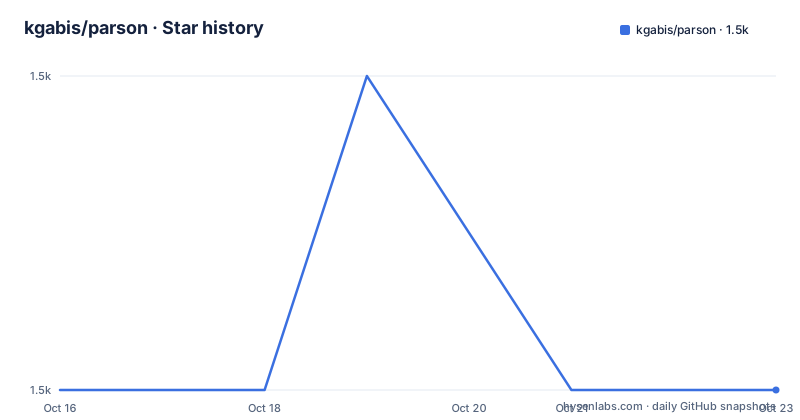
- kgabis/parson1,473 ★ · +0
| Repository | 2026-10-16 | 2026-10-23 |
|---|---|---|
| kgabis/parson | 1.5k | 1.5k |
0 Stars in the last 7 days, measured from the daily GitHub snapshot. Compare with other projects
Editorial analysis
Why kgabis/parson Targets Small C Codebases
kgabis/parson solves the problem of reading and writing JSON without introducing a large service or a package-manager dependency into a C project. It is aimed at developers who can include `parson.h` and `parson.c` directly in a source tree. The README describes the library as lightweight and identifies its defining feature as the use of only two files. That constraint makes the adoption mechanism unusually clear: clone the repository and copy both source files into the target project.
The library supports more than tokenizing a JSON document. Its API exposes values, arrays, and objects; retrieves typed fields; validates one value against another schema-shaped value; and writes serialized JSON to strings or files. Dot notation also lets code address nested fields through strings such as `commit.author.date`, which can reduce repetitive traversal code in applications whose JSON structure is known.
Parson is not presented as a complete application framework. The README does not document network behavior, asynchronous I/O, a schema registry, or bindings for another language. Its repository instead centers on `parson.c`, `parson.h`, `tests.c`, and build files for C, C++, and collision testing. That makes it a better fit for adding JSON handling to an existing C program than for teams looking for a standalone JSON command-line tool.
How Parson Represents and Traverses JSON
The examples show a dynamic data path based on `JSON_Value`. A file is parsed with `json_parse_file`, its type is checked with `json_value_get_type`, and callers then request a `JSON_Array` or `JSON_Object`. Array access is index based through `json_array_get_count` and `json_array_get_object`. Object access includes direct typed getters such as `json_object_get_string` and nested dot-notation getters such as `json_object_dotget_string`.
The data flow in the commit example starts with a separate command that places GitHub API output in `commits.json`. Parson parses that file, rejects a root that is not `JSONArray`, and iterates over its entries. For each entry, it extracts the author date and name from a nested path and reads the SHA from the object. This demonstrates that Parson does not fetch HTTP data. The caller must arrange transport and storage independently.
Construction follows a similar dynamic model. `json_value_init_object` creates a root value, and `json_value_get_object` gives the caller an object handle. Parson stores strings and numbers through typed setters. Calls such as `json_object_dotset_string` and `json_object_dotset_value` create the addressed hierarchy automatically in the example. Serialization then produces either compact or pretty output through `json_serialize_to_string_pretty`.
Memory ownership is explicit in the examples. Serialized text returned by `json_serialize_to_string_pretty` is released with `json_free_serialized_string`, while parsed or constructed trees are released with `json_value_free`. Callers should also check parsing results before dereferencing them. The persistence example rejects a `NULL` result from `json_parse_file`, then decides whether to build replacement data.
Copying Parson into a C Project and Running Its Tests
The README's installation method is source copying rather than an `apt`, `brew`, or package-manager installation. Clone the repository first. This command retrieves the project sources from the URL documented by the repository.
git clone https://github.com/kgabis/parson.gitAfter cloning, copy `parson.h` and `parson.c` into the source tree of the consuming project. The README does not give package-manager commands or a release artifact procedure. The repository also includes a Makefile, but its documented `make test` target compiles and executes the test binary, so it is principally useful for validating the repository checkout.
make testThe Makefile documents the target as building from `tests.c` and `parson.c` with `gcc`, then running the resulting `./test` executable. A reader should expect the command to compile the included tests and execute them. The `make` metadata does not document a separate installation target for placing Parson in a system include or library directory. Integrating it into another build therefore requires adding the copied implementation file and including the header according to that project's own build rules.
A First Parse, Validation, and File Round Trip
The smallest documented starting point is `json_parse_string`, followed by typed access and `json_value_free`. For a program that must load existing data, `json_parse_file` provides the corresponding file operation. The persistence example combines both paths: it defines a schema value containing an empty `name` string, loads `user_data.json`, validates the loaded value, and creates a new object when parsing or validation fails.
JSON_Value *schema = json_parse_string("{\"name\":\"\"}");
JSON_Value *user_data = json_parse_file("user_data.json");
Those declarations come directly from the persistence example. They show two constraints that matter in real C integration. First, `json_parse_file` can return `NULL`, so type conversion must not happen before a null check. Second, the example calls `json_validate` with a parsed schema-shaped value. The README does not describe this operation as full JSON Schema validation, and it does not document support for standard keywords, error paths, or validator options. Calling it “schema validation” without this boundary would overstate the documented feature.
When the file is absent or does not satisfy that minimal shape, the example initializes an object and saves it with `json_serialize_to_file`. The reader should see the supplied name added under `name` and subsequently loaded into `user_data`. The temporary `buf` and parsed tree have different lifetimes, which makes the explicit `json_value_free` calls important when adapting this pattern.
Building Nested Objects with Parson Dot Notation
Parson’s dot-notation setters are its most distinctive C API feature. The serialization example starts with an empty root object, sets `name` and `age`, then creates nested `address.city` and `contact.emails` members. The README states that the object hierarchy is created automatically when specific fields are addressed.
json_object_dotset_string(root_object, "address.city", "Cupertino");
json_object_dotset_value(root_object, "contact.emails", json_parse_string("[\"[email protected]\",\"[email protected]\"]"));
The first call creates an address object and assigns its city string. The second stores a parsed array as the `emails` member under `contact`. Because the call transfers a newly parsed `JSON_Value` into the object hierarchy, this pattern adds another ownership relationship that consuming code must understand. Parson also provides compact and pretty serialization, with the example using `json_serialize_to_string_pretty`.
char *serialized_string = json_serialize_to_string_pretty(root_value);
puts(serialized_string);
json_free_serialized_string(serialized_string);
This is concise for fixed document shapes, but it is not a general-purpose query language. The README does not define how dots behave when an existing field name contains a dot, how arrays can be addressed through dot notation, or whether every setter returns a status that identifies collisions. Applications with arbitrary keys should use the direct object API and inspect the repository headers for the exact contracts.
Parson Constraints Compared with a Library-Managed JSON Approach
Parson's source-copy installation contrasts with libraries distributed as versioned registry packages and system development packages. A registry-based approach commonly separates dependency metadata, upgrade commands, and installed artifacts from application source. Parson instead places `parson.c` and `parson.h` directly in the consuming tree. This keeps the documented integration small, but it also means the maintainer owns update work such as replacing those files and reviewing changes.
The repository contains no GitHub releases, so the README provides no documented upgrade or compatibility policy between versions. The package metadata records version `1.5.4` and identifies the two source files. The last repository push was on 2026-09-15, which is recent, while the absence of GitHub releases means there is no documented release cadence to infer from that push.
Another difference is validation scope. Parson demonstrates validating a parsed value against a parsed schema-shaped value. It does not document JSON Schema support, remote schema loading, or detailed validation diagnostics. A full JSON Schema implementation is therefore a more appropriate alternative when those are hard requirements. Parson is more relevant when the application needs a small in-process parser and serializer with direct C access.
The MIT license permits use, modification, distribution, and sublicensing under its conditions, including preservation of the copyright and license notices. That is a licensing fact, not legal advice. Projects with formal third-party review requirements should still record how the copied files were obtained and how future copies will be updated.
Editorial conclusion
C developers that value a small source-level dependency and need basic JSON parsing or serialization should evaluate parson after checking allocation ownership and error handling in their required API paths. Projects that need documented JSON Schema validation, thread safety, stable releases, or an established package registry should first confirm those needs are outside the current repository scope. The most concrete adoption step is to add parson.c and parson.h, compile the included tests with make test, and review the ownership rules around every returned JSON_Value.
Frequently asked questions
How do I install kgabis/parson in a C project?
The README instructs users to clone the repository and copy `parson.h` and `parson.c` into the consuming project's source tree. It does not document a system-wide package installation command.
Does kgabis/parson support JSON Schema validation?
The persistence example uses `json_validate` to compare a loaded value with a parsed value shaped as `{"name":""}`. The README does not claim support for JSON Schema keywords, remote schemas, or detailed validation paths.
How do I create nested JSON objects with kgabis/parson?
The README uses `json_object_dotset_string` and `json_object_dotset_value` with paths such as `address.city` and `contact.emails`. It states that the addressed object hierarchy is created automatically.
Official sources
Add this badge to your README
If you maintain this project, the badge below links readers to this analysis and shows its maintenance status from the daily GitHub snapshot. Paste the markdown into your README; add ?metric=license or ?metric=stars to the image URL for a different field.

[](https://hysenlabs.com/projects/kgabis-parson)Star history chart for your README
[](https://hysenlabs.com/projects/kgabis-parson)Was this useful?