Ecommerce-CodeIgniter-Bootstrap: A Multi-Vendor Store Platform
Responsive, Multi-Vendor, MultiLanguage Online Store Platform (shopping cart solution)
At a glance
- What is it?
- Ecommerce-CodeIgniter-Bootstrap is a PHP shopping cart platform built on CodeIgniter 3.1.13 and Bootstrap 3.3.7. It suits teams that need a multilingual, multi-vendor storefront with an administration panel, API support, virtual products, PayPal, bank-transfer payments, and template flexibility.
- Who is it for?
- Adopt Ecommerce-CodeIgniter-Bootstrap when a PHP team needs a configurable storefront with vendors, multilingual content, virtual products, and a built-in administration panel. Do not choose it when a supported modern commerce platform, a fully documented payment workflow, or a release-backed upgrade path is a requirement.
- Can I use it commercially?
- Yes. MIT is a permissive licence: you can use, modify and sell software built on it, as long as you keep its copyright and licence notices.
- Is it still maintained?
- Yes. The repository last received commits 16 days ago.
- What is it written in?
- Mainly PHP, according to GitHub's language statistics.
Answers come from the project's GitHub data, last synced on November 7, 2026, and from our analysis. They are not legal advice.
Star history
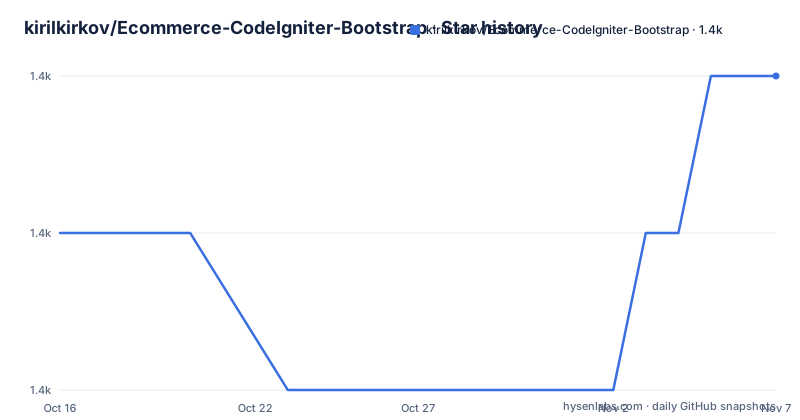
- kirilkirkov/Ecommerce-CodeIgniter-Bootstrap1,437 ★ · +1
| Repository | 2026-10-16 | 2026-11-07 |
|---|---|---|
| kirilkirkov/Ecommerce-CodeIgniter-Bootstrap | 1.4k | 1.4k |
1 Stars in the last 22 days, measured from the daily GitHub snapshot. Compare with other projects
Editorial analysis
What Ecommerce-CodeIgniter-Bootstrap Actually Provides
Ecommerce-CodeIgniter-Bootstrap addresses the need for a configurable online store rather than a single-purpose product catalog. Its intended users are PHP developers and small or medium store operators who want a ready-made shopping cart with administrative controls. The repository describes a responsive, multi-vendor, multilingual platform. It supports physical and virtual products, which lets a store use the same application for downloadable goods and conventional inventory.
The feature set is broad for a repository of this type. The administration panel includes role-based access, product and category management, order storage, email notifications for new orders, stock updates, content pages, a file manager, a blog, subscriptions, discount codes, and Highcharts order statistics. The public side includes responsive pages, advanced search with tree-view categories, product sorting, multilingual public text, and AJAX-based cart behavior. That combination makes this a store application with back-office operations, not just a front-end theme.
The platform is not limited to a single seller or language. Vendors have a dedicated login and registration area, while customer registration is documented as available in the greenlabel template. The README lists English, Greek, Bulgarian, French, Hindi, German, Spanish, Simplified Chinese, and Indonesian translations. It also documents PayPal payments, PayPal Sandbox support, and bank-account payments. These are useful starting points, but the README does not describe webhook handling, recurring payments, tax calculation, shipping-provider integration, or refund automation, so those areas should not be assumed.
CodeIgniter Routing, Templates, and Store Data Flow
The repository layout follows a CodeIgniter application structure. Public requests enter through index.php, while application/ contains the application code, views, configuration, controllers, and template directories. The README identifies CodeIgniter 3.1.13, specifically a modified version with PHP 8.5 support, and Bootstrap 3.3.7. It also states that TailwindCSS 4.1 templates are supported, which means the front end is not tied to the older Bootstrap presentation by default.
The store separates administration, vendor, and public presentation. The administration entry point is /admin, the vendor entry point is /vendor/login, and vendor registration is available at /vendor/register. The README places editable templates under application/views/templates/. This gives a developer a place to alter page markup and styling without treating the public shop as a fixed generated page. Customer registration is specifically documented for the greenlabel template, with login.php, signup.php, and user.php named as files that can be copied into another template directory.
The documented data relationships are straightforward. The installer imports database.sql into MySQL. Product stock quantities are updated from orders, and saved orders appear in the administration panel with an email notification for each new order. Public text is editable and translatable. The API is listed as a supported feature, but the README does not document endpoint paths, authentication, request formats, or versioning. Consequently, the repository's layout confirms an API presence, while its external API contract remains unverified.
Installing the Store and Creating the First Storefront Session
The repository documents two installation paths. Option A uses the browser installer. Open the project locally, and when the database is not configured or the schema is missing, the application redirects to /installation.php. Enter the hostname, username, password, and database, then select Install. The installer imports database.sql automatically and writes the credentials into application/config/database.php.
The PHP process must be able to write application/config/database.php. After installation, the application creates application/config/installed.lock. To run the installer again, delete that lock file. This is an operational detail worth checking before deployment because a read-only configuration file prevents the documented installer from completing.
Option B is the manual path. Import database.sql into the database yourself, then set the same four database values in application/config/database.php. The README does not provide a Composer command, package installation step, web-server configuration, or PHP CLI command, so none is added here. After setup, the documented administration URL is /admin. The repository gives default credentials in the README, but a new installation should change the password from the Password Change control in the administration navigation before using the store with real data.
A first administrative check is straightforward. Open /admin, sign in, and inspect the Settings area at /admin/settings. The README specifically says that Multi-Vendor Support is enabled from Settings. Then open /vendor/login or /vendor/register to confirm the vendor flow. Vendors are not supported by the onepage template, so template selection matters before evaluating vendor functionality.
Payments, Orders, and Administrative Operations
Order management is one of the clearest parts of the documented design. New orders are saved in the administration panel, and the application sends an email notification for each order. Product stock quantities are updated from orders, which reduces the need for a separate inventory reconciliation step during normal operation. Highcharts provides order statistics, while discount codes and bank-account payments are listed as additional store capabilities.
PayPal integration is documented at the feature level, including PayPal Sandbox support. The README does not explain whether the application creates orders before or after payment confirmation, how it validates callbacks, or how administrators reconcile a failed or abandoned transaction. The same limitation applies to bank-account payments. The repository confirms that these payment paths exist, but the README does not provide enough information to describe their transaction state machine or operational recovery procedure.
The administration panel also covers content and operational features such as pages, activation and deactivation of pages, a file manager, email subscriptions, a blog, and role-based access. These features expand the application beyond a bare catalog, but they also increase the configuration surface. An operator should review permissions and file-management exposure before adding real content. The README does not document backup procedures, audit logs, data-retention controls, or database migration conventions, so those maintenance tasks cannot be inferred from the feature list.
Template Choices and Multi-Vendor Boundaries
Template support is a significant design choice. The repository names Bootstrap 3.3.7 templates and TailwindCSS 4.1 templates, with custom templates located under application/views/templates/. This makes it possible to change the public appearance by editing view files or adding a template directory. It also creates a maintenance burden because a custom template may need to preserve routes, cart behavior, language handling, and checkout expectations that are not fully described in the README.
Vendor support is template-dependent in a concrete way. The README states that vendors are not supported by the onepage template. It also documents vendor pages, vendor login, vendor registration, and an administration setting for enabling multi-vendor support. The repository therefore offers a seller-facing feature, but it does not promise that every bundled theme exposes the same workflow. A team that requires vendors across all themes should inspect the selected view files and compare them with the greenlabel or other vendor-compatible template.
Customer registration has a similar boundary. It is documented as added only in the greenlabel template, and the README says users can track order history only. The documented extension path is to copy login.php, signup.php, and user.php into another template directory and adjust the design. That is a source-level customization step, not a plugin interface. It may be adequate for a small deployment, but it means template maintenance and feature maintenance can overlap.
Maintenance, Licensing, and Upgrade Constraints
The repository is not archived. Its last push was on 2026-08-11, which indicates recent repository activity, although the repository has no GitHub releases. The absence of releases means the repository has no documented release version to pin or changelog to inspect. The project therefore should be treated as a repository to inspect and configure, not as a packaged release with an established upgrade channel.
The project uses the MIT License. That identifies the repository's stated licensing model, but it does not by itself answer operational questions about bundled assets, payment integrations, translations, or third-party services. A deployment should review the license files and the provenance of any separately distributed components before redistribution or commercial use.
The CodeIgniter 3.1.13 foundation and Bootstrap 3.3.7 baseline are important compatibility facts. The README calls the CodeIgniter version a modified version with PHP 8.5 support, so deployments should preserve the repository's intended application files rather than assuming compatibility with an arbitrary CodeIgniter release. It does not document automated tests, a migration tool, a supported upgrade procedure, or a rollback process. The absence of GitHub releases further limits upgrade planning. The first concrete maintenance check is to compare the deployed database and configuration against database.sql and application/config/database.php before applying local changes.
When This CodeIgniter Store Is the Right Choice
This platform is a reasonable fit for a PHP developer who wants a working store skeleton with multiple sellers, language switching, virtual products, an AJAX cart, order administration, and several payment options in one repository. It is especially relevant when the project can be hosted as a traditional PHP application and when modifying CodeIgniter views and controllers is acceptable. The MIT license and the documented source layout also make the codebase approachable for teams that intend to adapt it.
It is a poor fit for a team that requires a modern release process, a documented API contract, automated upgrades, or evidence of formal compatibility testing. The README does not document those areas. It is also a poor fit when every available theme must support vendors and customer accounts, because the README explicitly limits vendor support and identifies customer registration as a greenlabel-template feature.
A real alternative is a hosted commerce platform that supplies storefront themes, payment processing, catalog administration, and account management as managed services. The difference is architectural: this repository makes the store a PHP codebase that the operator configures, customizes, and upgrades, while a hosted platform moves much of that work to the provider. For adoption, verify server compatibility, writable configuration, database import behavior, payment confirmation details, and the selected template's vendor support before committing to the project.
Editorial conclusion
Adopt Ecommerce-CodeIgniter-Bootstrap when a PHP team needs a configurable storefront with vendors, multilingual content, virtual products, and a built-in administration panel. Do not choose it when a supported modern commerce platform, a fully documented payment workflow, or a release-backed upgrade path is a requirement. Verify first that your server can run the repository's CodeIgniter version, that application/config/database.php is writable during installation, and that the selected template supports the vendor and registration features you need.
Frequently asked questions
How do I install Ecommerce-CodeIgniter-Bootstrap?
Create an empty MySQL database, open the project locally, and follow the redirect to /installation.php when the database is not configured. Enter the hostname, username, password, and database, then select Install to import database.sql automatically.
Where do I change the database settings for Ecommerce-CodeIgniter-Bootstrap?
The installer writes database settings into application/config/database.php, or you can set the hostname, username, password, and database in that file for manual installation. PHP must be able to write the file when using the installer.
Does Ecommerce-CodeIgniter-Bootstrap support vendors and customer accounts?
Vendor login and registration are documented at /vendor/login and /vendor/register, but vendors are not supported by the onepage template. Customer registration is documented only for the greenlabel template, where users can track order history.
Official sources
Add this badge to your README
If you maintain this project, the badge below links readers to this analysis and shows its maintenance status from the daily GitHub snapshot. Paste the markdown into your README; add ?metric=license or ?metric=stars to the image URL for a different field.

[](https://hysenlabs.com/projects/kirilkirkov-ecommerce-codeigniter-bootstrap)Star history chart for your README
[](https://hysenlabs.com/projects/kirilkirkov-ecommerce-codeigniter-bootstrap)Was this useful?