Pyxel: a retro game engine for Python whose core is Rust, and what that means for building it
A retro game engine for Python
At a glance
- What is it?
- Pyxel by kitao gives Python programmers a retro game engine, but the repository is mostly Rust and a source build pulls in Rust, CMake, Node.js 22, SDL2 and, for the browser, Emscripten 5.0.3. This piece walks through the repo layout, the Makefile workflow and where it bites.
- Who is it for?
- Pyxel suits Python programmers who want to make small retro-style games and can learn from the kitao.dev website and its demo pages rather than from the GitHub page. Contributors and anyone building from source should expect a multi-language toolchain: Rust via rustup, CMake, Python 3.11+, Node.js 22+, SDL2 2.32.10 on Linux and Emscripten 5.0.3 for the browser target.
- Can I use it commercially?
- Check first. The repository uses a licence we do not classify automatically, so read its LICENSE file before any commercial use.
- Is it still maintained?
- Yes. The repository last received commits 2 days ago.
- What is it written in?
- Mainly Rust, according to GitHub's language statistics.
Answers come from the project's GitHub data, last synced on November 14, 2026, and from our analysis. They are not legal advice.
Star history
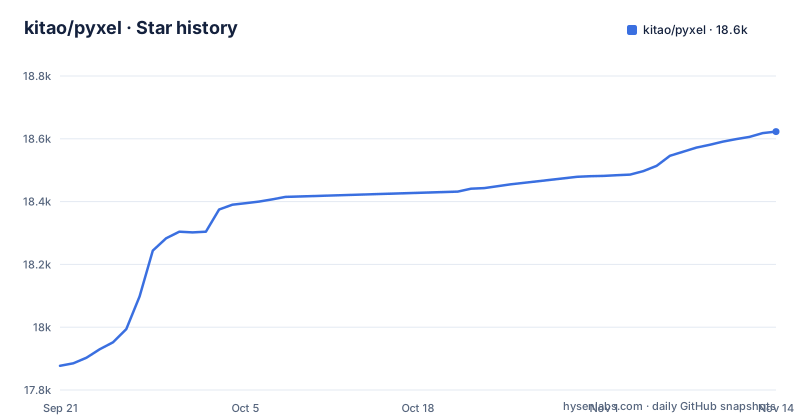
- kitao/pyxel18,623 ★ · +746
| Repository | 2026-09-21 | 2026-11-14 |
|---|---|---|
| kitao/pyxel | 17.9k | 18.6k |
746 Stars in the last 54 days, measured from the daily GitHub snapshot. Compare with other projects
Editorial analysis
A Python game API sitting on a Rust core
Pyxel describes itself in one line: a retro game engine for Python. The repository tells a fuller story. Its primary language is Rust, the engine code lives under crates/, the Python side under python/, and a rust-toolchain.toml at the top level fixes which Rust toolchain the build uses. The Makefile reads the native build target straight from the compiler with rustc -vV, taking the host triple unless you set TARGET yourself.
For someone writing games, this split is mostly invisible: you write Python. For someone who wants to fix a bug in the engine or build it on an unusual platform, it matters a lot, because the code you need to read and change is Rust, and the build steps assume a working rustup installation alongside Python.
The GitHub front page is a gallery that sends you to kitao.dev
The README on GitHub is short and mostly visual. It links to the project website at kitao.dev/pyxel, a user examples page, a book listed on gihyo.jp with a 2025 ISBN (978-4-297-14657-3), and a row of demo pages. Those demo entries are named after what they demonstrate: examples such as 02-jump-game and 10-platformer, apps such as 30sec-of-daylight and megaball, tools named image-editor and sound-editor, and examples named c04-mesh-and-motion, c05-3d-collision and c06-3d-physics.
The consequence for a newcomer is that the GitHub page will not teach you the API. Plan to start from the website and its demo pages, and treat the repository as the place to read source, file issues and track the CHANGELOG.md. The page also carries sponsorship links to GitHub Sponsors, Patreon and Ko-fi.
A source build needs five toolchains before it compiles anything
The Makefile header lists the prerequisites for working on Pyxel: git, make, cmake, rustup, Python 3.11 or newer, and Node.js 22 or newer. Windows contributors are expected to run everything from Git Bash. Linux needs extra system packages: python3-pip, python3-venv, clang, libclang-dev and libsdl2-dev at version 2.32.10.
That last pin is the one to check first. If your distribution ships a different libsdl2-dev, the Makefile gives you no alternative path, so you will be sorting out SDL2 yourself before the native build can start. The Node.js requirement surprises people who only want the Python engine; it exists because the web/ directory is part of the same build and test flow. A contributor on an older Python than 3.11 or an older Node.js than 22 is outside the stated requirements and should upgrade before filing build problems.
scripts/setup_venv replaces the .venv you already have
The one-time setup is two commands, run from the repository root:
./scripts/setup_venv
npm ci --prefix web
The Makefile comment next to the first command is explicit that it replaces an existing .venv directory. If you already created a virtual environment in the checkout and installed your own tools into it, running the script throws that environment away. Move it or record its contents first.
The environment is not activated for you. Every new shell needs one of these before any make target:
source .venv/bin/activate
source .venv/Scripts/activate
The first line is for macOS and Linux, the second for Git Bash on Windows. Forgetting this step means the make targets run against whatever Python is first on your PATH instead of the project environment.
make test builds and installs the native module, it does not just check it
The common checks are make format and make test. The test target covers Python, Rust and JavaScript in one run, and the Makefile notes that it builds and installs native code as part of the run. That makes it slower and more invasive than a read-only test pass: running it changes what is installed in your active environment.
The native workflow has three more targets, for linting, a clean rebuild and running:
make lint
make clean build
make run
The lint step also handles the project's helper scripts. The Makefile collects extensionless files under scripts/ that start with a python3 shebang and passes them to ruff explicitly, because ruff only discovers files ending in .py. A helper script without that exact shebang line is skipped by this lint step.
The browser build is tied to Emscripten 5.0.3, the version Pyodide uses
Pyxel also builds for the web. The WASM target is wasm32-unknown-emscripten, and the Makefile states that it requires Emscripten 5.0.3, chosen because that is the version Pyodide uses. A PYEMSCRIPTEN_PLATFORM_VERSION of 2026_0 is set alongside it. You must source the emsdk environment in every new shell before running the WASM commands:
make lint-wasm
make clean-wasm build-wasm
make run-wasm
The cost is version lock-in. Emscripten 5.0.3 is the only version named, so a contributor with a different emsdk installed has no supported route and should install that exact release. The WASM build also remaps source paths: Rust is given --remap-path-prefix so that the checkout path appears as /src/pyxel, and the user home is remapped to /user by default, which keeps local directory names out of the compiled output.
SOURCE_DATE_EPOCH is pinned to 1980 for repeatable builds
The Makefile sets SOURCE_DATE_EPOCH to 315532800 unless you override it, and exports it to every command it runs. That value is midnight UTC on 1 January 1980, so timestamps embedded in build artifacts do not depend on when you ran the build. Combined with the path remapping above, two people building the same commit get output that does not carry their clock or their home directory.
The web pages have their own targets. make pages builds the site, node web/scripts/build-og.mjs generates the social preview image, and the web tests run under Node.js and in a browser:
npm test --prefix web
npm run test:browser --prefix web
Both commands use the web/ dependencies installed by npm ci during setup, so skipping that setup step leaves the site build and these tests without their packages.
Three releases in six weeks, then a quiet stretch on main
The latest tagged releases are v2.9.7 on 2026-07-05, v2.9.8 on 2026-07-14 and v2.9.9 on 2026-08-12. The repository is not archived, and the last push to it was on 2026-10-28, so commits are still landing on main after the most recent tag. If you depend on a fixed engine version for a game you plan to distribute, pin to a release tag rather than building main, and read CHANGELOG.md for what changed between 2.9.x releases.
Two more files at the top level deserve a look before you adopt Pyxel for a larger project. LICENSE holds the terms, and GitHub's detector reports them as NOASSERTION, meaning it could not map the file to a standard license identifier, so read it yourself rather than relying on the label. AGENTS.md also sits at the root next to README.md.
Editorial conclusion
Pyxel suits Python programmers who want to make small retro-style games and can learn from the kitao.dev website and its demo pages rather than from the GitHub page. Contributors and anyone building from source should expect a multi-language toolchain: Rust via rustup, CMake, Python 3.11+, Node.js 22+, SDL2 2.32.10 on Linux and Emscripten 5.0.3 for the browser target. Before you run the setup script, move any existing .venv out of the way, and read the LICENSE file yourself because GitHub reports the license as NOASSERTION.
Frequently asked questions
How do I use Pyxel?
Pyxel is a retro game engine you program in Python. Start from the project website at kitao.dev/pyxel, its user examples page and its demo pages of examples, apps and tools.
What language is Pyxel written in?
Pyxel exposes a Python API, but the repository's primary language is Rust, with engine code under crates/ and the Python side under python/.
Can Pyxel run in a web browser?
Pyxel has a WASM build targeting wasm32-unknown-emscripten. Building it requires Emscripten 5.0.3, the version Pyodide uses, and the make targets lint-wasm, build-wasm and run-wasm.
Is Pyxel still maintained?
Pyxel is not archived. Its latest release is v2.9.9 from 2026-08-12, and the last push to the repository was on 2026-10-28.
Official sources
Where developers are discussing it
Posts on Hacker News, dev.to and Lobsters that link to this repository, found by our scan of those communities. 0 in the last 30 days; newest first.
- Show HN: Pyxel – A Python retro game engine with built-in art and sound editorsHacker News · Oct 1, 2026 · 107 points · 9 comments
Add this badge to your README
If you maintain this project, the badge below links readers to this analysis and shows its maintenance status from the daily GitHub snapshot. Paste the markdown into your README; add ?metric=license or ?metric=stars to the image URL for a different field.

[](https://hysenlabs.com/projects/kitao-pyxel)Star history chart for your README
[](https://hysenlabs.com/projects/kitao-pyxel)Was this useful?