KMK writes mechanical keyboard firmware in CircuitPython, and is on life support
Clackety Keyboards Powered by Python
At a glance
- What is it?
- KMK is a keyboard firmware for CircuitPython that replaces a C firmware with a Python file you edit on the microcontroller's flash drive, with split keyboards, chainable keys, macros, RGB and tap dance built in. The project states plainly that it is no longer actively maintained, that issues and pull requests will not be addressed, and that it needs volunteers.
- Who is it for?
- KMK suits a keyboard hobbyist who wants to change a keymap or add a macro by editing a Python file on the board, and it suits someone who would rather not deal with a compiled C firmware and a vendor toolchain. It is the wrong choice for a keyboard you depend on daily and expect to be maintained, because the project states it is no longer actively maintained, is on limited life support, and that issues and pull requests will not be addressed for the time being.
- Can I use it commercially?
- Check first. The repository uses a licence we do not classify automatically, so read its LICENSE file before any commercial use.
- Is it still maintained?
- Activity is slowing. The repository last received commits 6 months ago.
- What is it written in?
- Mainly Python, according to GitHub's language statistics.
Answers come from the project's GitHub data, last synced on October 23, 2026, and from our analysis. They are not legal advice.
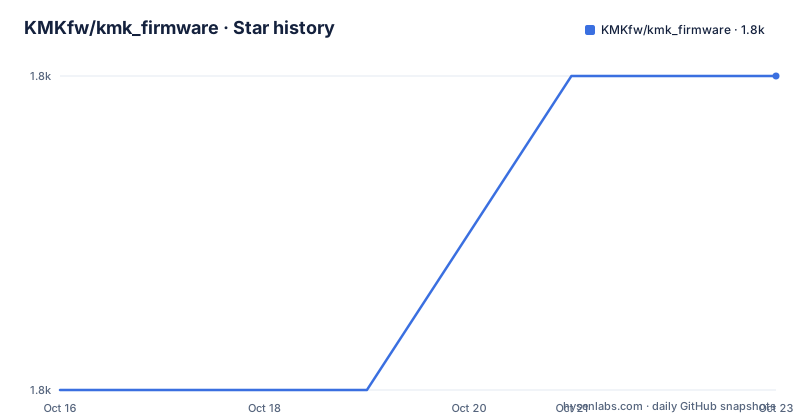
Star history
- KMKfw/kmk_firmware1,760 ★ · +1
| Repository | 2026-10-16 | 2026-10-23 |
|---|---|---|
| KMKfw/kmk_firmware | 1.8k | 1.8k |
1 Stars in the last 7 days, measured from the daily GitHub snapshot. Compare with other projects
Editorial analysis
Firmware as a Python file on the board
KMK is described as a feature-rich and beginner-friendly firmware for computer keyboards, written and configured in CircuitPython. The important word is configured.
Most mechanical keyboard firmware is a compiled binary produced by a vendor toolchain and flashed onto a controller. KMK replaces that with something much more ordinary: a single Python file that lives on a flash-drive-esque space on the microcontroller. You edit it on the go, without DFU or other developer tooling, which means the loop between an idea and a working keyboard is a text editor and a file copy.
That is the entire value proposition for most hobbyists. A keymap change in a C firmware means finding the right source file, understanding the matrix layout, compiling, flashing and hoping. In KMK it means editing a list of key definitions in a Python file that you can read on the board itself.
The features are what you would expect from a project with a large community using it daily. Single piece and two piece split keyboards are supported, with the split case documented separately, which is the case that forces a firmware to deal with a second controller over a serial or Bluetooth link. Keys are chainable, so a definition such as KC.LWIN(KC.L) locks the screen on a Windows machine, and the same mechanism underpins the built-in Unicode macros including emojis. RGB underglow and LED backlights are both supported. One key can turn into many based on how many times you tap it, which is the tap dance feature. And Bluetooth HID is supported, including for split keyboards, so the two halves can talk to the host without a cable.
The audience is a keyboard builder or tinkerer. The requirement is CircuitPython 8.0 or higher, and the getting started guide is in the repository's own documentation folder.
The status section is the most important paragraph in the readme
The status section is short and it changes the evaluation of everything above it. KMK is no longer actively maintained and is on limited life support. Issues and pull requests will not be addressed for the time being. Volunteers for taking on the project can voice their interest in the Zulip chat.
That is a project telling you, in advance and without ambiguity, what to expect. There is no pull request queue that will be reviewed, no issue triage, and no fix for the bug you will find.
The repository state is consistent with that statement. The last push was on 2026-04-09, the repository is not archived, and there are no GitHub releases, so there is no tagged version to pin to and no changelog to check. The code is there, it works, and nobody is on the other side of the issue tracker.
The one piece of good news in the status section is the last line, that volunteers can voice their interest in taking the project on. A keyboard firmware with a community of users, a documented hardware directory and a build system is a reasonable thing for a new maintainer to pick up, and the fact that the project is advertising for one tells you it is not about to be deleted.
So the decision depends on what you need. If you want a stable keyboard you never touch, this is not the answer. If you want a keyboard you will keep changing, and you are willing to maintain your own copy, the code is a good deal: CircuitPython keyboard firmware with split support, Bluetooth and a Python configuration model is not trivial to write, and it exists and works today.
Support moved to Zulip, and the old rooms are closed
The support arrangement has changed too, and the readme is unusually firm about it.
Asynchronous support and chatter about KMK happens on a Zulip community, and the project asks that if you ask for help in chat or open a bug report, you make sure your copy of KMK is up to date. It also asks you to swing by the chat before opening a GitHub issue about configuration or documentation concerns, which is a reasonable request and a way of keeping the tracker for real bugs.
Then there is the warning about the former Matrix and Discord rooms: they are no longer officially supported and the readme asks people not to use them. That is a small but useful signal, because the rooms most people find first through an old link are the ones that are dead.
The practical consequence for someone picking this up today is that the support surface is a single chat platform, and the chat is also where the development stream lives, with a dedicated stream for KMK development in the same Zulip. The contributing document in the documentation folder covers the workflow and code style, and the project says to ask specific questions in the development stream.
For a project seeking volunteers, this shape makes sense. It also means that any knowledge you need is likely to live in a chat archive rather than in issues, which is harder to search and harder to cite. That is an argument for reading the documentation carefully before asking, and for keeping your own notes, because the institutional memory is in a chat log.
The build compiles Python to bytecode with mpy-cross
KMK runs on CircuitPython, and the build produces the bytecode the interpreter loads.
The Makefile has a compile target that converts the kmk/ tree of Python files into.mpy files in a.compiled directory, using a tool called mpy-cross with the -O2 flag, and it fails early with a clear message if mpy-cross is not in the path. The compile target depends on a separate compile-check target, and the default all target copies the kmk tree, the boot.py file, the keymap and the board file into place.
The packaging goes through Docker. The dist target builds a dockerbase image and then runs it with the.dist directory mounted, and the dockerbase target passes two build arguments, KMKPY_URL and KMKPY_REF, which are read from the first two fields of a file called kmkpython_ref.tsv. That file is the pin: it records which upstream KMKPython revision the build uses, and the Dockerfile fetches exactly that revision with submodules, builds the mpy-cross compiler, copies the kmk tree into the frozen directory and runs the release script.
The Dockerfile itself is a python:3.9-slim-buster base that installs the build tooling and then pulls a CircuitPython designated ARM GCC toolchain, with a comment explaining why: to avoid mismatches and weird inconsistencies with upstream. The comment also says the project no longer provides MPY builds for kmkpython, which is why the container can be opinionated about it.
The practical takeaway is that the firmware you flash is a build artifact, and the build needs a Docker daemon and a pinned toolchain, but the configuration you edit afterwards is a plain Python file. The heavy part happens once, and the iteration happens in a text editor.
The lint configuration is a lesson in CircuitPython's module names
The development configuration is worth a look, because it encodes something non-obvious about the platform.
The isort configuration lists a known_standard_library that is not the Python standard library at all. It contains analogio, bitbangio, bleio, board, busio, digitalio, framebuf, gc, machine, microcontroller, micropython, neopixel, pulseio, supervisor and usb_hid. These are the CircuitPython modules, and telling the import sorter that they are standard library is what stops it from trying to sort them into third party sections, and what stops it from complaining that they are missing.
The rest of the tooling is a fairly standard Python setup with a few deliberate choices. The dev extra pins flake8 to 7.0.0 and adds plugins for black, commas, comprehensions, isort, pyproject and quotes, so the style rules come from separate plugins rather than being hand written. Flake8 runs with a maximum line length of 88 to match black, and it enforces single quotes through the docstring and multiline quote settings. Black is configured with skip-string-normalization, and the comment in the configuration explains why, pointing at a long running discussion on the black project about single quotes. So the project has deliberately gone against black's default in favour of the CircuitPython community style, and left the reasoning in the file.
There are also per file ignores, allowing misaligned array entries in the boards and user keymap directories, which is a concession to the shape of the data those files hold rather than a stylistic accident.
The Makefile exposes the same workflow as commands: lint runs flake8, fix-formatting runs black, fix-isort runs isort, and there is a spellcheck target that calls a script in the util directory. That last one is a sign of how seriously the documentation is taken, since spell checking a project whose main interface is documentation files is a meaningful investment.
Two licences, and an explicit policy on AI generated contributions
The licensing is split by artefact, which is a sensible arrangement for a project that contains software, documentation and hardware designs at once. All software in the repository is licensed under the GNU General Public License version 3, while all documentation and hardware designs are licensed under Creative Commons Attribution-ShareAlike 4.0.
The software licence is GPL-3.0, which is copyleft. For firmware that is normal and unremarkable, and for anyone who modifies and redistributes the firmware it means the derivative has to be published under the same terms. The documentation and hardware side under a share-alike creative commons licence is the arrangement you would expect for designs people are expected to copy and build from.
The more unusual paragraph is the one about artificial intelligence tooling. The project states that, due to ethical and legal concerns, works derived from GitHub Copilot or similar artificial intelligence tooling are unacceptable for inclusion in any first-party KMK repository or other code collection, and it further recommends not using GitHub Copilot while developing anything KMK related, regardless of intent to submit upstream.
That is a stricter position than most projects take, and it has an obvious consequence for you as a user rather than as a contributor. If you write your own keymap or firmware with the help of an AI assistant and you intend to publish it as part of a KMK-based project or a wider collection, you are in the territory the project has declared off limits. Nothing in the statement stops you using the firmware itself, and a keymap file that never touches the upstream repository is a different matter from a first-party KMK collection. But it is a condition on redistribution that is written plainly rather than implied, and it is the kind of thing to check before you plan a public project around KMK.
Editorial conclusion
KMK suits a keyboard hobbyist who wants to change a keymap or add a macro by editing a Python file on the board, and it suits someone who would rather not deal with a compiled C firmware and a vendor toolchain. It is the wrong choice for a keyboard you depend on daily and expect to be maintained, because the project states it is no longer actively maintained, is on limited life support, and that issues and pull requests will not be addressed for the time being. Before adopting, read the status section rather than the feature list, check that your board is supported by the boards directory and your CircuitPython is 8.0 or newer, and plan to maintain your own fork, since the project is actively looking for volunteers to take it on.
Frequently asked questions
What is KMK and what does it do?
KMK is a feature-rich and beginner-friendly firmware for computer keyboards written and configured in CircuitPython. It is fully configured through a single Python file that lives on the microcontroller's flash drive space, so you can edit the layout without DFU or other developer tooling.
Is KMK still maintained?
The project states that KMK is no longer actively maintained and is on limited life support, and that issues and pull requests will not be addressed for the time being. Volunteers for taking the project on are asked to voice their interest in the Zulip chat, and the last push was on 2026-04-09.
Which keyboard features does KMK support?
Single piece and two piece split keyboards, chainable keys such as KC.LWIN(KC.L), built-in Unicode macros including emojis, RGB underglow, LED backlights, tap dance for one key becoming many based on tap count, and Bluetooth HID including for split keyboards.
What licence applies to KMK code and documentation?
All software in the repository is under the GNU General Public License version 3, while all documentation and hardware designs are under Creative Commons Attribution-ShareAlike 4.0. The project also states that works derived from GitHub Copilot or similar AI tooling are unacceptable for inclusion in any first-party KMK repository or code collection.
Official sources
Add this badge to your README
If you maintain this project, the badge below links readers to this analysis and shows its maintenance status from the daily GitHub snapshot. Paste the markdown into your README; add ?metric=license or ?metric=stars to the image URL for a different field.

[](https://hysenlabs.com/projects/kmkfw-kmk-firmware)Star history chart for your README
[](https://hysenlabs.com/projects/kmkfw-kmk-firmware)Was this useful?