Komikku: A Manga Reader Fork With Its Own Ideas
Free and open source manga reader for Android
At a glance
- What is it?
- Komikku is a free and open source Android manga reader forked from TachiyomiSY and Mihon. It adds suggestions, hidden categories and bulk library operations.
- Who is it for?
- Adopt Komikku if you already run Mihon or TachiyomiSY and want the extra library tooling: suggestions per entry, hidden categories, bulk-favorite and merge, and a Feed tab that the README says supports all sources. Before installing, check that your device runs Android 8.0 or higher, that the repo URL you intend to use is one you trust, and that you have a backup file, since the README lists local backup creation among its features.
- Can I use it commercially?
- Yes. Apache-2.0 is a permissive licence: you can use, modify and sell software built on it, as long as you keep its copyright and licence notices.
- Is it still maintained?
- Yes. The repository received new commits within the last day.
- What is it written in?
- Mainly Kotlin, according to GitHub's language statistics.
Answers come from the project's GitHub data, last synced on November 15, 2026, and from our analysis. They are not legal advice.
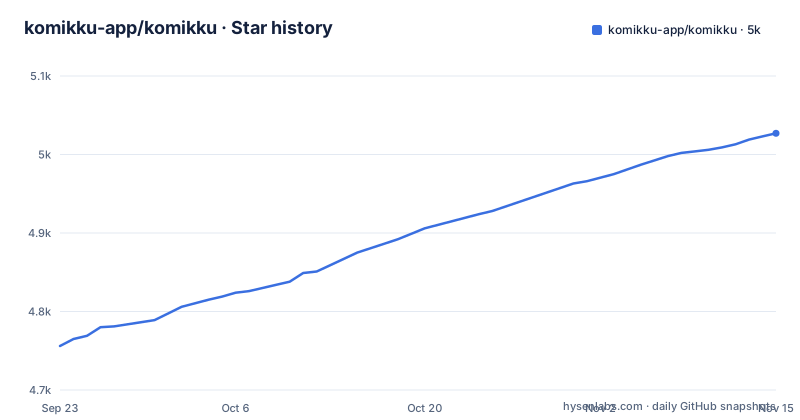
Star history
- komikku-app/komikku5,027 ★ · +271
| Repository | 2026-09-23 | 2026-11-15 |
|---|---|---|
| komikku-app/komikku | 4.8k | 5k |
271 Stars in the last 53 days, measured from the daily GitHub snapshot. Compare with other projects
Editorial analysis
What Komikku adds on top of Mihon and TachiyomiSY
Komikku is not a new reader built from scratch. The README describes it as a fork of TachiyomiSY and Mihon/Tachiyomi, and it inherits the reader, the tracker integrations and the library model from those projects. What the fork adds is a list of library and browsing features that the upstream apps do not have. The most visible one is Suggestions: for every entry, the app pulls recommendations, suggestions or related titles from the source website itself, rather than from an external recommendation service. TachiyomiSY also has a recommendations feature, but the README attributes that one to MyAnimeList, AniList and a Neko-based path for MangaDex titles, which is a different data source and a different failure mode.
The second cluster is library control. Hidden categories let you keep part of your library out of casual view, bulk-favorite adds many entries to the library at once, merge multiple combines duplicate entries for the same title, and range-selection speeds up migration. None of these are exotic ideas, but they are the kind of thing you only miss after your library passes a few hundred entries. The README also lists a fast browsing mode aimed at people whose large library loads slowly, and grouped entries in the Update tab, which it credits to J2K.
The target user is therefore someone who already lives inside the Tachiyomi lineage. A first-time manga reader gets no benefit from merge or migration tooling. A long-time Mihon user with a sprawling library is exactly who the feature list is written for.
How Komikku gets content: extensions, repos and the source-api module
The repository layout shows the split: source-api/ defines the interface extensions implement, source-local/ handles on-device files, core-metadata/ deals with metadata, and the app/ module is the Android application.
The README's feature list mentions the ability to enable or disable a repo with an icon, a search field for sources, and a quick NSFW filter in the Extensions, Browse and Migration screens. Those controls only matter once at least one repo is configured.
Because extensions are distributed outside the app, the trust boundary sits with whoever operates the repo you add. Treat the repo URL as a security decision, not a convenience setting. The same architecture is what lets Komikku track upstream: the README states the project regularly takes features and updates from Mihon and other forks such as SY, J2K and Neko, so the source API stays aligned with the wider ecosystem.
Installing Komikku and adding your first extension repo
The README points to GitHub Releases for both the stable and preview builds, and states the app requires Android 8.0 or higher. There is no package manager install and no desktop build. The repository's release list names the current stable version as v1.14.1, so that is the APK to look for on the releases page.
The README's feature list includes the ability to enable or disable a repo, with an icon.
The README also lists a search for sources and a quick NSFW sources filter in the Extensions, Browse and Migration screens.
Where Komikku is the wrong tool
Storage and battery behaviour is one constraint. The README advertises a configurable interval for refreshing entries from downloaded storage and a schedule for updating the library for new chapters. Both features mean background work. On a low-end phone with a large library, the fast browsing mode exists precisely because the default path was slow for some users; that is an admission that library size affects performance.
Third, the app is Android only. The topic list includes android and kotlin, and the README repeats the Android 8.0 requirement. No desktop build is documented. If you read on a laptop, this is not your reader.
Finally, the README lists local backup creation as a feature inherited from Mihon; make a backup before you migrate a large library onto a preview build.
Komikku versus Mihon: the actual difference
Mihon is the maintained continuation of Tachiyomi, and Komikku is a fork of TachiyomiSY, which is itself in that lineage. The practical difference is not the reading engine, which comes from the same ancestry, but the surrounding library features and the update cadence.
Mihon is the conservative choice. You get the core reader, the tracker support and the extension model without the extra screens. Komikku layers on Suggestions per entry, hidden categories, bulk-favorite, merge multiple, range-selection for migration, a Feed tab the README says covers all sources with around 20 items, and an update-error screen that lets you migrate failing entries away. If your library is small and tidy, most of that is dead weight.
The trade-off is maintenance surface. Komikku's README states the project regularly pulls features and updates from Mihon and other forks, which means the fork carries its own features plus the upstream ones. That is more code to keep coherent, and the release history shows a steady cadence of patch releases rather than a single long-lived branch. For a reader, the risk is not catastrophic, but a fork that drifts from upstream can lag on extension API changes. The repository's last push was on 2026-11-01, so the project is still receiving commits.
Licence, maintenance and upgrade cost
Komikku is licensed under Apache-2.0, and the LICENSE file sits at the repository root. For an end user this mostly matters in two ways: you may redistribute and modify the app under the licence terms, and any copy you redistribute must include the licence and the relevant notices. This is a summary of what the repository states, not legal advice; read the LICENSE file if you plan to ship a build.
The maintenance picture is active but fork-shaped. The last push was on 2026-11-01, and the most recent release in the list is v1.14.1 from 2026-07-17, preceded by v1.14.0 two days earlier and v1.13.6 in May. That pattern suggests frequent small releases rather than long stabilization windows, which is normal for a project that merges upstream work continuously.
The README mentions auto-install of app updates, which reduces the upgrade burden for the app itself. The repository also carries i18n, i18n-sy and i18n-kmk directories plus a Weblate translation badge, so translations are maintained separately from the code.
Editorial conclusion
Adopt Komikku if you already run Mihon or TachiyomiSY and want the extra library tooling: suggestions per entry, hidden categories, bulk-favorite and merge, and a Feed tab that the README says supports all sources. Before installing, check that your device runs Android 8.0 or higher, that the repo URL you intend to use is one you trust, and that you have a backup file, since the README lists local backup creation among its features.
Frequently asked questions
What is the difference between Mihon and Komikku?
Komikku is a fork based on TachiyomiSY and Mihon/Tachiyomi, so it inherits the reader, tracker support and extension model from that lineage. It adds its own library and browsing features, including per-entry Suggestions, hidden categories, bulk-favorite, merge multiple and a Feed tab that the README says supports all sources.
How do I install Komikku?
The README points to GitHub Releases for the stable and preview builds and states the app requires Android 8.0 or higher. There is no documented desktop or package manager install path.
How do I add a repo to Komikku?
The README lists the ability to enable or disable a repo, with an icon, and a search for sources with a quick NSFW filter in the Extensions, Browse and Migration screens. For further help it points to the FAQ on komikku-app.github.io.
How do I add sources to Komikku?
Sources come from extensions; the README also lists local reading of downloaded content and E-Hentai/ExHentai as a built-in custom source. The README mentions a source search field and a quick NSFW filter in the Extensions, Browse and Migration screens to help you find them.
Is Komikku free to use?
The repository is licensed under Apache-2.0 and describes the app as free and open source. The README does not describe any paid tier or in-app purchase requirement.
Official sources
Add this badge to your README
If you maintain this project, the badge below links readers to this analysis and shows its maintenance status from the daily GitHub snapshot. Paste the markdown into your README; add ?metric=license or ?metric=stars to the image URL for a different field.

[](https://hysenlabs.com/projects/komikku-app-komikku)Star history chart for your README
[](https://hysenlabs.com/projects/komikku-app-komikku)Was this useful?