Kratos Multiphysics: C++ Simulation Framework with Python and Parallel Execution
Kratos Multiphysics (A.K.A Kratos) is a framework for building parallel multi-disciplinary simulation software. Modularity, extensibility and HPC are the main objectives. Kratos has BSD license and is written in C++ with extensive Python interface.
At a glance
- What is it?
- Kratos Multiphysics is a modular C++ framework for coupled and disciplinary simulation, with application plug-ins, Python interfaces, OpenMP, and MPI support. It fits research and engineering teams willing to configure solvers, dependencies, and execution environments rather than teams seeking a turnkey analysis package.
- Who is it for?
- Kratos is appropriate for engineering teams that need to assemble or extend a simulation application across mechanics, fluids, contact, particles, or coupled multiphysics problems. It is less suitable for users who require a documented one-command workflow, bundled dependencies, or a turnkey analysis package.
- Can I use it commercially?
- Check first. The repository uses a licence we do not classify automatically, so read its LICENSE file before any commercial use.
- Is it still maintained?
- Yes. The repository received new commits within the last day.
- What is it written in?
- Mainly C++, according to GitHub's language statistics.
Answers come from the project's GitHub data, last synced on November 7, 2026, and from our analysis. They are not legal advice.
Star history
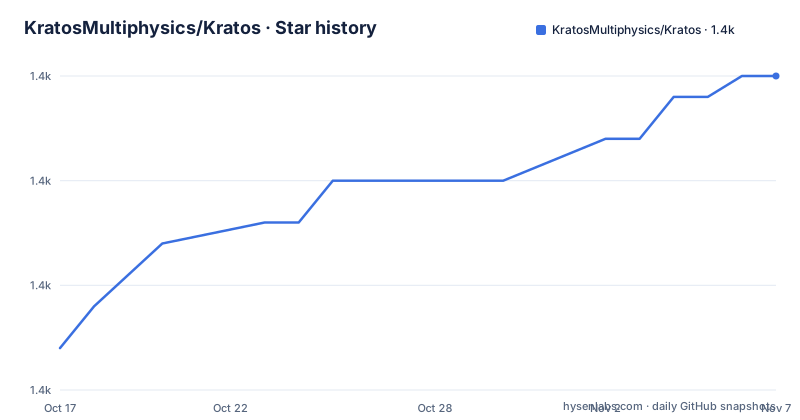
- KratosMultiphysics/Kratos1,395 ★ · +13
| Repository | 2026-10-17 | 2026-11-07 |
|---|---|---|
| KratosMultiphysics/Kratos | 1.4k | 1.4k |
13 Stars in the last 21 days, measured from the daily GitHub snapshot. Compare with other projects
Editorial analysis
Kratos applications and the engineers they serve
Kratos addresses a specific engineering problem: teams need simulation software that can combine numerical methods, physics formulations, data management, and parallel execution without writing an entire application framework from the beginning. It targets developers, numerical analysts, and simulation engineers working on solid mechanics, fluid dynamics, contact, discrete particles, or problems that couple several physical domains. The README describes the project as a framework for parallel, multi-disciplinary simulation software, not as one solver dedicated to a single equation or industry.
The repository layout reflects that broader scope. Its `applications/` directory contains application-level packages for DEM, fluid dynamics, fluid-structure interaction, structural mechanics, nonlinear constitutive laws, and contact structural mechanics. Other modules cover linear solvers, Trilinos, Metis, and meshing. This matters because a user is not choosing between a single solver and the framework as a generic utility library. They are choosing a base on which an application can be assembled, extended, or specialized.
Kratos also serves different levels of users. A Python-facing user can work through the documented Python interface, while a C++ developer can extend its core and applications. That breadth is useful for research code that needs both executable simulation components and scripting around data or workflows. It also creates an adoption cost: the framework does not present one universal interface for every physics package, and the README points to separate tutorials for input files, solving strategies, data management, and multiphysics workflows.
Core, applications, solvers, and parallel data flow
The visible architecture has a core framework plus application packages that behave like plug-ins. The README states that the core defines common framework behavior, while the applications extend it in different fields. That separation is the central design choice. It allows an application such as Structural Mechanics or Fluid Dynamics to use shared infrastructure while keeping physics-specific components in a defined package.
The listed applications expose distinct numerical responsibilities. Structural Mechanics covers solid, shell, and beam structures with linear and nonlinear, static, and dynamic behavior. Fluid Dynamics provides two-dimensional and three-dimensional incompressible-fluid formulations. DEM covers cohesive and non-cohesive spherical and non-spherical particles. Constitutive modeling includes plasticity, damage, anisotropy, viscoelasticity, and composites. Contact Structural Mechanics is tied to the Structural Mechanics application rather than presented as an unrelated standalone package.
Execution can use OpenMP and MPI, and the README says the framework is scalable to thousands of cores. The repository also contains linear solver, Trilinos, and Metis modules, indicating that solution infrastructure is part of the framework's concern. The README does not document a universal pipeline diagram, memory model, mesh format, or call sequence, so those details cannot be inferred from it. The documentation does identify tutorials for Kratos input files and I/O, data management, solving strategies, and multiphysics, which are the relevant starting points for understanding the actual data flow.
Installing Kratos from PyPI or compiling it
The shortest documented installation route uses the `KratosMultiphysics-all` package from PyPI. The README presents this as a way to get the last compiled release. Run the following command in the terminal where the Python environment for your project is active. The command is copied from the README. The README does not specify a virtual environment command or a supported Python version, so neither should be invented here.
pip install KratosMultiphysics-allAfter installation, the reader should verify that the intended Kratos package is available in the selected Python environment. The README does not provide a first executable sample command or a minimal input file, so it does not document a complete smoke test at this level. The repository instead links to tutorials for running an example from GiD and for using Kratos input files and I/O.
For a source build, the README directs developers to `INSTALL.md`. That file is the authoritative project-specific installation guide for compiler, dependency, configuration, and build decisions. The repository uses `CMakeLists.txt`, `cmake_modules/`, and `external_libraries/`, which confirms that compilation is a build-system task rather than a single binary download. The README does not reproduce the contents of `INSTALL.md`, so a source-build command cannot be safely stated from the README alone.
Kratos is documented as available on Windows, Linux, with several distributions, and macOS. Availability does not mean that every application, solver, and external library is equally portable in every configuration. The first adoption check should therefore be the documented installation path for the required platform and selected application.
A first use should follow the documented tutorial path
A practical first use is better approached through an existing tutorial than by inventing a model from the README. The project documentation links to a GiD example, a tutorial on Kratos input files and I/O, a tutorial on data management, and a tutorial on solving strategies. Those links divide the first run into recognizable parts: obtain an example, understand its input and output, inspect how data is managed, then understand the solution procedure.
The README does not reproduce the files or launch commands for any one example, so this article does not present a fabricated command, mesh, material card, or solver setting. For a new user, the first concrete action is to open the linked GiD tutorial and follow the example it names. A user working outside GiD should begin with the Kratos input files and I/O tutorial because that is the documented route into Kratos's own file conventions.
The C++ and Python split affects the first workflow too. A Python-based workflow can use the installed package and interface, while extending the framework itself requires source-level work and a compiled build. Developers should decide which boundary they need before choosing an example. The README explicitly advertises an extensive Python interface, but it does not specify whether every application is equally exposed through Python. For that reason, the documentation page should be checked for the exact application and interface combination.
HPC support and the operational trade-offs
OpenMP and MPI support is Kratos's clearest answer to large-scale execution. OpenMP is associated with shared-memory parallelism, while MPI is associated with distributed-memory communication. The README does not explain partition setup, communicator configuration, process launch commands, or performance tuning, but it identifies both technologies and claims scalability to thousands of cores. That makes Kratos a candidate for teams whose simulation cannot stay inside a single process.
Parallel support also changes adoption decisions. A solver designed for a workstation may work on a laptop without extra infrastructure, while an MPI deployment requires a compatible runtime and a defined execution environment. Kratos includes solver and meshing-related modules, including Trilinos and Metis, which suggests that external numerical infrastructure can affect the configuration. The README does not say which solver is required for a particular problem, nor does it provide a general performance comparison.
The framework can therefore be the wrong tool when the requirement is a simple interactive model, a single-file analysis with no extensibility need, or a fully packaged application that hides compilation and dependency decisions. Its design is more appropriate when the team values shared simulation infrastructure and expects to configure physics, solvers, data, and parallel execution as project decisions. Those benefits do not remove the need to validate a particular application and dependency set.
License, maintenance, and upgrade considerations
The README identifies Kratos as free under BSD-4 and says that it can be used in commercial software. The repository license metadata lists a custom license that GitHub cannot classify, while the README links to `kratos/license.txt` and labels the project BSD-4. This is not a contradiction that can be resolved from the README alone. The relevant file is `kratos/license.txt`, and teams should inspect the actual terms for the version and derived work they use.
The README also says that many main applications are free under BSD-4, but each derived application can have its own proprietary license. That distinction is central for commercial adoption. A permissive license for the framework does not by itself settle the terms of a modified application, bundled dependency, or separately distributed product. This is a licensing boundary to verify, not a substitute for legal advice.
The repository is not archived. Its last push was on 2026-10-15, and the listed recent releases include v10.4.4 on 2026-10-06, v10.4.3 on 2026-07-03, and v10.4.2 on 2026-06-19. That release sequence provides evidence of recent version activity. Upgrade planning still needs attention because the project is a C++ framework with applications, modules, external libraries, and Python access. The README does not document a migration guide, compatibility matrix, or rollback procedure, so those points should be checked before changing a working installation.
Kratos versus a focused simulation application
A real alternative is a focused application that packages one physics domain, one solver workflow, and its own input and output conventions. Such an application may be easier for a user who only needs a standard analysis and does not want to assemble or extend a framework. The difference is not that either approach is universally better. It is the ownership boundary: a focused application offers a narrower user experience, while Kratos exposes a core and multiple application packages intended for extension.
Kratos is also distinct from a general-purpose Python numerical environment. Its primary language is C++, it includes C++-based simulation applications and modules, and its stated goals include parallel multi-disciplinary simulation. Python is an interface, not the identity of the whole system. A team that needs C++ extensibility, OpenMP, and MPI can use that combination as the deciding criterion. A team that only needs a compact notebook workflow may prefer a package centered on that workflow.
The alternative should be judged against the required physics and deployment environment. Kratos's breadth can help when the project spans structural mechanics, fluids, contact, constitutive laws, or multiphysics. A narrower tool can be the better fit when the model is fixed, the workflow is routine, and customization is unnecessary. The README does not provide a benchmark against particular alternatives, so no performance or productivity ranking is justified.
Editorial conclusion
Kratos is appropriate for engineering teams that need to assemble or extend a simulation application across mechanics, fluids, contact, particles, or coupled multiphysics problems. It is less suitable for users who require a documented one-command workflow, bundled dependencies, or a turnkey analysis package. Before adoption, verify the installation path in INSTALL.md, the selected application and solver dependencies, the intended Windows, Linux, or macOS environment, and the required level of C++ and Python integration. The repository is not archived, and its last push was on 2026-10-15. The licensing boundary also needs checking: the README describes Kratos as BSD-4, while the repository license field points to a custom license and warns that derived applications may carry their own terms.
Frequently asked questions
How do I install Kratos Multiphysics?
The README gives `pip install KratosMultiphysics-all` as the PyPI installation route for a compiled release. For source compilation, it directs users to `INSTALL.md` in the repository.
What programming languages and parallelism options does Kratos support?
Kratos is written in C++ and has an extensive Python interface. The README identifies OpenMP and MPI parallelism and says the framework supports Windows, Linux, and macOS.
Can Kratos simulate fluid-structure interaction and particle problems?
Yes. The listed applications include Fluid Structure Interaction for FSI problems and DEM for cohesive and non-cohesive spherical and non-spherical particle simulations. Structural Mechanics, Fluid Dynamics, and contact applications are also included.
What documentation should I use for my first Kratos example?
The README links to a GiD example tutorial and tutorials for Kratos input files and I/O, data management, solving strategies, and multiphysics. It does not provide a self-contained launch command for a new example.
Is Kratos released under a standard open source license?
The README describes Kratos as free under BSD-4, but the repository license field identifies a custom license that GitHub cannot classify. The README also states that derived applications can have their own proprietary license, so the applicable `kratos/license.txt` terms should be checked for the specific distribution.
Official sources
Add this badge to your README
If you maintain this project, the badge below links readers to this analysis and shows its maintenance status from the daily GitHub snapshot. Paste the markdown into your README; add ?metric=license or ?metric=stars to the image URL for a different field.

[](https://hysenlabs.com/projects/kratosmultiphysics-kratos)Star history chart for your README
[](https://hysenlabs.com/projects/kratosmultiphysics-kratos)Was this useful?