KubeStellar Console: a self-hosted AI dashboard that bridges browsers to kubeconfig contexts
World's first fully integrated and fully Automated Kubernetes management and orchestration solution
At a glance
- What is it?
- KubeStellar Console is a TypeScript dashboard that pairs a hosted demo with a self-hosted web app and a local kc-agent bridge. The core judgement: it is useful for teams that want a guided, AI-assisted view of multi-cluster state, but the demo and the real product are deliberately separate.
- Who is it for?
- Adopt KubeStellar Console if you want a browser-based dashboard that can talk to your own clusters through a local kc-agent, and if you are comfortable with a self-hosted setup that keeps the demo data separate from real data. Do not adopt it if you need a fully managed SaaS that connects to your clusters out of the box, because the hosted version at console.kubestellar.io intentionally does not reach a local agent.
- Can I use it commercially?
- Yes. Apache-2.0 is a permissive licence: you can use, modify and sell software built on it, as long as you keep its copyright and licence notices.
- Is it still maintained?
- Yes. The repository received new commits within the last day.
- What is it written in?
- Mainly TypeScript, according to GitHub's language statistics.
Answers come from the project's GitHub data, last synced on October 22, 2026, and from our analysis. They are not legal advice.
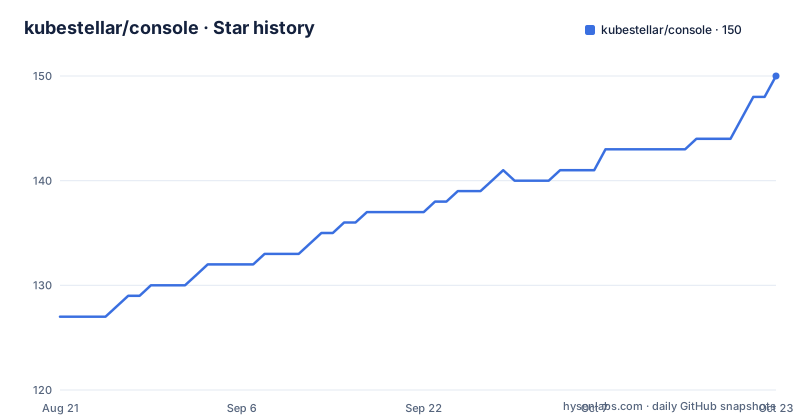
Star history
- kubestellar/console148 ★ · +21
| Repository | 2026-08-21 | 2026-10-22 |
|---|---|---|
| kubestellar/console | 127 | 148 |
21 Stars in the last 62 days, measured from the daily GitHub snapshot. Compare with other projects
Editorial analysis
What the console actually solves
KubeStellar Console is a multi-cluster Kubernetes dashboard with an AI layer and a catalog of guided install missions for over 250 CNCF projects. The problem it targets is the gap between browsing a single cluster's UI and making sense of several clusters at once. The README frames it as an AI-powered dashboard, but the concrete mechanism is a web console that can connect to your existing kubeconfig contexts through a local daemon called kc-agent. It is for operators who want a unified view of multiple clusters without installing a heavy management platform, and for teams evaluating CNCF projects through step-by-step missions. The hosted demo exists to let you explore the UI without touching your machine, but it serves canned data and deliberately does not talk to a local agent. That separation is the first thing to understand before you decide whether this tool fits.
The two-tier architecture: hosted demo versus self-hosted reality
The project draws a hard line between the hosted version and the self-hosted version. The hosted demo at console.kubestellar.io is a self-contained showcase with built-in demo data. The README is explicit that it does not communicate with a local agent, and the environment variable LOCAL_AGENT_HTTP_URL is disabled in the Netlify build. That means the browser cannot reach a kc-agent on your laptop. To see your own clusters, you must self-host the console and run kc-agent on the same machine. This is a deliberate design choice, not an oversight. The trade-off is clear: you get a zero-install way to evaluate the UI, but the convenience of the hosted UI plus your real cluster data is not available. Anyone expecting a SaaS that connects to their clusters will be disappointed. The architecture is honest about that, but it does mean the demo and the product are two different experiences.
How kc-agent bridges the browser to your clusters
kc-agent is a small local HTTP and WebSocket daemon that the self-hosted console talks to, by default at http://127.0.0.1:8585. It forwards requests from the browser to your kubeconfig contexts and to AI providers. The flow is: the browser sends a request to the console, the console forwards it to kc-agent, and kc-agent uses your kubeconfig to reach the actual clusters. This is a pragmatic way to avoid shipping cluster credentials to a remote server. The README notes that kc-agent is not consumed by the hosted demo, so it only matters in self-hosted setups. For most users, start.sh installs and launches a pre-built kc-agent automatically, so manual installation is only needed for development builds or platforms without a Homebrew formula. The authentication model uses a shared secret via KC_AGENT_TOKEN. When set, browser and WebSocket requests must present an Authorization: Bearer header or a token query parameter for WebSocket upgrades. This protects against other local processes reaching the agent port, which is a reasonable concern for a daemon that has access to your kubeconfig.
Getting it running: start.sh, deploy.sh, and the Windows caveat
The quickest path to a working console with your own data is a single command: curl -sSL https://raw.githubusercontent.com/kubestellar/console/main/start.sh | bash. This downloads the pre-built console binary and a pre-built kc-agent, starts both, and opens http://localhost:8080. The script only needs curl, no Go toolchain. For cluster deployment, there is deploy.sh with flags like --openshift, --ingress <host>, --github-oauth, and --uninstall. The README points to docs/deploy.md for the full flag and environment-variable reference, and to a Helm chart for in-cluster Kagenti backend connections. On Windows, native PowerShell or CMD is not supported. You must use WSL2 with Ubuntu, and the same curl command works inside the WSL shell. The prerequisite is just curl, installed via apt. This is a concrete constraint: if your team is Windows-only without WSL2, this tool is not for you. The installation story is straightforward for Linux and macOS, but the Windows path adds a layer of setup that some teams may not want.
AI features and the marketplace extension
The console markets itself as AI-powered, but the README does not detail which AI providers are supported or how the AI features work beyond forwarding requests to AI providers through kc-agent. The implication is that AI features require your own keys, since the hosted demo cannot reach a local agent. The marketplace is a separate repository, console-marketplace, that hosts community dashboard content: dashboards, card presets, and themes for areas like Kubernetes operations, AI/ML, security, GitOps, and networking. The value of the marketplace is that you can extend the console without adding custom code to the core bundle. This is a modular approach, but it also means the core console is only as useful as the content you either build or pull from the marketplace. The README does not specify how many dashboards or presets are available, so the practical depth of the marketplace is unknown from the material. If you need a specific integration, you may have to contribute it yourself.
Limitations and failure modes
The most obvious limitation is that the hosted demo cannot connect to real clusters. That is intentional, but it means the demo is only a UI preview. A second limitation is the platform constraint: native Windows is unsupported, and WSL2 is the only path. A third limitation is that kc-agent must run on the same machine as the self-hosted console, and it needs a kubeconfig that points to reachable clusters. If your clusters are behind a VPN or require interactive authentication, kc-agent may fail to reach them. The README also notes that when KC_AGENT_TOKEN is not set, any local process can reach the agent, which is a security risk on multi-user machines. The project recommends setting the token, but it is not enforced. Another failure mode is that the AI features depend on external providers, and if you do not have your own keys, those features will not work. The README does not specify which providers or how to configure them, so there is a gap in the documentation. For teams that need a turnkey AI assistant, this is not it.
Alternatives and how they differ
The obvious alternative is a hosted multi-cluster management platform like Rancher or a SaaS such as Komodor. Rancher provides a web UI that manages multiple clusters with an agent installed in each cluster, and it includes RBAC and project-level namespaces. The key difference is that Rancher's agent runs inside the cluster and communicates with a central server, whereas KubeStellar Console's kc-agent runs on your local machine and uses your kubeconfig. That means Rancher is designed for persistent, centrally managed fleet operations, while KubeStellar Console is more of a personal or team dashboard that bridges a browser to local kubeconfig contexts. Another alternative is Lens, a desktop IDE for Kubernetes that also reads kubeconfig contexts but runs as a native application, not a web console. Lens does not require a separate daemon; it accesses clusters directly from the desktop process. KubeStellar Console's browser-based model has the advantage of not installing a desktop app, but it adds the kc-agent dependency. If you want a central server that manages clusters over time, KubeStellar Console is not that.
Maintenance, licensing, and upgrade cost
The project is licensed under Apache-2.0, which allows commercial use, modification, and distribution with attribution. There is no indication of a copyleft requirement, so you can embed it in proprietary products as long as you preserve the license notice. The repository shows a nightly release cadence, with versions like v0.3.39-nightly.20260829, which suggests active development but also that you may be tracking moving targets. The README does not describe an upgrade path or migration notes, so the cost of upgrading is unclear. The start.sh script downloads pre-built binaries, which means upgrades are likely a matter of re-running the script or pulling a new release, but there is no explicit documentation on that. The presence of a docs/deploy.md and a Helm chart suggests a structured deployment, but the maintenance burden falls on you to track releases and test new versions. Given the nightly releases, teams should pin to a specific version rather than following the main branch, unless they want the latest features and are willing to handle potential breakage.
Editorial conclusion
Adopt KubeStellar Console if you want a browser-based dashboard that can talk to your own clusters through a local kc-agent, and if you are comfortable with a self-hosted setup that keeps the demo data separate from real data. Do not adopt it if you need a fully managed SaaS that connects to your clusters out of the box, because the hosted version at console.kubestellar.io intentionally does not reach a local agent. Before adopting, verify that your kubeconfig contexts are reachable from the machine where kc-agent runs, check whether the AI features require your own provider keys, and confirm that your platform is macOS, Linux, or Windows with WSL2, since native Windows is not supported.
Frequently asked questions
What is KubeStellar Console and what does it do?
It is an AI-powered multi-cluster Kubernetes dashboard with guided install missions for more than 250 CNCF projects. It ships as a browser interface plus a local kc-agent daemon that forwards requests to your kubeconfig contexts and to AI providers.
Can the hosted KubeStellar Console demo connect to my own clusters?
No. The hosted demo serves canned data and intentionally does not reach a local agent, since the agent's local URL is disabled in the Netlify build. To use your real cluster data you must self-host the console and run kc-agent on the same machine.
How do I self-host the KubeStellar Console?
Run curl piped to bash on the start.sh script. It downloads a pre-built console binary and a pre-built kc-agent, starts both, and opens the console at http://localhost:8080. For an in-cluster deployment use deploy.sh, which accepts flags for OpenShift, an ingress host, GitHub OAuth and uninstall.
What is kc-agent and why does it need a token?
kc-agent is a small local HTTP and WebSocket daemon, by default on 127.0.0.1:8585, that bridges the self-hosted console to your kubeconfig contexts and AI providers. Because any local process could otherwise reach it, setting KC_AGENT_TOKEN requires requests to present an authorization bearer header or a token query parameter.
Can I install the KubeStellar Console on native Windows?
No. The install scripts and kc-agent are POSIX shell and Go, so they run unchanged inside WSL2, but native PowerShell and CMD are not supported. Install WSL2 with Ubuntu from PowerShell and run everything from the WSL shell, where start.sh needs only curl.
How do I extend the KubeStellar Console with community content?
Through the separate console-marketplace repository, which hosts dashboards, card presets and themes for Kubernetes operations, AI and machine learning, security, GitOps, networking and CNCF integrations. Adding content means a pull request against the marketplace, not the core console bundle.
Official sources
Add this badge to your README
If you maintain this project, the badge below links readers to this analysis and shows its maintenance status from the daily GitHub snapshot. Paste the markdown into your README; add ?metric=license or ?metric=stars to the image URL for a different field.

[](https://hysenlabs.com/projects/kubestellar-console)Star history chart for your README
[](https://hysenlabs.com/projects/kubestellar-console)