latex-yearly-planner for Supernote and reMarkable
Digital planner for Supernote and ReMarkable // Support Ukraine 🇺🇦 https://savelife.in.ua/en/
At a glance
- What is it?
- latex-yearly-planner generates PDF planners for e-ink devices through LaTeX templates, YAML configuration, and a small Go-based repository. It suits users who want customizable yearly, quarterly, monthly, weekly, and daily layouts, while its build process requires local LaTeX or Nix.
- Who is it for?
- Users who want a printable PDF planner and can work with LaTeX or Nix may adopt this project. Users who need a ready-made installation, a documented production build, or predictable long-term compatibility should first inspect the available planner discussions and verify the required dependencies.
- Can I use it commercially?
- Yes. MIT is a permissive licence: you can use, modify and sell software built on it, as long as you keep its copyright and licence notices.
- Is it still maintained?
- Activity is slowing. The repository last received commits 6 months ago.
- What is it written in?
- Mainly Go, according to GitHub's language statistics.
Answers come from the project's GitHub data, last synced on November 7, 2026, and from our analysis. They are not legal advice.
Star history
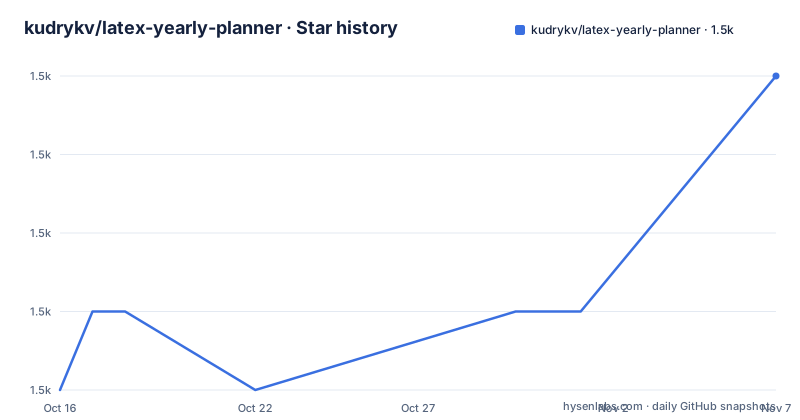
- kudrykv/latex-yearly-planner1,535 ★ · +4
| Repository | 2026-10-16 | 2026-11-07 |
|---|---|---|
| kudrykv/latex-yearly-planner | 1.5k | 1.5k |
4 Stars in the last 22 days, measured from the daily GitHub snapshot. Compare with other projects
Editorial analysis
What latex-yearly-planner Does for E-ink Note Devices
latex-yearly-planner is a digital planner generator aimed at e-ink devices, especially Supernote and reMarkable users. It produces PDFs rather than an interactive note-taking service. The previews in the repository show annual, quarterly, monthly, weekly, daily, notes, todos, and reflection pages for an A5x-style planner. A person can generate a planner, transfer the PDF to a supported device, and use a stylus to mark the paper-like pages.
The project is for people who want more control over planner layout than a fixed application provides. Its variations include templates such as `sn_a5x.breadcrumb.default`, and the discussions area contains available planners and additional variants. The README does not document synchronization, cloud storage, handwriting recognition, automatic calendar synchronization, or a device-side application. Those capabilities should not be inferred from the PDF format.
The project’s scope is therefore narrower than a full digital planning platform. It is a collection of LaTeX templates and build inputs that generate a document for later use on an e-ink device. This distinction matters when evaluating adoption: the relevant output is a PDF, not an API or a running planner service.
LaTeX Templates, YAML Configuration, and PDF Output
The documented build path starts from the repository directory and passes several environment variables to `./single.sh`: `PLANNER_YEAR`, `PASSES`, `CFG`, and `NAME`. The `CFG` value contains a comma-separated list of YAML files, while `NAME` identifies the planner variation being built. The script is expected to generate the resulting PDF in the `out` directory.
The repository layout reflects a template-driven generator. It contains a `tpls/` directory for LaTeX templates, a `cfg/` directory for configuration files, translation-related directories, shell scripts, and Go code under `app/` and `cmd/`. The `go.mod` file identifies `github.com/caarlos0/env/v6`, `github.com/urfave/cli/v2`, and `gopkg.in/yaml.v3` as Go dependencies. This supports a YAML-oriented configuration path, but the README does not provide a complete diagram of the internal execution flow.
The documented data flow can be stated without adding undocumented internals: configuration values select a planner variant and year, the build script invokes the project workflow, LaTeX processes the templates, and the resulting PDF is placed in `out`. The README says that users should check that directory for the PDF planner. It does not claim that the Go application itself is required for the basic manual dependency workflow, nor does it define a command-line interface beyond the shown shell entry point.
The pre-generated planner discussion is an important part of the design. Someone who only needs a planner may not need to understand the build system at all. The build route is intended for people who want variations or want to generate a planner for another year.
Generating the First Planner with Local Dependencies
The README lists Go, LaTeX, and PDFLaTeX as the dependencies for the manual build route. It says the following example was tested under Pop!_OS 22.04.1 LTS in Virtualbox 6.1. From the project directory, update `PLANNER_YEAR` and run the documented script. This invocation selects the year, pass count, configuration files, and output name.
PLANNER_YEAR=2022 \
PASSES=1 \
CFG="cfg/base.yaml,cfg/template_breadcrumb.yaml,cfg/sn_a5x.breadcrumb.default.yaml" \
NAME="sn_a5x.breadcrumb.default" \
./single.sh
The script should create the PDF in `out`. The README does not specify a required device format, filename convention beyond the configured `NAME`, or a separate transfer command. After checking `out`, the user must follow the manufacturer’s instructions for loading a PDF onto the device.
If a `.sty` file is missing, the README attributes the problem to missing LaTeX-related dependencies. It suggests copying the error and searching for the relevant dependency. That advice is useful, but it also exposes the project’s main setup constraint: the basic path expects the user to resolve LaTeX package installation issues rather than receiving a fully specified dependency list.
For a first real use, a user can start with the documented planner variation and replace `PLANNER_YEAR=2022` with the desired year. The source does not establish whether changing the year is supported for every template variation, so the generated result should be inspected before transferring it to a device.
Nix as the Fixed-Dependency Alternative
The repository provides an alternative to installing Go, LaTeX, and PDFLaTeX manually. It is defined as a Nix flake with fixed dependency versions. The README gives two operations: `nix build` for building a planner PDF, and `nix develop` for entering a development shell that contains the dependencies.
The documented setup begins by installing Nix. Once Nix is available, the user can use these commands from the repository:
nix buildThis is the repository’s documented build command for producing a planner PDF.
nix developThis opens a development environment with the required dependencies present. The README does not document a planner-specific `nix build` flag or a `nix build .#package` form, so those should not be added without checking the repository’s flake configuration.
Nix is a better fit for users who want the dependency set declared in the project rather than installing each tool by hand. It is less convenient for someone who does not already use Nix, because the README still requires Nix installation and does not provide a packaged installer for Supernote or reMarkable. The repository also does not state whether the generated output from `nix build` is identical to the output from `./single.sh` for every configuration.
Device Compatibility and PDF Workflow Boundaries
The repository identifies Supernote and reMarkable as target platforms through its project description and planner variants. It also uses template names containing `sn_a5x`, which appears to denote a Supernote A5X-related variation, although the README does not define every template suffix.
The workflow ends at the PDF. There is no documented import command for either device, no account integration, and no statement that the planner is optimized for a particular firmware version. The README tells users to follow the manufacturer’s instructions for loading a PDF. That is a reasonable division of responsibility, but it means device compatibility is not proven by the repository alone.
The planner’s usability will also depend on page dimensions, margins, stylus behavior, and the PDF viewer installed on the device. The previews establish that layouts exist, but they do not establish how the pages behave after transfer to every supported model. The source does not document selectable PDF sizes, page-count limits, or whether a particular device can display all pages smoothly.
This is a generation project, not a device integration project. It should be adopted when the desired interaction is writing on a PDF that the device already knows how to open. It should not be chosen by someone expecting automatic reminders, calendar updates, cloud backup, or a dedicated planning application.
Trade-offs Against Pre-generated and Interactive Planners
The repository itself offers a real alternative path through pre-generated planners in the `2022-2032 Planners Discussions` area. That route avoids local dependency setup for users who only need an available document. The build-based route is different because it allows the user to select a year and configuration and potentially adapt the planner variation.
Compared with an interactive planner application, latex-yearly-planner produces a static PDF. An interactive application may offer reminders, recurring events, search, synchronization, or data export, but none of those features is documented here. Conversely, the PDF route gives the device owner a document that can be marked with a stylus and does not require the repository to provide a device application.
Compared with a conventional printable planner template, the project offers device-specific LaTeX variations and a reusable configuration system. Its cost is technical. Users must understand YAML, environment variables, LaTeX dependencies, or Nix. The README also labels its documentation as work in progress and warns that learning to use and build the project will not be easy. That is a direct statement about the documentation burden, not an inference from the Go dependency list.
The alpha branch is described as an ongoing refactor. That creates a separate decision for contributors: `main` is the default branch, while the README points builders and developers toward `alpha` for that refactor. The repository does not document a migration plan or compatibility guarantees between branches.
Maintenance Signals, Releases, and License
The repository is not archived, and its last push was on 2026-05-03. The release history shown in the repository data includes `v0.0.8.2324` dated 2022-04-10, `v0.0.8` dated 2021-11-25, and `v0.0.7` dated 2021-09-17. These release dates create a visible gap between the last listed release and the more recent push. The source does not explain whether the newer push contains a release, unreleased changes, or documentation work.
That distinction matters for adoption planning. A project can receive commits without publishing a new tagged release, and the README does not define a support policy for older releases. Anyone planning to modify the templates should inspect the current `main` branch and decide whether the alpha branch is relevant to the intended change. The documentation states that alpha is an ongoing refactor, but it does not provide completion criteria.
The repository is licensed under MIT. That permits use and modification under the terms of the license, but the license text and its conditions should be reviewed by the person distributing a generated or modified planner. The MIT label does not answer device compatibility, dependency licensing for a local LaTeX installation, or the provenance of third-party templates.
The practical maintenance cost is therefore tied to LaTeX and template dependencies rather than an application server. A user must be comfortable reproducing a build and interpreting missing `.sty` errors. A Go developer interested in the generator must also account for the older `go 1.16` declaration in `go.mod` when choosing a local toolchain.
Adoption Checks for latex-yearly-planner
Adoption is most reasonable for a Supernote or reMarkable owner who wants a stylus-markable PDF, has a specific layout preference, and is comfortable generating the file. The pre-generated planners may be enough for someone who does not need customization. The repository’s MIT license and source layout also make it possible to inspect the templates rather than accepting an opaque generated document.
Adoption is less suitable for someone expecting a turnkey installer, automatic calendar synchronization, notifications, or a desktop application. The README does not document those features. The manual route also requires troubleshooting LaTeX package errors, while the Nix route requires adopting a separate dependency manager.
Before generating a final planner, verify three concrete things. First, inspect the discussions for the planner variation and confirm that its page design matches the target device and writing habits. Second, reproduce the documented build command and confirm that the expected PDF appears in `out`. Third, inspect `main` and `alpha` if customization is required, because the README describes alpha as an ongoing refactor. For most users, the relevant project-specific decision is whether a generated PDF offers more value than using one of the pre-generated planners.
Editorial conclusion
Users who want a printable PDF planner and can work with LaTeX or Nix may adopt this project. Users who need a ready-made installation, a documented production build, or predictable long-term compatibility should first inspect the available planner discussions and verify the required dependencies. The first concrete check is whether the documented `./single.sh` workflow produces the intended PDF in `out` for the selected configuration.
Frequently asked questions
How do I install and build latex-yearly-planner?
The README lists Go, LaTeX, and PDFLaTeX for the manual route, then shows `./single.sh` with `PLANNER_YEAR`, `PASSES`, `CFG`, and `NAME`. It also provides `nix build` and `nix develop` after installing Nix.
Can latex-yearly-planner generate a planner for Supernote and reMarkable?
Yes. The repository describes itself as a PDF planner for Supernote and reMarkable, and its previews include A5x planner layouts. The README says to transfer the generated PDF using the manufacturer’s instructions.
Does latex-yearly-planner sync with calendars or provide reminders?
The README does not document calendar synchronization, reminders, cloud storage, or a device application. It describes a process for generating PDF planner files and transferring them to an e-ink device.
Where are pre-generated planners available?
The README directs users who only need planners to the `2022-2032 Planners Discussions` page. The discussions area is described as the place for available planners and variations.
Official sources
Add this badge to your README
If you maintain this project, the badge below links readers to this analysis and shows its maintenance status from the daily GitHub snapshot. Paste the markdown into your README; add ?metric=license or ?metric=stars to the image URL for a different field.

[](https://hysenlabs.com/projects/kudrykv-latex-yearly-planner)Star history chart for your README
[](https://hysenlabs.com/projects/kudrykv-latex-yearly-planner)Was this useful?