rime-wubi86-jidian is a Rime schema that keeps the old Jidian Wubi muscle memory
86五笔极点码表 for 鼠须管(macOS)、小狼毫(Windows)、中州韵(Ubuntu) 、仓(iOS)、同文(Android)五笔输入方案,五笔输入法,Rime 方案。Chinese wubi input method schema
At a glance
- What is it?
- This repository is a configuration scheme rather than an input method: it supplies the schema, dictionaries and per-platform configuration files that let Rime-based front ends on Windows, macOS, Linux, iOS and Android all use the same 86 Wubi code table, with the character ordering aligned to the original Jidian scheme so that muscle memory carries over.
- Who is it for?
- rime-wubi86-jidian fits a Wubi user who learned the Jidian layout, wants the same code table on every device, and is willing to maintain a personal dictionary because the built-in one is small. It does not fit someone who needs a large professional vocabulary out of the box, because the author states the table has few entries and many specialist terms are missing.
- Can I use it commercially?
- Yes. MIT is a permissive licence: you can use, modify and sell software built on it, as long as you keep its copyright and licence notices.
- Is it still maintained?
- Yes. The repository last received commits 10 days ago.
- What is it written in?
- GitHub does not report a main language for this repository.
Answers come from the project's GitHub data, last synced on November 7, 2026, and from our analysis. They are not legal advice.
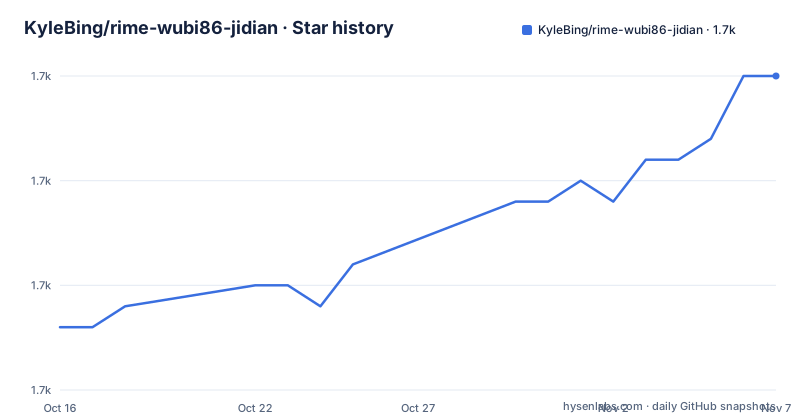
Star history
- KyleBing/rime-wubi86-jidian1,700 ★ · +12
| Repository | 2026-10-16 | 2026-11-07 |
|---|---|---|
| KyleBing/rime-wubi86-jidian | 1.7k | 1.7k |
12 Stars in the last 22 days, measured from the daily GitHub snapshot. Compare with other projects
Editorial analysis
This is a configuration scheme, not an input method
The first thing the README says is a distinction that determines everything else. Here is an input method configuration scheme, not an input method itself.
Rime is an input method engine, and on top of that engine there are front ends built for the five common operating systems. The table in the README lists them, and the point of the table is that a single scheme can be shared by all of them.
| Platform | Front end | Repository | Cost | | Windows | 小狼毫 | rime/weasel | free | | macOS | 鼠须管 | rime/squirrel | free, v1.00 and later | | Ubuntu | 中州韵 | rime/ibus-rime | free | | iOS | 仓输入法 | imfuxiao/Hamster | free, paid advanced features | | Android | 同文输入法 | osfans/trime | free |
Because the five platforms use the same code table, the same input habits can be kept across them, and the README explains why that matters more for Wubi than for other layouts: by the end, what you have really memorised is word frequency. A code table that is consistent across a phone and a desktop is worth more to a Wubi typist than a larger dictionary, because the muscle memory is the expensive part.
The author also mentions a separate project, a librime-based input method built to cover the common platforms with one unified input habit, and links it at kylebing.cn/wubi/. That is a different artefact from this one, and the distinction matters when you are deciding what to install.
The repository is licensed Apache-2.0 with the LICENSE file at the root, the repository is not archived, the default branch is master, and the last push was on 2026-10-10. There are no GitHub releases, so the repository itself is the distribution, and the scheme is updated by pulling it.
The character ordering is aligned to the original Jidian table
The scheme is a modern take on Jidian Wubi, and the README is precise about what that means.
The README says the input habits of this 86 Wubi scheme are relatively close to the previous Jidian Wubi, and that the code table is an extension of the original Jidian code table. The original table is generally not modified, and newly added words are appended to the extension code tables. The single-character ordering strictly follows the original Jidian dictionary, and the README gives the first-level simple codes with their two candidates as examples: y for 言, h for 目 and v for 女.
That is the entire value proposition of the project, and it is a narrow one. A generic Wubi 86 schema available elsewhere might use a different character ordering, which means that the first candidate you remember for a key would not be the one you get. If your Wubi training was on Jidian, matching the original ordering is the difference between a scheme you can use immediately and one that makes you relearn the low-frequency characters.
The original table itself lives in a separate repository, the wubi-jidian-dict project linked from the README, which is where the reference ordering comes from.
The other thing Rime brings is the breadth of input methods it can host, since reading different configuration files allows full pinyin, double pinyin, Wubi and Cangjie, along with settings such as two or three candidate pages, clearing the code on Enter, and reverse lookup of pinyin with the z key. The README is candid that this customisability raised the barrier to entry, and that this scheme exists to make Rime usable for Wubi users with less friction. The result is a scheme that inherits Rime's flexibility while keeping the layout you already know.
The repository is a set of schemas, dictionaries and per-platform patches
The file listing in the README is the best documentation of the project, because it shows exactly what a Rime scheme consists of.
The core of it is wubi86_jidian.schema.yaml, the schema, and wubi86_jidian.dict.yaml, the main code table. Alongside that sit wubi86_jidian_extra.dict.yaml for the extension dictionary, which the README describes as a live-updated online code table maintained with the companion word entry tool, and wubi86_jidian_extra_district.dict.yaml for administrative region names, the provinces, cities, counties and districts.
Then there are the personal dictionaries, wubi86_jidian_user.dict.yaml and wubi86_jidian_user_hamster.dict.yaml, and the second of those has a specific purpose. The README explains that the iOS front end cannot conveniently add words, so the scheme includes a table to receive words added on iOS, populated through a shared Shortcuts workflow.
The schema variants are where the Rime customisation shows. There is wubi86_jidian_pinyin.schema.yaml for mixed Wubi and pinyin input, wubi86_jidian_trad.schema.yaml for simplified input with traditional output, wubi86_jidian_trad_pinyin.schema.yaml for both, and pinyin_simp.schema.yaml with pinyin_simp.dict.yaml, which the README describes as the simplified pinyin table needed for pinyin input inside Wubi. numbers.schema.yaml handles capitalised numerals.
The per-platform customisation files are the interface layer. default.custom.yaml holds the general input settings such as punctuation and the number of candidate pages, squirrel.custom.yaml configures the candidate window on macOS, and weasel.custom.yaml does the same on Windows. The appearance is set in the same files. On macOS the style patch names two schemes, the light one and the dark one, so a user who does not want the dark theme can make both point at the same skin.
patch:
   style:
      color_scheme: roseo_maple            # 白亮模式下启用的皮肤,名字对应下方对皮肤的字义名
      color_scheme_dark: roseo_maple_dark  # 暗黑模式下启用的皮肤
On Windows the same idea is a single colour_scheme line, with the file named weasel.custom.yaml.
patch:
  style:
    color_scheme: WhiteAqua  # 匹配正文的颜色方案,对应正文的颜色方案名
The 仓键盘布局/ directory holds the custom keyboard layout for the iOS front end.
Installing on macOS and Windows is copy files, then deploy
The install instructions are per platform, and the pattern is the same everywhere: put the files in the front end's configuration directory and trigger a deploy.
On macOS, the README sends you to the official download page at rime.im/download and says to follow the steps there. Then you download this configuration scheme, and the 鼠须管 configuration directory is ~/Library/Rime, into which you move all the files from the downloaded rime-wubi86-jidian folder. Then you click the input method icon in the status bar and choose 部署, Deploy in English, or use the keyboard shortcut control + option + ~.
Two warnings follow. The Build directory inside the Rime directory is generated by the program, so configuration files must not be placed there, and it can be ignored. And for people unfamiliar with the command line, the README explains that ~ means the current user's home directory, giving the example that for a user named kyle, ~ stands for /Users/kyle/.
On Windows the steps are the tray-icon equivalents. Right-click the 小狼毫 icon in the system tray, choose 用户文件夹, copy the files from this project into it, then right-click the icon again and choose 重新部署 to redeploy.
On Ubuntu, the README gives one command to install the front end and one path for the configuration.
sudo apt-get install ibus-rime~/.config/ibus/rime/For iOS, 仓输入法 is an open source Rime engine for iOS and the README says to search for it in the App Store. The scheme is listed in its optional scheme list, and adding it goes through 输入方案设置, the plus button, 方案下载, finding 五笔86-极点方案 in the list, and 覆盖并部署.
Android and the web version round out the platforms
The remaining two platforms are the quickest to describe.
For Android, the README points at 同文输入法, the trime front end, with its repository and its releases page, and the instruction is to download and install it, add the dictionaries to the corresponding folder, and deploy.
For the web, the front end is 梧桐输入法, the my_rime project, with a hosted instance at my-rime.vercel.app. The flow there is to open the site, use Add new schemas and pick the Micro Plum button, and in the pop-up leave the Schema URL field empty apart from the scheme's raw URL, then click Install.
https://raw.githubusercontent.com/KyleBing/rime-wubi86-jidian/master/wubi86_jidian.schema.yamlThat is the only schema URL needed, and after the install the code table can be typed in the input box.
The interesting thing about the web path is that it takes the same schema file the desktop front ends read and serves it to a browser, which is the clearest demonstration of the Rime model: the engine, the schema and the dictionary are separate artefacts, so a front end on any platform can consume them.
One more resource is worth knowing about, because it addresses the dictionary gap. The companion tool, the 五笔词条工具 at the wubi-dict-editor repository, is what the README tells you to use when a word you need is missing from the table, and it is also what keeps the extension dictionary updated.
The dictionary is small, and that is the sharpest limitation
The README is straightforward about the size of the vocabulary. The code table does not have many entries, and many specialist terms may be missing, so you need to add them yourself gradually through daily use, using the companion word entry tool to do it.
This is the honest cost of the project, and it follows from the design decision. The character ordering strictly follows the original Jidian dictionary, and the original table is kept unmodified, with new words appended to the extension tables. That gives you the ordering consistency you want, at the cost of a base table that is much smaller than a commercial Wubi dictionary.
For a user who types everyday Chinese, that may be an acceptable trade, because the words you use constantly get added to your personal dictionary as you go. For someone who writes in a specialised domain, medicine, law or a particular industry, the gap is larger and grows more slowly.
The second limitation is the same one every Rime user has, and the README names it. Rime is highly customisable, reading different configuration files to implement different input methods and habits, and precisely because of that high customisability the barrier to entry was raised. This scheme is the answer to that problem, a Wubi scheme that requires less work, but it does not remove the underlying trade.
The third is the iOS word-adding path, which the README calls out as the same pain point as everywhere else. Since it is not convenient to add words on iOS, the scheme includes a dedicated table, wubi86_jidian_user_hamster.dict.yaml, and a shared Shortcuts workflow, so adding a word on the phone is a two-step procedure involving a shortcut rather than an editor.
Editorial conclusion
rime-wubi86-jidian fits a Wubi user who learned the Jidian layout, wants the same code table on every device, and is willing to maintain a personal dictionary because the built-in one is small. It does not fit someone who needs a large professional vocabulary out of the box, because the author states the table has few entries and many specialist terms are missing. Before adopting it, copy the main dictionary into your own user dictionary and install the companion word entry tool, and check the character ordering against the Jidian table you already know, since that ordering is the whole reason this schema exists.
Frequently asked questions
What is rime-wubi86-jidian and what is it not?
It is an input method configuration scheme for the Rime engine, not an input method itself. The README says so explicitly, and the repository holds the schema, dictionaries and per-platform configuration files that Rime-based front ends load.
Which platforms can use the rime-wubi86-jidian scheme?
Five front ends, all free apart from paid advanced features on iOS: 小狼毫 on Windows, 鼠须管 on macOS from version 1.00, 中州韵 on Ubuntu through ibus-rime, 仓输入法 on iOS and 同文输入法 on Android. There is also a web version through 梧桐输入法, the my_rime project.
How do I install the scheme on macOS?
Install 鼠须管 from the official download page, move all the files from the downloaded rime-wubi86-jidian folder into ~/Library/Rime, then choose 部署 or Deploy from the status bar icon, or press control + option + ~. The README warns that the Build directory inside Rime is generated and should be ignored.
How do I add words that are missing from the rime-wubi86-jidian dictionary?
The main code table is not modified, and new words go into the extension tables. The README points to the companion 五笔词条工具 in the wubi-dict-editor repository for adding entries, and the extension dictionary is described as live-updated online using that tool. On iOS, where adding words is awkward, a dedicated dictionary file and a shared Shortcuts workflow handle it.
Why does this scheme follow the Jidian character ordering?
The README states that the order of single characters strictly follows the original Jidian dictionary, and gives the first-level simple codes with their two candidates as examples. The point is that Wubi users memorise word frequency and layout over time, so matching the ordering they already learned is worth more than a larger table with a different arrangement.
Official sources
Add this badge to your README
If you maintain this project, the badge below links readers to this analysis and shows its maintenance status from the daily GitHub snapshot. Paste the markdown into your README; add ?metric=license or ?metric=stars to the image URL for a different field.

[](https://hysenlabs.com/projects/kylebing-rime-wubi86-jidian)Star history chart for your README
[](https://hysenlabs.com/projects/kylebing-rime-wubi86-jidian)Was this useful?