PIA-servers: A community-maintained IP list for Private Internet Access
This repository contains an automatically updated list of all Private Internet Access servers
At a glance
- What is it?
- Lars-/PIA-servers tracks Private Internet Access server IPs by polling DNS records, then publishes them in a GitHub Pages site. It solves a real gap in PIA's tooling, but its 14-day retention and unofficial status carry trade-offs.
- Who is it for?
- Adopt PIA-servers if you are a PIA user who needs a quick, scriptable way to verify VPN connectivity or to enumerate current server IPs without scraping the provider's website. Avoid it if you require real-time accuracy, because the 14-day retention means decommissioned servers linger, and the list may include stale IPs.
- Can I use it commercially?
- Not without permission. GitHub finds no licence file in the repository, and without a licence all rights are reserved by default: you may read the code but not reuse it. Check the README, or ask the authors, before using it.
- Is it still maintained?
- Yes. The repository received new commits within the last day.
- What is it written in?
- GitHub does not report a main language for this repository.
Answers come from the project's GitHub data, last synced on October 22, 2026, and from our analysis. They are not legal advice.
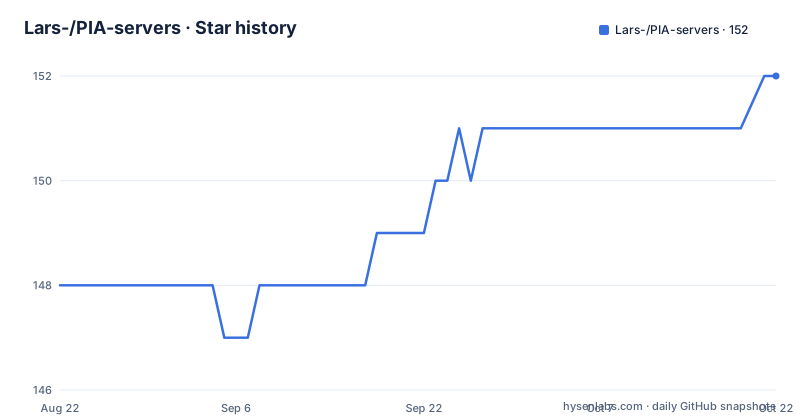
Star history
- Lars-/PIA-servers152 ★ · +4
| Repository | 2026-08-22 | 2026-10-22 |
|---|---|---|
| Lars-/PIA-servers | 148 | 152 |
4 Stars in the last 61 days, measured from the daily GitHub snapshot. Compare with other projects
Editorial analysis
What this repository actually provides
PIA-servers is a generated dataset, not a program. It holds a directory of IP addresses that have been observed as A records for Private Internet Access hostnames over the past 14 days. The README explains that PIA rotates its IPs via DNS: an OpenVPN file contains a remote line like `remote au-melbourne.privateinternetaccess.com 1198`, and resolving that hostname returns one or more IPs, but never all of them at once. This repository accumulates those IPs by polling regularly. The output is organized into region folders, each containing a list of IPs. For example, the README links to `regions/Netherlands` with over a thousand entries. This is a data source for people who want to know which IPs PIA might use in a given region, without querying DNS themselves.
The mechanism: DNS polling and a static site
The core idea is simple. Instead of asking PIA for a full server list, the project watches DNS records over time. The README notes that PIA rotates IPs via DNS, so checking A records periodically reveals new addresses as they appear. The repository is updated four times per day, and it keeps every IP seen in the last 14 days. That means the list is a rolling window of observed addresses. The data is published through GitHub Pages, which is how the connectivity check works. When you run the command `curl -s https://lars-.github.io/PIA-servers/$(curl -s https://ipinfo.io/ip)`, the site serves a file named after your public IP. If that IP appears in the list, you get a message saying you are connected to PIA. If not, you get the opposite. This is a clever use of static hosting: the IP list becomes a lookup table, and the client only needs two curl commands.
Getting it running: the connectivity check and local use
The README gives one concrete command for checking connectivity: `curl -s https://lars-.github.io/PIA-servers/$(curl -s https://ipinfo.io/ip)`. This fetches your public IP from ipinfo.io, then requests a corresponding file from the GitHub Pages site. The response is either `You are connected to PIA` or `You are not connected to PIA`. To use the full IP list locally, you can clone the repository and read the files under `regions/`. The README shows links to region folders, so the structure is clear. There is no installation step, no configuration file, and no API key. The project is essentially a static dataset, so running it means either curling the hosted files or cloning the repo. If you want to automate checks, you could wrap that curl command in a script, but the README does not provide one. The simplicity is both a strength and a limit.
Limitations: staleness and the 14-day window
The most obvious limitation is the 14-day retention. The README explicitly states that if PIA disables a server, it will take approximately 14 days for it to disappear from the list. That means the dataset can contain IPs that no longer route to PIA. For a connectivity check, this could produce false positives: an IP that was recently used by PIA might still appear, even if PIA has moved on. Conversely, a brand-new server might not appear until the next DNS poll, so the list lags behind reality. The update frequency of four times per day helps, but it is not real-time. Another limitation is that the list only includes IPs seen via DNS polling, so if PIA uses a different rotation mechanism or if a region is not polled, it will be missing. The README also notes that PIA provides both normal and 'nextgen' servers, and the repository includes both, but there is no distinction in the region folders, so you cannot filter by server type.
Why this exists: PIA's refusal to share IP lists
The README explains the motivation in a direct way. The author contacted Private Internet Access for a list of IPs, and the response was to 'reconfigure my device'. The author also mentions a forum theory that PIA does not publish IPs because Hulu could block them. The author counters that NordVPN publishes its IP list without apparent problems. This context matters because it frames the project as a workaround for a gap in PIA's official tooling. PIA does not offer a public API or a downloadable server list, so this repository fills that void. For users who want to script firewall rules, monitor VPN status, or build custom routing, this is a practical alternative to manual DNS lookups. The project is a single maintainer's effort, and it relies on the goodwill of PIA not to change its DNS behavior in a way that breaks the polling.
Alternatives: what else exists
The README itself mentions NordVPN as a comparison, but for a concrete alternative, you could use the official PIA OpenVPN configuration files. Those files contain hostnames like `au-melbourne.privateinternetaccess.com`, and you can resolve them yourself with `dig` or `nslookup`. That approach gives you the current IPs at that moment, but only for the specific server you look up. It is more accurate for a single server, but it does not give you a full list. Another alternative is to use a VPN monitoring service that tracks PIA IPs, but the README does not name any. The key difference is that PIA-servers aggregates IPs over time, while manual DNS resolution gives you a snapshot. If you need the full picture, the repository is better. If you only need one server's IP, DNS is simpler and fresher.
Maintenance and licence considerations
The repository metadata shows no license, which is a real issue for reuse. Without a license, default copyright rules apply, meaning you cannot legally copy or redistribute the data without permission. The README does not address this. The project is not archived, but the last push is unknown, so you should check the commit history before relying on it. The update mechanism is automated, so as long as the maintainer keeps the automation running, the list should stay current. However, the automation depends on PIA's DNS behavior, which can change without notice. If PIA starts using random subdomains or stops rotating via DNS, the polling would break. The maintenance cost is low for users, because there is no software to update, but the data's freshness depends entirely on external factors. For production use, you would need to mirror the data or set up your own polling, which the README does not document.
Who should use this and what to verify first
This project is for PIA customers who want a quick, scriptable connectivity check or a bulk IP list for a region. The curl command is trivial to integrate into a shell script or a monitoring tool. It is also useful for network administrators who need to whitelist PIA IPs on a firewall, but they must account for the 14-day lag. The wrong tool for this is anyone who needs real-time IP data or who expects official support. Before adopting it, verify that the GitHub Pages site is still serving files, and check the last commit date in the repository. Also, test the connectivity check while connected and disconnected to confirm it works for your IP. The project is a single point of failure, so do not build critical infrastructure on it without a fallback.
Editorial conclusion
Adopt PIA-servers if you are a PIA user who needs a quick, scriptable way to verify VPN connectivity or to enumerate current server IPs without scraping the provider's website. Avoid it if you require real-time accuracy, because the 14-day retention means decommissioned servers linger, and the list may include stale IPs. Before relying on it for firewall rules or monitoring, verify that the repository is still being updated (check the commit history), and test the connectivity check endpoint against your own PIA connection. The project is unofficial, so treat it as a convenience, not a contract.
Frequently asked questions
What is the PIA-servers repository?
An automatically updated list of Private Internet Access server addresses, which PIA does not publish itself. It covers both the normal servers and the newer nextgen servers, organised into per-region entries plus a single comma-separated export.
How do I check whether I am connected to a PIA server?
Run a single command that looks up your public address and then fetches the matching page from the project's published pages. The output is one of two fixed strings: that you are connected to PIA, or that you are not. The approach is credited to another contributor in the README.
How does PIA-servers find the server addresses?
PIA rotates addresses through DNS, so the project resolves the hostnames found in PIA's own configuration files. A single lookup returns one or more addresses but never all of them, so the list is a union of many observations accumulated over time rather than one authoritative answer.
Are the PIA servers in this list still online?
The list keeps every address seen in the past 14 days, so a working server appears promptly but a retired one takes about that long to disappear. That makes the list reliable for confirming an address is one of PIA's and unreliable for confirming it still works.
How often is the PIA-servers list updated?
Four times per day, automatically. The retention window is separate from the cadence: addresses are kept for 14 days after they were last seen, so the update rate does not shorten how long a dead server remains listed.
Why does one region have a thousand addresses in PIA-servers?
PIA operates two hardware tiers, and the repository publishes both. The regions with very large counts are where the newer nextgen fleet is concentrated, so the counts indicate where newer hardware sits rather than where any given address performs well. The repository does not record latency or tier per address.
Official sources
Add this badge to your README
If you maintain this project, the badge below links readers to this analysis and shows its maintenance status from the daily GitHub snapshot. Paste the markdown into your README; add ?metric=license or ?metric=stars to the image URL for a different field.

[](https://hysenlabs.com/projects/lars-pia-servers)Star history chart for your README
[](https://hysenlabs.com/projects/lars-pia-servers)