idevicerestore for iOS Firmware Restoration and Upgrades
Restore/upgrade firmware of iOS devices
At a glance
- What is it?
- idevicerestore is a command-line C application from libimobiledevice for restoring firmware to supported iOS devices. It supports IPSW files, firmware directories, firmware downloads, SHSH records, DFU workflows, and data-erasing restores, but the README warns that a restore can irreversibly destroy user data.
- Who is it for?
- Adopt idevicerestore if you need a command-line workflow for supported iOS firmware restores and already understand device signing and recovery requirements. Do not use it for an unbacked device or when the required firmware and signing records are unavailable.
- Can I use it commercially?
- Yes, with conditions. LGPL-3.0 is a weak copyleft licence: you can use it inside commercial and closed-source software, but if you distribute changes to its own files, you must publish those changes under the same licence.
- Is it still maintained?
- Yes. The repository last received commits 18 days ago.
- What is it written in?
- Mainly C, according to GitHub's language statistics.
Answers come from the project's GitHub data, last synced on October 23, 2026, and from our analysis. They are not legal advice.
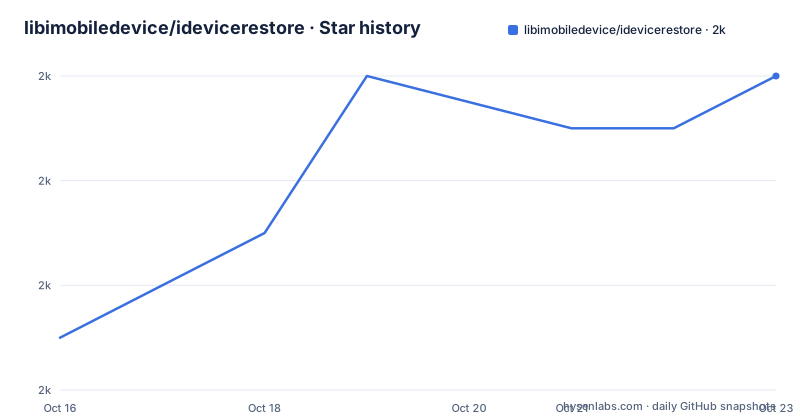
Star history
- libimobiledevice/idevicerestore1,990 ★ · +5
| Repository | 2026-10-16 | 2026-10-23 |
|---|---|---|
| libimobiledevice/idevicerestore | 2k | 2k |
5 Stars in the last 7 days, measured from the daily GitHub snapshot. Compare with other projects
Editorial analysis
What idevicerestore Does
idevicerestore addresses a specific part of iOS device administration: replacing or upgrading the firmware on a connected device from a command-line environment. Its intended users are technically capable operators who work with iOS devices, firmware archives, signing records, and low-level recovery states. The README describes it as a full reimplementation of the granular steps performed during a firmware restore, rather than a simple file-transfer utility. That distinction matters because the application manages a sequence of device operations, not merely the transfer of an IPSW file.
Updates and downgrades are described as possible in general terms, but the README qualifies that support with the availability of SHSH blobs from Apple for signing the firmware files. The software therefore addresses a restricted operation rather than offering unrestricted firmware installation. A restore may depend on having the correct device firmware, an appropriate signing record, and a device state that the selected mode supports.
The README warns that the tool can easily destroy user data irreversibly and instructs users to make a backup first. It also says that usage is at the user's own risk. The project is suitable for maintenance work where the operator can obtain an official IPSW or a firmware directory, inspect the signing situation, and accept that an update may erase data. It is a poor fit for an unattended deployment, a casual user who cannot inspect firmware compatibility, or a workflow where losing device contents is unacceptable.
Firmware Sources and Restore Modes
The documented firmware inputs are an official IPSW firmware archive file or a directory. The project also supports downloading the latest available firmware for a device on demand. Downloaded files are cached locally, which means repeated firmware work can rely on a local copy rather than fetching the same archive repeatedly. The README does not describe the internal download endpoint, cache directory, checksum policy, or download failure behavior, so those details should be checked in the source or command output before relying on them in a production procedure.
idevicerestore distinguishes update mode from a restore mode that erases all data. The README does not provide the exact command syntax for selecting either mode. It also lists optional capabilities for skipping a NOR or Baseband upgrade, using a custom AP ticket from a file, and restoring custom firmware when a bootrom exploit is available. Custom firmware is not a general replacement for the official firmware workflow. The README explicitly associates it with a bootrom exploit, and it associates pwned DFU mode with limera1n devices. Those qualifiers should be treated as hard boundaries rather than defaults.
The practical consequence is that operator choice matters at several stages. A user who wants to preserve data must select the documented update behavior rather than a data-erasing restore, while a user attempting a downgrade needs signing support that an ordinary IPSW workflow does not guarantee. The README does not document rollback, so a failed restore should not be assumed to be reversible through this tool.
Signing, DFU, and Device-Level Operations
SHSH support is central to the project's firmware workflow. According to the README, idevicerestore can fetch TSS records and save them as .shsh files. It can also use a custom AP ticket from a file. This indicates that firmware signing is treated as part of the restore process, not as an unrelated utility. The README does not explain the exact command-line options, record naming behavior, or how Apple signatures are located, so an operator should consult the project's usage documentation before attempting a signing-dependent restore.
The application can put devices into pwned DFU mode, but the README limits this statement to limera1n devices. It also lists custom firmware restoration as requiring a bootrom exploit. Those features make idevicerestore broader than a normal firmware updater, yet they also make device-state assumptions explicit. A device that does not meet the documented condition cannot be assumed to support the related workflow.
The feature list includes Baseband control because the tool can skip NOR or Baseband upgrade. Skipping a component is operationally different from installing it. The README does not document when skipping is appropriate or what behavior follows if a firmware image expects the omitted component to change, so this option should not be selected merely to avoid a longer operation. These are device-firmware operations with potentially irreversible effects.
Building idevicerestore on Linux
The README gives this dependency command for Debian or Ubuntu based systems:
sudo apt-get install \
  build-essential \
  pkg-config \
  checkinstall \
  git \
  autoconf \
  automake \
  libtool-bin \
  libreadline-dev \
  libusb-1.0-0-dev \
  libplist-dev \
  libimobiledevice-dev \
  libimobiledevice-glue-dev \
  libtatsu-dev \
  libcurl4-openssl-dev \
  libssl-dev \
  libzip-dev \
  zlib1g-dev
After installing the dependencies, the documented Git checkout procedure is:
git clone https://github.com/libimobiledevice/idevicerestore.git
cd idevicerestore
The repository uses autotools. For a Git checkout, run the documented configuration script:
./autogen.shThe README excerpt does not include the subsequent build and installation commands, and it does not show a first restore command. It therefore does not confirm an exact executable invocation or the expected device output. Use the repository's complete usage documentation for those steps, and do not infer flags from the feature list.
Cross-Platform Build Constraints
idevicerestore is documented as cross-platform and says it has been tested on Linux, macOS, Windows, and Android. The build instructions differ by system. On macOS, the README presents a shell script route and also lists Homebrew or MacPorts packages for the autotools prerequisites. It then requires several related libraries, including libplist, libimobiledevice-glue, libusbmuxd, libimobiledevice, libirecovery, and libtatsu. Those dependencies are not replaced by installing the idevicerestore source archive alone.
On Windows, MSYS2 is described as the official compilation route, with the MSYS2 MinGW 64-bit shell recommended. The documented package installation includes the build toolchain, Git, MinGW GCC, autotools, pkg-config, libcurl, and libzip packages. The README again lists the same libimobiledevice libraries as required dependencies. This is a source-build project rather than a documented single-package installation for Windows.
The macOS script command is presented as a complete dependency-building and installation route:
mkdir -p limd-build
cd limd-build
curl -o ./limd-build-macos.sh -L https://is.gd/limdmacos
bash ./limd-build-macos.sh
The README says to follow the script prompts and that it should result in a working idevicerestore. It does not explain what happens when a dependency build fails, so the script should not be treated as a rollback mechanism. Windows and macOS operators also face a different dependency setup from the Linux package route.
Limitations, Safety, and Alternatives
The clearest limitation is operational risk. The README explicitly warns that user data can be destroyed irreversibly, and its update and erase behavior creates a meaningful distinction between preserving data and restoring a clean system. The tool also cannot perform every restore by itself. SHSH blobs from Apple are required for signing in the situations described by the project, custom firmware requires a bootrom exploit, and pwned DFU mode is limited to limera1n devices. Firmware compatibility, device state, and signing availability must therefore be checked before a restore begins.
idevicerestore is licensed under LGPL-3.0. That license identifies the project's licensing terms, but it does not remove device-data risk or establish that every firmware image, Apple record, or platform interaction is authorized by the project. Operators must separately assess applicable device and firmware terms. The README does not document rollback, so a failed restore should not be assumed to be reversible through this tool.
Maintenance and Upgrade Cost
The repository is not archived, and its last push was on 2026-10-05. The release history lists 1.0.0 on 2020-06-15 as the latest shown release. The README describes development history back to 2010, but it does not state a release cadence or guarantee compatibility with future iOS firmware. The last push date indicates repository activity, while the release listing shows a much older latest published version. That difference is worth considering before adopting the project for a long-lived device-management environment.
Building from Git requires a compiler, autotools, and multiple native libraries. Linux can use distribution packages, but the README calls out libtatsu and possible missing development packages. macOS requires Xcode command line tools plus either its script route or package-manager setup and related libraries. Windows requires MSYS2 and a manually assembled dependency set. Upgrade cost is therefore not limited to compiling the C code. Operators must track changes in the dependency chain and confirm that the device, firmware source, signing records, and recovery workflow still match.
The README does not document a compatibility matrix, a migration guide, or an upgrade policy for saved .shsh files. Those omissions limit how confidently a team can plan long-term operations from the project documentation alone.
Editorial conclusion
Adopt idevicerestore if you need a command-line workflow for supported iOS firmware restores and already understand device signing and recovery requirements. Do not use it for an unbacked device or when the required firmware and signing records are unavailable. Verify first that your device is supported, that the firmware source matches it, and that a backup exists before any restore command is run.
Frequently asked questions
What does libimobiledevice/idevicerestore do?
It is a command-line application for restoring firmware files to iOS devices. The README lists firmware updates, IPSW or directory sources, firmware downloads, local caching, SHSH support, DFU mode, and other device-restore operations.
Can idevicerestore erase data from an iPhone?
Yes. The README warns that the tool can destroy user data irreversibly and states that update mode can either update the device or erase all data. It instructs users to make a backup before trying a restore.
What are the main build requirements for idevicerestore?
A working compiler and development environment are required, along with autotools and native dependencies. On Debian or Ubuntu based Linux, the README lists packages including libimobiledevice-dev, libimobiledevice-glue-dev, libtatsu-dev, libcurl4-openssl-dev, libssl-dev, libzip-dev, and zlib1g-dev.
Official sources
Add this badge to your README
If you maintain this project, the badge below links readers to this analysis and shows its maintenance status from the daily GitHub snapshot. Paste the markdown into your README; add ?metric=license or ?metric=stars to the image URL for a different field.

[](https://hysenlabs.com/projects/libimobiledevice-idevicerestore)Star history chart for your README
[](https://hysenlabs.com/projects/libimobiledevice-idevicerestore)Was this useful?