Lightspark: an open source SWF player for desktop use and legacy content
An open source flash player implementation
At a glance
- What is it?
- Lightspark is a C++ Flash player for SWF files, with a standalone player and plugin builds for older browsers. It suits users who need to inspect or run Flash content, although its implementation remains incomplete.
- Who is it for?
- Adopt Lightspark when you need a native player for a specific SWF file, can satisfy its C++ and multimedia build requirements, and can check the project’s compatibility documentation. Do not choose it as a general browser Flash replacement, because the README says current Firefox and Chromium no longer support Flash plugins and many applications remain incomplete.
- Can I use it commercially?
- Yes, with conditions. LGPL-3.0 is a weak copyleft licence: you can use it inside commercial and closed-source software, but if you distribute changes to its own files, you must publish those changes under the same licence.
- Is it still maintained?
- Yes. The repository last received commits 5 days ago.
- What is it written in?
- Mainly C++, according to GitHub's language statistics.
Answers come from the project's GitHub data, last synced on October 23, 2026, and from our analysis. They are not legal advice.
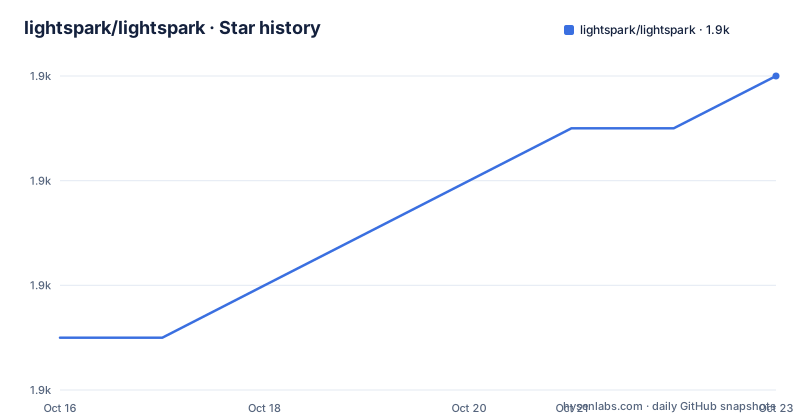
Star history
- lightspark/lightspark1,910 ★ · +5
| Repository | 2026-10-16 | 2026-10-23 |
|---|---|---|
| lightspark/lightspark | 1.9k | 1.9k |
5 Stars in the last 7 days, measured from the daily GitHub snapshot. Compare with other projects
Editorial analysis
Lightspark addresses SWF playback after browser Flash support ended
Lightspark solves a specific compatibility problem: opening SWF files after Adobe Flash became unavailable in current browser distributions. It can run as a standalone application or as a browser plugin, making it relevant to developers maintaining Flash-era applications, archivists examining old SWF content, and users who need a local playback path for a particular file. The README says the player supports SWF files written in all versions of the ActionScript language. That statement concerns language coverage, not a guarantee that every ActionScript application behaves correctly.
The browser integration has a hard practical limit. The README states that most current browsers, including Firefox and Chromium, no longer support Flash, so its plugins do not work in their latest versions. It points readers to a separate wiki page about browsers that still support Flash. This makes Lightspark primarily a native desktop tool for a controlled set of SWF files, not a straightforward replacement for Flash inside ordinary websites.
The repository contains C++ source, CMake configuration, tests, platform packaging directories, documentation, and a `flatpak` directory. Based on that layout, Lightspark is structured as a native media application rather than a browser-only JavaScript library. Adopting it therefore involves compiling against system libraries and deciding whether the obsolete browser plugin path is relevant to the intended use.
Lightspark combines local rendering, media decoding, and legacy plugin support
The repository identifies Lightspark as a C++ implementation with two execution modes: a standalone application and a browser plugin. The standalone executable is documented as a command line player for a local SWF file. The plugin registers for `application/x-shockwave-flash` and `application/x-lightspark`, allowing a compatible browser environment to associate SWF content with Lightspark.
The README does not provide a complete architecture diagram or a source-level description of the rendering pipeline. Its build requirements do reveal several parts of the player stack. Lightspark depends on OpenGL and SDL2 for graphics and windowing, FFmpeg libraries including `libavcodec`, `libswresample`, and `libavformat` for media handling, and `curl` plus `librtmp` for network-related functions. It also uses `zlib`, `libjpeg`, and `liblzma`, with fontconfig support required for access to fonts installed on the system. These libraries fit a player that can decode media, render it, resolve fonts, and interact with network content.
Lightspark can use LLVM-based JIT compilation when that option is enabled, although the README says it is disabled by default. Enabling it requires the LLVM development packages. A PPAPI Chromium plugin is enabled by default during compilation. The README warns that this plugin replaces the Adobe Flash plugin because only one Flash plugin is allowed in Chromium. That makes plugin selection an explicit deployment decision rather than a harmless build detail.
Ubuntu installation follows the README’s dependency and CMake commands
For Ubuntu, the README lists the packages required for a normal build. The following command installs Git, the C and C++ compilers, NASM, CMake, SDL2, fontconfig, FFmpeg development packages, and the networking, compression, JPEG, and RTMP libraries.
sudo apt install git gcc g++ nasm cmake libcurl4-gnutls-dev libsdl2-dev libfontconfig-dev libavcodec-dev libswresample-dev librtmp-dev libjpeg-dev libavformat-dev liblzma-devAfter those dependencies are present, the documented manual build creates a directory, enters it, configures a Release build, compiles the source, and installs the result.
cd lightspark
mkdir build
cd build
cmake -DCMAKE_BUILD_TYPE=Release ..
make
sudo make install
The repository also provides a standard build script and a debug mode. The README shows `./build.sh` for the normal build and `./build.sh -d` for a debug build. Its documented `CMAKE_BUILD_TYPE` values are `Debug`, `LeanDebug`, `Release`, `RelWithDebInfo`, and `Profile`.
If a build encounters problems, the README recommends deleting the contents of `obj` and running `./build.sh` again. It does not document an uninstall command, an upgrade migration, or a rollback procedure for an installed player. The top-level `cmake_uninstall.cmake.in` file suggests build-system support for uninstall generation, but the README does not give the resulting command, so the installation sequence should not be presented as a complete upgrade guide.
The standalone player provides the first useful SWF playback check
The first documented use is playback of a local SWF file. Once the executable is installed, pass its path to `lightspark`. The README uses `file.swf` as the example input.
lightspark file.swfThe player includes controls for a quick standalone inspection. `Ctrl+Q` quits the standalone player. `Ctrl+F` switches between normal and fullscreen view, while `Ctrl+M` mutes or unmutes sound. `Ctrl+P` displays profiling data. `Ctrl+S` creates a screenshot and saves it as a BMP file in the temporary folder. When the player fails, `Ctrl+C` copies an error to the clipboard. The availability of profiling and screenshot controls makes this more than a bare file launcher, although the README does not explain how those outputs should be interpreted.
For additional command line options, run:
lightspark -hLightspark also documents a random seed environment variable for debugging. Setting `LIGHTSPARK_RANDOM_SEED` to an integer makes the player use that seed, which can reproduce the same random sequence across runs. Browser plugin builds have separate diagnostics. `LIGHTSPARK_PLUGIN_LOGLEVEL` accepts values from 0 to 4, and `LIGHTSPARK_PLUGIN_LOGFILE` selects the destination log file. Setting `LIGHTSPARK_PLUGIN_PARAMFILE` causes Flash variables supplied by a website to be written to a file. The README identifies all three as browser-plugin settings, not standalone-player controls.
Incomplete application support is Lightspark’s main constraint
The README directly warns that many applications do not work because the implementation is incomplete. It directs readers to the `Status-of-Lightspark-support` compatibility page for current details. This warning matters because broad ActionScript language support is different from complete application compatibility. An SWF may use language features that Lightspark recognizes while still depending on an API, codec, font, network behavior, or rendering path that the player does not reproduce correctly.
The build requirements establish another operational boundary. Lightspark requires OpenGL, SDL2, FFmpeg libraries, and several compression and networking packages. Without fontconfig development files, the player cannot access fonts installed on the system, so an apparent text-rendering failure may originate in a missing host dependency. The presence of `curl` and `librtmp` also shows that network support belongs to the intended player design, but the README does not define every supported protocol, certificate policy, proxy setting, or cross-origin restriction.
Lightspark is therefore a poor choice when uninterrupted playback across an arbitrary Flash archive is the requirement. Compatibility may vary from one SWF to another, and the README does not claim that the project is a general replacement for Adobe Flash Player. It is more appropriate for reproducing or investigating a known file after its support status has been checked.
Adobe Flash Player Projector serves as a comparison runtime
The README names Adobe Flash Player Projector as a way to compare Lightspark with Adobe’s own runtime. The Projector is described as a standalone executable that can open SWF files directly from a command line. The README suggests using it to distinguish a Lightspark defect from a problem already present in the SWF file itself.
The practical difference is implementation authority. Lightspark is an independent open source implementation whose README explicitly notes incomplete application support. The Projector is Adobe’s standalone Flash runtime and therefore serves as a behavioral reference for comparison, where it remains available and usable under its own terms. The repository does not claim that results will be identical for every file, and the comparison does not remove the need to inspect Lightspark’s compatibility page.
For a new user, the two approaches suit different needs. Lightspark is the relevant option when an open source native player, local source builds, or access to the project’s implementation are priorities. The Projector is relevant when the goal is to compare behavior against Adobe’s own standalone runtime. Neither choice removes the need to determine whether a particular SWF is well formed and whether its dependencies are present.
LGPL-3.0 and recent development activity shape adoption costs
The repository uses the `LGPL-3.0` license and includes the files `COPYING` and `COPYING.LESSER`. Organizations considering redistribution or modification need to review those license texts and assess how their distribution method interacts with the license. This article does not provide legal advice, and the README does not document a project-specific compliance checklist.
The repository is not archived. Its last push was on 2026-10-12, which is also the date of the latest listed development release. The previous listed releases are 0.9.0 from 2025-02-16 and 0.8.7 from 2023-05-28. This recent repository activity shows that source changes continued, but it does not establish complete SWF compatibility. The latest release is explicitly labeled a development release rather than a numbered stable release.
Native installation also creates maintenance work. Upgrading system libraries can affect media decoding or rendering, while plugin users depend on a browser generation that still accepts the relevant plugin. The README does not document configuration migration, automatic updates, or rollback. An operator should preserve the exact source revision, `CMAKE_BUILD_TYPE`, optional build choices, host dependency versions, and failing SWF file so that later comparisons do not rely on an undocumented assumption that two installations are equivalent.
Editorial conclusion
Adopt Lightspark when you need a native player for a specific SWF file, can satisfy its C++ and multimedia build requirements, and can check the project’s compatibility documentation. Do not choose it as a general browser Flash replacement, because the README says current Firefox and Chromium no longer support Flash plugins and many applications remain incomplete. Verify the target SWF, operating system, dependencies, and build configuration first.
Frequently asked questions
How do I install Lightspark on Ubuntu?
Install the packages listed in the README, then configure and compile the project with CMake. The documented sequence creates a build directory, runs `cmake -DCMAKE_BUILD_TYPE=Release ..`, compiles with `make`, and installs with `sudo make install`.
Can Lightspark play an SWF file from the command line?
Yes. The standalone executable accepts a local SWF path, with the README example `lightspark file.swf`. Its command line options can be listed with `lightspark -h`.
Does Lightspark work in current Firefox or Chromium?
The README says current Firefox and Chromium no longer support Flash, so Lightspark plugins do not work in their latest versions. It refers users to a wiki page about browsers that still support Flash.
Official sources
Add this badge to your README
If you maintain this project, the badge below links readers to this analysis and shows its maintenance status from the daily GitHub snapshot. Paste the markdown into your README; add ?metric=license or ?metric=stars to the image URL for a different field.

[](https://hysenlabs.com/projects/lightspark-lightspark)Star history chart for your README
[](https://hysenlabs.com/projects/lightspark-lightspark)Was this useful?